manuals.online logo
Brands
  1. Home
  2. •
  3. Brands
  4. •
  5. Hioki
  6. •
  7. Measuring Instrument
  8. •
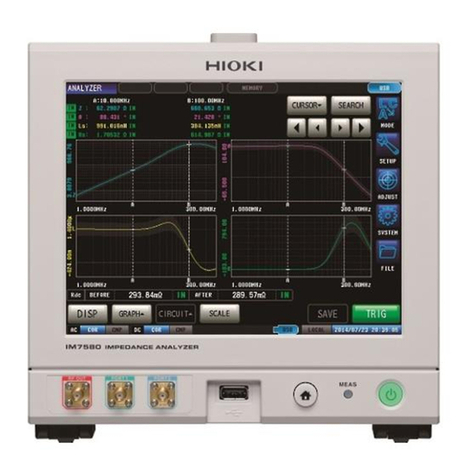
  9. Hioki IM7580 User manual

Hioki IM7580 User manual

Other Hioki Measuring Instrument manuals

Hioki 8846 User manual

Hioki

Hioki 8846 User manual

Hioki 3196 User manual

Hioki

Hioki 3196 User manual

Hioki 3169-20 User manual

Hioki

Hioki 3169-20 User manual

Hioki CM4141 User manual

Hioki

Hioki CM4141 User manual

Hioki PW3336-01 User manual

Hioki

Hioki PW3336-01 User manual

Hioki PW3365-20 User manual

Hioki

Hioki PW3365-20 User manual

Hioki L2003 User manual

Hioki

Hioki L2003 User manual

Hioki 9605-01 User manual

Hioki

Hioki 9605-01 User manual

Hioki 3441 User manual

Hioki

Hioki 3441 User manual

Hioki IM3523A User manual

Hioki

Hioki IM3523A User manual

Hioki CM4375 User manual

Hioki

Hioki CM4375 User manual

Hioki 8715-01 User manual

Hioki

Hioki 8715-01 User manual

Hioki CM4141 User manual

Hioki

Hioki CM4141 User manual

Hioki PR8111 User manual

Hioki

Hioki PR8111 User manual

Hioki 3126-01 User manual

Hioki

Hioki 3126-01 User manual

Hioki 3143 User manual

Hioki

Hioki 3143 User manual

Hioki 3662-20 User manual

Hioki

Hioki 3662-20 User manual

Hioki SM-8213 User manual

Hioki

Hioki SM-8213 User manual

Hioki FT3432 User manual

Hioki

Hioki FT3432 User manual

Hioki CM4002 User manual

Hioki

Hioki CM4002 User manual

Hioki 8730-10 User manual

Hioki

Hioki 8730-10 User manual

Hioki RM3545A-1 User guide

Hioki

Hioki RM3545A-1 User guide

Hioki PW3390 User manual

Hioki

Hioki PW3390 User manual

Hioki 3332 User manual

Hioki

Hioki 3332 User manual

Popular Measuring Instrument manuals by other brands

Suaoki D40 user manual

Suaoki

Suaoki D40 user manual

Elster BK-G1.6 operating instructions

Elster

Elster BK-G1.6 operating instructions

Endress+Hauser Deltabar FMD71 technical information

Endress+Hauser

Endress+Hauser Deltabar FMD71 technical information

Duratool D03128 manual

Duratool

Duratool D03128 manual

Vega VEGAPULS 65 Quick setup guide

Vega

Vega VEGAPULS 65 Quick setup guide

Tonghui TH2618B Operation manual

Tonghui

Tonghui TH2618B Operation manual

Tenmars TM-801 user manual

Tenmars

Tenmars TM-801 user manual

MSR 145 user manual

MSR

MSR 145 user manual

TPS WP-82 manual

TPS

TPS WP-82 manual

PCB Piezotronics 003C30 Installation and operating manual

PCB Piezotronics

PCB Piezotronics 003C30 Installation and operating manual

Tenma 72-10465 manual

Tenma

Tenma 72-10465 manual

Endress+Hauser Proline Promag 50 Brief operating instructions

Endress+Hauser

Endress+Hauser Proline Promag 50 Brief operating instructions

Siemens SITRANS F Coriolis FCT030 Function manual

Siemens

Siemens SITRANS F Coriolis FCT030 Function manual

KLINGER CMF V Series instruction manual

KLINGER

KLINGER CMF V Series instruction manual

Keysight M8290A Getting started guide

Keysight

Keysight M8290A Getting started guide

Acterna MS1400 Operation manual

Acterna

Acterna MS1400 Operation manual

R&S ZPH manual

R&S

R&S ZPH manual

Datacolor ColorReader DC10-2 user guide

Datacolor

Datacolor ColorReader DC10-2 user guide

manuals.online logo
manuals.online logoBrands
  • About & Mission
  • Contact us
  • Privacy Policy
  • Terms and Conditions

Copyright 2025 Manuals.Online. All Rights Reserved.

Contents
i
4.2 Setting Basic Settings of
Measurement .................................. 69
4.2.1 Setting the Measurement Parameters..........69
4.2.2 Starting Measurement at Any Arbitrary
Timing (Trigger) ...........................................70
4.2.3 Setting the Delay Time from Trigger to
Measurement Start (Trigger Delay) .............. 71
4.2.4 Applying the Signal to the Sample during
Measurement Only (Trigger Synchronous
Output) ........................................................72
4.2.5 Setting the Sweep Parameter ......................74
4.3 Sweep Measurement...................... 75
4.3.1 Setting the Sweep Method...........................76
4.3.2 Setting the Sweep Range ............................78
4.3.3 Normal Sweep .............................................82
4.3.4 Segment Sweep, Segment Interval
Sweep .........................................................85
4.4 Set Measurement Conditions for
Sweep Points.................................. 88
4.4.1 Setting Measurement Signal Frequency .......88
4.4.2 Setting the Measurement Signal Level .........89
4.4.3 Setting the Measurement Speed..................90
4.4.4 Displaying Average Values (Average) ..........92
4.4.5 Setting the Delay Time for Each Sweep
Point (Point Delay) .......................................93
4.5 Setting the Graph Display
Method ............................................ 94
4.5.1 Setting the Horizontal Axis ...........................94
4.5.2 Setting the Vertical Axis ...............................97
4.5.3 ConguringtheX-YDisplayVerticalAxis
Reversal Setting ........................................ 100
4.5.4 SettingtheX-YDisplayScaleWidth .......... 101
4.5.5 Setting Grid Display ................................... 102
4.5.6 Setting Overwrite ....................................... 103
4.6 Setting the Cursor........................ 105
4.6.1 Selecting the Cursor to Display in the
Screen....................................................... 105
4.6.2 Setting Cursor Move .................................. 106
4.7 Performing Measured Value
Search ........................................... 107
4.7.1 Setting the Search Target Parameter ......... 107
4.7.2 Setting the Search Type............................. 108
4.7.3 Using the Auto Search Function................. 109
4.7.4 Executing Search........................................110
4.8 Judging Measurement Results
(Comparator Function) .................112
4.8.1 Setting the Judgment Mode ........................112
4.8.2 Setting the Parameter to be Judged............113
4.8.3 Setting the Judgment Area to Display in
the Measurement Screen............................115
4.8.4 Area Judgment ...........................................116
4.8.5 Peak Judgment.......................................... 120
4.9 Equivalent Circuit Analysis
Function ........................................ 124
4.9.1 Equivalent Circuit Analysis Function ........... 124
4.9.2 ConguringBasicSettingsforAnalysis ...... 125
Contents
Introduction................................................ 1
Verifying Package Contents ..................... 1
Options (Sold separately)......................... 2
Safety Information..................................... 3
Operating Precautions.............................. 6
1 Overview 11
1.1 Overview and Features...................11
1.2 Names and Functions of Parts ..... 12
1.3 Screen Operations ......................... 15
2 Measurement
Preparations 17
2.1 Connecting the Test Head ............. 17
2.2 Pre-Operation Inspection .............. 19
2.3 Connecting the Power Cord.......... 20
2.4 Connecting a Measurement
Cable/Fixture .................................. 21
2.5 Connecting an Interface ................ 22
2.6 Turning the Power ON and OFF.... 24
2.7 Select the Measurement Mode...... 25
3 LCR Function 27
3.1 LCR Function.................................. 27
3.2 Setting Basic Settings of
Measurement Conditions .............. 32
3.2.1 Setting Display Parameters..........................32
3.2.2 Starting Measurement at Any Arbitrary
Timing (Trigger) ...........................................33
3.2.3 Setting the Delay Time from Trigger to
Measurement Start (Trigger Delay) ..............34
3.2.4 Applying the Signal to the Sample During
Measurement Only (Trigger Synchronous
Output) ........................................................35
3.2.5 Setting the Measurement Frequency ...........37
3.2.6 Setting the Measurement Signal Level .........38
3.2.7 Setting the Measurement Speed..................40
3.2.8 Displaying Average Values (Average) .......... 41
3.3 Judging Measurement Results ..... 43
3.3.1 Setting the Judgment Mode .........................44
3.3.2 Judging with Upper and Lower Limit
Values (Comparator Judgment Mode)..........46
3.3.3 ClassifyingMeasurementResults(BIN
Judgment) ...................................................53
4 Analyzer Function 61
4.1 Analyzer Function .......................... 61
IM7580A981-00
10
9
8
7
6
5
4
3
2
1
Appx. Index

Contents
ii
7.3 Common Functions (LCR Mode,
ANALYZER Mode) ........................ 180
7.3.1 Saving Measurement Results (Memory
Function) ................................................... 180
7.3.2 Setting the Screen Display......................... 182
7.3.3 SettingtheBeepSound ............................. 185
7.3.4 DisplaytheWarm-upMessage .................. 186
7.3.5 DisablingKeyOperation(Key-lock
Function) ................................................... 187
7.3.6 Setting the Communication Measurement
Data Type.................................................. 191
7.3.7 Initializing the Instrument ............................ 193
8 External Control 195
8.1 External Input/Output Connector
and Signals ................................... 195
8.2 Timing Chart ................................. 205
8.2.1 LCR Mode .................................................205
8.2.2 ANALYZERMode......................................207
8.2.3 CONTINUOUS Measurement Mode...........209
8.3 Internal Circuit...............................211
8.4 External Control Q&A .................. 214
8.5 Measurement Using a
Computer ...................................... 214
8.6 External Control I/O Settings ...... 215
8.6.1 Enabling Trigger Input During
Measurement (Trigger Enabled)................. 215
8.6.2 Setting Valid Edge of Trigger Input
(Trigger Edge)............................................ 216
8.6.3 Setting Reset of Judgment Results
(Judgment Result Signal Reset)................. 217
8.6.4 Setting the EOM
―――
Output Method (EOM
Mode) ........................................................ 218
8.6.5 Setting Delay Time from Judgment
Results Output until Output of EOM
―――
(LOW)(JUDGE-EOM) ...............................220
8.6.6  SetaDelayforINDEX
―― ― ― ―
Signal Output
(INDEXDelay) ........................................... 221
9 Saving and Loading
Panel Information 223
9.1 Saving Measurement Conditions
(Panel Save Function).................. 224
9.2 Loading Measurement
Conditions (Panel Load
Function)....................................... 227
9.3 Changing a Panel Name .............. 229
9.4 Deleting a Panel ........................... 230
4.9.3 Performing Equivalent Circuit Analysis ....... 132
4.9.4 Simulating Frequency Characteristics ........ 135
4.9.5 Settings to Judge Analysis Results............. 137
5 Calibration and
Compensation 139
5.1 Calibration and Compensation
Function Overview ....................... 139
5.2 Calibration .................................... 143
5.2.1 Setting the Calibration [CAL] ...................... 143
5.2.2 Setting the Electric Length [LENGTH] ........ 152
5.3 Error Compensation .................... 153
5.3.1 Setting the Compensation [COMPEN]........ 153
5.4 Calculating Values (Scaling) ....... 159
5.5 Troubleshooting of
Compensation .............................. 160
6 Continuous
Measurement Function 161
6.1 Continuous Measurement
Function ........................................ 161
6.2 ConguringContinuous
Measurement Basic Settings ...... 164
6.3 Executing and Stopping
Continuous Measurement ........... 165
6.4 Checking Continuous
Measurement Results .................. 166
6.5 Continuous Measurement
Application Settings .................... 167
6.5.1 Cancels the Measurement if an Error is
Detected.................................................... 167
6.5.2 Setting the LCD Display to ON/OFF........... 168
7 Application Function 169
7.1 Checking Contact Defects and
the Contact State (Contact
Check Function) ........................... 169
7.1.1 Setting the DC Measurement ..................... 169
7.1.2 Setting the Judgment ................................. 172
7.1.3 DetectingOPENDuring2-terminal
Measurement(HIGH-ZRejectFunction) .... 174
7.1.4 Monitoring the Detection Level (Detection
Level Monitoring Function) ......................... 175
7.2 Other Functions ........................... 177
7.2.1 Setting the Number of Display Digits .......... 177
7.2.2 Setting Absolute Values Display (LCR
only) .......................................................... 178
7.2.3 Setting the Communication Measurement
Data Type.................................................. 179
Contents
iii
10 Setting the SYSTEM 231
10.1 Setting the Interface..................... 231
10.2 Checking the Instrument
Version .......................................... 232
10.3 Self Checks (Self Diagnosis)....... 233
10.3.1 Panel Test..................................................233
10.3.2 Panel Compensation.................................. 234
10.3.3 Screen Display Test ...................................235
10.3.4 ROM/RAM Test ......................................... 236
10.3.5 I/O Test ......................................................237
10.4 Setting Date and Time.................. 238
11 Using USB Flash Drive 239
11.1 Overview ....................................... 239
11.2 Inserting and Removing USB
Flash Drive.................................... 241
11.3 Screen Display When Using
USB................................................ 242
11.4 Saving Data to USB Flash
Drive .............................................. 243
11.4.1 Saving Measurement Result as Text ..........243
11.4.2 Saving Measurement Screen (Screen
Copy) ........................................................254
11.4.3 Setting Save Folder ...................................256
11.4.4 Saving Memory Data ................................. 258
11.5 Saving Instrument Settings to
USB Flash Drive ........................... 259
11.5.1 Saving Instrument Settings ........................259
11.5.2 Saving All Settings of Instrument (ALL
SAVE Function) .........................................260
11.6 Loading Binary Data from USB
Flash Drive.................................... 261
11.6.1 LoadingMeasurementData(ANALYZER
Function) ................................................... 261
11.6.2 Loading Instrument Settings.......................262
11.6.3 Loading All Settings (ALL LOAD
Function) ...................................................264
11.7 Editing Data Saved in USB
Flash Drive.................................... 265
11.7.1 FormattingaUSBFlashDrive....................265
11.7.2 CreatingaFolderinUSBFlashDrive......... 267
11.7.3 Changing Folder Name or File Name in
USBFlashDrive ........................................268
11.7.4 DeletingaFileorFolderinUSBFlash
Drive..........................................................270
11.7.5 Checking the Contents of Files .................. 271
12 Specications 273
12.1 GeneralSpecications ................ 273
12.2 Measurement Accuracy ............... 283
12.2.1 Impedance Measurement .......................... 283
12.2.2 Example: Calculation of Accuracy ..............284
12.2.3 DCR Measurement .................................... 288
12.2.4 Conversion Table .......................................289
12.3 Measurement Time....................... 290
12.3.1 LCR Mode .................................................290
12.3.2 Analyzer Mode .......................................... 291
13 Maintenance and
Service 293
13.1 Inspection, Repair and
Cleaning ........................................ 293
13.2 Disposal ........................................ 295
13.3 Troubleshooting ........................... 297
13.4 Error Display................................. 303
Appendix A1
Appx. 1 Measurement
Parameters and
Calculation Formula ................A1
Appx. 2 Countermeasures
to Prevent Entry of
External Noise..........................A3
Countermeasures to prevent entry of
noise from the power supply line ............... A3
Countermeasures to prevent entry noise
from the measurement cables ................... A3
Appx. 3 Series Equivalent Circuit
Mode and Parallel
Equivalent Circuit Mode..........A4
Appx. 4 Selecting the Equivalent
Circuit Model ............................A5
Appx. 5 Maintenance of Coaxial
Connector.................................A6
Appx. 6 Rack Mounting.........................A7
Plate dimension ......................................... A8
Installation procedure .............................. A10
Appx. 7 Dimensional Diagram............A13
Appx. 8 Initial Settings Table ..............A15
Appx. 9 Device Compliance
Statement ...............................A20
Index Ind.1
10
9
8
7
6
5
4
3
2
1
Appx. Index
Contents
iv
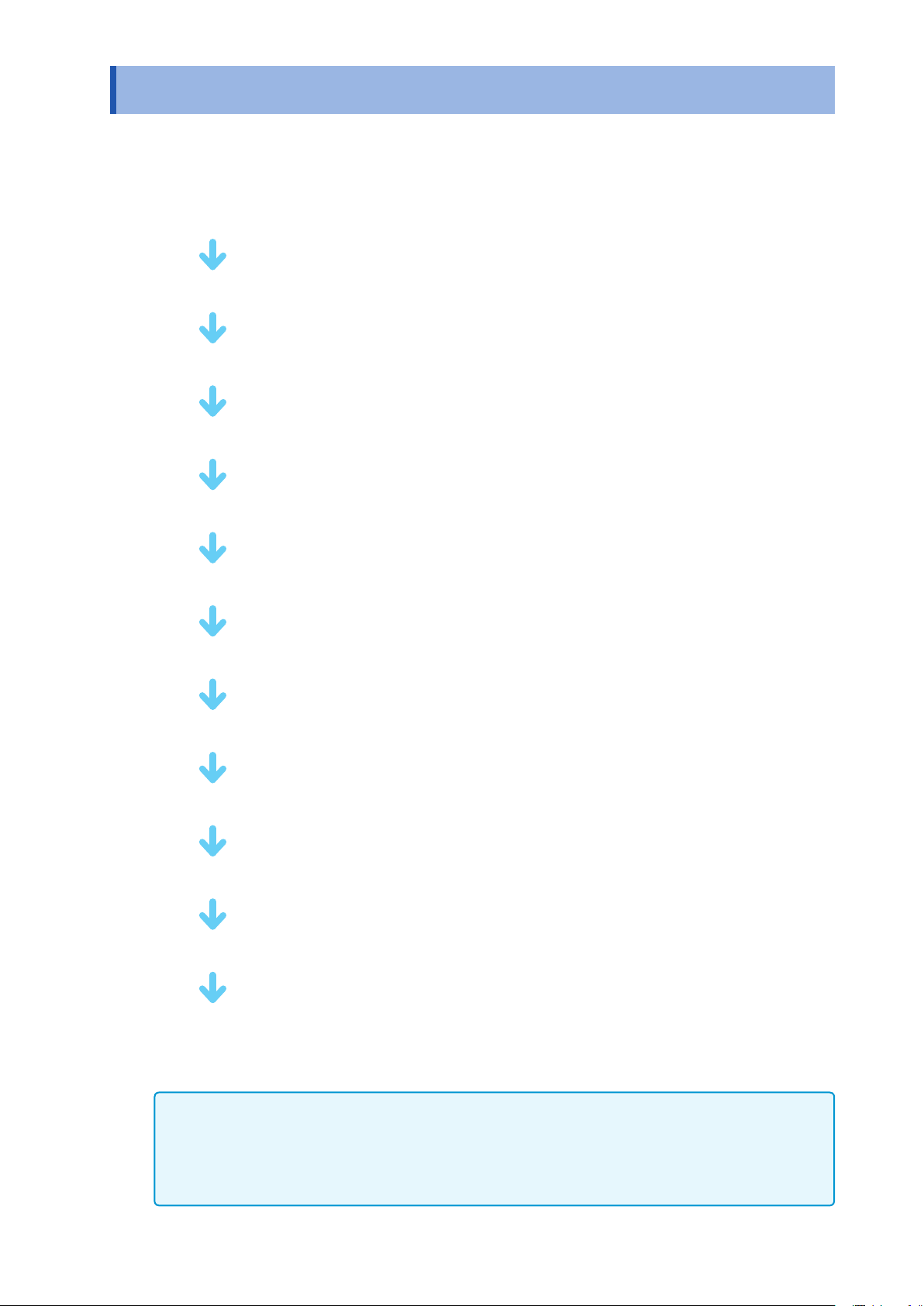
Measurement Process
Read “Operating Precautions” (p. 6) before installing and connecting this instrument.
Refer to “Appx. 6 Rack Mounting” (p. A7) for rack mounting.
Install the instrument (p. 6)
Connect test head (p. 17)
Connect power cord (p. 20)
Connectmeasurementcables,optionalHiokiprobesortestxture(p.21)
Connect external interfaces (as required) (p. 231)
Inspect all the connections (p. 19)
Turn ON the power supply (p. 24)
Perform calibration/compensation (p. 139)
Set measurement conditions
Connect to the test sample
Make measurements
Turn OFF the power supply (p. 24)
After using the instrument, remove the test sample and turn OFF the power supply.
Timing for Calibration and Compensation
• Beforemeasurements
• Whenthelengthofmeasurementcableischanged
• Whenthemeasurementsampleischanged
• Whenthextureischanged
2
1
Introduction
Introduction
Thank you for purchasing the HIOKI IM7580 Impedance Analyzer. To obtain maximum performance from
theinstrument,pleasereadthismanualrst,andkeepithandyforfuturereference.
Verifying Package Contents
• Whenyoureceivetheinstrument,inspectitcarefullytoensurethatnodamageoccurredduring
shipping.
In particular, check the accessories, panel switches, and connectors. If damage is evident, or if it fails to
operateaccordingtothespecications,contactyourauthorizedHiokidistributororreseller.
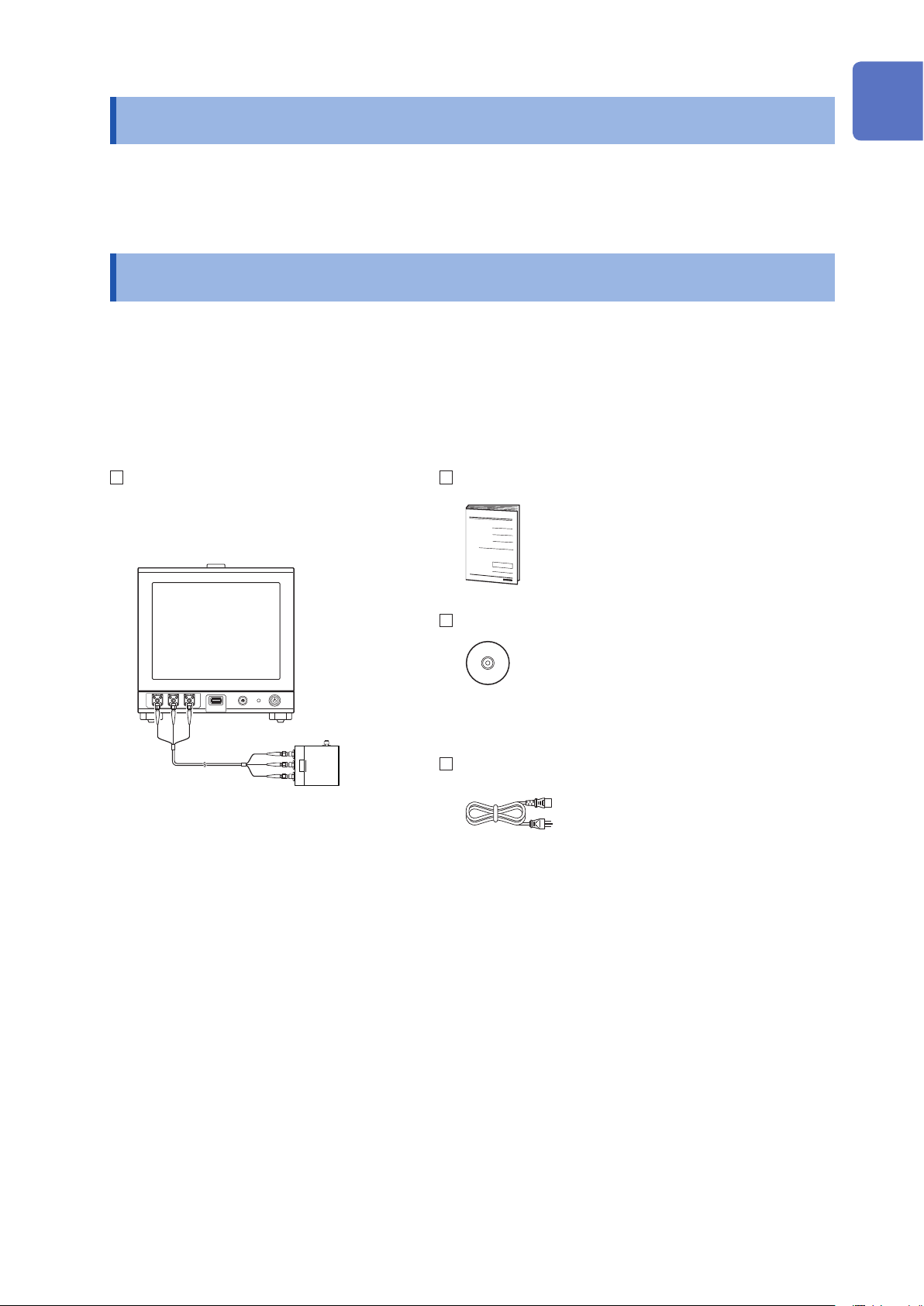
Conrmthatthefollowinghavebeenprovided.
IM7580 Impedance Analyzer
•Test head
•Connection cable
(IM7580:1m,IM7580-02:2m)
Instruction Manual
LCR Application Disc
(Communications user manual [PDF], explanation
ofcommunicationscommands,USBdriverand
sample application)
•The latest version can be downloaded from our web site.
Power Cord
10
9
8
7
6
5
4
3
2
1
Appx. Ind.
2
Options (Sold separately)
Contact your authorized Hioki distributor or reseller when ordering.
Testxtures
IM9200 Test Fixture Stand
IM9201 SMD Test Fixture (for SMD parts)
IM9906 Adapter (3.5 mm/7 mm)
Interfaces
Z3000 GP-IBInterface
Z3001 RS-232CInterface
Connection Cables
9151-02 GP-IBConnectorCable(2m)
9637 RS-232CCable(9pin-9pin/1.8m)