PRODUCT HELPLINE
Australia: 1800 625 123
New Zealand: (09) 973 2477
help@hyclor.com.au
www.hyclor.com.au
3.0 OPERATOR CONTROL PANEL
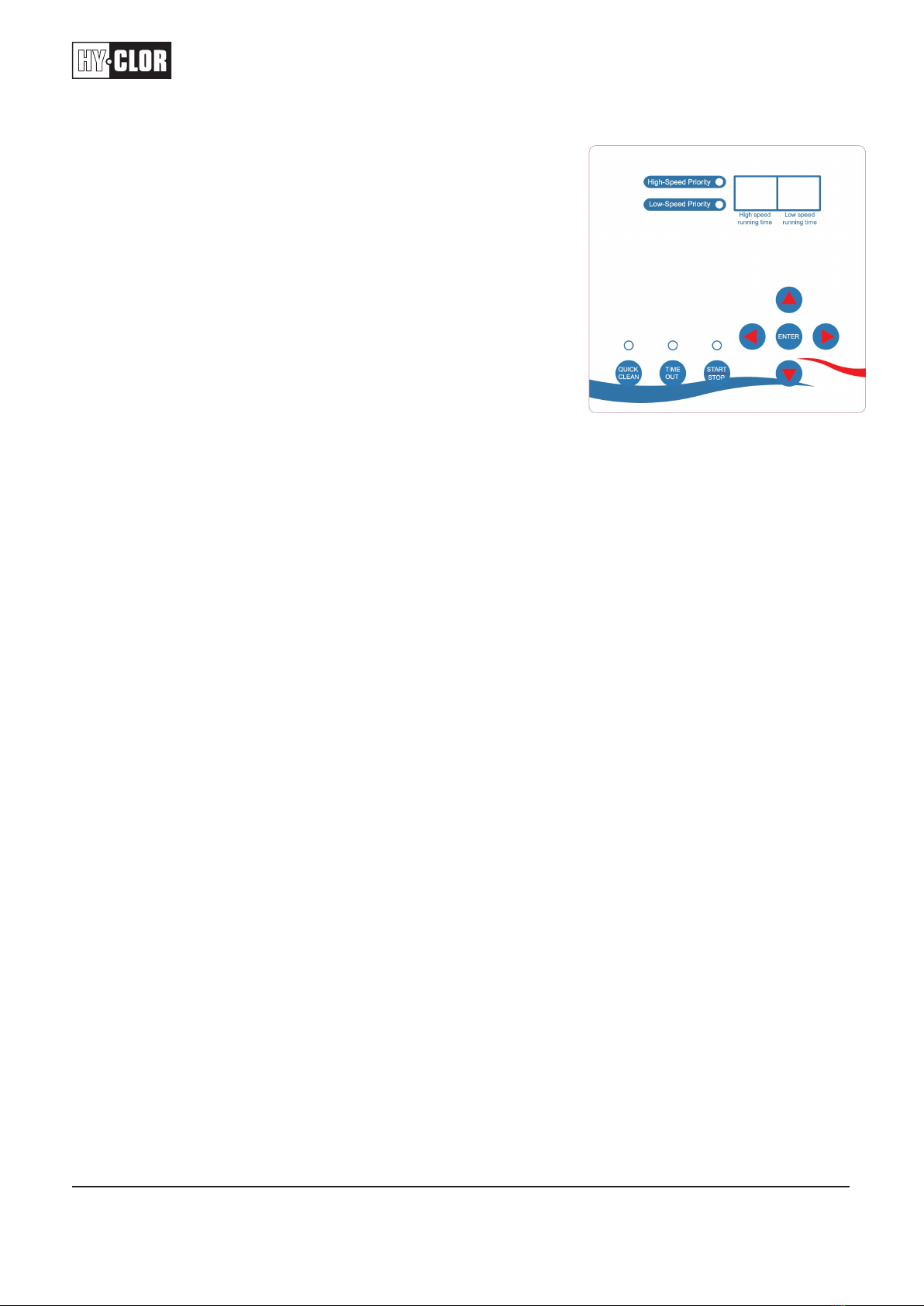
3.1 PUSH-BUTTON AND FUNCTION
3.1.1 Connect the power and ensure the pump is in stop status.
3.1.2 Push the enter button to activate the cursor.
3.1.2.1 Use the arrow buttons to move the cursor.
3.1.2.2 Blinking button is where the cursor is.
3.1.3 The pump operates on a 24-hour countdown, which
starts when power is connected and the start button
is pushed.
3.1.3.1 Both high-speed running time and low-speed
running time cannot total over 24.
3.1.3.2 The Pump Uses Hour Increments only.
3.1.4 The default operation of the pump is 3 hours on high and
6 hours on low speed, with a low-speed override option.
3.1.5 If the pump is in low-speed override mode, it will run for 5 minutes on high speed, then switch to
low speed for the remaining cycle indicated in the low-speed running time, then it will switch to
high speed for its remaining time before turning off.
3.1.6 If the pump is in high-speed override mode, it will run for the indicated high-speed running time
before switching to low speed for the remaining cycle.
3.1.7 The pump will always reset to zero if power is lost, meaning it will start the countdown from the
beginning, even if an external timer or chlorinator is used.
3.1.8 Please note: To program the Pump you will need to plug it into power and hit the start-stop button
to Stop the pump then you can program the hours from there using the arrow keys. Remember to
hit start again to re-enable the pump after programming it.
Remember to follow these steps to program and operate the pump effectively.
Example: The pump is Turned on at 8:30am. It Will then work for 3 hours on high then swap to low speed at
11:30 am and run at low speed for 6 hours meaning it will turn itself off at 4:30pm. It will then wait until the
remaining 24 hours have counted down and will turn back on at 8:30am the next day.
3.2 INDICATOR LIGHT
3.2.1 HIGH SPEED OVERRIDE: Starting with high-speed program; after finishing high-speed
programming time, automatically change to low-speed program
3.2.2 LOW SPEED OVERRIDE: Starting with high-speed for 5 minutes (to exhaust air), changing to
low-speed program; then running in high-speed program
3.2.3 QUICK CLEAN: Fast set for running in high-speed 3 hours; the same key to stop function
3.2.4 TIME OUT: For pause; the same key to wake up
3.2.5 START /STOP: For start/stop, light on means start
3.2.6 HIGH SPEED RUNNING TIME: Time install for running in high speed (by hour)
3.2.7 LOW SPEED RUNNING TIME: Time install for running in low speed (by hour)
Notice: Sum of high-speed running hours and low-speed running hours should not
exceed 24 hours (24 hours is ok)
3.2.8 NIXIE TUBE: Flash in high speed means pump is running in high speed, flash in low speed means
pump is running in low speed, not flashing means idle condition