manuals.online logo
Brands
  1. Home
  2. •
  3. Brands
  4. •
  5. JAKO
  6. •
  7. Door Lock
  8. •
  9. JAKO RD101CP User manual

JAKO RD101CP User manual

This manual suits for next models

2

Other JAKO Door Lock manuals

JAKO CER-285 User manual

JAKO

JAKO CER-285 User manual

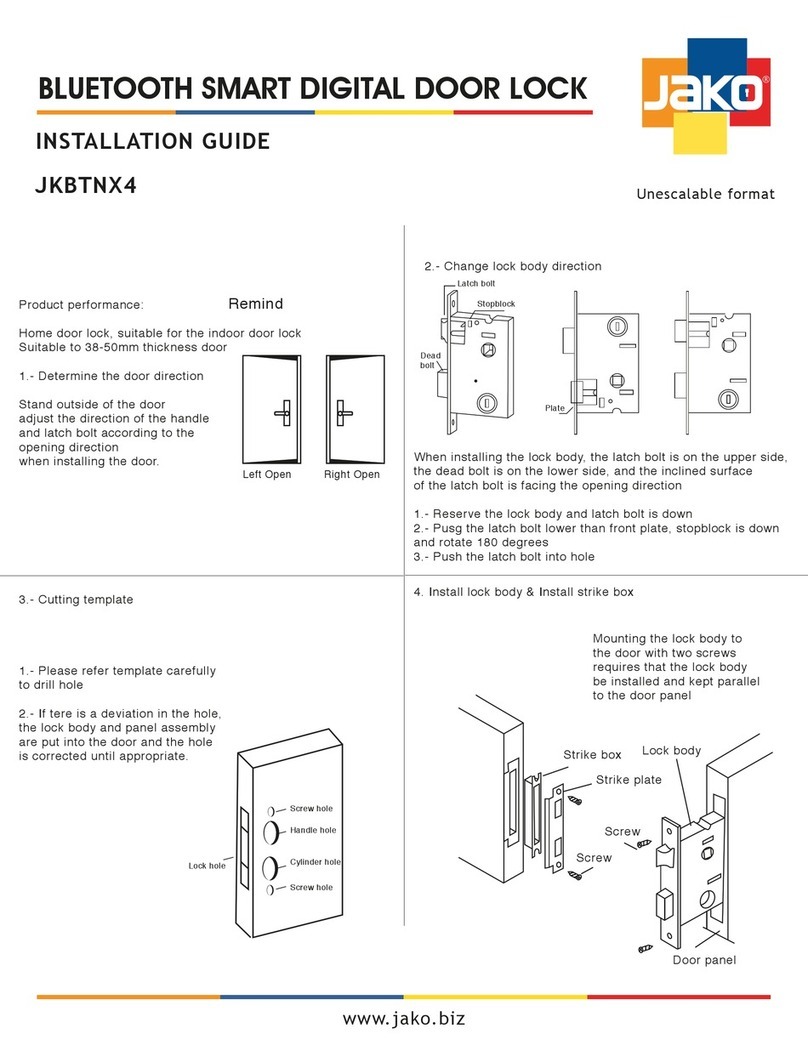
JAKO JKBTNX4 User manual

JAKO

JAKO JKBTNX4 User manual

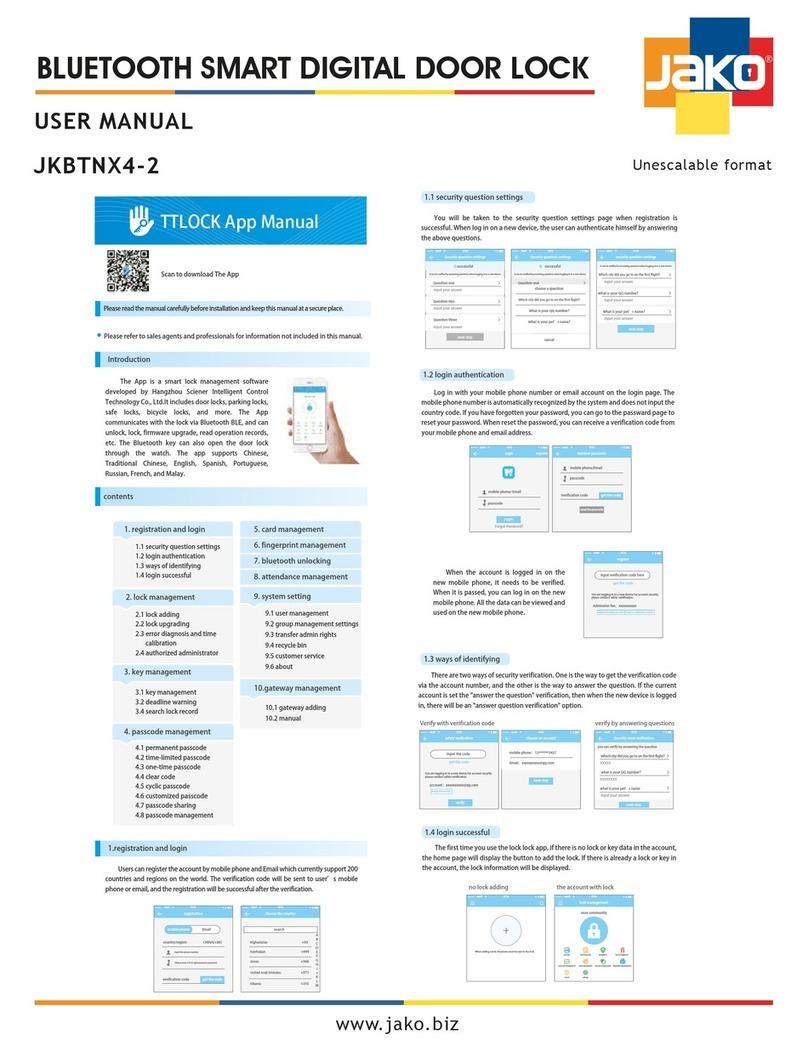
JAKO JKBTNX4-2 User manual

JAKO

JAKO JKBTNX4-2 User manual

JAKO JK15452 User manual

JAKO

JAKO JK15452 User manual

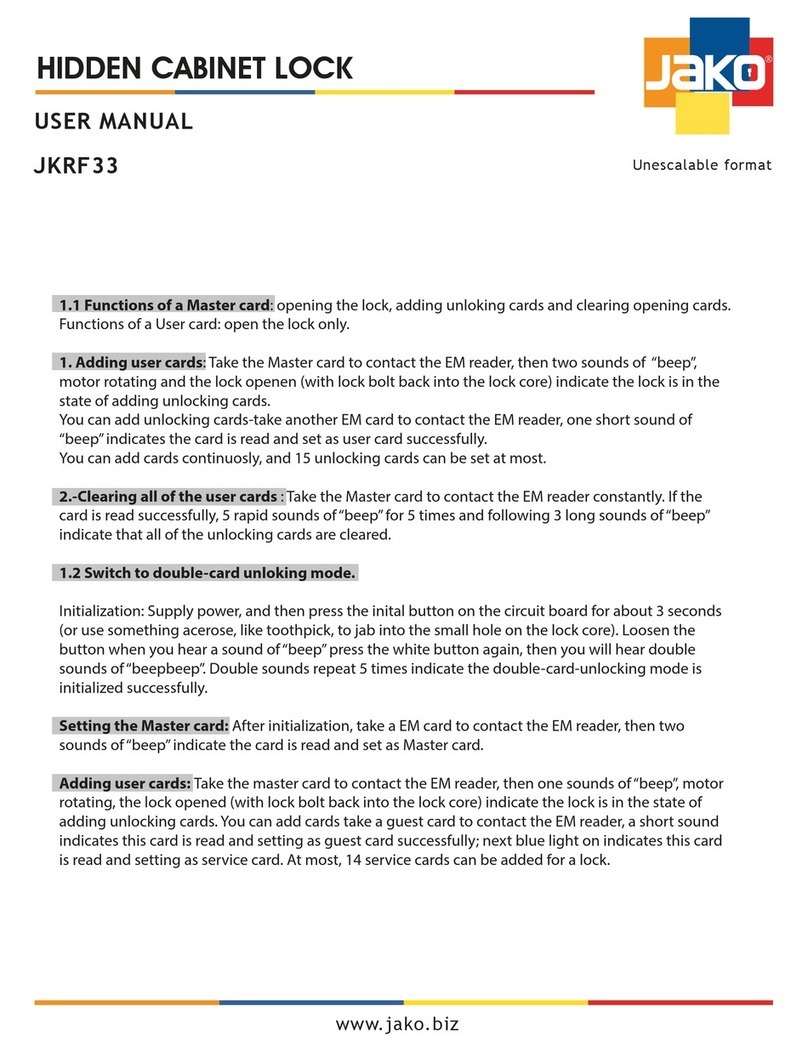
JAKO JKRF33 User manual

JAKO

JAKO JKRF33 User manual

Popular Door Lock manuals by other brands

Dorma MUNDUS PREMIUM US 10 Mounting instruction

Dorma

Dorma MUNDUS PREMIUM US 10 Mounting instruction

Defiant LG600BRA4BGT Instructions for installation

Defiant

Defiant LG600BRA4BGT Instructions for installation

TRU-BOLT M1740024 manual

TRU-BOLT

TRU-BOLT M1740024 manual

Opera ARCA SLIDE installation instructions

Opera

Opera ARCA SLIDE installation instructions

tell CODELOCK CL5500 Series installation instructions

tell

tell CODELOCK CL5500 Series installation instructions

ABH LR6000 installation instructions

ABH

ABH LR6000 installation instructions

Assa Abloy effeff 827A-IP Mounting instructions

Assa Abloy

Assa Abloy effeff 827A-IP Mounting instructions

Iseo MA1A installation guide

Iseo

Iseo MA1A installation guide

ID Lock 150 user manual

ID Lock

ID Lock 150 user manual

Lockly ACCESS TOUCH PRO user manual

Lockly

Lockly ACCESS TOUCH PRO user manual

iLoq G50S user guide

iLoq

iLoq G50S user guide

SDC Z7835 installation instructions

SDC

SDC Z7835 installation instructions

ilco 452 Installation

ilco

ilco 452 Installation

Samsung shs-h705 user guide

Samsung

Samsung shs-h705 user guide

TRU-BOLT 08102017 user manual

TRU-BOLT

TRU-BOLT 08102017 user manual

CDVI 500-LADJ quick start guide

CDVI

CDVI 500-LADJ quick start guide

Igloohome Deadbolt 2S Metal Grey Installer/user guide

Igloohome

Igloohome Deadbolt 2S Metal Grey Installer/user guide

eSSL FL-300 user manual

eSSL

eSSL FL-300 user manual

manuals.online logo
manuals.online logoBrands
  • About & Mission
  • Contact us
  • Privacy Policy
  • Terms and Conditions

Copyright 2025 Manuals.Online. All Rights Reserved.

Cod.RD101CP / RD101CP-AS / SD01CP
Installation guide
TOOLS REQUIRED FOR REMODELING OR
NEW CONSTRUCTION:
TOOLS REQUIRED FOR REPLACEMENT:
FOLLOW STEPS 6,7,8,9,10 FOR DO IT YOURSELF
REPLACEMENT, FOLLOWING REMOVAL OF EXISTING LOCK.
1 philips head screwdriver
1 2” hole saw
1 1” drill
1 chisel
1. MARKDOOR 2. DRILL HOLES
A. Fold and apply template to high
edge of door bevel and mark
center of door edge as indicated
on template at the desired
height from the oor.
A. Drill thru door face as marked
for lockset: It is recommended
that holes be drilled from both
sides to prevent splitting. Hole
size is 2” for standard installations.
B. Drill 1”hole in center of door
edge thru to 2” hole for latchB. Mark center hole on door face
through guide on template. For
either 2 3/8” , 2 3/4” bakset..
3. INSTALL LATCH 4. INSTALL STRIKE
A. Close door against door stop.
Insert edge of template
against the at side of latch
bolt, and mark template at
edge of door, jamb to locate
strike opening. Move 3/8”
toward door stop to locate
center line for screws and 1”
hole. This will insure the
proper location of the strike.
A. Insert latch in hole, keeping
it parallel to face of door.
Mark outline and remove
latch.
B. Chisel 1/8”deep or until latch
face is ush with door edge.
B. Install deadbolt latch in
“up” position into hole
as shown on latch.
Insert and tighten
screws.
B. Chisel 1/16”
deep for strike
matching 1”
hole in door
jamb. Insert
and tighten
screws.
INSTRUCTION FOR ADJUSTABLE DEADBOLT
TO CHANGE 2-3/8” TO 2-3/4”
Thumb press the end of the latch,
with the Adjustable Slot facing toward yourself,
turn the body of the latch clockwise and
make sure that THE PIN DROP INTO THE SECONDARY
SLOT, THEN PULL TO THE SIDE. Twist the body of the
latch counter clock wise TILL THE PIN DROP INTO THE
UPPER PRIMARY SLOT.
60mm (2-3/8”)
70mm (2-3/4”)
PRIMARY SLOT
SECONDARY SLOT
DEADBOLTS
Unscaled format
www.jakohardware.com
DEADBOLT LOCK KEY-THUMBTURN

READ INSTRUCTIONS
1 3/4” ( 45mm) THICK
DOOR
MARK
PROPER
DOOR
THICKNESS
FOR INSTALLING
DEADLOCKS
NOTE:
TEMPLATE MUST
BE PLACED ON
HIGH EDGE OF
DOOR BEVEL
DRILL 1” (25mm)
HOLE IN EDGE OF DOOR
(2” IN DEPTH)
1 3/8” ( 35mm)
THICK
DOOR BACKSET
DISTANCE
2 3/8” (60mm)
2 3/4” (70mm)
DRILL
2” (50.8mm)
HOLE
MARK
1
2
3
4
5
Name of lock component
Front rosette Intenal rosette Rear rosette Turn button
Hex screw
Hex screw driver
First step: take o the hex
scrow by hex screw driver,
and take away the turn button
Second step: Take o the hex
screw where is located bottom
of rear rosette by hex screw
driver after that take away rear
rosette.
5.
8.
9. 10.
6. 7.
Mounting screw
Locking bar
Latch Door with latch
Third step: put front
rosette and latch
logether through the
hole for mounting
screw
Hole for
mounting screw
Hole for locking
bar installation
Front rosette
Fourth step: According correct direction
to install the intenal rosette and make it
stable by machine screw.
Fifth step: According
correct direction to
install rear rosette and
make it stable by hex
screw.
Sixth step: install
the turn button
and make it stable
by hex screw.
Installation completed.
FOLD HERE
2” BACKSET
www.jakohardware.com