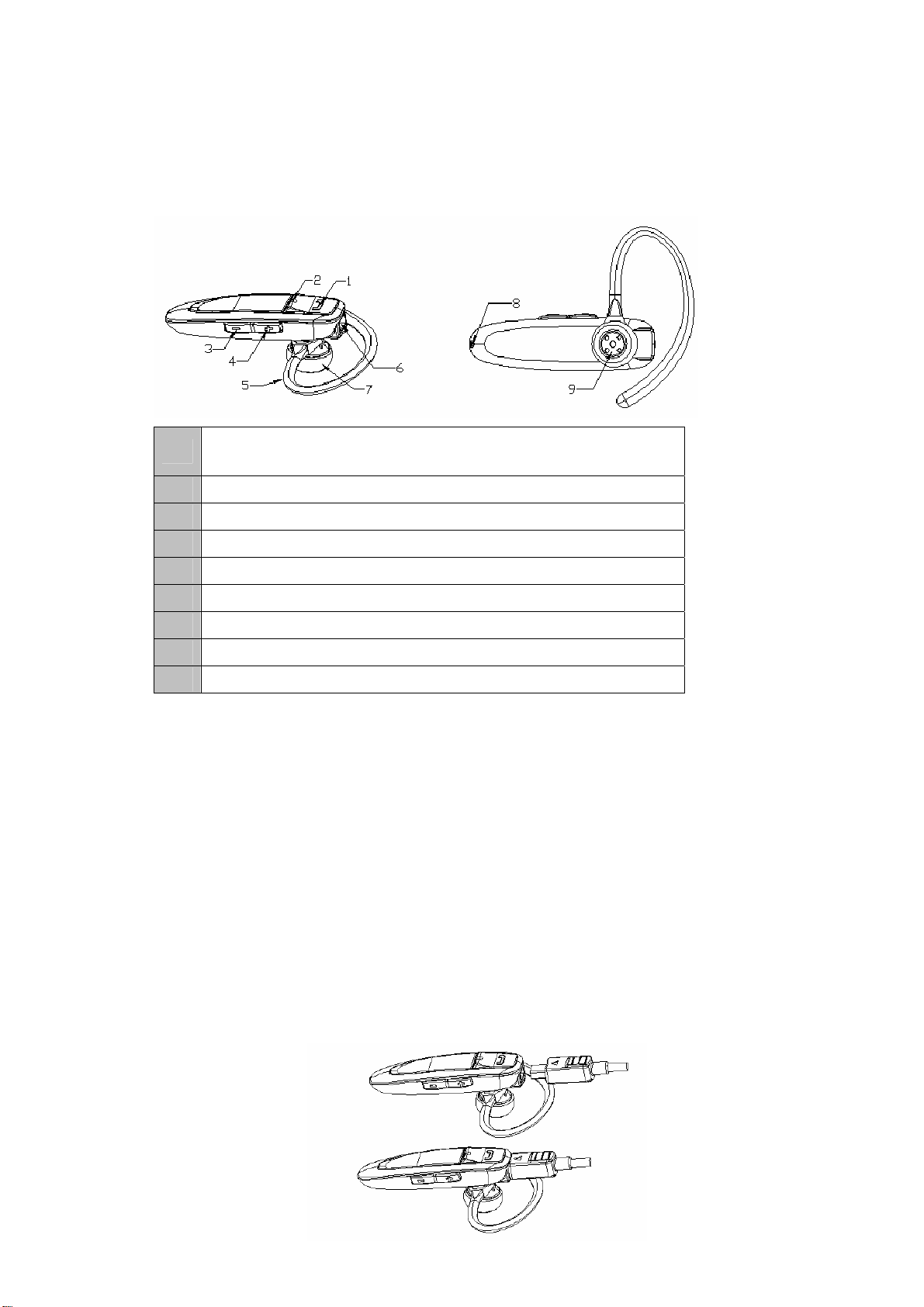
2) Make sure the headset is off, otherwise turn it off first;
3) Press and hold MFB button for about 12 seconds, and then release the
button after you hear the third indication tone(The first one is a “DI” tone,
the second one is “DU”, the third one is “DONG-DONG”) or see red and
blue LEDs flash alternately. The headset successfully enters into pairing
mode;
4) Activate your mobile phone’s Bluetooth function and set your mobile
phone to search for Bluetooth devices. After the search is completed,
select “BTE002” from the Bluetooth device list;
5) According to the indication, enter password or PIN No:”0000” and press ”
Yes” or “confirm”;
6) When the pairing is completed, the blue LED will flash twice every 5
seconds;
7) Go back to your mobile phone’s main menu. For certain mobile phone
models, a headset icon will be shown on the screen. You should now be
able to make calls using the headset.
Remarks:
Pairing mode will last 2 minutes. The headset will switch to standby mode
automatically if it can’t connect to any devices after 2 minutes. If you want
to continue pairing the headset with a Bluetooth device, please switch off
the headset first and then re-pair according to steps 1~7 mentioned
above.
After successful paring, the headset and your mobile phone will remember
each other, no need to re-pair at next use.
Every time the headset is turned on, it will connect to the last connected
device automatically. If you want to pair it with other devices, please turn
off the Bluetooth function of the last connected devices first and pair the
headset with the new device according to steps 1~7 mentioned above.
4. Connecting the headset with a Bluetooth mobile phone
You can make a call with the headset when it connects to a Bluetooth mobile
phone, general connecting methods are as following:
1) The headset often automatically connects to a Bluetooth mobile phone
when it sucessfully pair with a Bluetooth mobile phone. If the mobile phone
prompt “connect”, you just need to press “Yes” or “confirm” button (It varies
from different models of mobile phones).
2) Every time the headset is turned on, it will connect to the last connected
device automatically.
3) When the headset is standby and doesn’t connect to any devices, press
MFB button once, the headset will connect to the last connected device.
4) You can find “BTE002” in the Bluetooth list of the headset and connect.