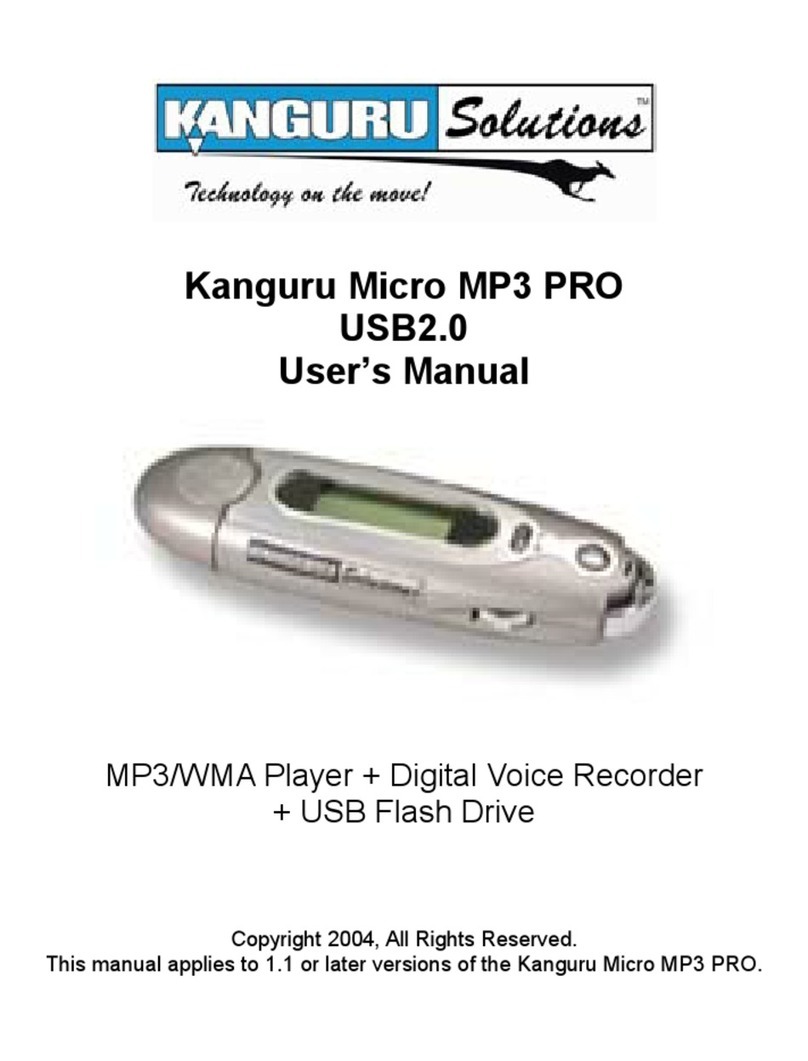
Kanguru Micro MP3 User manual

Kanguru Micro MP3 Player User
Manual
Copyright 2010, All Rights Reserved

BEFORE FIRST USE
Copyright © 2010, Kanguru Solutions. All rights reserved.
DOS®, Microsoft Windows XP®, Windows Vista® and Windows 7® are registered trademarks of
Microsoft Inc. Apple® and Macintosh® are registered trademarks of Apple Computer Inc. IBM and
OS/2 are registered trademarks of the International Business Machines Corporation. All other brand
or product names are trademarks of their respective companies or organizations.
Kanguru Solutions will not be held responsible for any illegal use of this product nor any losses incurred
while using this product. The user is responsible for the copyright laws, and is fully responsible for
any illegal actions taken.
CUSTOMER SERVICE
To obtain service or technical support for your system, please contact Kanguru Solutions Technical
Support Department at 508-376-4245, or visit www.Kanguru.com for web support.
DISCLAIMER
All the information in this document is subject to change without prior notice. The manufacturer
does not make any representations or any warranties (implied or otherwise) regarding the accuracy
and completeness of this document and shall in no event be liable for any loss of profit or any other
commercial damage, including but not limited to special, incidental, consequential, or other damages.
No part of this document may be reproduced or transmitted in any form by any means without the
express written permission of the manufacturer.
All brand names and product names used in this document are trademarks or registered trademarks
of their respective holders.
Before first Use

3
Table of Contents
Table of Contents
1. Introduction..................................................................... 4
1.1 Features............................................................................... 4
1.2 Parts and Functions ........................................................... 5
2. Technical Specifications.................................................. 6
3. General Operation .......................................................... 7
3.1 Safety Precautions.............................................................. 7
3.2 Turning the MP3 Player ON/OFF.................................... 7
3.3 Music playback .................................................................. 8
3.4 Play Settings Menu ............................................................ 9
3.4.1 Repeat Mode .........................................................................9
3.4.2 Equalizer ................................................................................9
3.4.3 3D sound.................................................................................9
3.4.4 Play Rate ..............................................................................10
3.4.5 File Browser .........................................................................10
3.4.6 Classification........................................................................11
3.4.7 PlayList ................................................................................11
3.4.8 ACL.......................................................................................12
3.4.9 Replay...................................................................................12
3.5 Record ............................................................................... 13
3.6 Voice ................................................................................. 13
3.7 FM Radio .......................................................................... 14
3.7.1 FM Radio Submenu ............................................................15
3.8 Setup.................................................................................. 16
3.8.1 Time ......................................................................................16
3.8.2 Power....................................................................................16
3.8.3 Language..............................................................................16
3.8.4 Display Settings ...................................................................16
3.8.5 Record Settings....................................................................17
3.8.6 System Tool ..........................................................................17
4. USB mode ...................................................................... 18
4.1 Transferring Files to Your Device................................... 18
4.2 Safely Removing Your Device ......................................... 18
5. Trouble shooting............................................................ 19
6. Warranty ....................................................................... 19
7. Tech Support ................................................................. 19

4
1. Introduction
Thank for choosing the Kanguru Micro MP3 player.
Please first refer to this user manual to obtain information about the product and functions. Before
using the Kanguru Micro MP3 player, please carefully read all information provided so that you have
a better understanding of how to operate your Kanguru Micro MP3 player.
While compiling this manual, we were very careful and rigorous, aiming to provide you with reliable
information. However, we need your understanding since it is hard to avoid some mistakes and
omissions. We welcome your comments. If you have any problem with this product, please contact
tech support at 1-508-376-4245.
Kanguru Solutions will not be responsible for loss of personal data, damage caused by malfunction
of SW/HW, artificial damage, replacement of battery as well as other accidental conditions. To avoid
the loss of your data, please back it up on your computer frequently. Kanguru Solutions will not take
any related responsibilities for potential accidental loss during the application of this manual.
• The information contained in this manual is subject to change without any prior notice.
• The information in this manual is protected by copyright. Do not copy or reproduce any part of this
manual without prior written permission from Kanguru Solutions.
• Kanguru Solutions reserves the right of final explanation for this manual, warranty, and any related
information.
1.1 Features
√Superb exterior design and comfortable handling
√Support for multiple audio formats including: MPEG1/MPEG2/MPEG2.5 Layer2/3, WMA and
WAV.
√Driver-free operation
√File operation can be done directly through “Removable Disk” in “My Computer” without any
additional software.
√EQ modes include Common, Pop, Rock, Classic, Jazz and Base.
√Multiple playing modes: Normal, Repeat 1, Repeat all, Random all, Play directory, Repeat
directory, and Random play directory.
√Configurable automatic power-off timer
√Graphical menu with LCD display
√Supports synchronized lyric display using LRC files.
√Multiple languages supported
Introduction

5
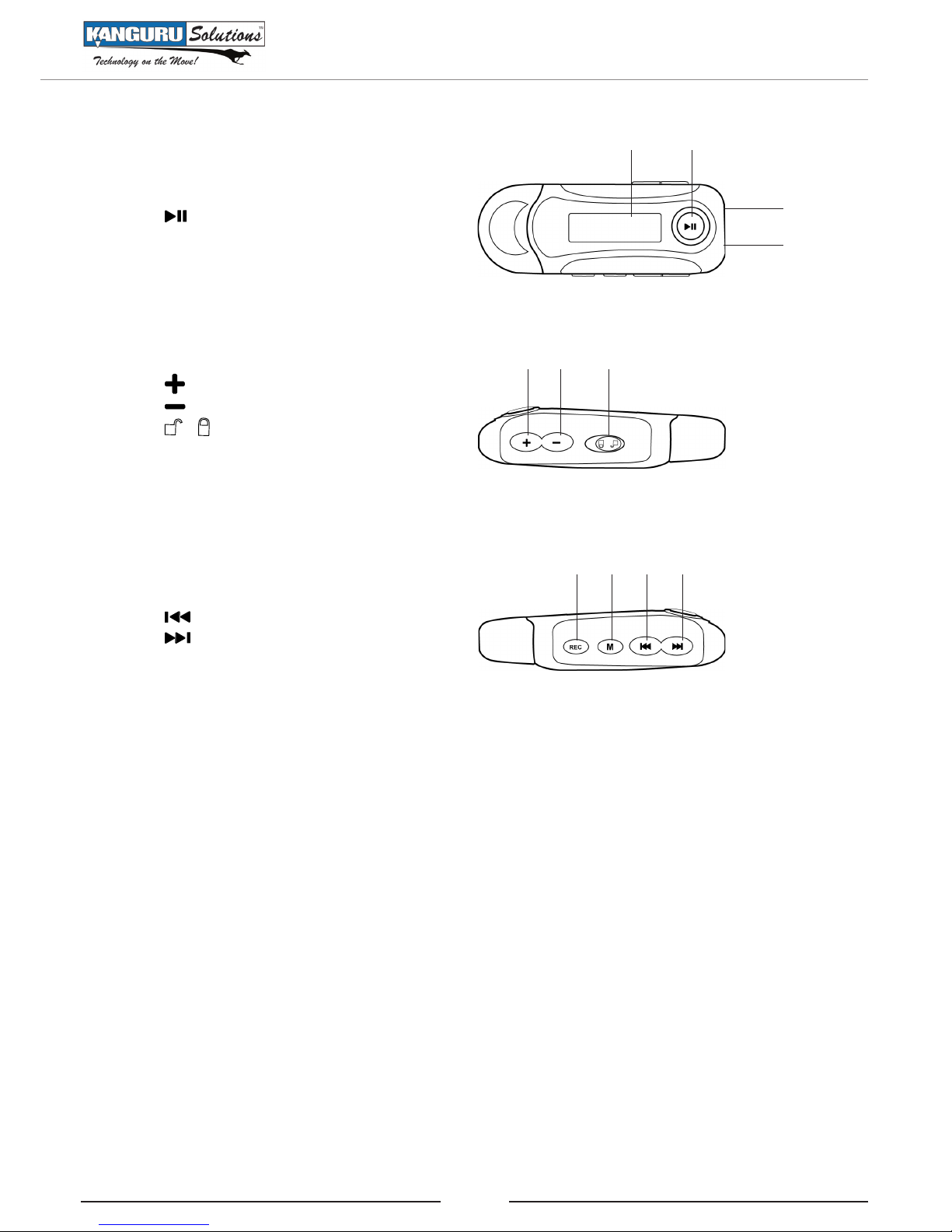
1.2 Parts and Functions
1. Display screen
2. button: ON/OFF, Play, Pause
3. MIC
4. Earphone jack
5. button: Volume up
6. button: Volume down
7. button: Hold key
8. REC button: Record
9. Mbutton: Menu, Enter
10. button: Previous, Backward
11. button: Next, Forward
1
3
2
4
5 6 7
8 9 10 11
Parts and Functions

6
2. Technical Specifications
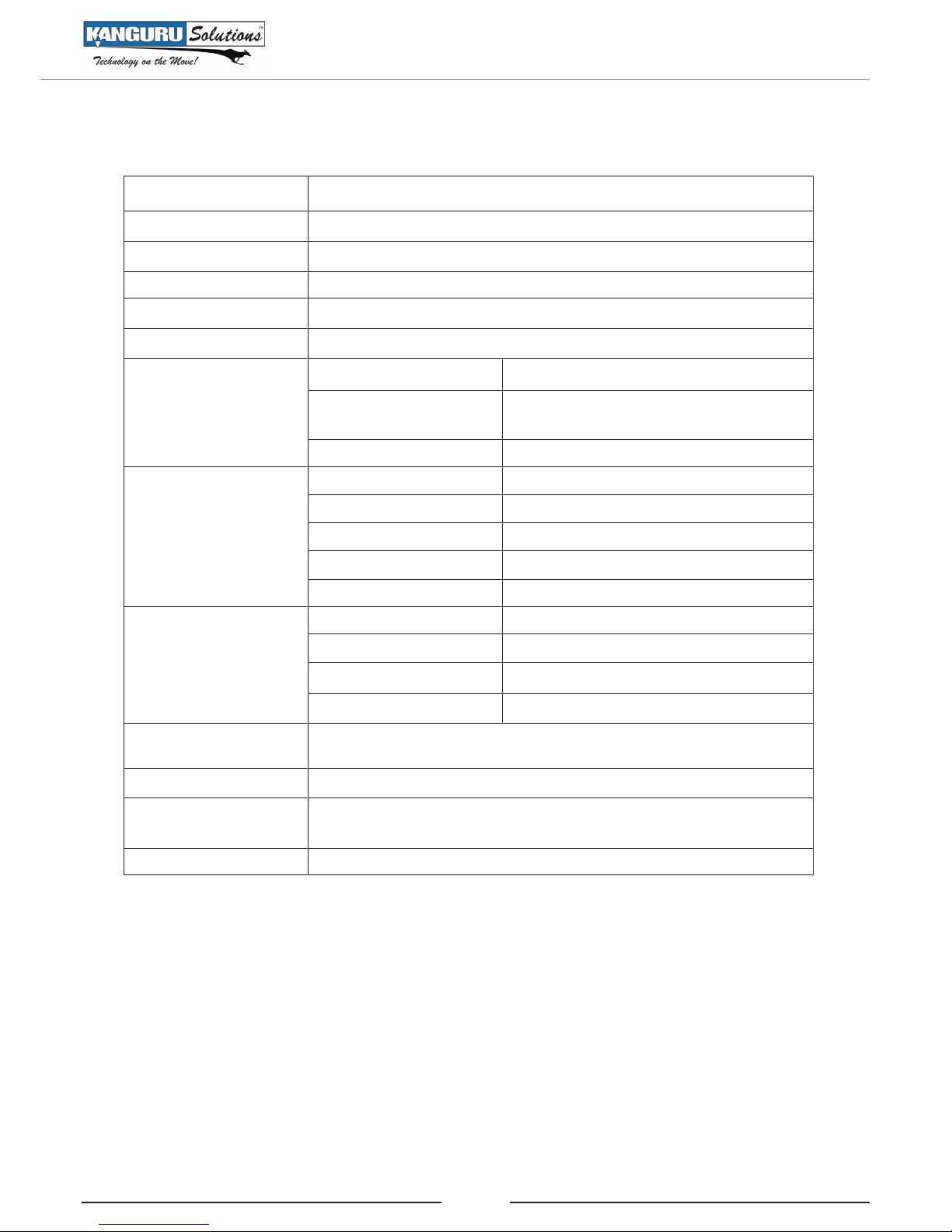
Dimensions 81.80mm(L)×33.00mm(W)×17.70mm(H)
Weight 28g (without battery)
Display area LCD(96×64) 7color Backlights
Computer interface High speed USB2.0
Memory size 4GB
Battery lifetime up to 10 hours
Recording
Rate 8KHz
Record format WAV(32Kbps, 44Kbps, 64Kbps or
88Kbps)
Record time 8 hours (WAV for 128MB)
MP3,WMA,WAV
Earphone max power (L) 5mW+ (R) 5mW (32 Ohm)
MP3 bit rate 8K bps-320K bps
WMA/WAV bit rate 5K bps-352K bps
Frequency response 20Hz-20KHz
Signal to Noise ratio 85dB
FM Radio
FM frequency range 87MHz108MHz
Number of channels 30
Earphone max power (L)10mW+(R)10mW(32 Ohm)
SNR 45dB
Music formats
supports MP1, MP2, MP3, WMA, WAV
Temperature range -5~40 Celsius Degree
Language supports 16 Languages including English, Simple Chinese, Spanish
French, German, Italian, Portuguese
Operating system Windows XP/Vista/7
Technical Specifications

7
3. General Operation
Please read through and understand the following instructions before using your Kanguru MP3 player.
3.1 Safety Precautions
• Please remove the battery if the Kanguru Micro MP3 player will not be used for a prolonged
period of time.
• Do not use the Kanguru Micro MP3 player in extremely hot, cold, dusty or humid conditions.
• Protect the player from falling, rubbing, or compacting while in use; this may lead to cosmetic
damage or damage of internal hardware.
• Please replace the battery under the following circumstances:
○In normal operation, the player will power off automatically after the battery symbol is
empty and “battery low” message is shown.
○The operating buttons do not respond and the battery symbol is empty .
• Avoid operating this player under extremely dry conditions to prevent damage to the hardware by
high static.
• Do not disconnect the player while it is connected to the PC and is formatting, uploading, or
downloading. Disconnecting the device abruptly can lead to program error and failure to power on.
• When the player is used as a removable disk, the user should store files using appropriate operation
methods for file management. Kanguru Solutions will not be responsible for any loss of data.
• It is recommended that you backup the data on the player to your PC at regularly scheduled
intervals.
Note: The battery meter may change during playing. This is generated from different power
consumption during use and playback. It will not affect the normal functions of the player and should
not be mistaken as quality problem.
3.2 Turning the MP3 Player ON/OFF
1. Please make sure the player is unlocked. The Hold key should be in the unlocked position .
2. Power on: While player is off, press and hold the button to power on the player.
3. Power off: While player is on, press and hold button until the word “Bye” is displayed on
screen.
Note:
• When powering on, the player may temporarily pause. The player is initializing and is subject to
this normal operation.
• Power-on memory function: When the player powers on, it will start in the mode it was in at the
time of the last power-off (music, FM). If powering off under Pause status, it will enter the position
that was playing at the time of previous power-off.
• If there is any failure during operation, the player can be reset by taking out the battery and then
putting it back In.
General Operation

8
3.3 Music playback
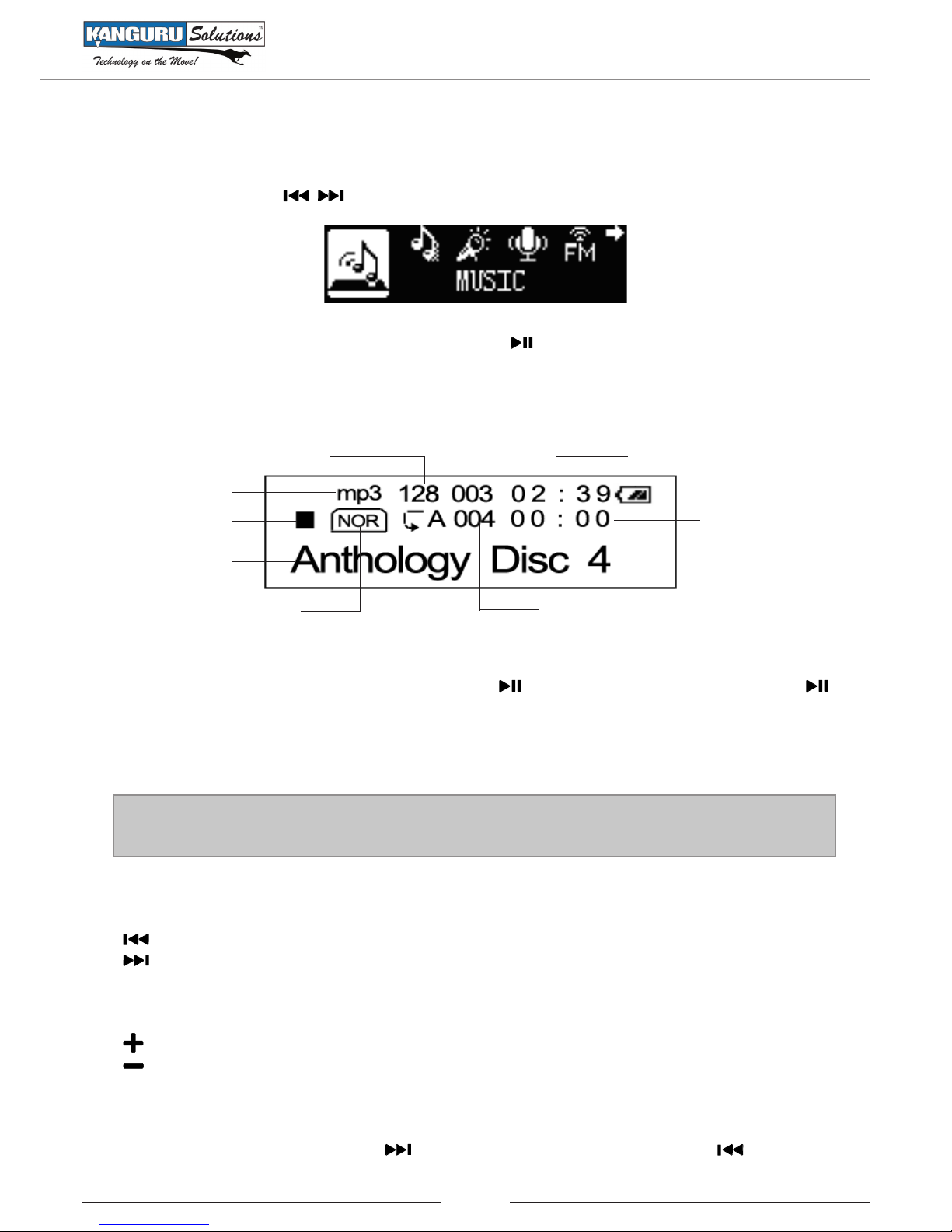
Press and hold the Mbutton to enter the Main Menu. In main menu screen you can choose the Music
Mode by pressing the buttons, as the following figure shows:
Phort press the Mbutton to enter Music Mode. Press to start playing the current song.
This displays such information as song number, type, and name, singer, lyrics, sound effect mode, bit
rate, repeat mode, A-B repeat mode, volume, charge display as well as the play duration current song.
Bit Rate Current Song Song Length
Battery Indicator
Play Progress
Total # of Songs
Loop Mode
Audio Mode
Song Name
Play Status
Music Format
Under Play status, you can pause by first pressing the button; to continue playback, press the
button again.
Stop playing the current song and return to the Main Menu by pressing and holding the Mbutton.
Note: The player supports “*.LRC” lyrics files to achieve synchronized play between lyrics and the
songs. Lyric files must have the same file name as the music file and be saved under the same folder.
Music Selection
button: choose the previous song.
button: choose the next song.
Volume adjustment
button: volume up
button: volume down.
Fast forward/backward
During playback, press and hold the button to fast forward the current song or to rewind.
Music Playback

9
3.4 Play Settings Menu
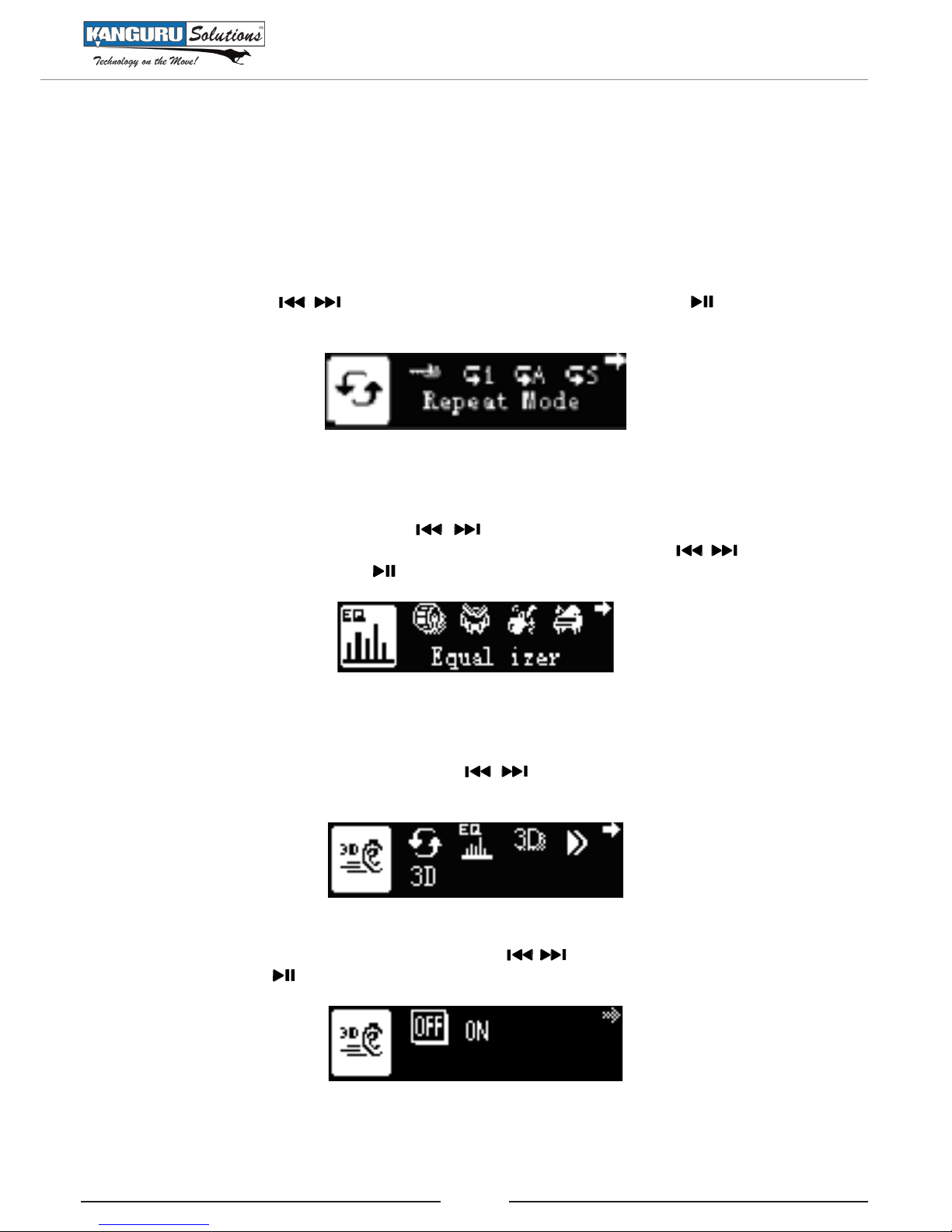
While in music playback mode, press the Mbutton to enter the Play Settings menu.
3.4.1 Repeat Mode
Under the Play Settings menu and then tap the Mbutton to enter Repeat menu. Select the Repeat
mode by pressing the buttons and then press the Mbutton. Press the button to return
to playback mode.
3.4.2 Equalizer
Under the Play Settings menu press the buttons to select Equalizer and then tap the M
button to enter the Equalizer menu. Select the Equalizer mode by pressing the buttons and
then press the Mbutton. Press the button to return to playback mode.
3.4.3 3D sound
Under the Play Settings menu and then use the buttons to select 3D and then tap the M
button to enter the 3D menu.
Turn surround sound ON or OFF mode by pressing the buttons and then press the Mbutton
to confirm. Press the button to return to playback mode.
Play Settings Menu

10
3.4.4 Play Rate
Under the Play Settings menu press the buttons to select Play Rate and then tap the Mbutton
to enter the Play Rate menu.
Adjust the play rate by pressing the buttons and then press the Mbutton. Press the
button to return to playback mode.
3.4.5 File Browser
Under the Play Settings menu and then use the buttons to select File Browser and then tap
the Mbutton to enter the File Browser.
Navigate the files stored on your drive by pressing the buttons. Press the to enter the
sub-menu where you can choose to add the file to your playlist or delete the file. Press the
buttons to select an option and then press the Mbutton to confirm.
Press the button to return to the Play Settings menu. Press the button to return to playback
mode.
Play Settings Menu
Table of contents
Other Kanguru MP3 Player manuals