Precautions
Location
Using the unit in the following locations can result
in a malfunction.
• In direct sunlight.
• Locations of extreme temperature or humidity.
• Excessively dusty or dirty locations.
• Locations of excessive vibration.
• Close to magnetic elds.
Power supply
Be sure to turn the power switch to OFF when the
unit is not in use. Remove the battery in order to
prevent it from leaking when the unit is not in use
for extended periods.
Interference with other electrical devices
Radios and televisions placed nearby may expe-
rience reception interference. Operate this unit at
a suitable distance from radios and televisions.
Handling
To avoid breakage, do not apply excessive force
to the switches or controls.
Care
If the exterior becomes dirty, wipe it with a clean,
dry cloth. Do not use liquid cleaners such as
benzene, thinners, cleaning compounds, or
ammable polishes.
Keep this manual
After reading this manual, please keep it for later
reference.
Keeping foreign matter out of your equip-
ment
Never set any container with liquid in it near this
equipment. If liquid gets into the equipment,
it could cause a breakdown, re, or electrical
shock. Be careful not to let metal objects get into
the equipment.
IMPORTANT NOTICE TO CONSUMERS
This product has been manufactured
according to strict specifications and
voltage requirements that are applicable
in the country in which it is intended that
this product should be used. If you have
purchased this product via the internet,
through mail order, and/or via a telephone
sale, you must verify that this product is
intended to be used in the country in which
you reside.
WARNING: Use of this product in any
country other than that for which it is
intended could be dangerous and could
invalidate the manufacturer’s or distribu-
tor’s warranty.
Please also retain your receipt as proof
of purchase otherwise your product may
be disqualied from the manufacturer’s or
distributor’s warranty.
* All product names and company names are
the trademarks or registered trademarks of their
respective owners.
234
5
6
7
8
(Bottom)
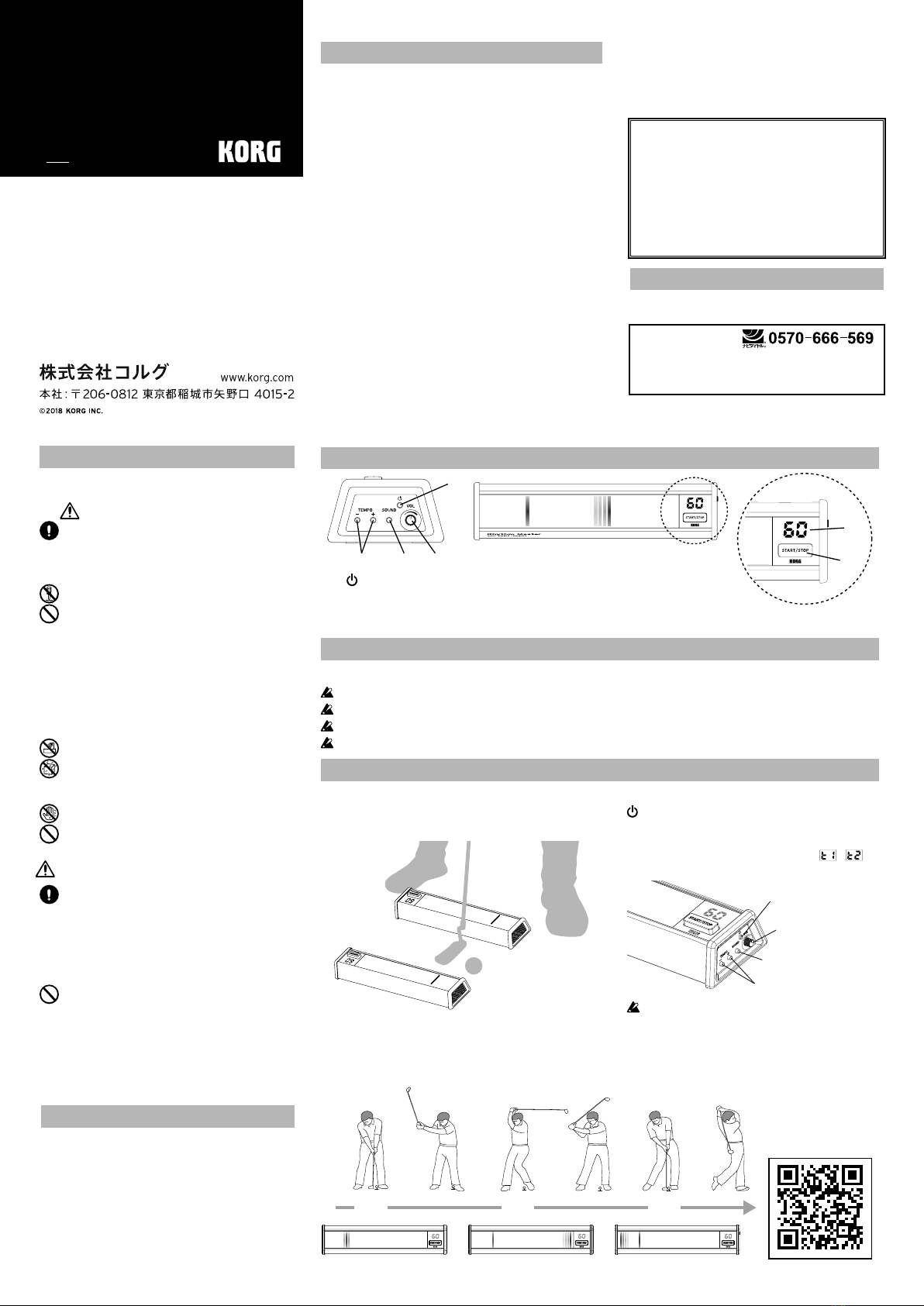
Inserting the battery
Open the baery cover, located on the boom of the Rhythm Master, and then insert the baeries,
making sure to observe the correct polarity.
Make sure to turn o the power before you replace the baery.
When the baeries begin to run low, the display will blink. When this happens, replace the baery as soon as
possible.
The Power will automatically turn o if the device has not been used for 5 minutes (Auto power-o).
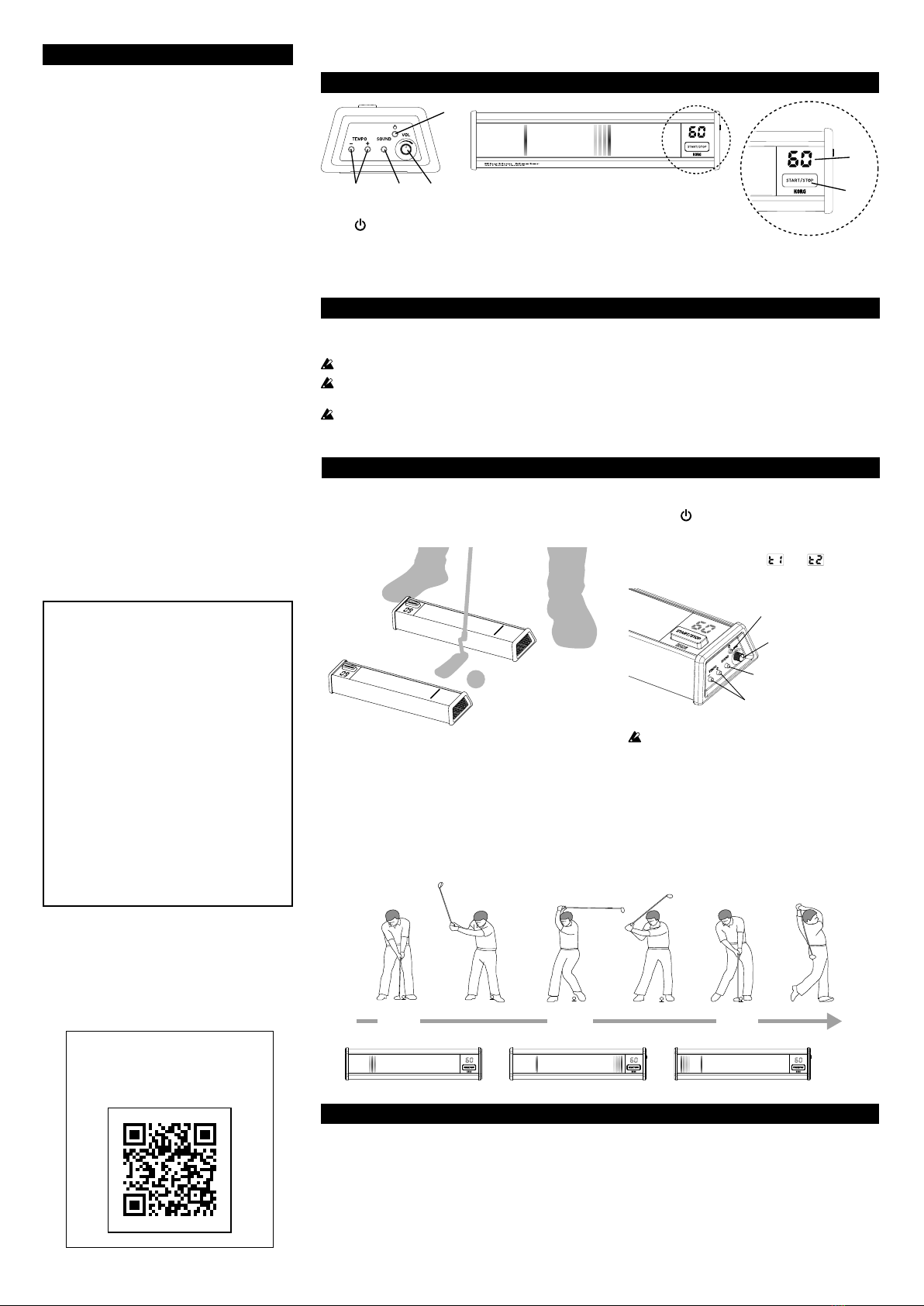
Features on this device
1. (Power) buon
2.TEMPO +/- buon
3.SOUND buon
4.VOL (Volume) knob
5.3D-Meter
6.Baery cover (on the boom)
7. Tempo/Count sound display
8.START/STOP buon
Using the Rhythm Master
3. Practicing your swing
Practice swinging to match the light running in the 3D meter and the count sound. Refer to the illus-
trations below for the timing.
TIP A standard tempo for men is 70, and a standard tempo for women is 60. Try practicing your swing
starting with this tempo.
1. Setup
Be sure to set up the Rhythm Master so that it is not
in the path of your swing, as shown below.
2. Starting the Rhythm Master
Press the buon to turn the Rhythm Master
on. Press the START/STOP buon to start the
count. Adjust the volume and tempo as de-
sired. The count sound ( or ) changes
each time you press the SOUND buon.
Do not press the START/STOP buon with your
golf club or foot. Doing so may cause damage.
AdjusttheVolume
ChangetheCountsound
AdjusttheTempo
TurnthePowerOn/Off
Thank you for purchasing the Korg Rhythm Master GOLF SWING TRAINER.
Pro Golf training TIPS
using the Rhythm Master
Watch video
Specications
Tempo Range: 20-80 beats/minute
Power supply: four AA baeries
Baery life: Approx. 200 hours (using alkaline baeries, Tempo=60, Count sound=t1, Volume=Max)
Dimensions (W x D x H): 308 x 73 x 42 mm / 12.13” x 2.87” x 1.65”
Weight: 517 g/18.24 oz. (including baeries)
Included Items: four AA baeries, Owner’s manual
* Specications and appearance are subject to change without notice for improvement.
ピッ ピッピッTick TickTick