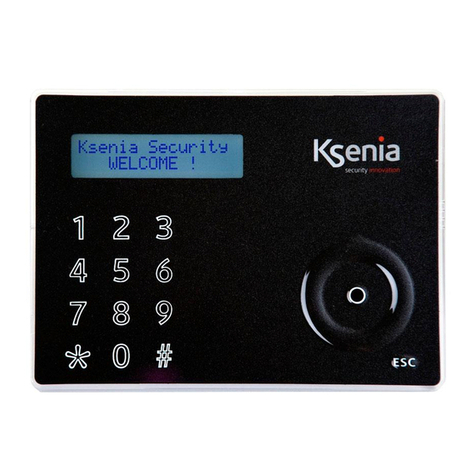
lares is a burglar alarm & Home Automation system that can be controlled by means of an ergo LCD
keyboard, as well as remotely by telephone, and even via the Internet through a built-in WEB server.
This manual describes the operations that can be performed by the end user.
KEYBOARD OPERATIONS
Refer to the keyboard manual to use the ergo capsense keyboard and get familiar with the functions of its
keys and circular scroll3.
Actions in stand-by mode
Four operations can be performed while the system is in stand-by mode
1. Detailed list of information (by pressing the Enter key).
2. Activation of a function (by holding down the corresponding numeric key for 3 seconds).
3. Entering the PI (default PI is 147258)4.
4. Keyboard lock for cleaning: hold the ESC key pressed for 3 seconds.
In stand-by mode, the following information can be displayed by pressing the Enter key:
If there are present some alarm, it is possible to see which zones are in alarm
List of armed (if the system activation status display is enabled)
List of open zones (if open zones real time display is enabled).
Information about the installer
Use the circular scroll to browse through these lines.
To activate a function (macro) without entering the PI , keep the corresponding numeric key pressed for
3 seconds. This function must be enabled by the installer.
Display information in stand-by mode
In stand-by mode the upper line of the display shows the system status. The informations are displayed in
the following order of priority:
TAMPER tamper condition on at least one of the partitions enabled for the keypad
ALARM! an alarm is active on at least one of the partitions enabled for the keypad.
MISSI G PERIPH. at least one KS-BUS peripheral is missing
TAMPER MEMORY tamper memory on at least one of the partitions enabled for the keypad.
ALARM MEMORY alarm memory on at least one of the partitions enabled for the keypad.
SYSTEM FAULTS the system has at least one fault
E TRY TIME entry time is active on at least one of the partitions enabled for the keypad.
EXIT TIME exit time is active on at least one of the partitions enabled for the keypad
WAR I G TIME warning time is active on the partitions enabled for the keypad
PHO E CALL ACTIVE a telephone call is in progress
PC CO ECTIO the system is connected to the PC via the USB link
FLASH USB DETECTED a Flash USB key is connected to the system
REMOTE ASS. remote assistancee is enable on the panel
ZO E BYP/TEST at least one zone is in test or manually bypassed
Remote Listening the remote listening from the keypad microphone is active
SYSTEM OK there are no faults
The lower line of the display shows pieces of information that can be tailored by the installer on each
keyboard:
3 If the keyboard is not configured in the system, the keyboard display does not show any information, and the user PI is
disabled. In this way, login is permitted only through the installer PI .
4 Please, see previous note.
8 www.kseniasecurity.com