
Letsfit EW1 User manual
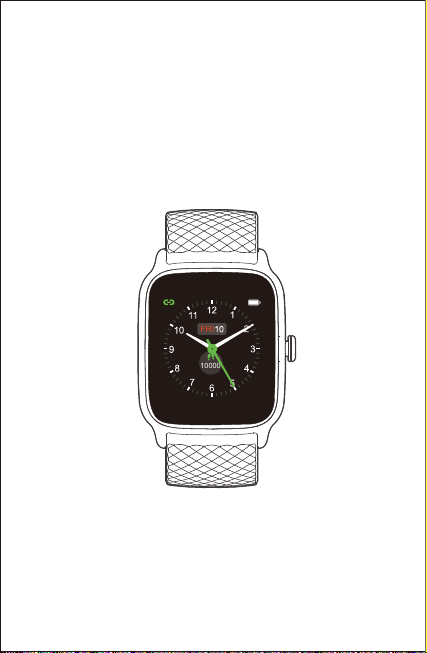
EW1
Smart Watch
User Manual
Thank you for purchasing our products. This manual addresses
the safety guidelines, warranty, and operating instructions. Please
review this manual thoroughly before operating your device.
All pictures in this manual are for illustration purpose only. Actual
product may vary due to product firmware upgrade and app upgrade.
FRI
10000

Getting Started................................................................1
What’s in the Box ...............................................................1
What’s in this Document ....................................................1
Setting up Your Watch..................................................1
Charging Your Watch .........................................................1
Disassembling / Assembling Your Watch...........................2
Wearing Your Watch......................................................4
Using Your Watch...........................................................5
App Installation ..................................................................5
Account Registration and Login ........................................6
Pairing the Watch with Your Phone....................................7
App Interfaces....................................................................9
Getting to Know Your Watch .....................................10
Basic Operations...............................................................10
Watch Interfaces ...............................................................10
Function Introduction ..................................................12
1. Tracking Sports .............................................................13
2. Tracking Daily Activity Data...........................................14
3. Monitoring Heart Rate...................................................15
4. Measuring Blood Oxygen Level ....................................15
5. Breathing Guide ............................................................16
6. Setting Alarms ...............................................................16
7. Controlling Phone Music ...............................................16
8. More Functions .............................................................17
8.1 Call Notification .......................................................17
8.2 Message Notification...............................................17
8.3 Sedentary Reminder ..............................................17
Basic Specifications.....................................................
18
FAQs ..................................................................................
19
Warranty ...........................................................................
21
Important Safety Instructions
...................................21
Table of Contents
- 1 -
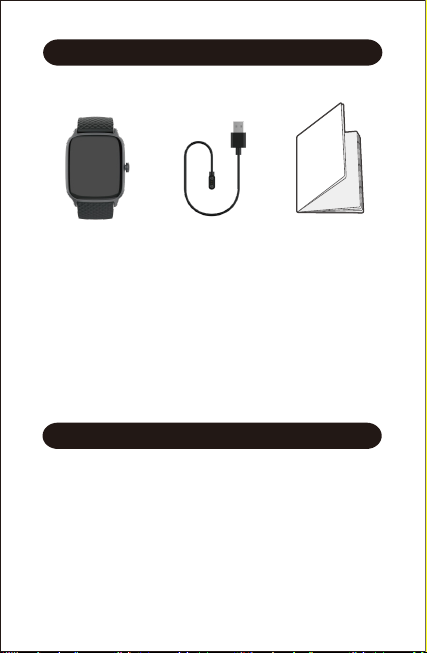
What’s in the Box
Getting Started
Setting up Your Watch
What’s in this Document
This manual gets you started quickly with setting up your
watch. Setup ensures that your watch can synchronize its data
with the Letsfit app, where you can get detailed information on
your stats, view historical trends, log sleep, and more. As soon
as setup is complete, you’re ready to start moving. The
remainder of the manual walks you through every function on
your EW1.
Charging Your Watch
Please fully charge your watch before initial use.
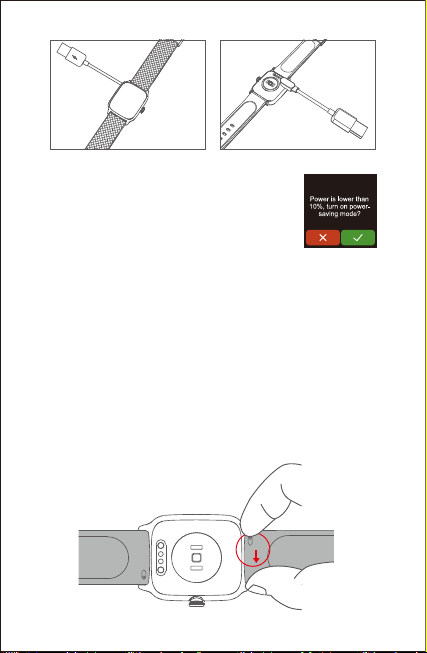
1. Insert the USB plug of the charging cable into the USB port
on your computer or a UL-certified USB wall charger.
2. Hold the other end of the charging cable near the port on
the back of the watch until it attaches magnetically.
3. Make sure the pins on the charging cable lock securely
with the port. The connection is secure when the battery
icon with percent charged appears on the screen.
Charging cableSmart watch
(EW1 with bands)
Quick start guide
- 2 -
When the watch shows that the battery is
low, connect the watch to a USB port with
5V-500mA.
While the watch charges, there is a battery
progress bar on the screen and you can
check the battery level at any time.
4. Remove the watch from the power supply once fully charged.
●USB charger requirement: DC USB port (5V-500mA)
●Charging time: Approximately 2 hours
Disassembling / Assembling Your Watch
Disassembly
1. To remove the wristbands, turn over the watch and find the
quick-release lever.
2. While pressing the quick-release lever inward, gently pull the
wristband away from the watch to release it.

- 3 -
3. Repeat on the other side.
Assembly
1. To reattach the wristbands, slide the pin (the side
opposite the quick-release lever) into the notch on the
watch. Attach the wristband with the clasp to the top of
the watch.
2. While pressing the quick-release lever inward, slide the
other end of the wristband into place.
3. When both ends of the pin are inserted, release the
quick-release lever.

All-day Wear and Exercise
Wearing Your Watch
- 4 -
For all-day wear when you’re not exercising, wear the device
on your wrist horizontally, a finger’s width below your wrist
bone and lying flat, the same way you would put on a watch.
For optimized heart rate tracking, keep these tips in mind:
1. Experiment with wearing the watch higher on your wrist
during exercise. Because the blood flow in your arm increases
the farther up you go, moving the watch up a couple of inches
can improve the heart rate signal. Also, many exercises such
as bike riding or weight lifting require you to bend your wrist
frequently, which is more likely to interfere with the heart rate
signal if the watch is lower on your wrist.
2. Do not wear your watch too tight. A tight band restricts blood
flow, potentially affecting the heart rate signal. This being
said, the watch should also be slightly tighter (snug but not
constricting) during exercise than during all-day wear.

AndroidiOS
Letsfit
- 5 -
Using Your Watch
App Installation
Use the watch with our customized Letsfit app. You can
download Letsfit from Apple Store / Google Play or scan the
QR codes below to download.
Note:
The Letsfit app is only compatible with smartphones, not
tablets or PCs.
●iOS 11.0 & higher
●Android 6.0 & higher
●Bluetooth 4.0 & higher
Smart Phone System Requirements
iOS 11.0 & above Android 6.0 & above

- 6 -
Account Registration and Login
Please register an account with a valid email address. After
registration, check your email box to complete email
verification, and then tap "Verified" to log in.

Pair the watch with your
smartphone in the Letsfit app
Do NOT pair the watch
with your smartphone
in your phone’s
Bluetooth settings
iOS Android
- 7 -
Please pair the watch with your phone in the Letsfit app, NOT
in the Bluetooth settings of your phone.
Pairing the Watch with Your Phone
1. Enable the Bluetooth of your smartphone.
2. Open the Letsfit app on your smartphone and go to the
"Device" page, tap "Pair device".
3. Tap " ", and your smartphone starts scanning.
4. Use the Letsfit app to scan the QR code displayed on your
watch to connect the watch to your smartphone.

15:05
Scan QR Code
- 8 -
15:05
15:05
Pair device
1 2 3
Notes:
●You can also search for this device in the app to pair (Go to
the "Device" page → "Pair device" → "EW1").
●Once the watch is connected to your app, the watch will
automatically search and reconnect itself if the connection is
lost or when Bluetooth is restarted after manual disconnec-
tion.
●If the watch is unbound from the app, the information on the
watch will be reset and the watch will be restarted. Please do
not unbind the connection unless there is an issue that will
require a reset.
●The watch can only pair with one smartphone at a time. When
pairing, please ensure the watch and your smartphone is
within 0.5 meters distance.
EW1
Table of contents
Other Letsfit Watch manuals

Letsfit
Letsfit IW1 User manual

Letsfit
Letsfit ID205L User manual
Letsfit
Letsfit ID215G User manual
Letsfit
Letsfit EW4 User manual
Letsfit
Letsfit ID205L User manual

Letsfit
Letsfit IW1 User manual
Letsfit
Letsfit IW2 User manual
Letsfit
Letsfit IW1 User manual
Letsfit
Letsfit E22 User manual
Letsfit
Letsfit IW1 User manual

















