manuals.online logo
Brands
  1. Home
  2. •
  3. Brands
  4. •
  5. Lindy
  6. •
  7. Switch
  8. •
  9. Lindy 38033 User manual

Lindy 38033 User manual

Other Lindy Switch manuals

Lindy 32818 User manual

Lindy

Lindy 32818 User manual

Lindy 38337 User manual

Lindy

Lindy 38337 User manual

Lindy 32361 User manual

Lindy

Lindy 32361 User manual

Lindy 32937 User manual

Lindy

Lindy 32937 User manual

Lindy 32810 User manual

Lindy

Lindy 32810 User manual

Lindy 43093 User manual

Lindy

Lindy 43093 User manual

Lindy 42340 User manual

Lindy

Lindy 42340 User manual

Lindy 51072 Quick start guide

Lindy

Lindy 51072 Quick start guide

Lindy 38420 User manual

Lindy

Lindy 38420 User manual

Lindy 32777 - 2 Port DVI-D User manual

Lindy

Lindy 32777 - 2 Port DVI-D User manual

Lindy 38036 User manual

Lindy

Lindy 38036 User manual

Lindy 32596 User manual

Lindy

Lindy 32596 User manual

Lindy Modular Matrix 38251 User manual

Lindy

Lindy Modular Matrix 38251 User manual

Lindy 39311 User manual

Lindy

Lindy 39311 User manual

Lindy 32165 User manual

Lindy

Lindy 32165 User manual

Lindy 32920 User manual

Lindy

Lindy 32920 User manual

Lindy 38414 User manual

Lindy

Lindy 38414 User manual

Lindy 32166 User manual

Lindy

Lindy 32166 User manual

Lindy 42341 User manual

Lindy

Lindy 42341 User manual

Lindy 38000 User manual

Lindy

Lindy 38000 User manual

Lindy 32328 User manual

Lindy

Lindy 32328 User manual

Lindy 43153 User manual

Lindy

Lindy 43153 User manual

Lindy 43154 User manual

Lindy

Lindy 43154 User manual

Lindy 43149 User manual

Lindy

Lindy 43149 User manual

Popular Switch manuals by other brands

SMC Networks SMC6224M Technical specifications

SMC Networks

SMC Networks SMC6224M Technical specifications

Aeotec ZWA003-S operating manual

Aeotec

Aeotec ZWA003-S operating manual

TRENDnet TK-209i Quick installation guide

TRENDnet

TRENDnet TK-209i Quick installation guide

Planet FGSW-2022VHP user manual

Planet

Planet FGSW-2022VHP user manual

Avocent AutoView 2000  AV2000BC AV2000BC Installer/user guide

Avocent

Avocent AutoView 2000 AV2000BC AV2000BC Installer/user guide

Moxa Technologies PT-7728 Series user manual

Moxa Technologies

Moxa Technologies PT-7728 Series user manual

Intos Electronic inLine 35392I operating instructions

Intos Electronic

Intos Electronic inLine 35392I operating instructions

Cisco Catalyst 3560-X-24T Technical specifications

Cisco

Cisco Catalyst 3560-X-24T Technical specifications

Asante IntraCore IC3648 Specifications

Asante

Asante IntraCore IC3648 Specifications

Siemens SIRIUS 3SE7310-1AE Series Original operating instructions

Siemens

Siemens SIRIUS 3SE7310-1AE Series Original operating instructions

Edge-Core DCS520 quick start guide

Edge-Core

Edge-Core DCS520 quick start guide

RGBLE S00203 user manual

RGBLE

RGBLE S00203 user manual

Thrustmaster FLIGHT SIMULATOR X quick guide

Thrustmaster

Thrustmaster FLIGHT SIMULATOR X quick guide

Southwire SURGE GUARD 41390 RVC troubleshooting guide

Southwire

Southwire SURGE GUARD 41390 RVC troubleshooting guide

Buhler Nivotemp NT 61 Brief instructions

Buhler

Buhler Nivotemp NT 61 Brief instructions

Kramer VS-41HDCP user manual

Kramer

Kramer VS-41HDCP user manual

Techly IDATA AU-270 user manual

Techly

Techly IDATA AU-270 user manual

Belkin F1U109 user manual

Belkin

Belkin F1U109 user manual

manuals.online logo
manuals.online logoBrands
  • About & Mission
  • Contact us
  • Privacy Policy
  • Terms and Conditions

Copyright 2025 Manuals.Online. All Rights Reserved.

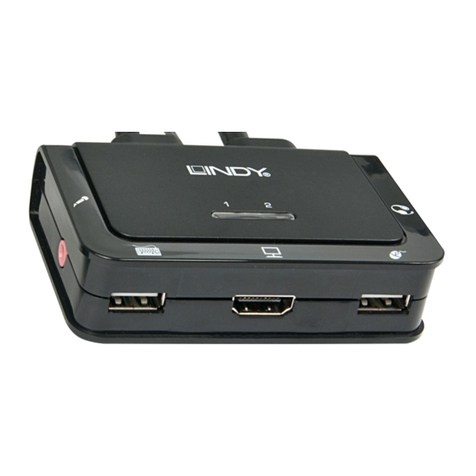
3 Port HDMI Switch
User Manual English
LINDY No. 38033
www.lindy.com
Introduction
Thank you for purchasing the LINDY 3 Port HDMI Switch. This switch
allows you to connect three HDMI devices to a single HDMI equipped TV
or projector and then switch between them using a push button or
remote control.
The maximum recommended cable transmission distance is a total of
30m from the source to the display. This can be made up with 15m from
the source to the switch and 15m from the switch to the display. Longer
distances may be possible but this does depend on the quality of the
source, the display and the connecting cables. We recommend you use
LINDY Premium Gold cables for the best possible performance.
The HDMI Switch also supports DVI-D signals when used with
appropriate DVI-D to HDMI adapters or DVI-D to HDMI cables.
Features
•High Speed HDMI, HDCP 1.1 and DVI 1.0 compatible
•LED channel selection indicators
•12-bit deep colour
•Ideal for home theatre integration, presentation, conference
rooms and retail stores
•Supports high resolution input:
•PC: Up to 1920 x 1200
•HDTV: Up to 1080p
•Easy to install and simple to operate
•Input source auto detects when an active source is connected
Package Contents
•LINDY 3 Port HDMI Switch
•Infra-red remote
•IR receiver extension cable
•This User Manual
Notes on using DVI equipped devices:
To connect DVI equipped devices you can use either modular
DVI/HDMI adapters or DVI/HDMI adapter cables. Be aware that DVI
is a ‘video only’ interface; audio signals are not supported when
using DVI source devices. Also, please note that DVI equipped
displays must support HDCP signal decoding to display HDCP
protected HDMI signals. HDCP compatible displays will normally
feature the HD Ready logo.
Product Information
Front Panel:
Connect your HDMI sources to one of the 3 input ports
Rear Panel:
Connect your HDTV to the output port
This switch has an optional PSU port. If your HDMI ports, on your source
device do not support power over HDMI then you will need to use an
appropriate power supply. Please contact LINDY if you require this.
Side Panel:
Connect the IR receiver extension cable to this port
Connection and Operation
1. Connect the HDMI cables from your source devices to the HDMI
Input ports 1, 2 & 3
2. Connect an HDMI cable from your display (monitor or projector) into
the HDMI Output port on the switch
3. Select the desired input as follows:
Manual Switching
On the top panel, press the Select button until the desired input is
selected. Each press will cycle to the next input in turn: 1-2-3 then back
to 1. The current input can be identified by the LED on the switch.
From the remote control
Plug the IR extender cable into the switch and then select the input you
require from the remote control.
Technical Information
•Frequency bandwidth: 2.5Gbps
•Inputs: 3 x HDMI Female ports (Type A connector)
•Output: 1 x HDMI Female port (Type A connector)
•Dimensions: 80 x 57 x 18mm (WxDxH)
CE/FCC Statement
CE
This device complies with the European Regulations for Electromagnetic Compatibility
(EMC) of the European Union and it is equipped with the CE mark. This unit has to be
used with high quality shielded connection cables. Only if these high quality shielded
cables are used it can be sure that the EMC compatibility is not adversely influenced.
FCC
Shielded cables must be used with this equipment to maintain compliance with radio
frequency energy emission regulations and ensure a suitably high level of immunity to
electromagnetic disturbances.
This equipment has been tested and found to comply with the limits for a Class B Digital
device, pursuant to part 15 of the FCC Rules. These limits are designed to provide
reasonable protection against harmful interference in a residential installation. This
equipment generates, uses, and can radiate radio frequency energy and, if not installed
and used in accordance with the instructions, may cause harmful interference to radio
communications. However, there is no guarantee that interference will not occur in a
particular installation. If this equipment does cause harmful interference to radio or
television reception, which can be determined by turning the equipment off and on, the
user is encouraged to try to correct the interference by one or more of the following
measures:
•Reorient or relocate the receiving antenna
•Increase the separation between the equipment and receiver
•Connect the equipment into an outlet on a circuit different from that to which the
receiver is connected
•Consult the dealer or an experienced technician for help
You are cautioned that changes or modifications not expressly approved by the party
responsible for compliance could void your authority to operate the equipment.
Recycling Information
WEEE (Waste of Electrical and Electronic Equipment),
Recycling of Electronic Products
In 2006 the European Union introduced regulations (WEEE) for the collection and
recycling of all waste electrical and electronic equipment. It is no longer allowable to
simply throw away electrical and electronic equipment. Instead, these products must
enter the recycling process.
Each individual EU member state has implemented the WEEE regulations into national
law in slightly different ways. Please follow your national law when you want to dispose of
any electrical or electronic products.
More details can be obtained from your national WEEE recycling agency.
German
Die Europäische Union hat mit der WEEE Direktive umfassende Regelungen für die
Verschrottung und das Recycling von Elektro- und Elektronikprodukten geschaffen. Diese
wurden im Elektro- und Elektronikgerätegesetz – ElektroG in deutsches Recht umgesetzt.
Dieses Gesetz verbietet das Entsorgen von Elektro- und Elektronikgeräten über die
Hausmülltonne! Diese Geräte müssen den lokalen Sammelsystemen bzw. örtlichen
Sammelstellen zugeführt werden! Dort werden sie kostenlos entgegen genommen. Die
Kosten für den weiteren Recyclingprozess übernimmt die Gesamtheit der
Gerätehersteller.
French
En 2006, l'union Européenne a introduit la nouvelle réglementation (DEEE) pour le
recyclage de tout équipement électrique et électronique.
Chaque Etat membre de l’Union Européenne a mis en application la nouvelle
réglementation DEEE de manières légèrement différentes. Veuillez suivre le décret
d’application correspondant à l’élimination des déchets électriques ou électroniques de
votre pays.
Italian
Nel 2006 l’unione europea ha introdotto regolamentazioni (WEEE) per la raccolta e il
riciclo di apparecchi elettrici ed elettronici. Non è più consentito semplicemente gettare
queste apparecchiature, devono essere riciclate.
Ogni stato membro dell’ EU ha tramutato le direttive WEEE in leggi statali in varie misure.
Fare riferimento alle leggi del proprio Stato quando si dispone di un apparecchio elettrico
o elettronico.
Per ulteriori dettagli fare riferimento alla direttiva WEEE sul riciclaggio del proprio Stato.
LINDY No. 38033
www.lindy.com
2nd Edition April 2011