manuals.online logo
Brands
  1. Home
  2. •
  3. Brands
  4. •
  5. Lorex
  6. •
  7. Security Camera
  8. •
  9. Lorex LEV4712 Series User manual

Lorex LEV4712 Series User manual

This manual suits for next models

1

Other Lorex Security Camera manuals

Lorex LW4211 SERIES User manual

Lorex

Lorex LW4211 SERIES User manual

Lorex SG6182SP User manual

Lorex

Lorex SG6182SP User manual

Lorex LIVE SD+ LW2730 Series Instruction Manual

Lorex

Lorex LIVE SD+ LW2730 Series Instruction Manual

Lorex LNZ32P4 SERIES User manual

Lorex

Lorex LNZ32P4 SERIES User manual

Lorex LW2202C User manual

Lorex

Lorex LW2202C User manual

Lorex F461AQ Series User manual

Lorex

Lorex F461AQ Series User manual

Lorex LZV2622BW User manual

Lorex

Lorex LZV2622BW User manual

Lorex SG6223 User manual

Lorex

Lorex SG6223 User manual

Lorex E892AB Series User manual

Lorex

Lorex E892AB Series User manual

Lorex VANTAGE LDC6050 User manual

Lorex

Lorex VANTAGE LDC6050 User manual

Lorex SG610 User manual

Lorex

Lorex SG610 User manual

Lorex VANTAGE VQ1138H Series User manual

Lorex

Lorex VANTAGE VQ1138H Series User manual

Lorex CVC6993 User manual

Lorex

Lorex CVC6993 User manual

Lorex LW2301AC1 Series User manual

Lorex

Lorex LW2301AC1 Series User manual

Lorex CVC6930 Series User manual

Lorex

Lorex CVC6930 Series User manual

Lorex LNC201 User manual

Lorex

Lorex LNC201 User manual

Lorex DMC2161 User manual

Lorex

Lorex DMC2161 User manual

Lorex CVC6945PK4 User manual

Lorex

Lorex CVC6945PK4 User manual

Lorex LNE1001 User manual

Lorex

Lorex LNE1001 User manual

Lorex CVC7715 SERIES User manual

Lorex

Lorex CVC7715 SERIES User manual

Lorex LNB4173BW-4PK User manual

Lorex

Lorex LNB4173BW-4PK User manual

Lorex LW2003 User manual

Lorex

Lorex LW2003 User manual

Lorex LEV2712 SERIES User manual

Lorex

Lorex LEV2712 SERIES User manual

Lorex SG600P User manual

Lorex

Lorex SG600P User manual

Popular Security Camera manuals by other brands

ADEMCO RapidDome Owners Operating & Installation Guide

ADEMCO

ADEMCO RapidDome Owners Operating & Installation Guide

EverFocus EBA2880 user manual

EverFocus

EverFocus EBA2880 user manual

Honeywell OptiCAM-IR Installation and setup guide

Honeywell

Honeywell OptiCAM-IR Installation and setup guide

Uniq UC-600 user manual

Uniq

Uniq UC-600 user manual

OPTICOM NVD-120-S datasheet

OPTICOM

OPTICOM NVD-120-S datasheet

Steren CCTV-221 instruction manual

Steren

Steren CCTV-221 instruction manual

Arm Electronics C420BCDNVFIR Features

Arm Electronics

Arm Electronics C420BCDNVFIR Features

Eneo PLD-2036PTZ installation guide

Eneo

Eneo PLD-2036PTZ installation guide

Axis AXIS M20 Series installation guide

Axis

Axis AXIS M20 Series installation guide

Panasonic KX-HCM230 operating instructions

Panasonic

Panasonic KX-HCM230 operating instructions

COP-USA CC15NV-SL Specifications

COP-USA

COP-USA CC15NV-SL Specifications

Active Silicon HARRIER H.264 quick start guide

Active Silicon

Active Silicon HARRIER H.264 quick start guide

Motorola Avigilon 1.3C-H5SL-BO1-IR installation guide

Motorola

Motorola Avigilon 1.3C-H5SL-BO1-IR installation guide

INSTEON 2864-232 user manual

INSTEON

INSTEON 2864-232 user manual

Wisenet XNB-6002 quick start guide

Wisenet

Wisenet XNB-6002 quick start guide

Axis M5525-E user manual

Axis

Axis M5525-E user manual

Vitek VTC-IR62NZ922 user guide

Vitek

Vitek VTC-IR62NZ922 user guide

Panasonic WV-SF342 Specifications

Panasonic

Panasonic WV-SF342 Specifications

manuals.online logo
manuals.online logoBrands
  • About & Mission
  • Contact us
  • Privacy Policy
  • Terms and Conditions

Copyright 2025 Manuals.Online. All Rights Reserved.

Resources
LEV4712_QSG_EN_R2
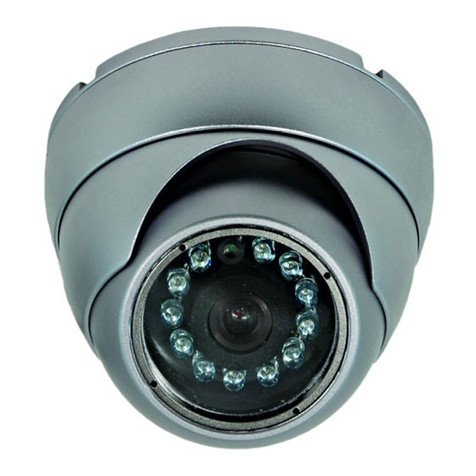
4MP HD Dome Security Camera
• 4MP HD Dome Security Camera
• Mounting Kit*
• BNC / Power Extension Cable*
• Power Adapter**
• Read this guide carefully and keep it for future reference.
• Follow all instructions for safe use of the product and handle with care.
• Use the camera within given temperature, humidity and voltage levels
noted in the camera’s specifications.
• Do not disassemble the camera.
• Do not point the camera directly towards the sun or a source of
intense light.
• Use only the supplied regulated power supply provided with the
product. Use of a non-regulated, non-conforming power supply can
damage the product and void the warranty.
• Periodic cleaning may be required. Use a damp cloth only. Do not use
any harsh, chemical-based cleaners.
• The supplied cable is rated for surface mounting only. Cables for in-wall
and floor-to-floor installations are sold separately (CMR type). These
and other cables are available at lorex.com
• Point the camera where there is the least amount of obstructions
(i.e., tree branches).
• Install the camera where vandals cannot easily reach.
• Secure cabling so that it is not exposed or easily cut.
• This camera is rated for outdoor use. Installation in a sheltered
location is recommended.
* Per camera in multi-camera packs.
** A multi-camera power adapter that provides power to multiple
cameras or individual power adapters may be provided depending on
product configuration.
Copyright © 2018 Lorex Corporation
As our products are subject to continuous improvement, Lorex reserves
the right to modify product design, specifications and prices, without
notice and without incurring any obligation. E&OE. All rights reserved.
• For a full list of compatible recorders, visit
lorex.com/compatibility
• Not intended for submersion in water. Installation in a sheltered
location recommended.
• This camera includes an Auto Mechanical IR Cut Filter. When the
camera changes between Day/Night viewing modes, an audible clicking
noise may be heard from the camera. This clicking is normal, and
indicates that the camera filter is working.
Quick Start Guide
English Version 2.0
LEV4712 SERIES
Package Contents
ATTENTION:
A REGULATED UL / CSA APPROVED power supply is REQUIRED for use
with this camera (included). Use of a non-regulated, non-conforming
power supply can damage this product and voids the warranty.
Safety Precautions
Installation Tips
Disclaimers
Need Help?
Visit us online for up-to-date software and
complete instruction manuals
Click on the Downloads tab
4
Visit lorex.com
Search for the model number
of your product
Click on your product in the
search results
3
2
1
www.lorex.com
3.7” /
94mm
Dimensions
3.9” /
98mm
Connecting the Cameras
Individual Power Adapter* Multi-Camera Power Adapter*
Connecting the Cameras
* Images for representation only
Mounting Surface
Camera Base
Ball Camera
Adjustment Ring
Dome Cover
Drywall Anchors (×4)
Mounting Screws (×4)
To install your camera:
Installing the Camera
Extend the cable run for your camera depending on the cable type used.
Additional extension cables sold separately. See table below:
Connect the male power head
and the BNC connector to the
camera.
Connect the BNC connector
to a video input on your DVR.
Connecting the Camera
Cable Notch
LEV4712_QSG_EN_R2
Power Adapter Types
A multi-camera power adapter that provides power to multiple cameras
or individual power adapters may be provided, depending on product
configuration.
Problem Solution
No picture / signal • The cameras are only compatible with
certain Lorex HD DVRs. For the full list of
compatible recorders, visit
lorex.com/compatibility
• Ensure your TV or monitor is on the correct
input channel. Common terms for input
channels: INPUT, AV CHANNEL, LINE1,
LINE2, AUX.
• Ensure your DVR is properly connected to
your TV or monitor.
• Ensure connections are properly connected.
• Ensure the camera power supply is plugged
in.
Picture is too bright • Ensure your camera isn’t pointed directly at
a source of light (e.g., sun or spot light).
• Check the brightness settings of the DVR
and monitor.
• Move your camera to a different location.
Picture is too dark • Check the brightness and contrast settings
of the DVR and monitor.
Night vision is not
working
• The night vision activates when light levels
drop. The area may have too much light.
Picture is not clear • Check the camera lens for dirt, dust,
spiderwebs. Clean the lens with a soft,
clean cloth.
• Make sure that the cable run is within the
limitations specified in the section ‘Cable
Extension Options’.
• Remove the vinyl film from the camera lens
when your installation is complete.

Bright spot in video when
viewing camera at night
• Night vision reflects when pointing a
camera through a window. Move the camera
to a different location.
Troubleshooting
ATTENTION:
Test your camera prior to selecting a permanent mounting location by temporarily
connecting the camera and cable to your DVR.
Before Installing the Camera
• Decide whether to run the cables through the
wall / ceiling (drilling required) or along the wall
/ ceiling.
• If you run the cables along the wall / ceiling,
you must run the cable through the cable
notch on the base. This will keep the camera

base flush to the surface when mounted.

Connect the female power
head to the included power
adapter.
Camera DVR
Male Power Female Power
Setup Diagram
BNC Video
12V DC Power
Camera
Extension Cable
Power Adapter
HD DVR
Cable Extension Options
Option Cable Type Max Cable Run
Distance
1Lorex model MCBL-60BNC4 BNC Cable
(included with camera) 60ft (18m)
2‘RG59’ or ‘Coax’ or ‘Coaxial BNC’ Siamese
(Video and Power) 300ft (91m)
3‘RG59’ or ‘Coax’ or ‘Coaxial BNC’ (Video
Only)21000ft (305m)
Notes:
1. The extension cable must be a single stretch of cable between the
DVR and camera. You cannot connect multiple extension cables to
each other.
2. For cable runs above 300ft (91m), you must connect the power
adapter directly to the camera, rather than at the end of the
extension cable.
3. If using a balun, ensure it is rated for the maximum supported
resolution of the camera (e.g., a 4MP camera requires a balun rated
for 4MP or above).
4. Indicators that your cable run may be too long:
• Video is permanently black & white (even during day time).
• Video is unclear, soft, or distorted.
5. For more information on extension cables, visit lorex.com.
1. Rotate the camera base counterclockwise to separate it
from the ball camera, adjustment ring, and dome cover.
2. Use the included mounting template to mark and drill holes
for the included mounting screws.
3. Feed the cable through the camera base. If you are running
the cables against a wall or ceiling, make sure to pass the
cable through the cable notch as shown above.
4. Connect the cables as shown in the section ‘Connecting the
Camera’.
5. Mount the camera base to the mounting surface using the
included screws and optional drywall anchors.
6. Place the adjustment ring over the dome cover, then place
both over the ball camera. Twist the adjustment ring
clockwise halfway onto the camera base. Do not tighten all
the way.
7. Move the ball camera to the desired position. While holding
the ball camera firmly in place, twist the adjustment ring
the rest of the way to secure it to the camera base. Holding
the camera prevents it from moving while securing the
adjustment ring.
8. Remove the vinyl film from the camera lens when your
installation is complete.