Operating the Walkie Talkies
1. Rotate the VOLUME/ON/OFF control on each Walkie Talkie handset clockwise
until a click is heard to turn the unit ON.
2. Rotate the VOLUME/ON/OFF control on each Walkie Talkie handset clockwise
to increase volume from LOW to HI as desired.
3. To transmit, press and hold the PUSH-TO-TALK button and speak into the
speaker/Microphone grill. Release the button when you finished speaking.
NOTE: The range is approximately 100 feet. If message are not transmitted /
received properly, move closer together.
4. To turn the unit OFF, rotate the VOLUME/ON/OFF control counter-clockwise
until a click heard.
NOTE:
• Take care when using these Walkie Talkies. Do not play around automobiles
or near street while using Walkie Talkies.
• If you place any of the unit too close to each other, you will hear feedback.
If this occurs, move the unit away from each other.
• After use, make sure all units are in the OFF position or the batteries will
drain quickly.
Troubleshooting
If operation malfunction occurs, please follow these steps:
1. Rotate the VOLUME/ON/OFF control to the OFF position to turn the unit OFF.
2. Remove all the batteries in the battery compartment.
3. Let the unit stand for a few minutes, then replace the batteries.
4. Turn on the unit. The unit will be ready to play again.
5. If the unit is still not working properly, replace all the batteries with fresh
ones.
FISHER-PRICE and associated trademarks are owned by Mattel and used under license from Mattel Europa B.V.
©2017 Mattel. All Rights Reserved. MADE IN CHINA. FISHER-PRICE ainsi que les marques et les logos afférents
appartiennent à Mattel Europa B.V. et sont utilisés sous licence. ©2017 Mattel. Tous droits réservés.
FABRIQUÉ EN/AUX/AU/À CHINE. Marcas registradas utilizadas bajo licencia. Todos los derechos reservados.
HECHO EN CHINA.
Manufactured for and distributed by Kids Station Toys Incorporated
P.O. BOX 694660 MIAMI, FLORIDA 33269-4660
KFP2153-IB-E0JB1-A0US
PRINTED IN CHINA
Caution: Warning: Changes or modifications to this unit not expressly
approved by the party responsible for compliance could void the user’s
authority to operate the equipment.
NOTE: This equipment has been tested and found to comply with the limits for
a Class B digital device, pursuant to Part 15 of the FCC Rules. These limits are
designed to provide reasonable protection against harmful interference in a
residential installation.
This equipment generates, uses and can radiate radio frequency energy and, if
not installed and used in accordance with the instructions, may cause harmful
interference to radio communications.
However, there is no guarantee that interference will not occur in a particular
installation. If this equipment does cause harmful interference to radio or
television reception, which can be determined by turning the equipment off
and on, the user is encouraged to try to correct the interference by one or
more of the following measures:
• Reorient or relocate the receiving antenna.
• Increase the separation between the equipment and receiver.
• Connect the equipment into an outlet on a circuit different from that to
which the receiver is connected.
• Consult the dealer or an experienced radio/TV technician for help.
Operation is subject to the following two conditions: (1) this
device may not cause interference, and (2) this device must
accept any interference, including interference that may cause
undesired operation of the device.”
This category II radio communication device complies with
Industry Canada Standard RSS-310.
The field strength is 68.21dBuV/M@3m
The carries freq. is 49.860 MHz
This radiocommunication device complies with all the requirements of
Industry Canada Standard RSS-310. Operation is subject to the following
two conditions: (1) This device may not cause harmful interference. (2) This
device must accept any interference received, including interference that
may cause undesired operation.
Battery Information
Adult Installation Required
1. Open the battery compartment door on the bottom
of unit by removing the screw with a screwdriver
(not included) and lift up.
2. Insert 1x 9V battery for each device (not included)
following the polarity marked inside the battery
compartment.
3. Replace the battery compartment door and screw.
Battery Precautions
Follow these precautions when using batteries in this device:
1. Use only the size and type of batteries specified.
2. Be sure to follow the correct polarity when installing the batteries as
indicated in the battery compartment. Reversed batteries may cause
damage to the device.
3. If the batteries in the device are weak/dead or if the device will not be
used for a long period of time, remove the batteries to prevent damage or
injury from possible battery leakage.
4. Do not try to recharge batteries not intended to be recharged; they can
overheat and rupture. (Follow battery manufacturer’s directions.)
5. Do not dispose of batteries in a fire; batteries may leak or explode.
• Rechargeable batteries are to be removed from the toy before being
charged,
• Rechargeable batteries are only to be charged under adult supervision,
• The supply terminals are not to be short-circuited.
Care and Maintenance
1. Keep the Walkie Talkies surface clean by wiping with a soft dry cloth.
2. Keep the Walkie Talkies away from direct sunlight or excess heat sources.
3. Remove batteries when the Walkie Talkies is not in use for an extended
period of time.
4. Do not expose the Walkie Talkies to moisture or water, and do not drop on
hard surface.
5. The product is designed for indoor play only.
Location of Controls
To obtain service on your product,
Please contact Kids Station Toys at
1888-321-7191, or
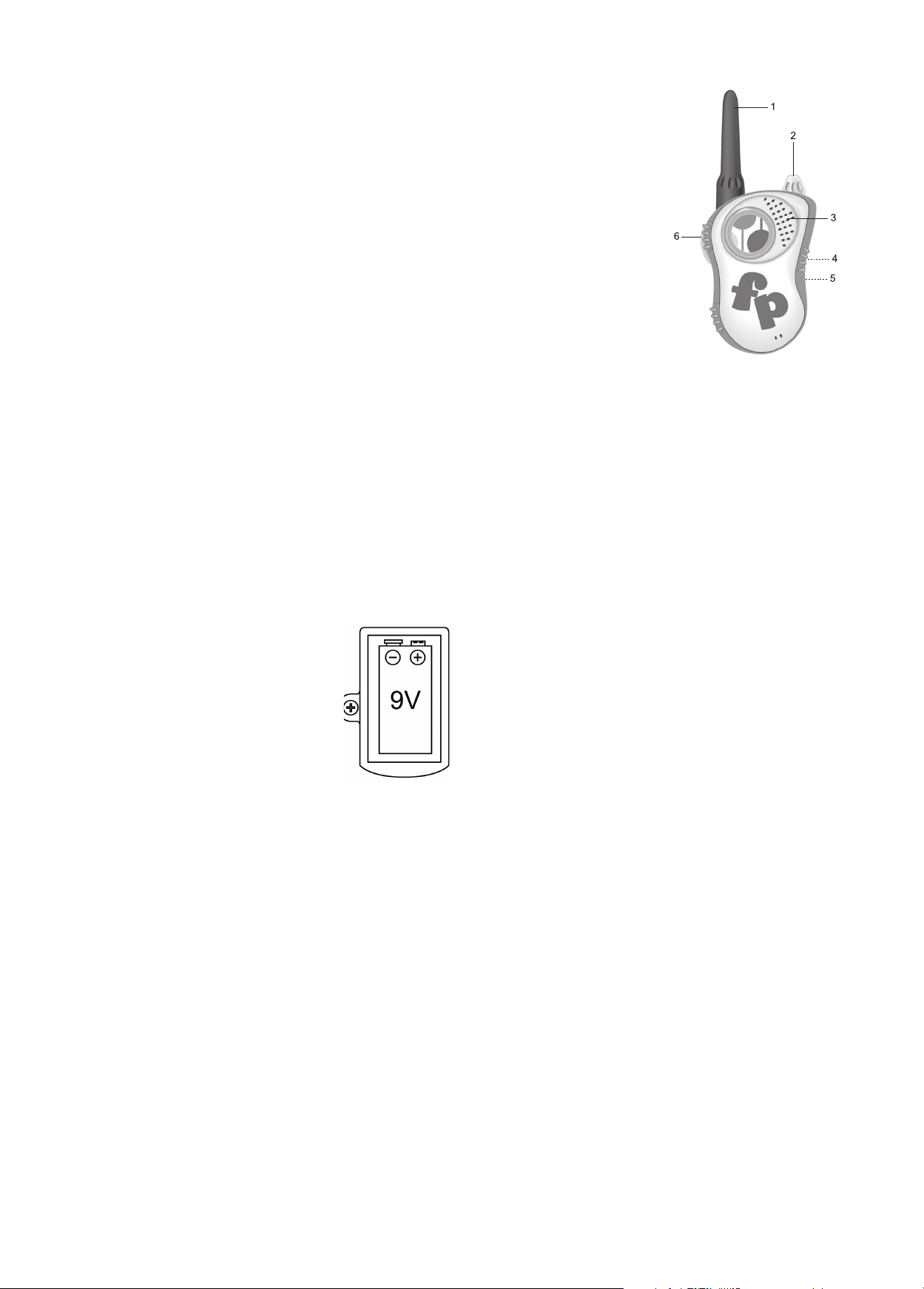
1. Antenna
2. VOLUME/ON/OFF Control
3. Speaker/Microphone
4. Belt Clip (rear of unit)
5. Battery Compartment (rear of unit)
6. PUSH-TO-TALK Button