manuals.online logo
Brands
  1. Home
  2. •
  3. Brands
  4. •
  5. MGI
  6. •
  7. Batteries Charger
  8. •
  9. MGI 12vLC2322 User manual

MGI 12vLC2322 User manual

This manual suits for next models

3

Other MGI Batteries Charger manuals

MGI Ai Series User manual

MGI

MGI Ai Series User manual

MGI 24v-LC2323 User manual

MGI

MGI 24v-LC2323 User manual

Popular Batteries Charger manuals by other brands

EVBox BusinessLine manual

EVBox

EVBox BusinessLine manual

Goobay 71808 user manual

Goobay

Goobay 71808 user manual

Kogan KACRDQIS4XA user manual

Kogan

Kogan KACRDQIS4XA user manual

Sealey WCB3 quick start guide

Sealey

Sealey WCB3 quick start guide

Vanner SP00143/181 owner's manual

Vanner

Vanner SP00143/181 owner's manual

KeyOuest KO037515 quick start guide

KeyOuest

KeyOuest KO037515 quick start guide

Enplus Silk Series user manual

Enplus

Enplus Silk Series user manual

Intermec SF51 user guide

Intermec

Intermec SF51 user guide

Colorovo PowerBox 6800 user guide

Colorovo

Colorovo PowerBox 6800 user guide

Smartech WBC-250 Operator's manual

Smartech

Smartech WBC-250 Operator's manual

PIXO C-USB instruction manual

PIXO

PIXO C-USB instruction manual

Gunson G4104 quick start guide

Gunson

Gunson G4104 quick start guide

Dometic NDS SCE320 Short Operating Manual

Dometic

Dometic NDS SCE320 Short Operating Manual

ABB HT572708 Operation manual

ABB

ABB HT572708 Operation manual

EVOline Square80 manual

EVOline

EVOline Square80 manual

Redarc SBC24025 Operating instructions and owner's manual

Redarc

Redarc SBC24025 Operating instructions and owner's manual

Absaar HV04 manual

Absaar

Absaar HV04 manual

DazeTechnology Cover Dazebox Home installation manual

DazeTechnology

DazeTechnology Cover Dazebox Home installation manual

manuals.online logo
manuals.online logoBrands
  • About & Mission
  • Contact us
  • Privacy Policy
  • Terms and Conditions

Copyright 2025 Manuals.Online. All Rights Reserved.

SLA BATTERY User Manual & Important Safety Information 01
User Manual
and Important Safety Information
12 & 24 Volt
Lithium-ion Battery
12v SLA Battery
Models: 12vLC2322, 24v-LC2321
and S12045(A)
VERSION 2.0
AUTOMATIC BATTERY
CHARGER
SLA BATTERY User Manual & Important Safety Information 0302
IMPORTANT
• The battery is designed for indoor charing only. Please ensure it
is used on an uncarpeted, non-flammable hard floor in a well
ventilated area.
• Do not attempt to use the battery or charger if it has been
dropped or damaged.
• Never attempt to charge a damaged battery, frozen battery or
non-rechargeable battery.
• Do not smoke, use an open flame or create sparks near your
battery and charger during charging.
• Do not operate the charger if the cord or plug is damaged.
Do not attempt to repair the charger if damaged.
• Do not attempt to open or repair the battery or charger casing
as it will void the warranty.
• Ensure the battery is fully charged after each use no matter
how many holes are played. A lithium battery is designed to last
18 holes in a day, not combined multiple consecutive days.
• Never attempt to fully discharge your battery. If your Zip cuts
out repeatedly, please take your model, battery and charger
to your nearest MGI Service Agent.
• It is not recommended that you leave your battery off charge
for longer than 3 months. If you are not playing golf for some
time, fully charge your battery, disconnect it and store it in a
warm and dry environment. The battery will need charging at
least every 3 months and must be charged prior to use.
• Only use this MGI charger with the correct MGI battery. The
wrong charger on a battery may cause damage to the battery
or model. This will also void the warranty of both the battery
and the charger.
• Your lithium battery leads, casing and connections should be
regularly inspected for damage and wear.
• If your leads or connections need repair or replacement,
please contact your local MGI repair centre for assistance
immediately.
• Under no circumstances should a lithium battery that has been
dropped, damaged or immersed in water be connected to a
Zip or charger. By doing so you may create a fire hazard or risk
the battery catching fire. Please safely dispose of your battery
immediately.
Operating Instructions
• Prior to first use and after every use the charger to charge the
battery.
• In between use, always leave the charger connected to the
battery with power on. The battery is fitted with a smart charger
that will charge until full then turn off until needed again.
• The battery and charger come with an easy colour-coded
connection system. See below:
Battery Connectors
SLA 12v Lithium Red (1) and Black (2) side by side
1 2
24v Lithium Red (1) and Black (2) on top of each other
1 2
• The charger should be matched with its respective battery
by ensuring the same coloured connector is on the battery.
For example the 12v Lithium charger with the Red and Black
connector is to be connected to a 12v Lithium battery also with
a Red and Black connectors. For 12v Lithium connect Red to
Red and Black to Black. For 24v Lithium connect Blue to Red
and Black to Black.
Do NOT connect unmatched batteries or chargers otherwise the
warranty on each item will be void.
• Plug the charger into a power point and attach the battery
lead to the charger matching the connections properly.
• Always recharge the battery as soon as possible after use, no
matter how short the period of use. Your battery will charge
best, in a warm and ventilated location.
• Do not charge your battery on cold concrete or in a room
below 10ºC (50ºF).
• To minimise drain on the battery during play, avoid taking your
Zip into thick rough where possible.
• Do not use the Zip to pull yourself up hills.
• In between use, always leave the charger connected to the
battery with power on.
• The battery is a sealed battery. If you are intending to take
your model and battery on air travel, we advise that you make
contact with your airline prior to travel.
• Do not drop your battery. The battery casing is fragile and any
damage may compromise its functionality and operation.

SLA BATTERY User Manual & Important Safety Information 0504
Charging Process
LED Indicator
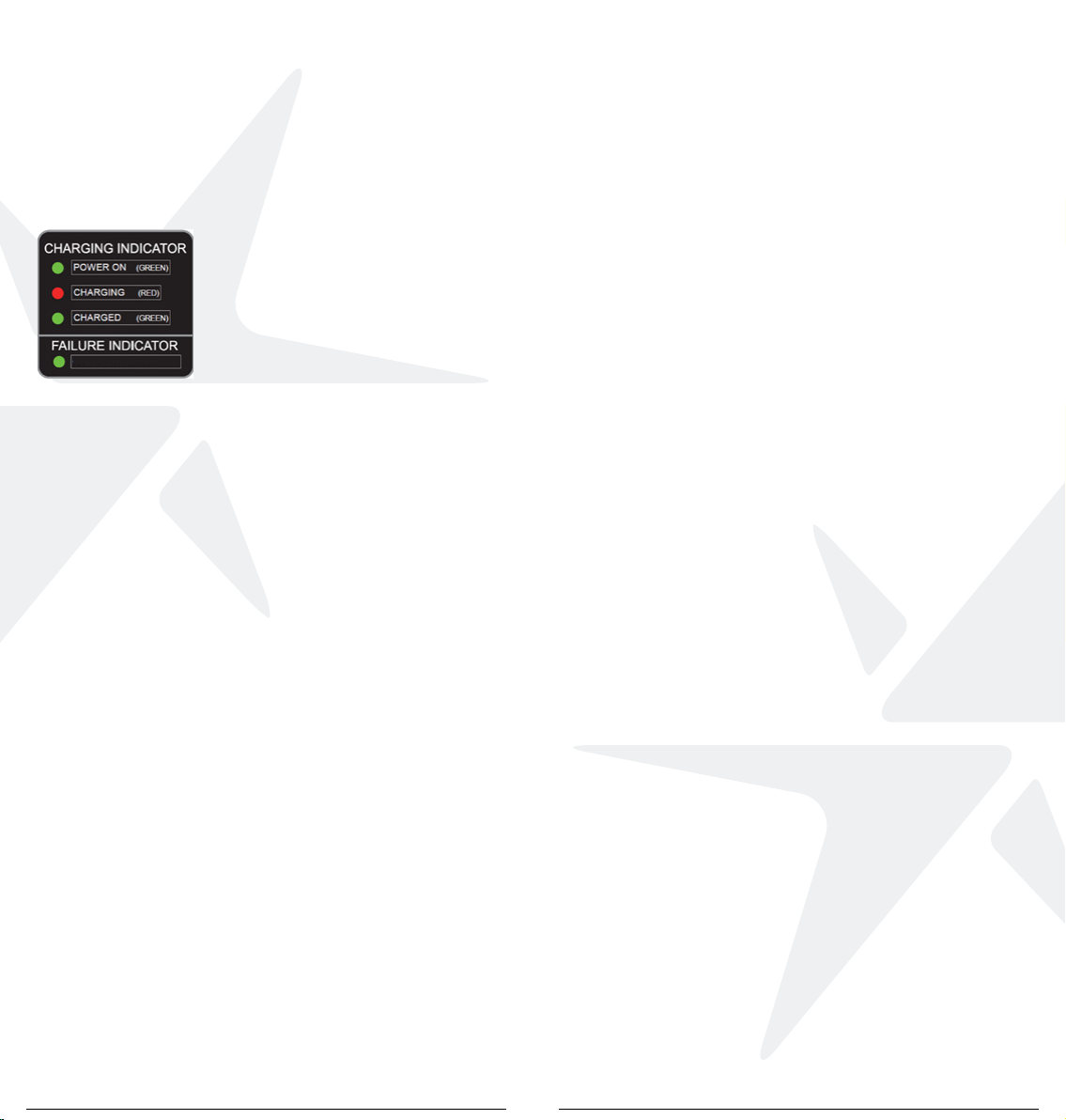
• The charging indicator found on the charging lead will show
the different stages of the battery during the charging process.
• The Green LED will illuminate when
the charger is powered on.
• The Red LED will illuminate when the
battery is charging.
• The LED will return to Green when the
battery is fully charged.
• If the Green power indicator flashes
constantly, this indicates that the
charging process has failed, there
may be a problem with your charger
or battery. In this situation you should
contact the MGI service centre.
• If the LED indicator light does not turn Red when the power is
connected, there may be a problem with your charger. In this
situation you should also contact the MGI service centre.
• The charger is connected to power and no LED light appears,
contact the MGI service centre.
Warranty Information
Your MGI Zip model has a 24 month manufacturer warranty from
the date of purchase against faulty material or workmanship
which includes the battery and charger.
This warranty is void if the charger is damaged due to misuse or
overheating from inadequate conditions during charging.
IMPORTANT: Register your model online to validate your
warranty. Visit www.mgigolf.com to register.
Customer Support
For customer support, please contact MGI directly
for immediate and professional advice.
www.mgigolf.com
MGI AUSTRALIA
Service Email: [email protected]
Live Chat: visit www.mgigolf.com
Toll Free within Australia: 1300 644 523 (excludes mobiles)
Western Australia/ Internal phone +61 3 8872 6700
Local Service Centres: visit www.mgigolf.com
MGI USA
Service Email: [email protected]
Live Chat: visit www.mgigolf.com
Telephone: 1800 617 2990
Servicing Enquiries Telephone: 1888 391 0200
MGI GLOBAL
Sales Email: [email protected]
Service Email: [email protected]
Live Chat: visit www.mgigolf.com
RED OR GREEN FLASHING
06
www.mgigolf.com
MGI AUSTRALIA
MGI HEAD OFFICE
11 Maurice Court Nunawading 3131
Victoria Australia
T+61 3 8872 6700 E[email protected]
SERVICE [email protected]
MGI USA
T1800 617 2990 E[email protected]
SERVICE 1888 391 0200 SERVICE [email protected]
MGI GLOBAL
E[email protected]
Follow us on
Absolute attention has been taken to ensure this manual
is correct at time of printing. Specifications, images
and statistics may change at any time.
Visit www.mgigolf.com for the most current model
information. Version 2.0. 05/20