•Press Label
•Enter a name to store using the keypad i.e. press 2 three times for C. The # key inserts a space
•Press OK
If you want to clear a programmed button press Menu then press the button you want to clear then dial 0
Forward All calls to another number
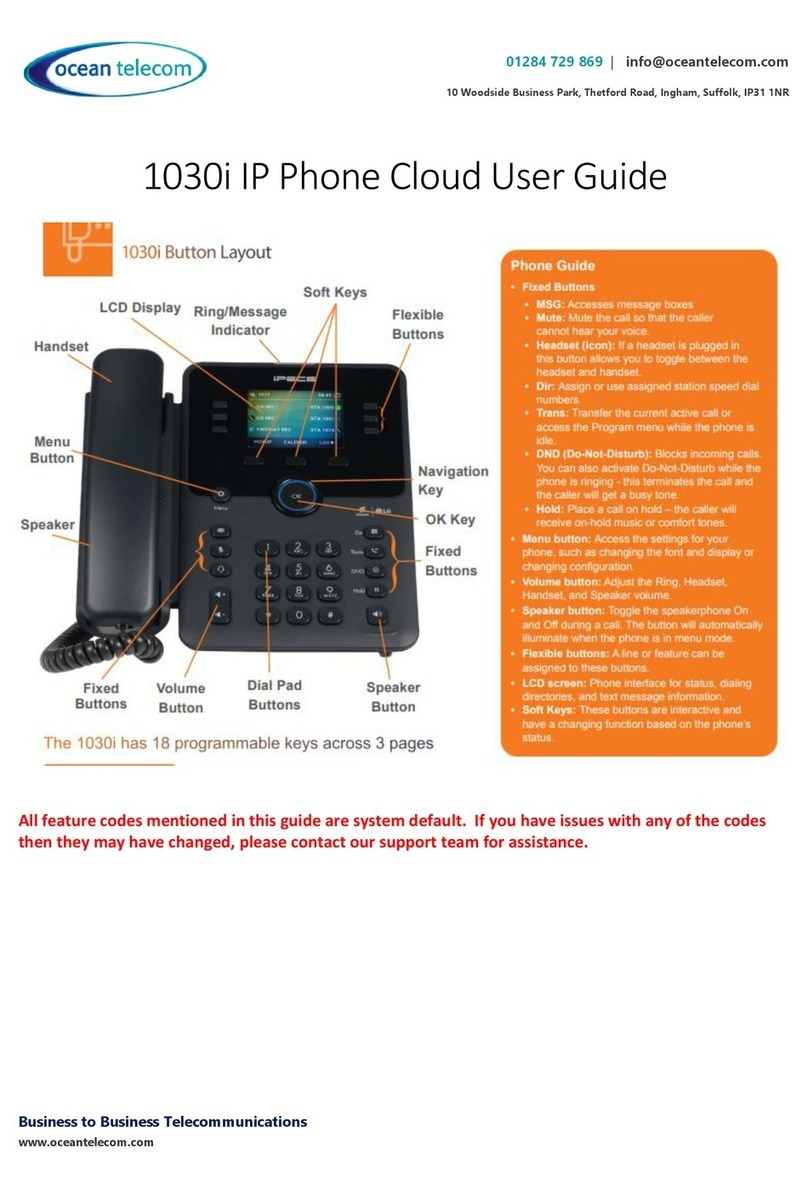
Lift the handset and press DND button or dial 501 then press 1
•Enter the forward destination:
oInternal Number—enter the extension or group number or press one of your pre-programmed buttons
oVoicemail—Enter 801
oExternal Number—enter the telephone number with or without 9 first
•Then press Hold
•To cancel the forward lift the handset and press DND button or dial 501 then #
Voicemail
To access your voicemail, either:
•Press the Message button then dial 2 then enter your passcode (default passcode is your extension number)
•or
•Dial 801 then enter your extension number and passcode
To change your voicemail greeting:
Access your voicemail then:
1. Dial 4 to manage greeting
2. Follow the prompts to listen (1), re-record (2), delete (3) when recording make sure you save your greeting.
To change your passcode:
Access your voicemail then:
1. Dial 5 for preferences
2. Dial 2 to manage your passcode.
To listen to a message received:
Access your voicemail then:
1. Dial 1 for new messages
2. At the end of the message, delete (1), replay (2), previous messages (3), next message (4)
To listen to saved messages:
Access your voicemail then:
1. Dial 2 for saved messages
2. At the end of the message, delete (1), replay (2), previous messages (3), next message (4)