manuals.online logo
Brands
  1. Home
  2. •
  3. Brands
  4. •
  5. Panasonic
  6. •
  7. Measuring Instrument
  8. •
  9. Panasonic RS-790S User manual

Panasonic RS-790S User manual

Other Panasonic Measuring Instrument manuals

Panasonic LP-400 Series Use and maintenance manual

Panasonic

Panasonic LP-400 Series Use and maintenance manual

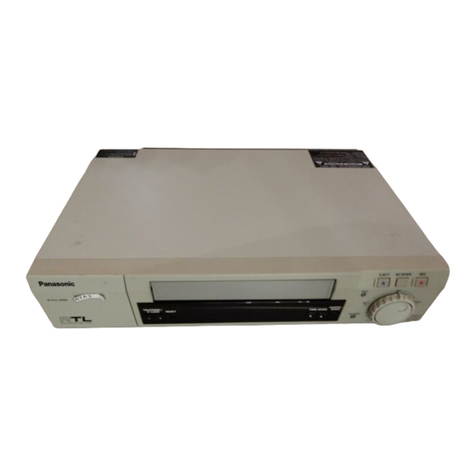
Panasonic Omnivision PV-V4600 User manual

Panasonic

Panasonic Omnivision PV-V4600 User manual

Panasonic DMRE20 - DVD VIDEO RECORDER User manual

Panasonic

Panasonic DMRE20 - DVD VIDEO RECORDER User manual

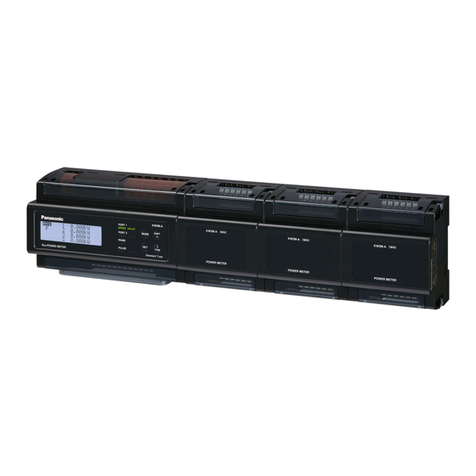
Panasonic KW9M Eco-Power Meter User manual

Panasonic

Panasonic KW9M Eco-Power Meter User manual

Panasonic KW2M-A User manual

Panasonic

Panasonic KW2M-A User manual

Panasonic NA1-11 User manual

Panasonic

Panasonic NA1-11 User manual

Panasonic FM-252-4(-P) User manual

Panasonic

Panasonic FM-252-4(-P) User manual

Panasonic EYFR02 User manual

Panasonic

Panasonic EYFR02 User manual

Panasonic RR-QR230E User manual

Panasonic

Panasonic RR-QR230E User manual

Panasonic k-nl304k User manual

Panasonic

Panasonic k-nl304k User manual

Panasonic AG-RT850P User manual

Panasonic

Panasonic AG-RT850P User manual

Panasonic WJHD309 - DIGITAL DISK RECORDER Manual

Panasonic

Panasonic WJHD309 - DIGITAL DISK RECORDER Manual

Panasonic K-NL316G User manual

Panasonic

Panasonic K-NL316G User manual

Panasonic KW9M Eco-Power Meter User manual

Panasonic

Panasonic KW9M Eco-Power Meter User manual

Panasonic VP-7722A User manual

Panasonic

Panasonic VP-7722A User manual

Panasonic ShowStopper PV-SS2710 User manual

Panasonic

Panasonic ShowStopper PV-SS2710 User manual

Panasonic KC2S Eco-COUNT METER User manual

Panasonic

Panasonic KC2S Eco-COUNT METER User manual

Panasonic FZ-VNP001U User manual

Panasonic

Panasonic FZ-VNP001U User manual

Panasonic LH2H-FE-DHK User manual

Panasonic

Panasonic LH2H-FE-DHK User manual

Panasonic RRQR100 - IC RECORDER User manual

Panasonic

Panasonic RRQR100 - IC RECORDER User manual

Panasonic KW1M Eco-Power METER User manual

Panasonic

Panasonic KW1M Eco-Power METER User manual

Panasonic LC2H preset User manual

Panasonic

Panasonic LC2H preset User manual

Panasonic BL-WV10A User manual

Panasonic

Panasonic BL-WV10A User manual

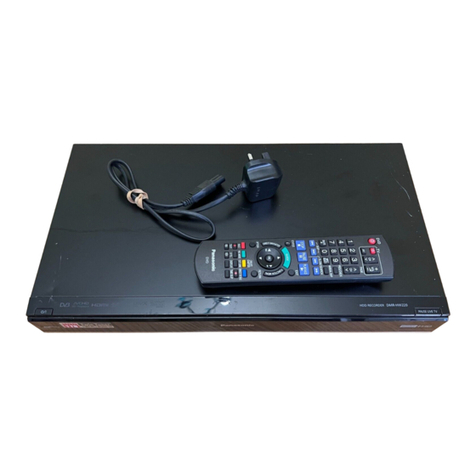
Panasonic DMR-HW220 User manual

Panasonic

Panasonic DMR-HW220 User manual

Popular Measuring Instrument manuals by other brands

Powerfix Profi 278296 Operation and safety notes

Powerfix Profi

Powerfix Profi 278296 Operation and safety notes

Test Equipment Depot GVT-427B user manual

Test Equipment Depot

Test Equipment Depot GVT-427B user manual

Fieldpiece ACH Operator's manual

Fieldpiece

Fieldpiece ACH Operator's manual

FLYSURFER VIRON3 user manual

FLYSURFER

FLYSURFER VIRON3 user manual

GMW TG uni 1 operating manual

GMW

GMW TG uni 1 operating manual

Downeaster Wind & Weather Medallion Series instruction manual

Downeaster

Downeaster Wind & Weather Medallion Series instruction manual

Hanna Instruments HI96725C instruction manual

Hanna Instruments

Hanna Instruments HI96725C instruction manual

Nokeval KMR260 quick guide

Nokeval

Nokeval KMR260 quick guide

HOKUYO AUTOMATIC UBG-05LN instruction manual

HOKUYO AUTOMATIC

HOKUYO AUTOMATIC UBG-05LN instruction manual

Fluke 96000 Series Operator's manual

Fluke

Fluke 96000 Series Operator's manual

Test Products International SP565 user manual

Test Products International

Test Products International SP565 user manual

General Sleep Zmachine Insight+ DT-200 Service manual
General Sleep

General Sleep Zmachine Insight+ DT-200 Service manual
Sensa Core Lacto Spark user manual

Sensa Core

Sensa Core Lacto Spark user manual

VOLTCRAFT UTS-1980 operating instructions

VOLTCRAFT

VOLTCRAFT UTS-1980 operating instructions

EBCHQ 94915 Operation manual

EBCHQ

EBCHQ 94915 Operation manual

Balluff BIP LD2-T017-01-EP-S4 Series user guide

Balluff

Balluff BIP LD2-T017-01-EP-S4 Series user guide

Pulsar IMP Lite Series instruction manual

Pulsar

Pulsar IMP Lite Series instruction manual

ETCR 6800 user manual

ETCR

ETCR 6800 user manual

manuals.online logo
manuals.online logoBrands
  • About & Mission
  • Contact us
  • Privacy Policy
  • Terms and Conditions

Copyright 2025 Manuals.Online. All Rights Reserved.

PRDER
NO.
ARD-711034
MODEL
Hay
i
I
Hue
ool
hn
ut
He
a
mi
wi
SOLID
STATE
4-TRACK
STEREO
TAPE
RECORDER
move.
RS-790S
SPECIFICATIONS
Power
Source:
'
AC:
117
volts
60
cps
Frequency
Response:
_
40~18,000
cps
at
7-1/2
ips
Power
Consumption:
Approx.
50
W
40~10,000
cps
at
3-3/4
ips
Music
Power
Output:
BWx2
_—
on
eres
;
ose
“
Transistor:
288
346
(4)
2B
175A
(4)
oe
a
ae
pe
ee
peat
ee
Output
LINE”
1OKQ
GOdB
(2)
"
ape
P
iu
pu
‘
cr
"
Diode
&
Rectifier:
OA
70
(2)
FR-1M
(1)
25F
(1)
“EXT.
SP”
8Q
(2)
Recording
System:
AC
bias
50
Ke
“HEADPHONE”
8©
(1)
Erasure
System:
AC
erase
Program
Time:
12
hours
for
7”
150%
tape
at
Reel
Size:
7”
max.
;
1-7/8
ips
Track
System:
4
track
stereo
system
Recording
Level
Indicator:
VU
meter
‘ 1
‘nd
.
a”
af
=
2)
Tape
Speed:
3
speeds,
7-1/2,
3-3/4
and
Built-in
Speaker
:
7”
x5”
dynamic
speaker
(
1-7/8
ips
Dimensions:
16-11/16”
(W)
x
17-3/167
(H)
x
9”
(D)
Weight:
Approx.
38-1/4
tb
MATSUSHITA
ELECTRIC
CORP.
OF
AMERICA
Pan-Am
Tiv'g.,
200
Park
Ave.,
New
York,
N.Y.
10017
HAWAII/MATSUSHITA
ELECTRIC
OF
HAWAII
INC.,
205
Kalihi
St.
Honolulu,
Hawaii
96819
CANADA/MATSUSHITA
ELECTRIC
OF
CANADA
LTD.,
1054
Kipling
Ave.
North,
Rexdale,
Ont,
©@OOOGO9OO8
OHO
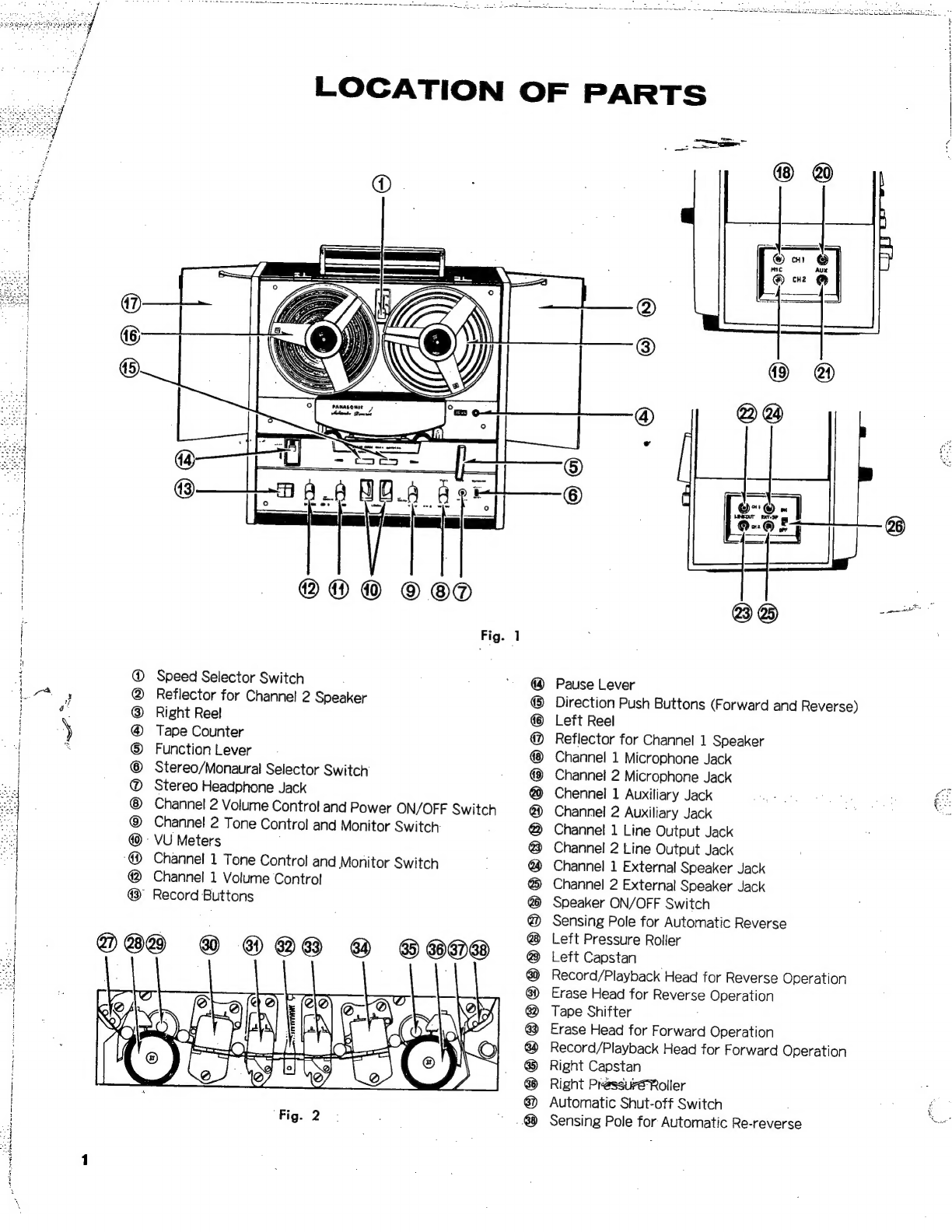
LOCATION
OF
PARTS
on
@®
®@
©
©®
Fig.
1
Speed
Selector
Switch
Reflector
for
Channe!
2
Speaker
Right
Reel
Tape
Counter
Function
Lever
Stereo/Monaural
Selector
Switch
Stereo
Headphone
Jack
Channel
2
Volume
Control
and
Power
ON/OFF
Switch
Channel
2
Tone
Control
and
Monitor
Switch:
'
VU
Meters
Channel
1
Tone
Control
and
Monitor
Switch
Channel
1
Volume
Control
”
Record
Buttons
ee
®
®28
@
8809
ene
at
Fig.
2
heer
oe
[ett
aie
|
[ss
z
®
QS
—
Pause
Lever
Direction
Push
Buttons
(Forward
and
Reverse)
Left
Reel
Reflector
for
Channel
1
Speaker
Channel
1
Microphone
Jack
Channel
2
Microphone
Jack
Chennel
1
Auxiliary
Jack
Channel
2
Auxiliary
Jack
Channel
1
Line
Output
Jack
Channel
2
Line
Output
Jack
Channel
1
External
Speaker
Jack
Channel
2
External
Speaker
Jack
Speaker
ON/OFF
Switch
Sensing
Pole
for
Automatic
Reverse
Left
Pressure
Roller
Left
Capstan
Record/Playback
Head
for
Reverse
Operation
Erase
Head
for
Reverse
Operation
Tape
Shifter
:
Erase
Head
for
Forward
Operation
Record/Playback
Head
for
Forward
Operation
Right
Capstan
Right
Pressuré
Roller
Automatic
Shut-off
Switch
Sensing
Pole
for
Automatic
Re-reverse
To
nee
SUSE
Ue
ce
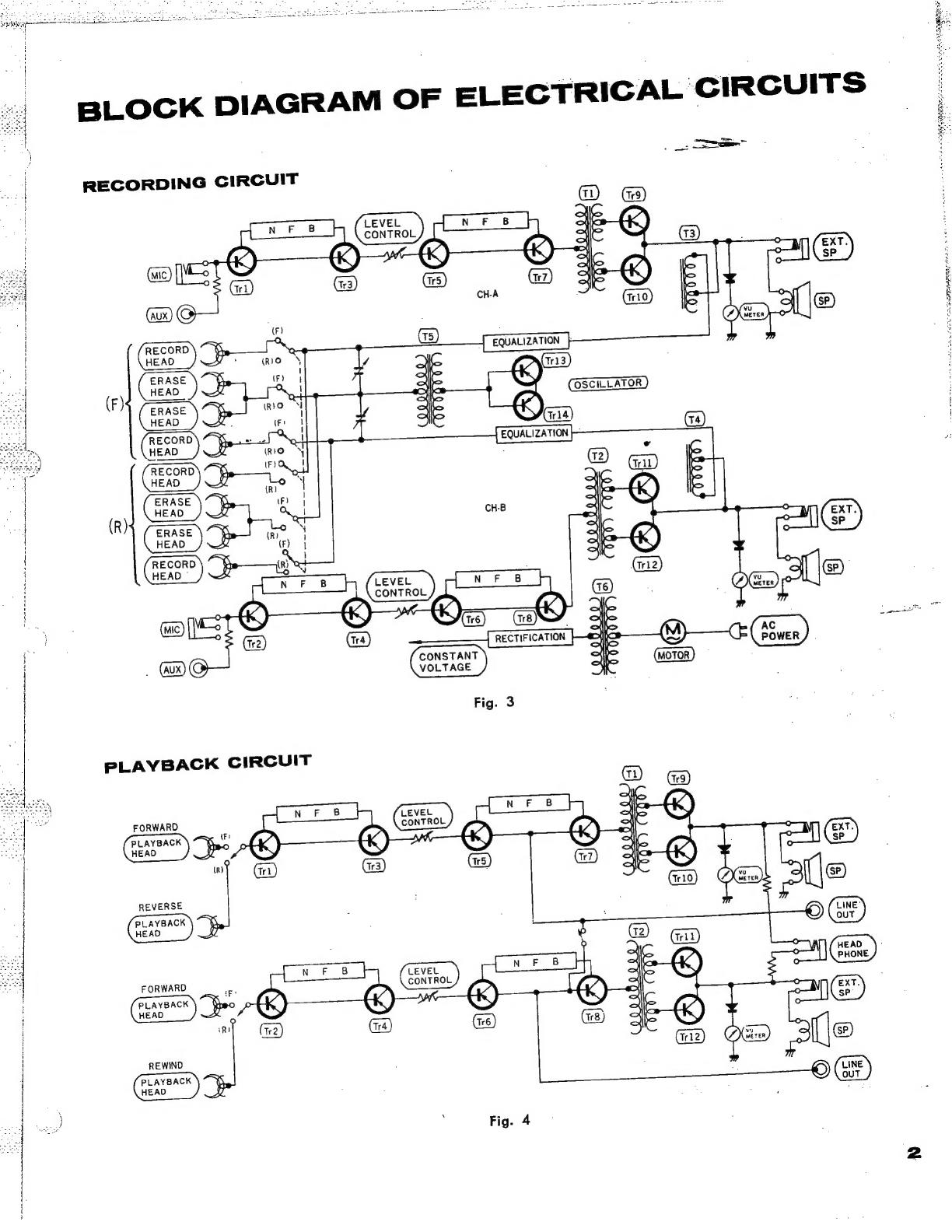
BLOCK
DIAGRAM
OF
ELECTRICAL
CIRCUITS
RECORDING
CIRCUIT
“(F)
RECORD
\
~
¥y
aw
EQUALIZATION
|
HEAD
HW:
(RIO
y,
oxo
(113)
ERASE
\~
%
(F)
lhe
AK)
m3
HEAD
%
.
ajo
=
Q
SHS
OSCILLATOR
x
=
fy
x
0)
Xs
~"
1
t
\
XS
(RrO
NM
ee
se
Sian)
eu]
‘gt
EQUALIZATION
v
(t2)
Gri)
—
pe)
m
aD
>
wn
m
ae
RECTIFICATION
(M)
oS
“We
CONSTANT
VOLTAGE
Fig.
3
FORWARD
PLAYBACK
(Fr
HEAD
p
(R)
FORWARD
|
my
REVERSE
i
PLAYBACK
HEAD
PLAYBACK
HEAD
:
tp:
H
|
ik)
}
{
REWIND
PLAYBACK
HEAD
a
Fig.
4
ea
.
HOW
TO
REMOVE
(E)
_
3g
PANEL
foe
(G)
7
;
od
3
;
H
dq
j
'
4
1
(F)
(G)
(C)
|
ran
Fig.
5
;
1.
Remove
the
Head
Cover
(A).
5.
Remove
the
Speed
Selector
Knob
(E).
2.
Remove
the
Volume
Controls
and
Tone
Controls
(B)
6.
Remove
2
Setscrews
(F)
in
the
center.
ke
(4
Controls).
7.
Remove
6
Setscrews
(G)
of
the
Panel,
and
draw
out
3.
Remove
the
Function
Lever
Knob
(C).
the
Panel
Slowly.
4.
Remove
the
Pause
Lever
Knob
(D).
HOW
TO
REMOVE
BODY
CASE
Fig.
6
1.
First
remove
the
Panel.
4.
Remove
the
Body
Case
by
slowly
lifting
it.
2.
Remove
2
Setscrews
(H)
of
the
Mechanism
Chassis.
5.
Lead
Wire
of
the
Speaker
can
be
separated
if
the
3.
Turn
the
set
upside
down,
and
remove
4
Setscrews
Ccnnector
is
removed.
of
Rubber
Feet.
+
i
4
q
5
1
|
«
TAPE
TRANSPORT
OPERATIONS
~
GENERAL
OPERATING
INSTRUCTIONS
RS-790S
is
operated
with
a
3-Position
Lever.
When
this
Lever
is
set
to
PLAY,
the
unit
is
placed
into
the
playback
mode.
and
the
Tape
{Ss
forwarded
to
the
right
or
left
at
a
constant
speed.
When
the
Lever
is
set
to
PLAY
while
pressing
the
Record
Button,
the
unit
is
placed
into
the
recording
mode.
When
the
Lever
is
set
to
FAST
WIND,
the
Tape
is
forwarded
rapidly
to
the
right
or
left.
When
the
Lever
is
set
to
STOP
thereby
releasing
all
the
mechanisms,
the
Tape
stops
running
while
the
Motor keeps
on
rotating.
POWER
SUPPL
The
Channel
2
Volume
Control
Knob
is
used
for
switch-
ing
the
power
source
ON
and
OFF.
When
the
Tape
finishes
during
recording.
playback
or
fast
forwarding.
the
Tension
Arm
switches
off
the
power
source
as
the
Automatic
Shut-Off
Mechanism
functions.
THREADING
OF
TAPE
The
Tape
can
be
threaded
only
when
the
Operating
Lever
is
set
at
STOP.
When
it
is
set
to
other
position
than
STOP,
the
Shut-Off
Arm
rises
out
so
that
the
Tape
cannot
be
threaded.
PLAYBACK
Set
the
Operating
Lever
to
PLAY.
Select
the
direction
of
Tape
by
the
Direction
Buttons.
Tracks
1
and
3
are
played
back
in
the
normal
forward
mode,
while
Tracks
4
and
2
in
the
reversing
mode.
The
Sound
Reflectors
are
opened
so
that
the
best
results
will
be
obtained.
ae
RECORDING
Depress
the
Record
Button
(both
Buttons
in
the
case
of
a
Stereo)
of
the
Channel
of
which
you
desire
to
make
recording.
Set
the
Operating
Lever
to
PLAY.
Select
the
direction
of
Tape
by
the
Direction
Button.
Tracks
1
and
3
can
be
recorded
in
the
normal
forward
mode,
while
Tracks
4
and
2
in
the
reversing
mode.
FAST
FORWARD
When
the
Operating
Lever
is
set
to
FAST
WIND,
the
Tape
is
forwarded
fast
to
the
right
or
left.
Select
the
di-
rection
of
the
Tape
by
the
Direction
Button
before
turn-
ing
the
Operating
Lefer.
When
changing
the
direction
of
-
fast
forwarding,
the
Operating
Lever
should
be
set
to
STOP.
SELECTION
OF
TAPE
SPEED
Tape
speed
can
be
selected
only
while
the
motor
is
rotating
(only
while
the
power
is
supplied).
!f
the
Speed
Selector
Lever
is
moved
with
the
power
source
switched:
~~~"
7
OFF,
the
Belt
may
get
entangled
with
the
Motor
Pulley
when
the
power
source
is
switched
on.
AUTOMATIC
RECIPROCATION
If
you
attach
Sensing
Tape
(Metal
Sensing
Foil)
to
both
ends
of
the
Tape,
continuous
playback
is
available
be-
tween
them
until
the
Tape
stops.
In
the
case
of
re-
cording,
after
a
reciprocal
recording,
the
Tape
does
not
reverse
for
the
2nd
reciprocation,
but
is
taken
up
onto
the
Left
Reel
regardless
of
the
Sensing
Tape.
This
is
in
order
to
prevent
re-recording
on
the.
once
recorded
Tape.
Sent
TREO
TI
A
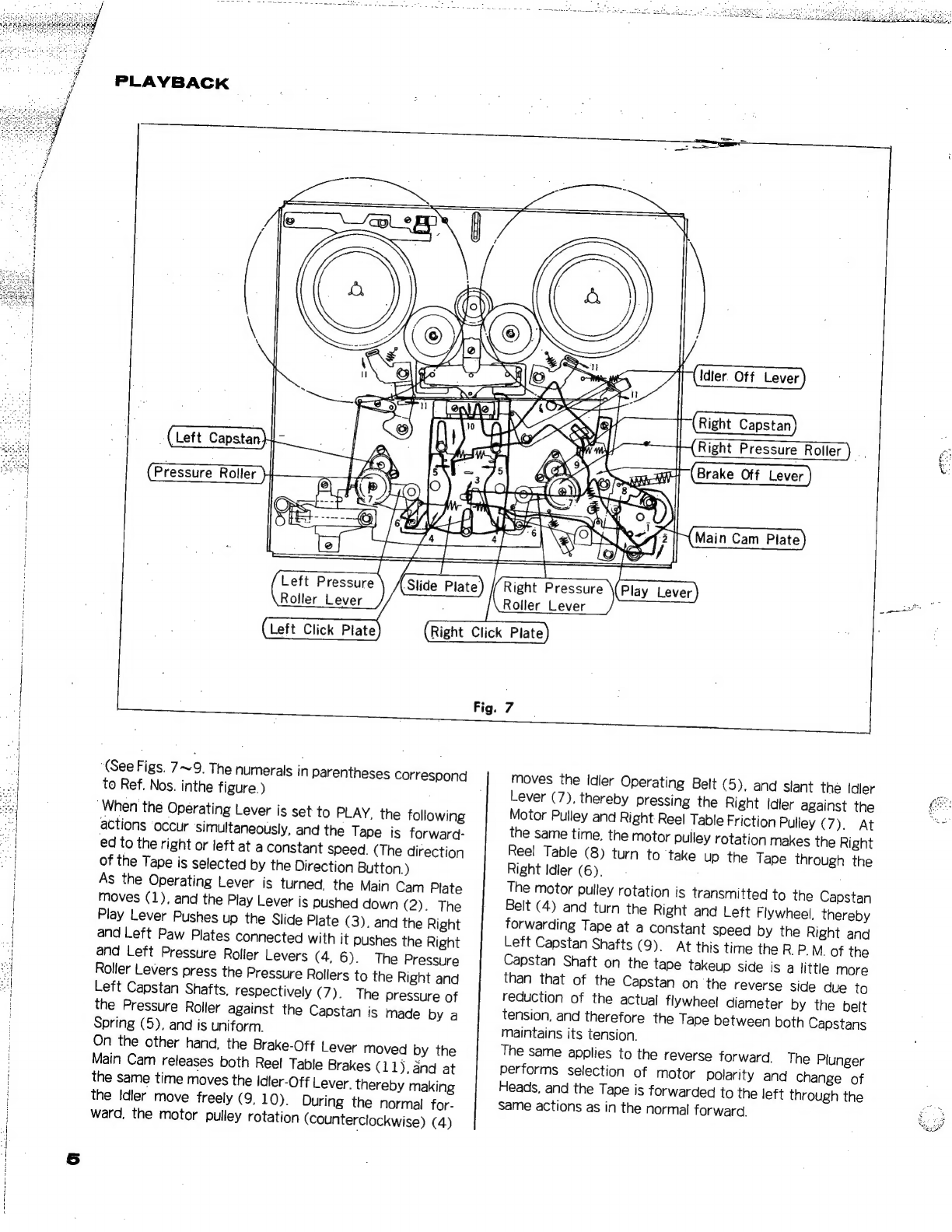
PLAYBACK
Idler.
Off
Lever
;
|
(Right
Capstan}
Right
Pressure
Roller
oe
re
Se
Brake
Off
Lever
aie
NeoD)
No
:
dM
Main
Cam
Plate
{———5
TY
ee
pa
Left
Pressure
‘Slide
Plate)
//Right
Pressure
Play
Lever
Roller
Lever
;
Roller
Lever
Left
Click
Plate
Right
Click
Plate
Left
Capstan}
|
=
.
i
Pressure
Roller
5
by
Fig.
7
|
‘(See
Figs.
7~9.
The
numerals
in
parentheses
correspond
moves
the
Idler
Operating
Belt
(5),
and
slant
the
Idler
4
to
Ref.
Nos.
inthe
figure.)
Lever
(7),
thereby
pressing
the
Right
Idler
against
the
Bes
;
When
the
Operating
Lever
is
set
to
PLAY,
the
following
Motor
Pulley
and
Right
Reel
Table
Friction
Pulley
(7).
At
~
|
actions
‘occur
simultaneously,
and
the
Tape
is
forward:
the
same
time,
the
motor
pulley
rotation
makes
the
Right
ed
to
the
right
or
left
at
a
constant
speed.
(The
direction
Reel
Table
(8)
turn
to
take
up
the
Tape
through
the
“|
of
the
Tape
is
selected
by
the
Direction
Button.)
Right
Idler
(6).
As
the
Operating
Lever
is
turned,
the
Main
Cam
Plate
The
motor
pulley
rotation
is
transmitted
to
the
Capstan
moves
(1),
and
the
Play
Lever
is
pushed
down
(2).
The
Belt
(4)
and
turn
the
Right
and
Left
Flywheel,
thereby
Play
Lever
Pushes
up
the
Slide
Plate
(3),
and
the
Right
forwarding
Tape
at
a
constant
speed
by
the
Right
and
and
Left
Paw
Plates
connected
with
it
pushes
the
Right
Left
Capstan
Shafts
(9).
At
this
time
the
R
P.M.
of
the
and
Left
Pressure
Roller
Levers
(4,
6).
The
Pressure
Capstan
Shaft
on
the
tape
takeup
side
is
a
little
more
Roller
Levers
press
the
Pressure
Rollers
to
the
Right
and
than
that
of
the
Capstan
on
the
reverse
side
due
to
Left
Capstan
Shafts,
respectively
(7).
The
pressure
of
reduction
of
the
actual
flywheel
diameter
by
the
belt
the
Pressure
Roller
against
the
Capstan
is
made
by
a
tension,
and
therefore
the
Tape
between
both
Capstans
Spring
(5),
and
is
uniform.
maintains
its
tension.
On
the
other
hand,
the
Brake-Off
Lever
moved
by
the
The
same
applies
to
the
reverse
forward.
The
Plunger
Main
Cam
releases
both
Reel
Table
Brakes
(11),
and
at
performs
selection
of
motor
polarity
and
change
of
the
same
time
moves
the
Idler-Off
Lever.
thereby
making
Heads,
and
the
Tape
is
forwarded
to
the
left
thr
ough
the
the
Idler
move
freely
(9,10).
During
the
normal
for-
same
actions
as
in
the
normal
forward.
ward,
the
motor
pulley
rotation
(counterclockwise)
(4)
1
i
1
j
i
j
,
1
i
|
{
}
{
|
4
a
t
i
i
i
|
|
|
i
|
|
Motor
Pulley
Left
Reel
Table};
Plunger
Lever
‘Left
Capstan
,
ot
(Left
Flywheel}
|
4
ia
“~
(EF
Brake
Arm
Head
Switch
Arm
Capstan
Belt
Idler
Operating
Belt
oe
Right
Idler
Right
Reel
Table
It
5
JN
Right
Capstan
Right
Flywheel
Idler
Lever
RECORDING
When
the
Record
Button
is
depressed,
the
Record/Play-
back
Selector
Switch
on
the
Printed
Base
Plate
is
placed
into
the
recording
mode.
When
the
Operating
Lever
is
turned
to
PLAY,
the
Tape
moves
through
the
same
actions
as
in
playback,
and
carries.on
recording.
AUER!
ASTOR
Se
Te
eee
Oe
OU
he
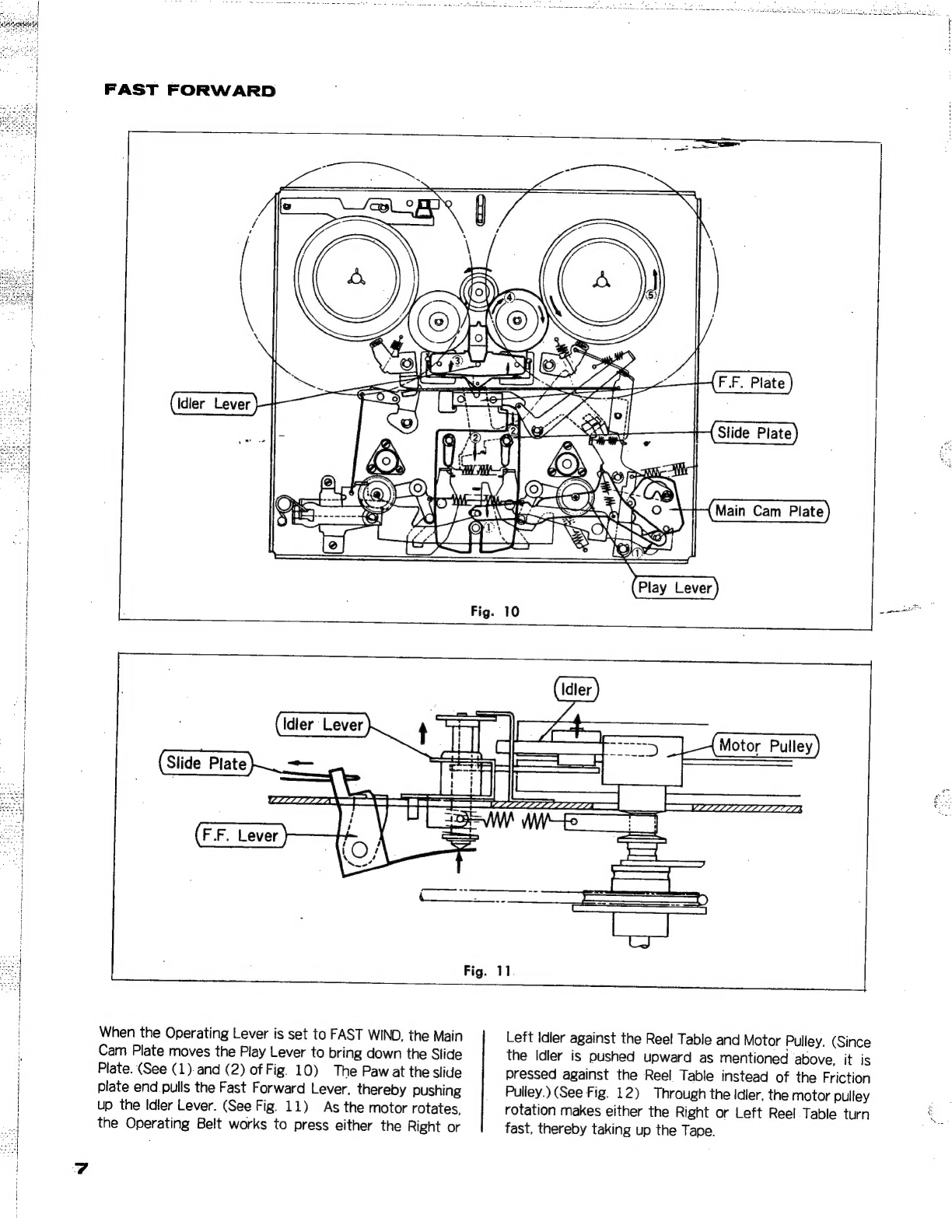
FAST
FORWARD
|
.
Idler
Lever
Slide
Plate
—
WLLL
LIZZ
|
When
the
Operating
Lever
is
set
to
FAST
WIND,
the
Main
Left
Idler
against
the
Reel
Table
and
Motor
Pulley.
(Since
Cam
Plate
moves
the
Play
Lever
to
bring
down
the
Slide
the
Idler
is
pushed
upward
as
mentioned
above,
it
is
:
Plate.
(See
(1)
and
(2)
of
Fig.
10)
The
Paw
at
the
slide
pressed
against
the
Reel
Table
instead
of
the
Friction
plate
end.
pulls
the
Fast
Forward
Lever,
thereby
pushing
Pulley.)
(See
Fig.
12)
Through
the
Idler,
the
motor
pulley
up
the
Idler
Lever.
(See
Fig.
11)
As
the
motor
rotates,
rotation
makes
either
the
Right
or
Left
Reel
Table
turn
the
Operating
Belt
works
to
press
either
the
Right
or
fast,
thereby
taking
up
the
Tape.
Fig.
12
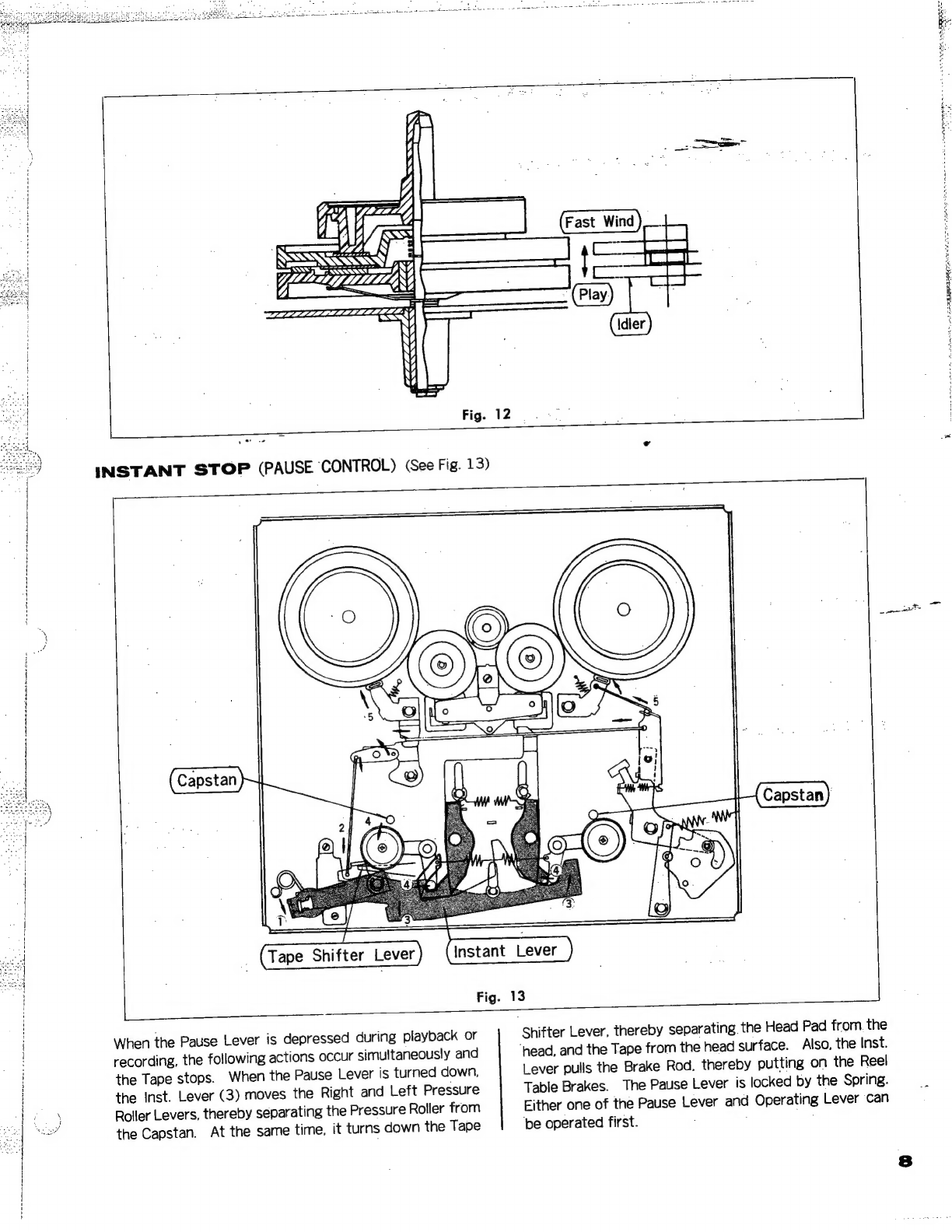
INSTANT
STOP
(PAUSE
CONTROL)
(See
Fig.
13)
Tape
Shifter
Lever
Fig.
13
L
=
When
the
Pause
Lever
is
depressed
during
playback
or
recording,
the
following
actions
occur
simultaneously
and
the
Tape
stops.
When
the
Pause
Lever
is
turned
down,
the
Inst.
Lever
(3)
moves
the
Right
and
Left
Pressure
Roller
Levers,
thereby
separating
the
Pressure
Roller
from
the
Capstan.
At
the
same
time,
it
turns
down
the
Tape
Shifter
Lever,
thereby
separating
the
Head
Pad
from.
the
‘head,
and
the
Tape
from
the
head
surface.
Also.
the
Inst.
Lever
pulls
the
Brake
Rod,
thereby
putting
on
the
Reel
Table
Brakes.
The
Pause
Lever
is
locked
by
the
Spring.
Either
one
of
the
Pause
Lever
and
Operating
Lever
can
‘be
operated
first.
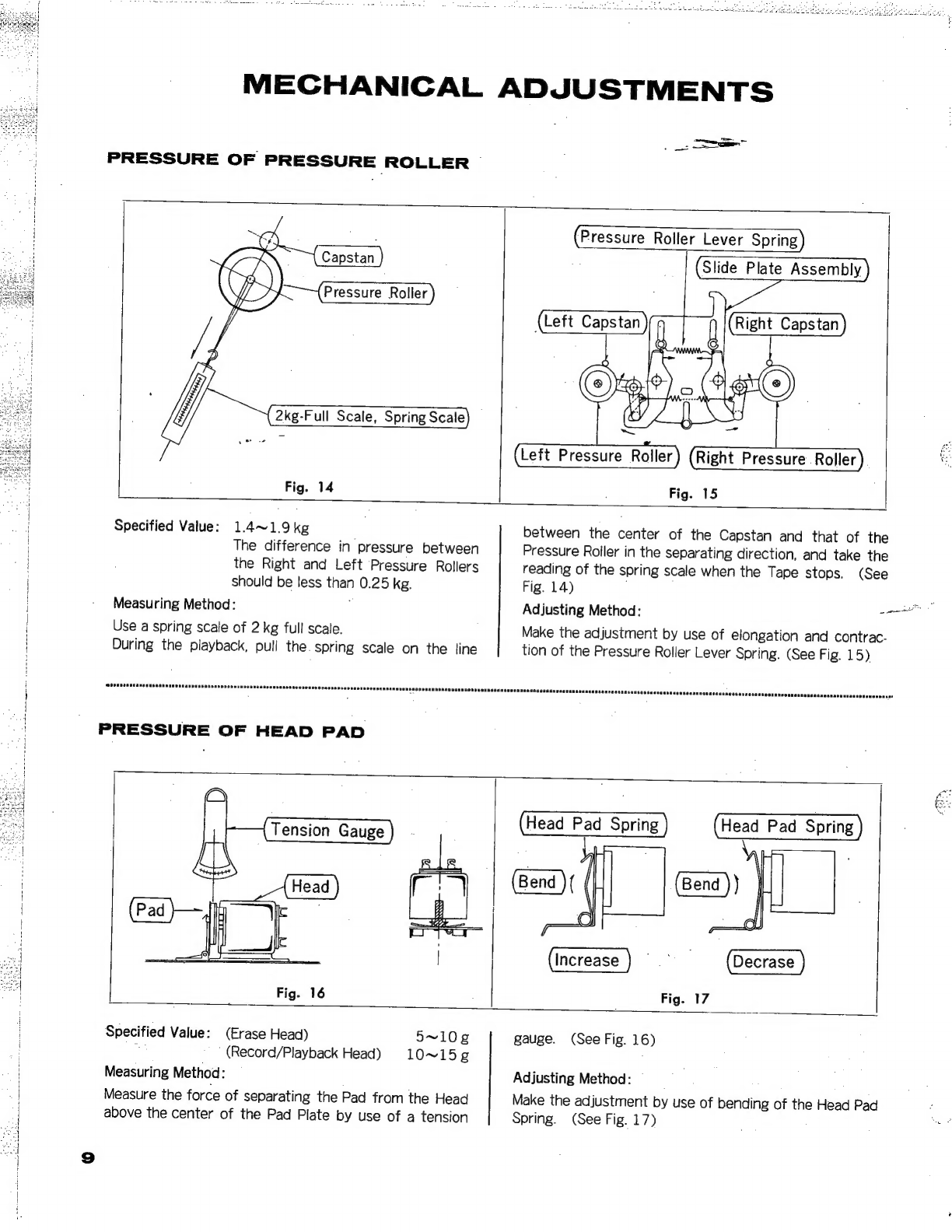
MECHANICAL
ADJUSTMENTS
PRESSURE
OF
PRESSURE
ROLLER
>
=e
-
Fig.
14
(Pressure
Roller
Lever
Spring
)
Slide
Plate
Assembly
Right
Capstan
(Left
Capstan
j
Left
Pressure
Roller)
(Right
Pressure
Roller
Fig.
15
Specified
Value:
1.4~1.9kg
The
difference
in
pressure
between
the
Right
and
Left
Pressure
Rollers
should
be
less
than
0.25
kg.
Measuring
Method:
.
Use
a
spring
scale
of
2
kg
full
scale.
During
the
playback,
pull
the.
spring
scale
on
the
line
ocamnaacucanseanscunes:
between
the
center
of
the
Capstan
and
that
of
the
Pressure
Roller
in
the
separating
direction,
and
take
the
reading
of
the
spring
scale
when
the
Tape
stops.
(See
Fig.
14)
Adjusting
Method:
eas
Make
the
adjustment
by
use
of
elongation
and
contrac-
tion
of
the
Pressure
Roller
Lever
Spring.
(See
Fig.
15)
Head
Pad
Spring
(Bend
)(
Head
Pad
Spring
(Bend
))
Increase}
Fig.
17
Specified
Value:
(Erase
Head)
mat
’
(Record/Playback
Head)
Measuring
Method:
Measure
the
force
of
separating
the
Pad
from
the
Head
above
the
center
of
the
Pad
Plate
by
use
of
a
tension
5~10g
10~15¢g
gauge.
(See
Fig.
16)
Adjusting
Method:
Make
the
adjustment
by
use
of
bending
of
the
Head
Pad
Spring.
(See
Fig.
17)