manuals.online logo
Brands
  1. Home
  2. •
  3. Brands
  4. •
  5. Partron
  6. •
  7. Batteries Charger
  8. •
  9. Partron PTC-130 User manual

Partron PTC-130 User manual

This manual suits for next models

1

Popular Batteries Charger manuals by other brands

EVBox BusinessLine manual

EVBox

EVBox BusinessLine manual

Goobay 71808 user manual

Goobay

Goobay 71808 user manual

Kogan KACRDQIS4XA user manual

Kogan

Kogan KACRDQIS4XA user manual

Sealey WCB3 quick start guide

Sealey

Sealey WCB3 quick start guide

Vanner SP00143/181 owner's manual

Vanner

Vanner SP00143/181 owner's manual

KeyOuest KO037515 quick start guide

KeyOuest

KeyOuest KO037515 quick start guide

Enplus Silk Series user manual

Enplus

Enplus Silk Series user manual

Intermec SF51 user guide

Intermec

Intermec SF51 user guide

Colorovo PowerBox 6800 user guide

Colorovo

Colorovo PowerBox 6800 user guide

Smartech WBC-250 Operator's manual

Smartech

Smartech WBC-250 Operator's manual

PIXO C-USB instruction manual

PIXO

PIXO C-USB instruction manual

Gunson G4104 quick start guide

Gunson

Gunson G4104 quick start guide

Dometic NDS SCE320 Short Operating Manual

Dometic

Dometic NDS SCE320 Short Operating Manual

ABB HT572708 Operation manual

ABB

ABB HT572708 Operation manual

EVOline Square80 manual

EVOline

EVOline Square80 manual

Redarc SBC24025 Operating instructions and owner's manual

Redarc

Redarc SBC24025 Operating instructions and owner's manual

Absaar HV04 manual

Absaar

Absaar HV04 manual

DazeTechnology Cover Dazebox Home installation manual

DazeTechnology

DazeTechnology Cover Dazebox Home installation manual

manuals.online logo
manuals.online logoBrands
  • About & Mission
  • Contact us
  • Privacy Policy
  • Terms and Conditions

Copyright 2025 Manuals.Online. All Rights Reserved.

Order Number : GETEC-C1-16-340 FCC Part 18
Test Report Number : GETEC-E3-16-048 Page 1 / 1
EUT Type: Wireless Charger
FCC ID.: OZ5URCTDC7100CG
APPENDIX H
: USER’S MANUAL
Wireless Charger Manual
Product Name : Wireless Charging PAD & Receiver
Model : PTC-13 / PRC-11
Manufacturer : Partron Co., Ltd.
22 Samsung 1-ro 2-gil, Hwaseong-si, Gyeonggi-do, Korea 445-17
TEL 82-31-2 1-77 | FAX 82-31-2 1-78 |
Homepage www.partron.co.kr / www.croise.co.kr
Precautions for safety
The contents inside the product warranty is described below to ensure user's safety and prevent
property damage.
Please read the manual carefully to use the product appropriately.
Partron is not responsible for any injury or damage occurred by not following safety precautions.
Please do not use damaged power cord, plug, and loose socket.
Please do not contact power plug with wet hands, and do not unplug by pulling the cord part.
Please do not bend or damage power cord.
Please do not place or use the product nearby coin, key, cell phone, accessories, metal.
The product could cause the heat.
If the product overheated, please put down the cell phone from the charger for separation. Then,
please pause using the product.
Please be cautious in use since the contact with the heated product on the skin could cause the
red spots, pigmentation, and low-temperature burn.
Please do not place the product nearby stove, microwave, heating utensil, or high heat container.
This may cause a re.
- Do not drop the product or impact on the product.
- Do not store or leave the product on a sloping area.
- Product can be damaged, and internal parts can be broken.
- Please be cautious and guide children, baby or pet not to suck or bite the product.
- Please do not use the product other than its original purpose.
- Please leave the product on dry area where is not wet or damp.
Humidity or liquid components can damage on part and circuit of product. If product gets wet,
remove the moisture with a dry towel and take it to service center.
- Do not alter, disassemble, or repair.
Make sure to use a repair service center qualied by Parton. Free repair is not available if there is
any alteration, disassemble, or repair.
This device is built for home use (B level), and completed EMC registration. It is usable in every
area, and primarily intended for use in homes and offices.
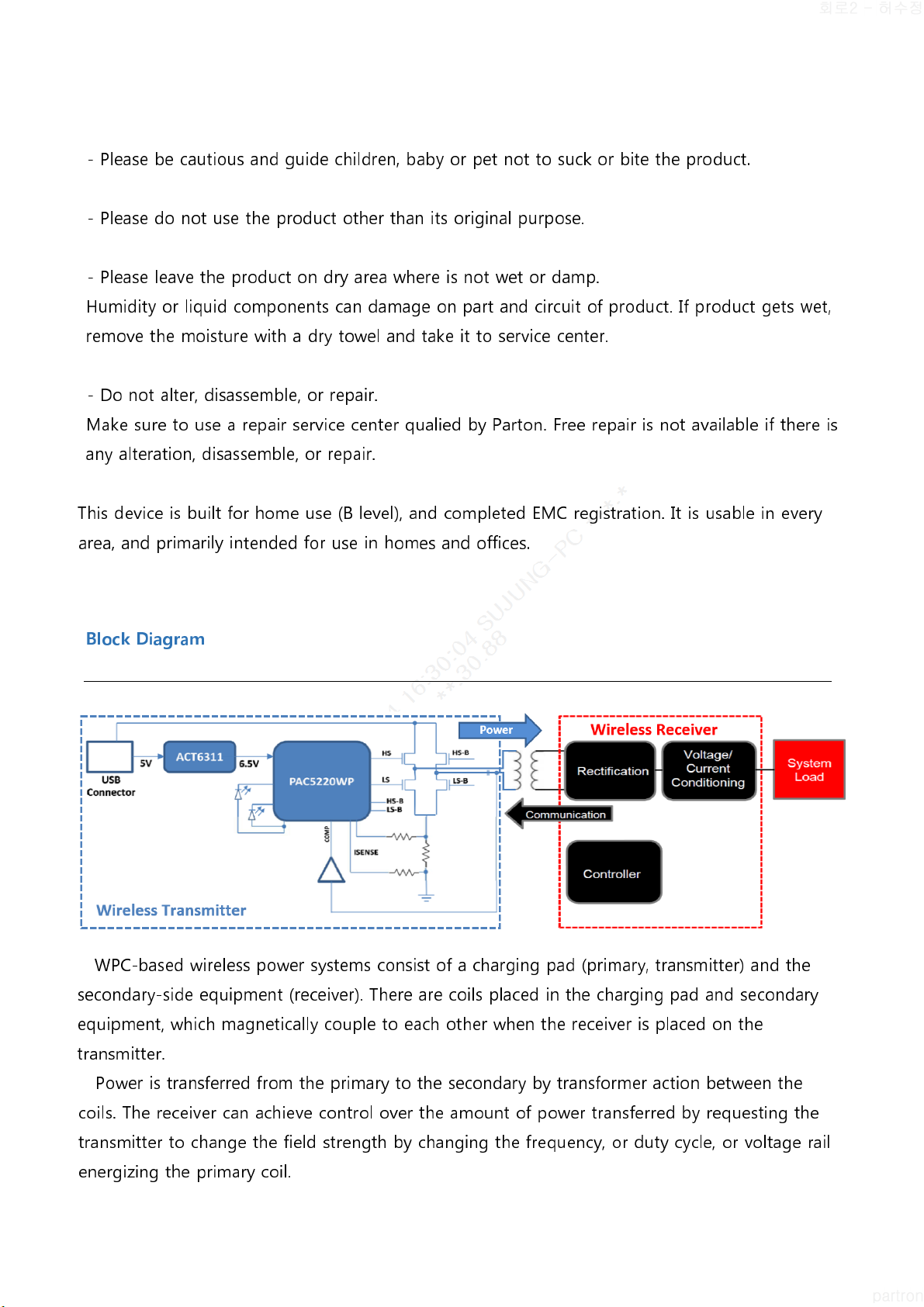
Block Diagram
WPC-based wireless power systems consist of a charging pad (primary, transmitter) and the
secondary-side equipment (receiver). There are coils placed in the charging pad and secondary
equipment, which magnetically couple to each other when the receiver is placed on the
transmitter.
Power is transferred from the primary to the secondary by transformer action between the
coils. The receiver can achieve control over the amount of power transferred by requesting the
transmitter to change the field strength by changing the frequency, or duty cycle, or voltage rail
energizing the primary coil.

Using the Product
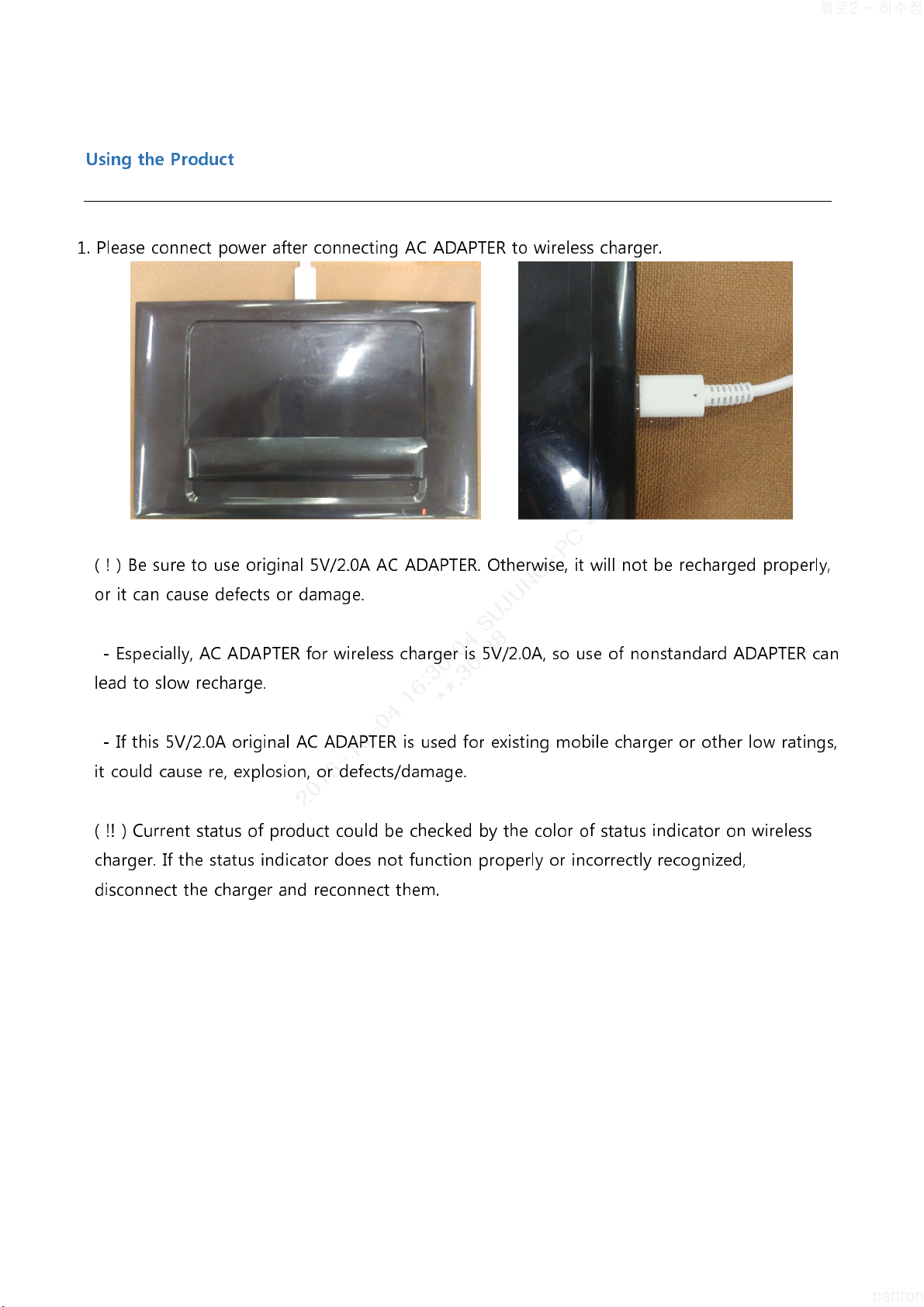
1. Please connect power after connecting AC ADAPTER to wireless charger.
( ! ) Be sure to use original 5V/2. A AC ADAPTER. Otherwise, it will not be recharged properly,
or it can cause defects or damage.
- Especially, AC ADAPTER for wireless charger is 5V/2. A, so use of nonstandard ADAPTER can
lead to slow recharge.
- If this 5V/2. A original AC ADAPTER is used for existing mobile charger or other low ratings,
it could cause re, explosion, or defects/damage.
( !! ) Current status of product could be checked by the color of status indicator on wireless
charger. If the status indicator does not function properly or incorrectly recognized,
disconnect the charger and reconnect them.
Color of Status indicator Wireless Charger Status
Off Standby or Charging completed
White Fixed Charging in progress
Orange Flashed Fast
When foreign object (knife, key, metal substance and etc) is
recognized between TDC-71 (or cell phone) and cradle,
FOD function operates
Orange Flashed Slow Pressure lower than rated power (5V/2A of Genuine Adapter is
recommended.)
Orange Fixed Wireless charger operates inappropriately (Over Temperature)
* Color of Status indicator after full charge will not be changed per phones
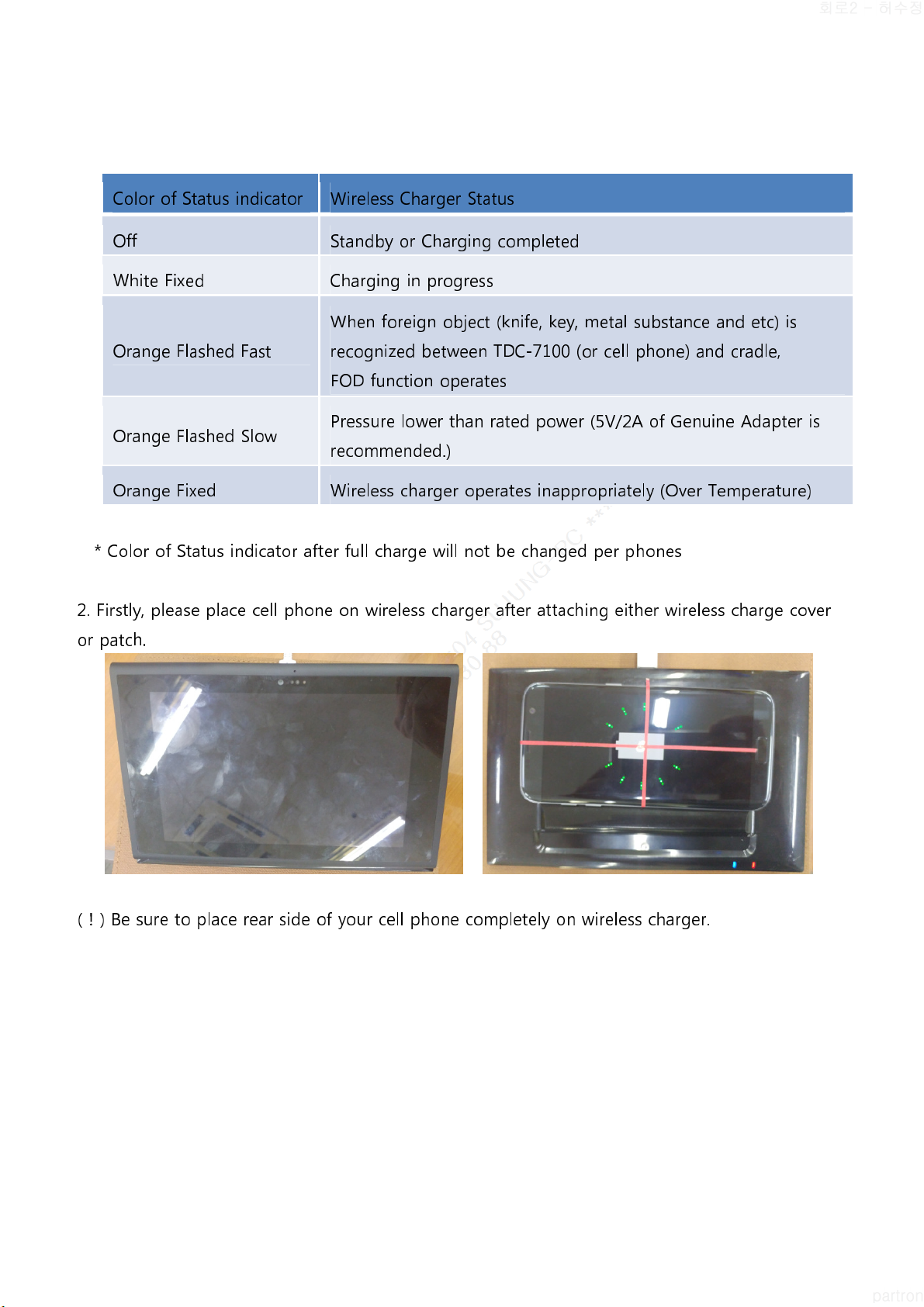
2. Firstly, please place cell phone on wireless charger after attaching either wireless charge cover
or patch.
( ! ) Be sure to place rear side of your cell phone completely on wireless charger.
3. Please separate AC ADAPTER from wireless charger when charging is completed.
( ! ) To check charging status, please check charger icon on your cell phone display.
- Wireless charger might not function properly if foreign substances exist between cell phone
and wireless charger.
- DMB is not available while wireless charging.
- If wireless charger is used where signal is weak, reception rate of cell phone could be weak.
- This product is compatible with the Wireless Power Consortium(WPC) certied product.
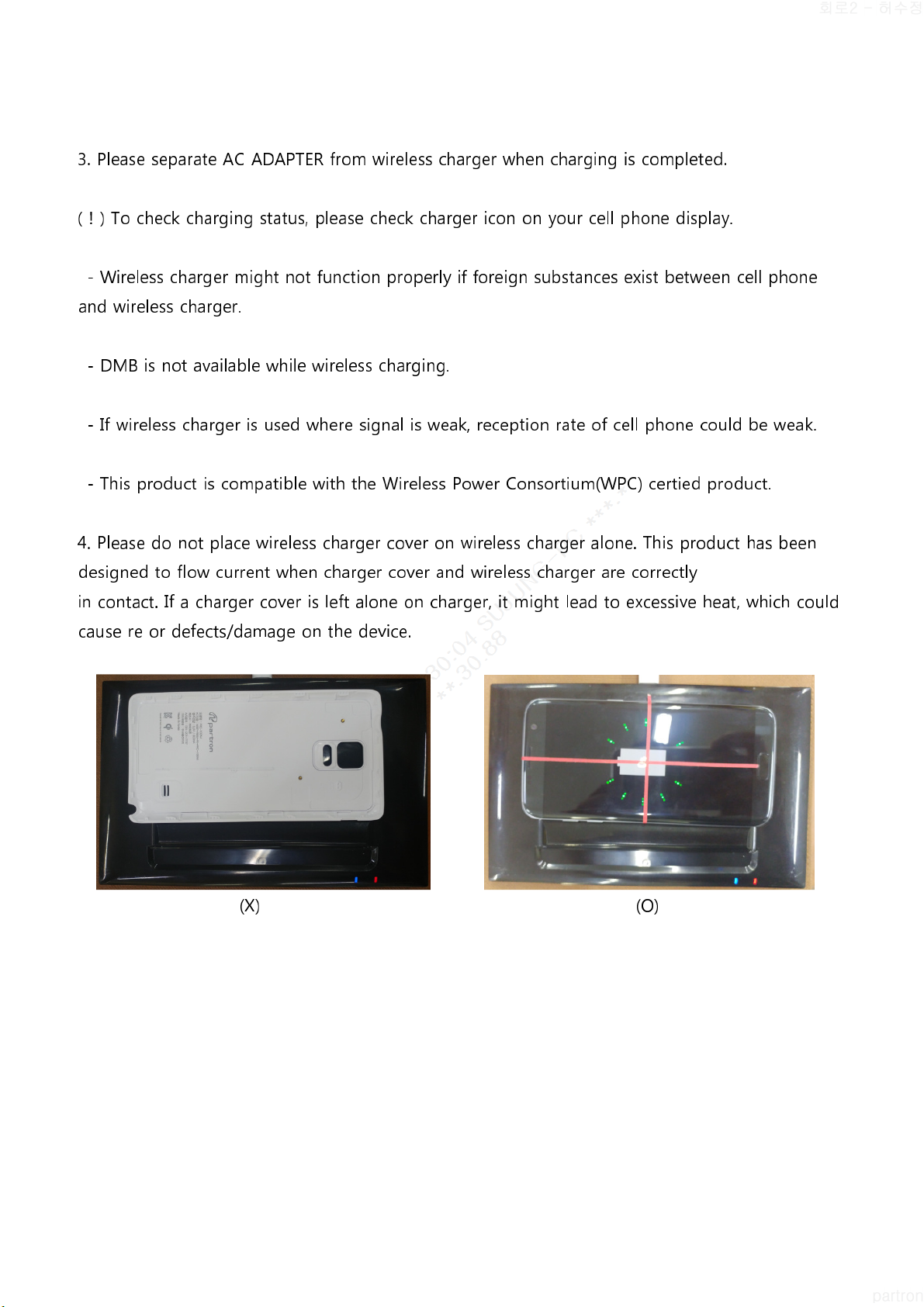
4. Please do not place wireless charger cover on wireless charger alone. This product has been
designed to flow current when charger cover and wireless charger are correctly
in contact. If a charger cover is left alone on charger, it might lead to excessive heat, which could
cause re or defects/damage on the device.
(X) (O)
Spec and Features
Wireless charging is enabled to charge batteries without the use of cables or device-specific AC
adapters. As follows Detailed Specifications are :
ITEM
Specification
Size 2 x 125 x 17 (W x L x T) mm
3
Recharging Method Magnetic Induction Method (WPC Standard)
Transmission Power DC 5W (Maximum 5V, 1A)
Using Frequency Range 115 ~ 2 5kHz
Input Power DC 5V, 2. A
Operating Temperature ℃ ~ +55 ℃
Regulatory Compliance for TDC-7100CG
IMPORTANT NOT : FCC Compliance statement
This device complies with part 18 of the FCC Rules.
IMPORTANT NOT : FCC RF exposure statement
The antenna(s) used for this device must be installed to provide a separation distance of at least 20
cm from all persons and must not be co-located or operating in
conjunction with any other antenna or transmitter.