manuals.online logo
Brands
  1. Home
  2. •
  3. Brands
  4. •
  5. Pioneer
  6. •
  7. Car Video System
  8. •
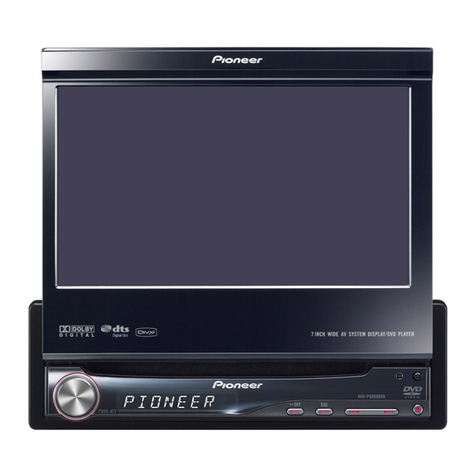
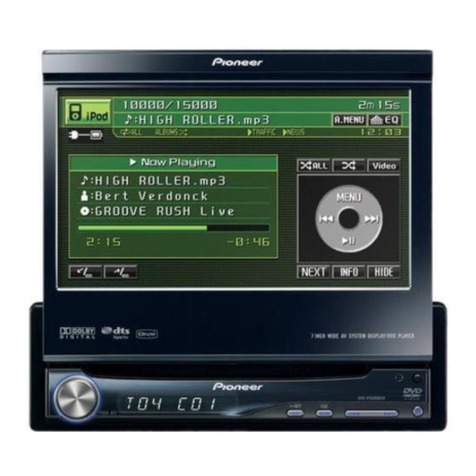
  9. Pioneer AVH-P6600DVD User manual

Pioneer AVH-P6600DVD User manual

Other manuals for AVH-P6600DVD

3

Other Pioneer Car Video System manuals

Pioneer AVH-P7600D User manual

Pioneer

Pioneer AVH-P7600D User manual

Pioneer Super Tuner IIID AVH-P4000DVD User manual

Pioneer

Pioneer Super Tuner IIID AVH-P4000DVD User manual

Pioneer Super Tuner IIID AVIC-N4 User manual

Pioneer

Pioneer Super Tuner IIID AVIC-N4 User manual

Pioneer AVH-P6800DVD - DVD Changer With LCD Monitor User manual

Pioneer

Pioneer AVH-P6800DVD - DVD Changer With LCD Monitor User manual

Pioneer DMH-WT8600NEX User manual

Pioneer

Pioneer DMH-WT8600NEX User manual

Pioneer AVIC-X930BT User manual

Pioneer

Pioneer AVIC-X930BT User manual

Pioneer MVH-AV290BT User manual

Pioneer

Pioneer MVH-AV290BT User manual

Pioneer Super Tuner IIID+ AVH-P7800DVD User manual

Pioneer

Pioneer Super Tuner IIID+ AVH-P7800DVD User manual

Pioneer Super Tuner IIID AVIC-N5 User manual

Pioneer

Pioneer Super Tuner IIID AVIC-N5 User manual

Pioneer Super Tuner IIID AVH-P4100DVD User manual

Pioneer

Pioneer Super Tuner IIID AVH-P4100DVD User manual

Pioneer AVIC-D2 User manual

Pioneer

Pioneer AVIC-D2 User manual

Pioneer Super Tuner III D AVH-P4950DVD User manual

Pioneer

Pioneer Super Tuner III D AVH-P4950DVD User manual

Pioneer AVH-280BT User manual

Pioneer

Pioneer AVH-280BT User manual

Pioneer CA-HM-SUB.006 User manual

Pioneer

Pioneer CA-HM-SUB.006 User manual

Pioneer AVH-P7600DVD User manual

Pioneer

Pioneer AVH-P7600DVD User manual

Pioneer Super Tuner IIID AVH-P5100DVD User manual

Pioneer

Pioneer Super Tuner IIID AVH-P5100DVD User manual

Pioneer Super Tuner IIID AVH-P5200BT User manual

Pioneer

Pioneer Super Tuner IIID AVH-P5200BT User manual

Pioneer AVH-P6800DVD - DVD Changer With LCD Monitor User manual

Pioneer

Pioneer AVH-P6800DVD - DVD Changer With LCD Monitor User manual

Pioneer GEX-P10XMT - Satellite Radio Tuner User manual

Pioneer

Pioneer GEX-P10XMT - Satellite Radio Tuner User manual

Pioneer AVM-P505R User manual

Pioneer

Pioneer AVM-P505R User manual

Pioneer AVH-P7480DVD User manual

Pioneer

Pioneer AVH-P7480DVD User manual

Pioneer AVIC-D3 - Navigation System With DVD Player User manual

Pioneer

Pioneer AVIC-D3 - Navigation System With DVD Player User manual

Pioneer AVX-P7300CD User manual

Pioneer

Pioneer AVX-P7300CD User manual

Pioneer AVH-265BT User manual

Pioneer

Pioneer AVH-265BT User manual

Popular Car Video System manuals by other brands

Farenheit MD-1510CM instruction manual

Farenheit

Farenheit MD-1510CM instruction manual

Mazda Connect manual

Mazda

Mazda Connect manual

RCA DRC97983 Manual de usuario

RCA

RCA DRC97983 Manual de usuario

Panasonic CY-VHD9401U Service manual

Panasonic

Panasonic CY-VHD9401U Service manual

Stinger HEIGH10 RB10RAM13B installation manual

Stinger

Stinger HEIGH10 RB10RAM13B installation manual

Alpine IVA-W203 - 6.5" Touch Screen 2-DIN DVD In-Dash... owner's manual

Alpine

Alpine IVA-W203 - 6.5" Touch Screen 2-DIN DVD In-Dash... owner's manual

Eonon E1057 instructions

Eonon

Eonon E1057 instructions

Milion D2223 user manual

Milion

Milion D2223 user manual

Metra Electronics 99-8153 installation instructions

Metra Electronics

Metra Electronics 99-8153 installation instructions

Voxx Electronics HR8MA1 owner's manual

Voxx Electronics

Voxx Electronics HR8MA1 owner's manual

Axxera AV604Bi quick start guide

Axxera

Axxera AV604Bi quick start guide

Clarion NX706E owner's manual

Clarion

Clarion NX706E owner's manual

Pyle view PLDN74BTi owner's manual

Pyle view

Pyle view PLDN74BTi owner's manual

Clarion NX602 quick start guide

Clarion

Clarion NX602 quick start guide

RCA DRC6296 - Twin 9" Mobile DVD System Manual Del Usuario

RCA

RCA DRC6296 - Twin 9" Mobile DVD System Manual Del Usuario

Fiat Uconnect 5.0 manual

Fiat

Fiat Uconnect 5.0 manual

Lanzar SVDVD5 owner's manual

Lanzar

Lanzar SVDVD5 owner's manual

Eonon E1060 instructions

Eonon

Eonon E1060 instructions

manuals.online logo
manuals.online logoBrands
  • About & Mission
  • Contact us
  • Privacy Policy
  • Terms and Conditions

Copyright 2025 Manuals.Online. All Rights Reserved.

Operation Manual
AV Receiver/DVD Player with 6.5 inch Wide Display
AVH-P6600DVD
English
Thank you for buying this Pioneer product.
Please read through these operating instructions so you will know how to operate
your model properly. After you have finished reading the instructions, keep this man-
ual in a safe place for future reference.
Be sure to read this
!Playable discs 8
!DVD video disc region numbers 8
!When an operation is prohibited 11
Precautions
IMPORTANT SAFE UARDS 6
To ensure safe driving 6
To avoid battery exhaustion 7
Before You Start
About this unit 8
About this manual 9
Precautions 9
In case of trouble 9
Features 9
About WMA 11
To protect the LCD screen 11
For viewing LCD comfortably 11
What the marks on DVDs indicate 11
Resetting the microprocessor 12
Use and care of the remote control 12
Whats What
Head unit 14
Remote control 16
Basic Operations
Turning the unit on and selecting a
source 19
Loading a disc 20
Adjusting the volume 20
Turning the unit off 20
Using the rear display 20
Displaying the navigation image 21
Touch panel key basic operation 21
Opening and closing the LCD panel 22
Changing the wide screen mode 23
Adjusting the picture adjustment 24
Protecting your unit from theft 25
Tuner
Listening to the radio 27
Introduction of advanced tuner
operation 28
Storing and recalling broadcast
frequencies 28
Tuning in strong signals 28
Storing the strongest broadcast
frequencies 29
DS
Introduction of RDS operation 30
Switching the RDS display 30
Selecting alternative frequencies 31
Receiving traffic announcements 32
Using PTY functions 32
Using radio text 33
PTY list 35
Playing DVD video discs
Watching a DVD video 36
Operating the DVD menu 37
Skipping back or forward to another title 37
Stopping playback 37
Introduction of advanced DVD video
operation 38
Repeating play 38
Pausing DVD video playback 38
Frame-by-frame playback 39
Slow motion playback 39
Searching for a desired scene, starting
playback from a specified time 39
Changing audio language during playback
(Multi-audio) 40
Contents
En
2
Changing the subtitle language during
playback (Multi-subtitle) 40
Changing the viewing angle during playback
(Multi-angle) 41
Resume playback (Bookmark) 41
Selecting audio output 41
Playing Video CDs
Watching a Video CD 42
Stopping playback 43
PBC playback 43
Introduction of advanced Video CD
operation 43
Repeating play 43
Pausing Video CD playback 44
Frame-by-frame playback 44
Slow motion playback 44
Searching for a desired scene, starting
playback from a specified time 45
Selecting audio output 45
Playing CDs
Listening to a CD 46
Stopping playback 46
Introduction of advanced CD operation 47
Repeating play 47
Playing tracks in a random order 47
Scanning tracks of a CD 47
Pausing CD playback 48
Searching for a desired track 48
Entering disc titles 48
Using CD TEXT functions 49
Playing MP3/WMA
Listening to MP3/WMA 50
Stopping playback 51
Introduction of advanced built-in DVD player
(MP3/WMA) operation 52
Repeating play 52
Playing tracks in a random order 52
Scanning folders and tracks 53
Pausing MP3/WMA playback 53
Searching for a desired track in the current
folder 53
Displaying text information on MP3/WMA
disc 53
Scrolling text information in the display 54
Selecting tracks from the file name list 54
Multi-CD Player
Listening to a CD 55
50-disc multi-CD player 55
Introduction of advanced multi-CD player
operation 56
Repeating play 56
Playing tracks in a random order 56
Scanning CDs and tracks 57
Pausing CD playback 57
Using ITS playlists 57
Using disc title functions 58
Using CD TEXT functions 59
Using compression and bass emphasis 60
DAB tuner
Listening to the DAB 61
Introduction of advanced DAB tuner
operation 62
Switching the DAB display 62
Storing and recalling broadcast
frequencies 63
Setting the announcement support
interruption 63
Selecting services from the available service
list 64
Searching for service by available PTY
information 64
Switching primary or secondary service
component 64
En 3
Contents
Switching the service follow 64
Using dynamic label 64
TV tuner
Watching the TV tuner 66
Introduction of advanced TV tuner
operation 67
Storing and recalling broadcast stations 67
Storing the strongest broadcast stations
sequentially 67
Selecting the country group 68
DVD Player
Playing a disc 69
Turning the DVD player on or off 69
Selecting a disc 70
Introduction of advanced DVD player
operation 70
Repeating play 70
Pausing disc playback 71
Playing tracks in a random order 71
Scanning tracks of a CD 71
Using ITS playlists 71
Using disc title functions 71
Audio Adjustments
Introduction of audio adjustments 72
Using balance adjustment 72
Using the equalizer 73
Adjusting bass and treble 74
Adjusting loudness 74
Using subwoofer output 75
Using nonfading output 75
Using the high pass filter 75
Adjusting source levels 76
Compensating for equalizer curves (EQ-
EX) 76
Setting the sound focus equalizer
(SFEQ) 77
Digital Signal Processor
Introduction of DSP adjustments 78
Using the sound field control 78
Using the position selector 79
Using balance adjustment 79
Adjusting source levels 80
Using the dynamic range control 80
Using the down-mix function 80
Using the direct control 81
Using the Dolby Pro Logic B81
Setting the speaker setting 82
Selecting a cut-off frequency 83
Adjusting the speaker output levels 83
Adjusting the speaker output levels using a
test tone 84
Using the time alignment 84
Using the equalizer 85
Using the auto-equalizer 87
Auto TA and EQ (auto-time alignment and
auto-equalizing) 87
Setting up the DVD player
Introduction of DVD setup adjustments 90
Setting the subtitle language 90
Setting the audio language 91
Setting the menu language 91
Setting assist subtitles on or off 91
Setting angle icon display 92
Setting the aspect ratio 92
Setting the parental lock 92
Automatic playback of DVDs 93
Setting remote control code type 93
Initial Settings
Adjusting initial settings 95
Setting the FM tuning step 95
Switching Auto PI Seek 95
Switching the warning tone 95
Switching the auxiliary setting 96
Contents
En
4
Selecting the illumination color 96
Setting the rear output and subwoofer
controller 96
Correcting distorted sound 97
Switching the sound muting/attenuation 97
Switching the automatic disc playback 97
Switching the dimmer setting for sub-
display 98
Mixing navigation voice/beep and audio
sound 98
Resetting the audio functions 98
Other Functions
Introduction of setup adjustments 99
Setting the video input 99
Setting for rear view camera 99
Selecting the video of rear display 100
Setting the automatic open function 100
Setting the clock 100
Setting the display appearance 101
Using the AUX source 101
Switching the background display 102
Using the P M button 103
Additional Information
Troubleshooting 104
Error messages 106
Understanding auto TA and EQ error
messages 106
DVD player and care 108
DVD discs 108
CD-R/CD-RW discs 108
MP3 and WMA files 109
About folders and MP3/WMA files 110
Using the display correctly 111
Language code chart for DVD 113
Terms 114
Specifications 117
Index 119
En 5
Contents
IMPORTANT SAFEGUARDS
Please read all of these instructions regarding
your display and retain them for future refer-
ence.
1Read this manual fully and carefully before
operating your display.
2Keep this manual handy as a reference for
operating procedures and safety informa-
tion.
3Pay close attention to all warnings in this
manual and follow the instructions care-
fully.
4Do not allow other persons to use this sys-
tem until they have read and understood
the operating instructions.
5Do not install the display where it may (i)
obstruct the drivers vision, (ii) impair the
performance of any of the vehicles operat-
ing systems or safety features, including
air bags, hazard lamp buttons or (iii) impair
the drivers ability to safely operate the ve-
hicle.
6s with any accessory in your vehiclesin-
terior, the display should not divert your
attention from the safe operation of your
vehicle. If you experience difficulty in oper-
ating the system or reading the display,
please park safely before making adjust-
ments.
7Do not attempt to install or service your
display by yourself. Installation or servi-
cing of the display by persons without
training and experience in electronic
equipment and automotive accessories
may be dangerous and could expose you
to the risk of electric shock or other ha-
zards and can cause damage to the system
that is not covered by warranty.
8Please remember to wear your seat belt at
all times while operating your vehicle. If
you are ever in an accident, your injuries
can be considerably more severe if your
seat belt is not properly buckled.
9Never use headphones while driving.
To ensure safe driving
WA NING
!LIGHT G EEN LEAD AT POWE CON-
NECTO IS DESIGNED TO DETECT
PA KED STATUS AND MUST BE CON-
NECTED TO THE POWE SUPPLY SIDE
OF THE PA KING B AKE SWITCH. IM-
P OPE CONNECTION O USE OF
THIS LEAD MAY VIOLATE APPLICABLE
LAW AND MAY ESULT IN SE IOUS IN-
JU Y O DAMAGE.
!To avoid the risk of accident and the potential
violation of applicable laws, the front DVD or
TV (sold separately) feature should never be
used while the vehicle is being driven. Also,
rear displays should not be in a location
where it is a visible distraction to the driver.
!In some countries or states the viewing of
images on a display inside a vehicle even by
persons other than the driver may be illegal.
Where such regulations apply, they must be
obeyed and this units DVD features should
not be used.
This unit detects whether your vehicles park-
ing brake is engaged or not, and prevents you
from watching a DVD, Video CD or TV on the
front display while driving. When you attempt
to watch a DVD, Video CD or TV, the warning
VIDEO VIEWING IS NOT V IL BLE WHILE
DRIVING will appear on the front display.
To watch a DVD, Video CD or TV on the front
display, park your vehicle in a safe place and
apply the parking brake.
When using a disp ay connected
to RE R MONITOR OUT
This unitsRE R MONITOR OUT is for con-
nection of a display to enable passengers in
the rear seats to watch the DVD, Video CD or
TV.
Precautions
En
6
Section
01

WA NING
NEVER install the rear display in a location that
enables the driver to watch the DVD, Video CD or
TV while driving.
To avoid battery exhaustion
Be sure to run the vehicle engine while using
this unit. Using this unit without running the
engine can result in battery drainage.
WA NING
Do not use with vehicles that do not feature an
ACC position.
Precautions
En 7
Section
01

Precautions
About this unit
The tuner frequencies on this unit are allo-
cated for use in Western Europe, Asia, the
Middle East, Africa and Oceania. Use in other
areas may result in poor reception. The RDS
(radio data system) function operates only in
areas with FM stations broadcasting RDS sig-
nals.
P ayab e discs
DVD, Video CD and CD discs that display the
logos shown below can be played back on this
player.
DVD video
Video CD
CD
Note
It is not possible to play back DVD audio disc.
This player can only play back discs bearing the
marks shown above.
DVD video disc region numbers
DVD video discs that have incompatible region
numbers cannot be played on this player. The
region number of the player can be found on
the bottom of this unit.
The illustration below shows the regions and
corresponding region numbers.
When combined with a Pioneer
navigation unit
We recommend that you use the latest version
of the navigation map disc that is correspond-
ing to the touch panel operation.
When you use this unit with the Pioneer DVD
navigation unit, make sure that you use the
map disc CNDV-30 or later. This manual ex-
plains the operations with the combined use
of them.
If you do not use the map disc CNDV-30 but
use an older version with the navigation unit,
this unit may have some failures or inconve-
niences as follows:
!ENTERT INMENT button and WIDE button
cannot function as POS button and
N VI MENU button.
!N VI (navigation unit), such as DVD video
from the combined Pioneer navigation unit
with DVD video playback, cannot be se-
lected as a source.
!In N VI MIXING, the settings other than
LL cannot be selected.
!Voice-recognition control system of the
combined Pioneer navigation unit cannot
function properly. The voice operation for
navigation can be used, but the voice op-
eration related to AV equipment cannot be
used.
!Route guidance of the combined Pioneer
navigation unit cannot function properly
when some other source images are dis-
Before You Start
En
8
Section
02
played. uidance by voice can be obtained,
but on guidance by display (e.g. switching
to an enlarged map of an intersection) can-
not be obtained.
!N VI (navigation unit wallpaper) cannot be
selected as a background display.
About this manua
This unit features a number of sophisticated
functions ensuring superior reception and op-
eration. All the functions have been designed
for the easiest possible use, but many are not
self-explanatory. This operation manual will
help you benefit fully from this units potential
and to maximize your listening enjoyment.
We recommend that you familiarize yourself
with the functions and their operation by read-
ing through the manual before you begin
using this unit. It is especially important that
you read and observe precautions noted on
this page and in other sections.
Precautions
!This product contains a laser diode of high-
er class than 1. To ensure continued safety,
do not remove any covers or attempt to
gain access to the inside of the product.
Refer all servicing to qualified personnel.
The following labels appear on your unit.
Location:
On the bottom of the unit
CLASS 1

LASER PRODUCT
On the top of the unit
!The Pioneer CarStereo-Pass is for use only
in ermany.
!Keep this manual handy as a reference for
operating procedures and precautions.
!Always keep the volume low enough so
that you can hear sounds from outside the
vehicle.
!Protect this unit from moisture.
!If the battery is disconnected or dis-
charged, the preset memory will be erased
and must be reprogrammed.
In case of troub e
Should this product fail to operate properly,
contact your dealer or nearest authorized Pio-
neer Service Station.
Features
Touch pane key operation
It is possible to operate this unit by using
touch panel key.
DVD video p ayback
It is possible to play back DVD video, DVD-R
(video mode) and DVD-RW (video mode).
Remember that use of this system for com-
mercial or public viewing purposes may con-
stitute an infringement on the authors rights
protected by the Copyright Law.
Before You Start
En 9
Section
02
Before You Start
Video CDs featuring PBC compatibi ity
It is possible to play back Video CDs featuring
PBC (playback control).
CD p ayback
Music CD/CD-R/CD-RW playback is possible.
MP3 fi e p ayback
You can play back MP3 files recorded on CD-
ROM/CD-R/CD-RW (ISO9660 Level 1/Level 2
standard recordings).
!Supply of this product only conveys a li-
cense for private, non-commercial use and
does not convey a license nor imply any
right to use this product in any commercial
(i.e. revenue-generating) real time broad-
casting (terrestrial, satellite, cable and/or
any other media), broadcasting/streaming
via internet, intranets and/or other net-
works or in other electronic content distri-
bution systems, such as pay-audio or
audio-on-demand applications. An inde-
pendent license for such use is required.
For details, please visit
http://www.mp3licensing.com.
WMA fi e p ayback
You can play back WMA files recorded on CD-
ROM/CD-R/CD-RW (ISO9660 Level 1/Level 2
standard recordings).
NTSC/PAL compatibi ity
This unit is NTSC/PAL system compatible.
When connecting other components to this
unit, be sure components are compatible with
the same video system otherwise images will
not be correctly reproduced.
Do by Digita /DTS compatibi ity
When using this unit with a Pioneer multi-
channel processor, you can enjoy the atmo-
sphere and excitement provided by DVD movie
and music software featuring 5.1 channel re-
cordings.
!Manufactured under license from Dolby La-
boratories. Dolbyand the double-D sym-
bol are trademarks of Dolby Laboratories.
!DTSis a registered trademark of Digital
Theater Systems, Inc.
Mu ti-aspect
Switching between wide screen, letterbox and
panscan display is possible.
Mu ti-audio
You can switch between multiple audio sys-
tems recorded on a DVD as desired.
Mu ti-subtit e
You can switch between multiple subtitle lan-
guages recorded on a DVD as desired.
Mu ti-ang e
You can switch between multiple viewing an-
gles of a scene recorded on a DVD as desired.
Note
This product incorporates copyright protection
technology that is protected by method claims of
certain U.S. patents and other intellectual prop-
erty rights owned by Macrovision Corporation
and other rights owners. Use of this copyright
protection technology must be authorized by
Macrovision Corporation, and is intended for
home and other limited viewing uses only unless
otherwise authorized by Macrovision Corporation.
Reverse engineering or disassembly is
prohibited.
Before You Start
En
10
Section
02