manuals.online logo
Brands
  1. Home
  2. •
  3. Brands
  4. •
  5. RCA
  6. •
  7. TV
  8. •
  9. RCA RT2412-C User manual

RCA RT2412-C User manual

Other manuals for RT2412-C

1

Other RCA TV manuals

RCA 27F520T - 27" TruFlat Picture Tube TV Quick start guide

RCA

RCA 27F520T - 27" TruFlat Picture Tube TV Quick start guide

RCA RLDED5078A User manual

RCA

RCA RLDED5078A User manual

RCA F19425 User manual

RCA

RCA F19425 User manual

RCA R32C9A-EU User manual

RCA

RCA R32C9A-EU User manual

RCA G27666 User manual

RCA

RCA G27666 User manual

RCA F19627YX1L User manual

RCA

RCA F19627YX1L User manual

RCA F36685YX1CN User manual

RCA

RCA F36685YX1CN User manual

RCA G27692 Instruction Manual

RCA

RCA G27692 Instruction Manual

RCA 27V412T User manual

RCA

RCA 27V412T User manual

RCA F25215 User manual

RCA

RCA F25215 User manual

RCA 20F511T User manual

RCA

RCA 20F511T User manual

RCA 5inch BLACK & WHITE TVwith CD Player and AM/FM... User manual

RCA

RCA 5inch BLACK & WHITE TVwith CD Player and AM/FM... User manual

RCA F27440 User manual

RCA

RCA F27440 User manual

RCA F27442 User manual

RCA

RCA F27442 User manual

RCA F32649YX71 User manual

RCA

RCA F32649YX71 User manual

RCA F27450 User manual

RCA

RCA F27450 User manual

RCA F25674 User manual

RCA

RCA F25674 User manual

RCA F27628 User manual

RCA

RCA F27628 User manual

RCA J20420YX1J User manual

RCA

RCA J20420YX1J User manual

RCA 32F530TYX1 User manual

RCA

RCA 32F530TYX1 User manual

RCA RTRU5028-D-CA User manual

RCA

RCA RTRU5028-D-CA User manual

RCA J20542 User manual

RCA

RCA J20542 User manual

RCA F19421 User manual

RCA

RCA F19421 User manual

RCA color tv User manual

RCA

RCA color tv User manual

Popular TV manuals by other brands

IKEA UPPLEVA user manual

IKEA

IKEA UPPLEVA user manual

Toshiba 19A20 Service manual

Toshiba

Toshiba 19A20 Service manual

Sony XBR-100Z9D reference guide

Sony

Sony XBR-100Z9D reference guide

Sony Trinitron KV-HR36M90 Service manual

Sony

Sony Trinitron KV-HR36M90 Service manual

JVC AV-14AG16 instructions

JVC

JVC AV-14AG16 instructions

Loewe Table Stand Reference 55 user guide

Loewe

Loewe Table Stand Reference 55 user guide

Panasonic Genus TX-G10 operating instructions

Panasonic

Panasonic Genus TX-G10 operating instructions

Samsung LN26C350D1D Service manual

Samsung

Samsung LN26C350D1D Service manual

BBK LT1516D Service manual

BBK

BBK LT1516D Service manual

Samsung 55S9 B Series Quick setup guide

Samsung

Samsung 55S9 B Series Quick setup guide

Sharp LC-40FI5012E user manual

Sharp

Sharp LC-40FI5012E user manual

Evervue BN185 Operation manual

Evervue

Evervue BN185 Operation manual

North State TV2GO user guide

North State

North State TV2GO user guide

Toshiba CX35F70 owner's manual

Toshiba

Toshiba CX35F70 owner's manual

Magnavox PS1980 owner's manual

Magnavox

Magnavox PS1980 owner's manual

Philips 20HF5335D manual

Philips

Philips 20HF5335D manual

Panasonic QuintrixF TX-29AS1D operating instructions

Panasonic

Panasonic QuintrixF TX-29AS1D operating instructions

Samsung 4 Series Quick setup guide

Samsung

Samsung 4 Series Quick setup guide

manuals.online logo
manuals.online logoBrands
  • About & Mission
  • Contact us
  • Privacy Policy
  • Terms and Conditions

Copyright 2025 Manuals.Online. All Rights Reserved.

Model:RT2412-C
All manuals and user guides at all-guides.com
all-guides.com
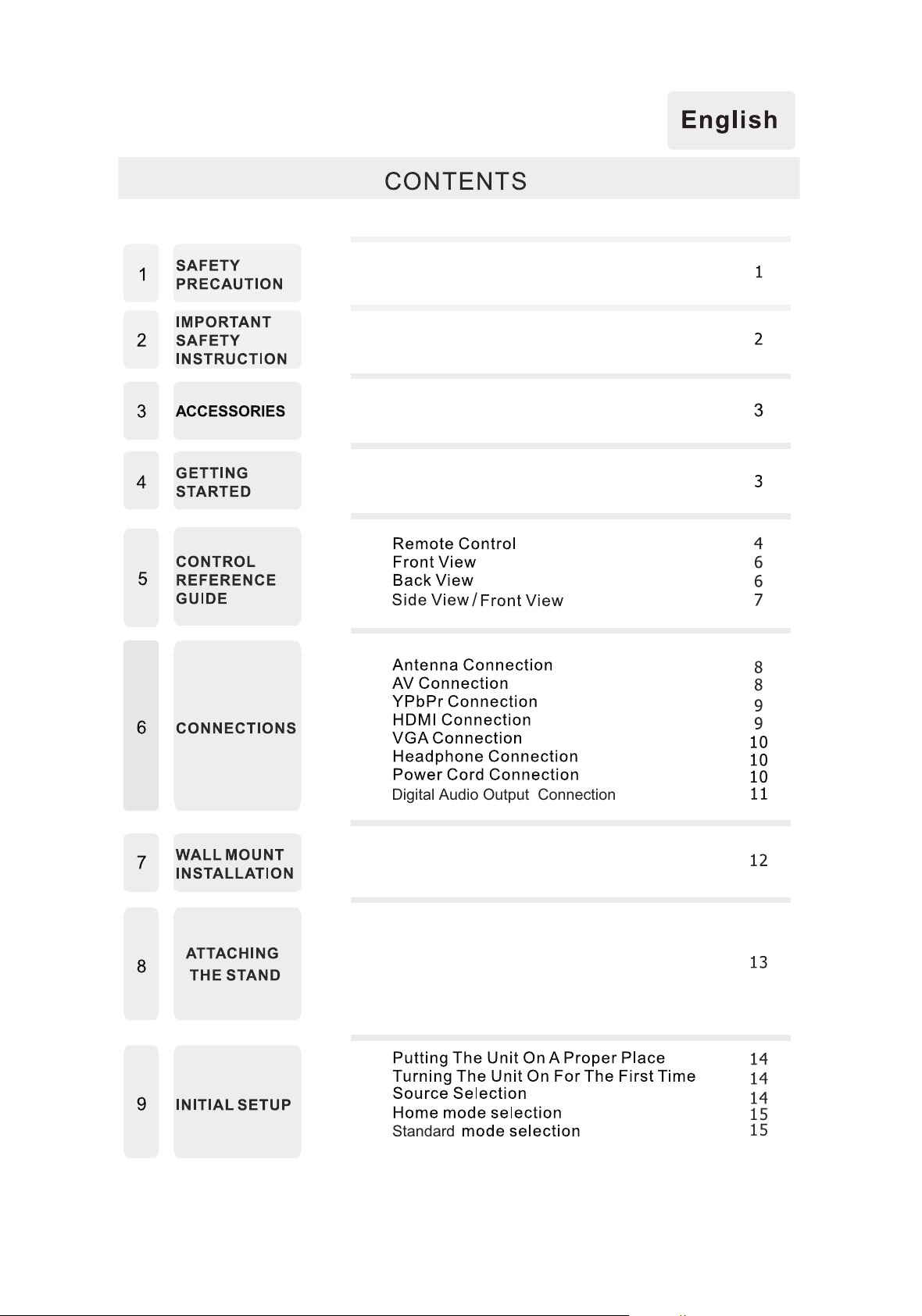
Digital Audio Output Connection
/
Standard
15
15
All manuals and user guides at all-guides.com
CONTENTS
32
12
34
13
14 35
DISPLAY
MODE
SPECIFICA TION
TROU BLE-
SH OOTI N G
GUIDE
PC Formats
Video Formats
TV Symptom
33
30
16
17
19
21
22
25
28
10 TV SETUP
TV Se t up
Picture Menu
Sound
TV Channel Menu
Menu
Time Menu
Setup Menu
LOCK(Parental) Menu
USB Media
Player
All manuals and user guides at all-guides.com
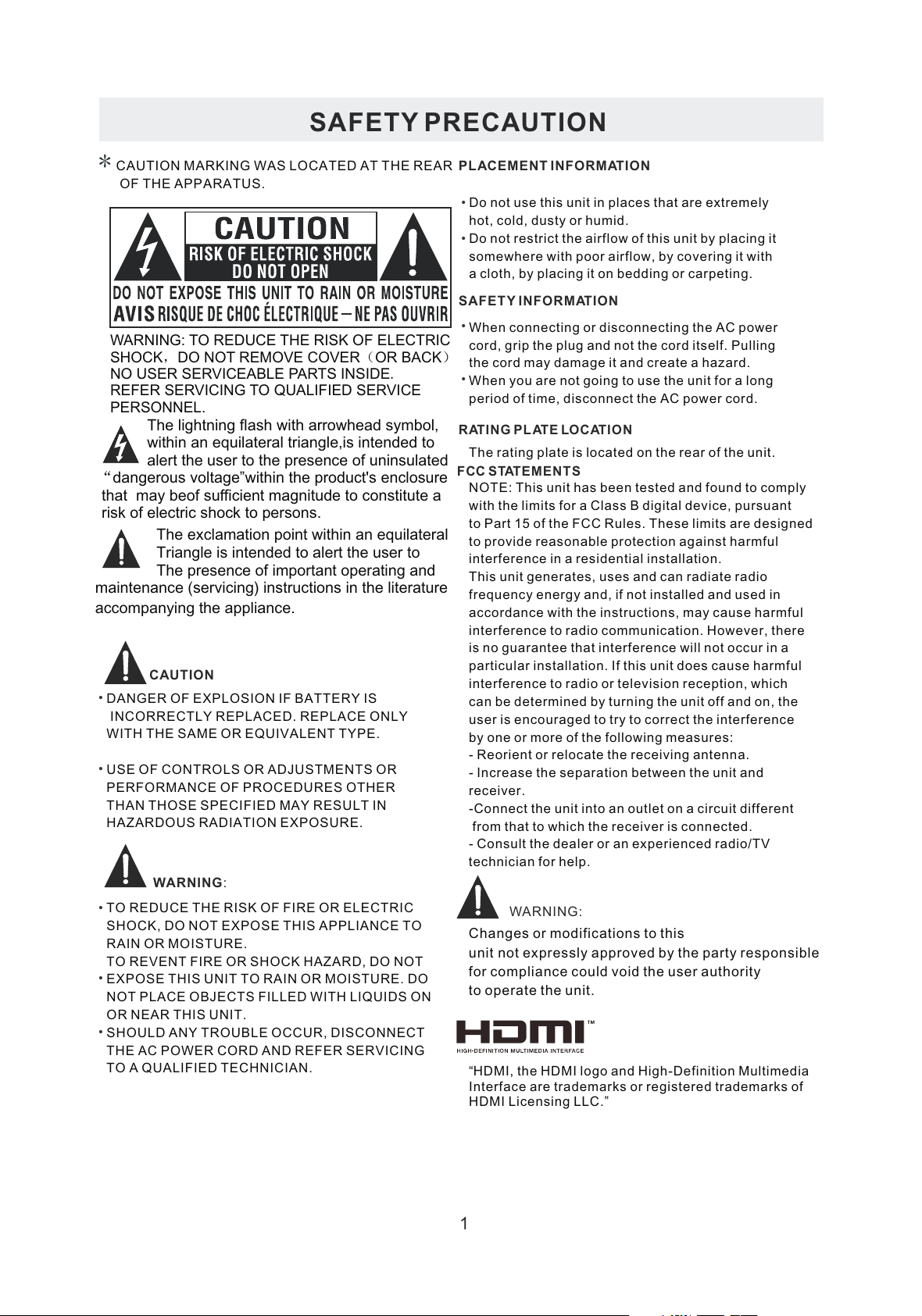
*SAFETY PRECAUTIONCAUTION
•••
WARNING:PLACEMENT INFORMATIONSAFETY INFORMATIONRATING PLATE LOCATIONFCC STATEMENTSWARNING:1CAUTION MARKING WAS LOCATED AT THE REAR OF THE APPARATUS.WARNING: TO REDUCE THE RISK OF ELECTRICSHOCK,DO NOT REMOVE COVER(OR BACK)NO USER SERVICEABLE PARTS INSIDE.REFER SERVICING TO QUALIFIED SERVICEPERSONNEL.The lightning flash with arrowhead symbol, within an equilateral triangle,is intended to alert the user to the presence of uninsulated“dangerous voltage”within the product's enclosure that may beof sufficient magnitude to constitute a risk of electric shock to persons.The exclamation point within an equilateral Triangle is intended to alert the user toThe presence of important operating andmaintenance (servicing) instructions in the literatureaccompanying the appliance.DANGER OF EXPLOSION IF BATTERY IS INCORRECTLY REPLACED. REPLACE ONLY WITH THE SAME OR EQUIVALENT TYPE. USE OF CONTROLS OR ADJUSTMENTS ORPERFORMANCE OF PROCEDURES OTHERTHAN THOSE SPECIFIED MAY RESULT INHAZARDOUS RADIATION EXPOSURE.
••
TO REDUCE THE RISK OF FIRE OR ELECTRICSHOCK, DO NOT EXPOSE THIS APPLIANCE TORAIN OR MOISTURE.TO REVENT FIRE OR SHOCK HAZARD, DO NOTEXPOSE THIS UNIT TO RAIN OR MOISTURE. DONOT PLACE OBJECTS FILLED WITH LIQUIDS ONOR NEAR THIS UNIT. SHOULD ANY TROUBLE OCCUR, DISCONNECTTHE AC POWER CORD AND REFER SERVICINGTO A QUALIFIED TECHNICIAN.Do not use this unit in places that are extremely hot, cold, dusty or humid. Do not restrict the airflow of this unit by placing itsomewhere with poor airflow, by covering it with a cloth, by placing it on bedding or carpeting. When connecting or disconnecting the AC power cord, grip the plug and not the cord itself. Pulling the cord may damage it and create a hazard. When you are not going to use the unit for a long period of time, disconnect the AC power cord. The rating plate is located on the rear of the unit.NOTE: This unit has been tested and found to comply with the limits for a Class B digital device, pursuantto Part 15 of the FCC Rules. These limits are designedto provide reasonable protection against harmful interference in a residential installation. This unit generates, uses and can radiate radiofrequency energy and, if not installed and used in accordance with the instructions, may cause harmful interference to radio communication. However, thereis no guarantee that interference will not occur in a particular installation. If this unit does cause harmful interference to radio or television reception, whichcan be determined by turning the unit off and on, the user is encouraged to try to correct the interference by one or more of the following measures: - Reorient or relocate the receiving antenna. - Increase the separation between the unit and receiver. -Connect the unit into an outlet on a circuit different from that to which the receiver is connected. - Consult the dealer or an experienced radio/TV technician for help.Changes or modifications to thisunit not expressly approved by the party responsible for compliance could void the user authorityto operate the unit.
••••
“HDMI, the HDMI logo and High-Definition Multimedia Interface are trademarks or registered trademarks of HDMI Licensing LLC.”

All manuals and user guides at all-guides.com
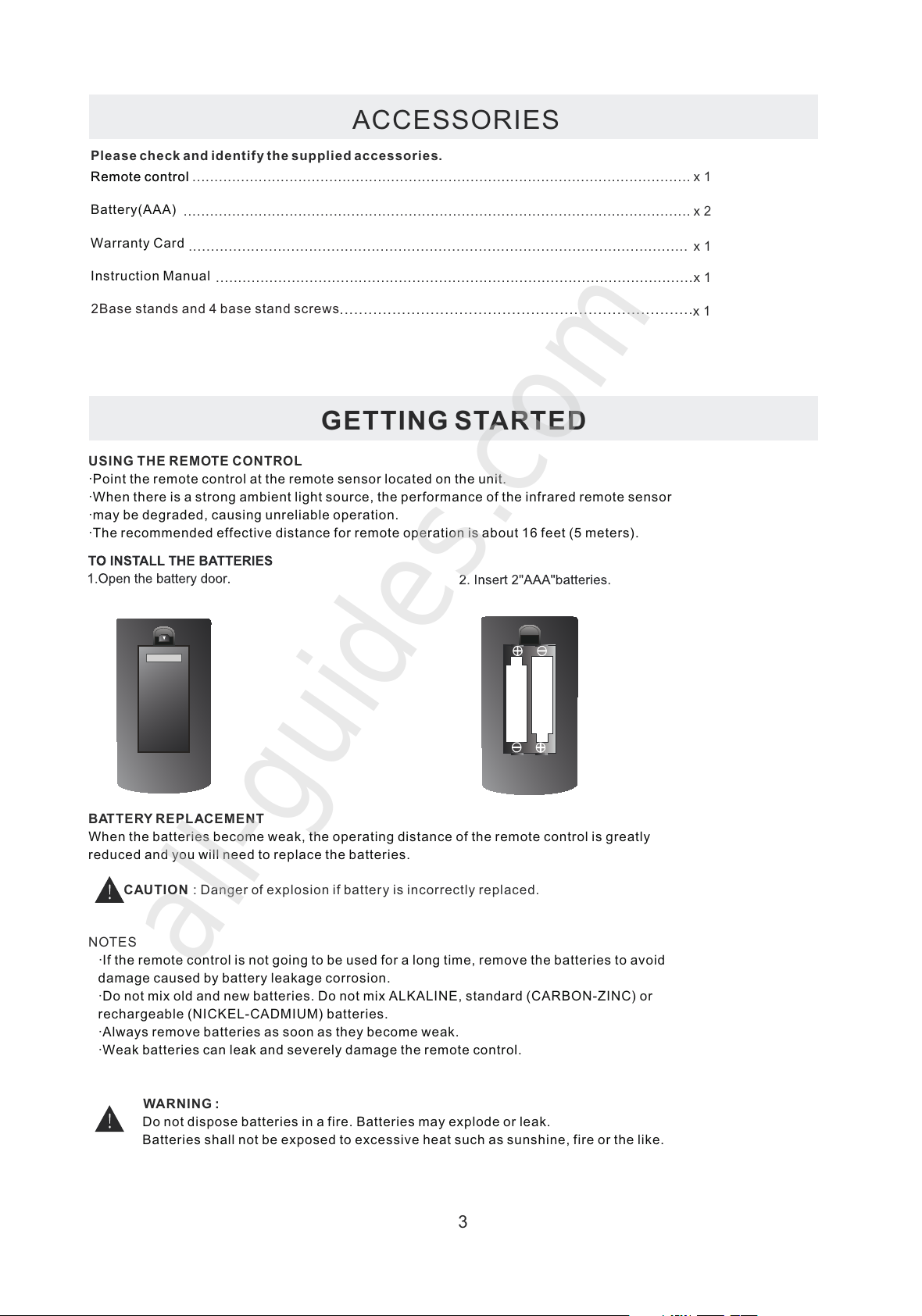
ACCESSORIES
Please check and identify the supplied accessories............................................................................................................................................................................................................................
GETTING STARTED
USING THE REMOTE CONTROLBATTERY REPLACEMENTCAUTION: Danger of explosion if battery is incorrectly replaced.NOTESWARNING :3x 2x 1x 1x 1Remote control .................................................................................................................Remote controlBattery(AAA)Warranty CardInstruction Manual·Point the remote control at the remote sensor located on the unit.·When there is a strong ambient light source, the performance of the infrared remote sensor·may be degraded, causing unreliable operation.·The recommended effective distance for remote operation is about 16 feet (5 meters).When the batteries become weak, the operating distance of the remote control is greatlyreduced and you will need to replace the batteries.·If the remote control is not going to be used for a long time, remove the batteries to avoiddamage caused by battery leakage corrosion.·Do not mix old and new batteries. Do not mix ALKALINE, standard (CARBON-ZINC) orrechargeable (NICKEL-CADMIUM) batteries.·Always remove batteries as soon as they become weak.·Weak batteries can leak and severely damage the remote control. Do not dispose batteries in a fire. Batteries may explode or leak. Batteries shall not be exposed to excessive heat such as sunshine, fire or the like.2Base stands and 4 screwsbase stand
..........................................................................
x 1...................................................................................................................
All manuals and user guides at all-guides.com
all-guides.com
CC
FAV FAV+
FAV-
EN TER
EP G
AU TO
CH .LI ST
AD D/D EL
REPEAT AB
RT2412-C
All manuals and user guides at all-guides.com
CC
FAV FAV+
FAV-
EN TER
EP G
AU TO
CH.LIS T
AD D/D EL
REPEAT AB
RT2412-C
USB
USB
USB
USB
USB
USB
All manuals and user guides at all-guides.com
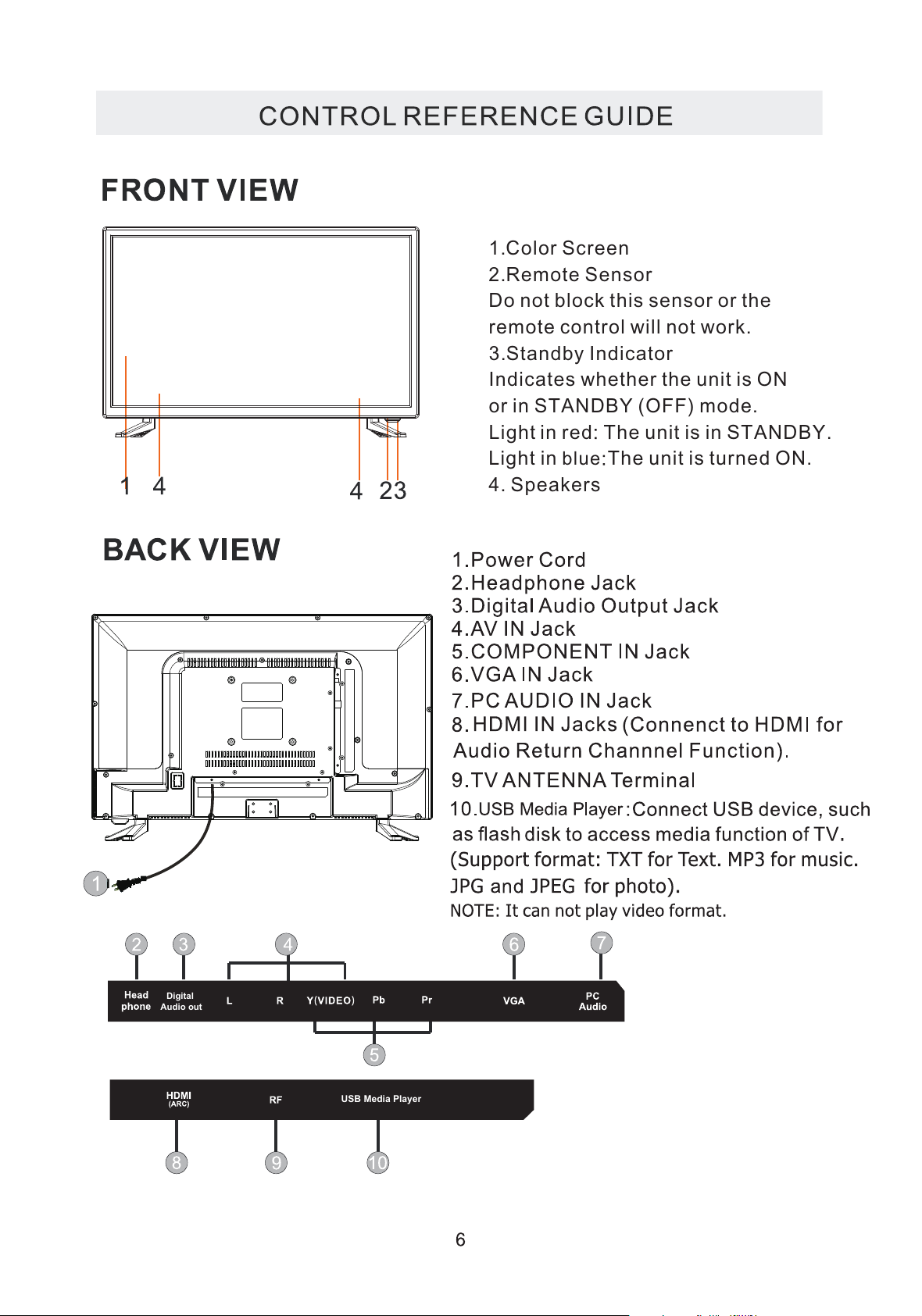
1.Color Screen
2.Remote Sensor
Do not block this sensor or the
remote control will not work.
3.Standby Indicator
Indicates whether the unit is ON
or in STANDBY (OFF) mode.
Light in red he unit is in STANDBY.
Light in blue The unit is turned ON.
4. Speakers
Digital
Audio out
USB Media Player
All manuals and user guides at all-guides.com
VOL
CH
MENU SOURCE
STANDBY
All manuals and user guides at all-guides.com