Red Sea ReefLED™
6
Safety
PLEASE READ AND FOLLOW ALL SAFETY INSTRUCTIONS
DO NOT LOOK DIRECTLY AT LEDS REGARDLESS OF INTENSITY.
THIS DEVICE IS INTENDED FOR INDOOR USE ONLY.
CAUTION: When switched on, contact with the LED lens may cause
burns. Allow to cool before touching, adjusting or servicing.
DANGER: To avoid possible electric shock, special care should be taken
when handling a wet aquarium. For each of the following
situations, do not attempt repairs yourself; return the appliance
to an authorized service facility for service or discard the
appliance.
WARNING: To guard against injury, basic safety precautions should be
observed, including the following:
Do not operate any appliance if it has a damaged cord or plug, if it is
malfunctioning, or if it is dropped or damaged in any manner.
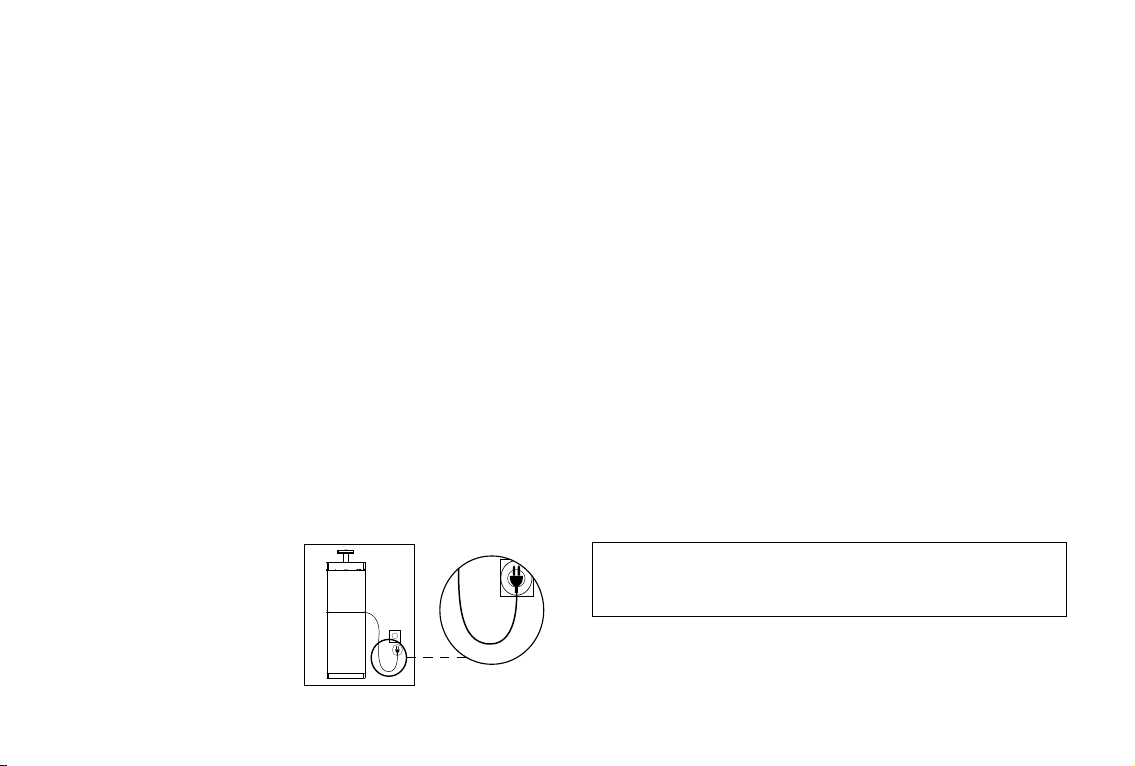
To avoid the possibility of the appliance, plug or receptacle getting wet,
position the aquarium stand and tank to one side of a wall-mounted
receptacle to prevent water from
dripping onto the receptacle or
plug. You should create a "drip
loop" (see Figure 1) for each cord
connecting an aquarium appliance
to a receptacle. The "drip loop"
is that part of the cord below
the level of the receptacle, or
the connector. Use an extension cord, if necessary, to prevent water
traveling along the cord and coming into contact with the receptacle. If
the plug or receptacle does get wet, DO NOT unplug the cord. Disconnect
the fuse or circuit breaker that supplies power to the appliance. Then
unplug the device and examine for presence of water in the receptacle.
Close supervision is necessary when any appliance is used by or near
children.
To avoid injury, do not contact moving parts.
Always unplug an appliance from an outlet when not in use, before
putting on or taking off parts, and before cleaning. Never pull the cord
itself to remove the plug from the outlet. Grasp the plug and pull to
disconnect.
Do not use an appliance for anything other than its intended use.
The use of attachments not recommended or sold by the appliance
manufacturer may cause unsafe conditions.
Do not install or store the appliance where it will be exposed to the
weather or to temperatures below freezing point.
Make sure an appliance mounted on a tank is securely installed before
operating it.
Read and observe all the important notices on the appliance.
Note: A cord rated for less amperes or watts than the appliance rating
may overheat. Care should be taken to arrange the cord so that
it cannot be tripped over or pulled accidentally.
Figure 1: Drip Loop