Toot
Toot→Toot, toot
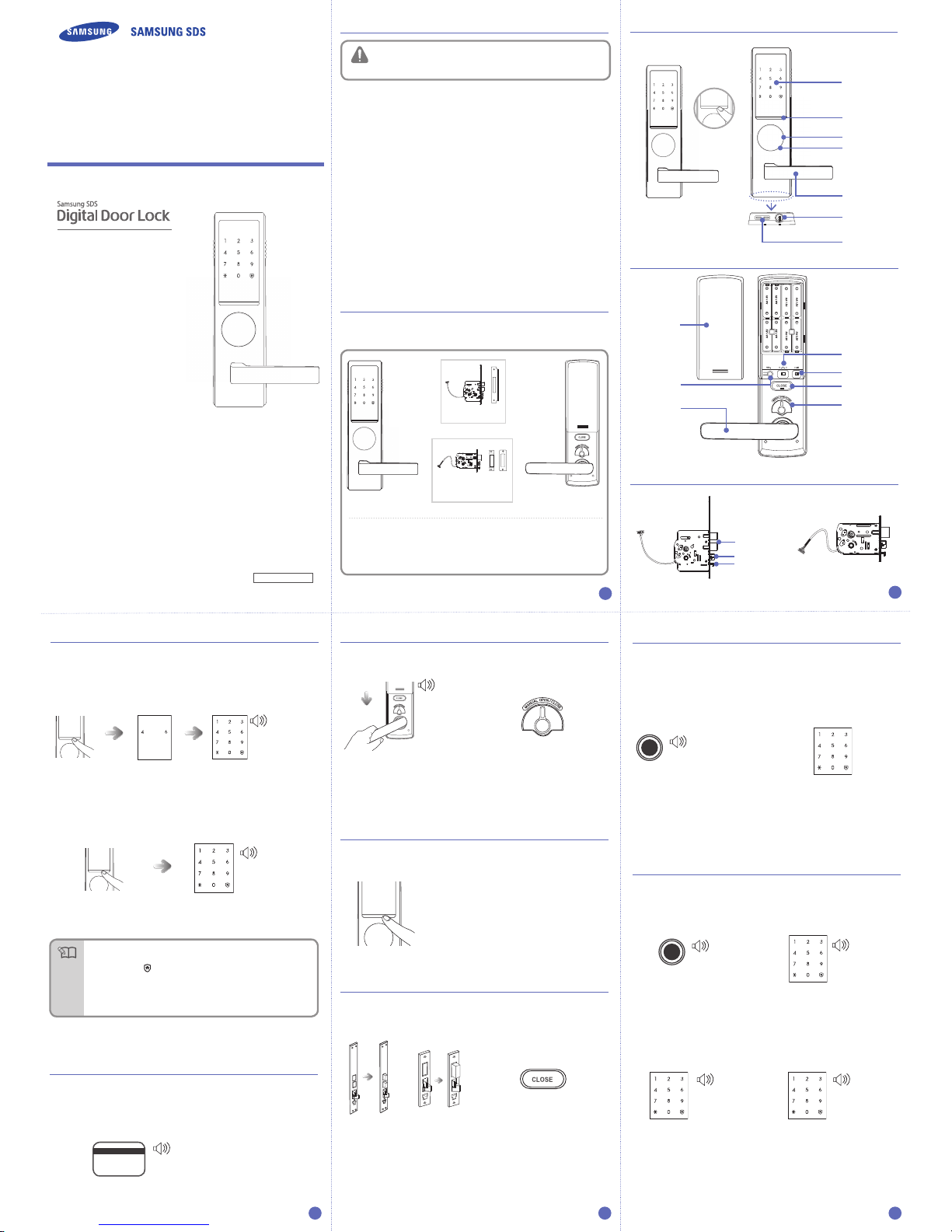
The sound that is generated when the number buttons are pressed, when the
door is locked or when the locked door is unlocked, can be set according to
the user’s preference. The product is set to generate all sounds at the factory.
Inside : The double locking sound is generated
when the [Close] button is pressed.
Outside :
The double locking sound is
generated, the double locking display
LED is lighted, and the door cannot
be opened When the [Enter Number]
Button is pressed, or a card is applied.
The double locking function prevents opening of a locked door from outside.
Activating Double Locking
Press the [Close] button for 2
seconds or longer from the inside
while the door is locked.
The double locking function is released
when the inner body handle is rotated
downward, or the manual Open/Close
lever is rotated to the right or left.
Setting Double Locking Releasing Double Locking
Item Specifications
Voltage 8EA of 1.5V AA Alkaline Batteries(LR6) (6V)
Emergency
Power
Source
9V Battery (6LF22) (Separately sold)
Operation
Method
Electronic Control Method (Password entry or card or
key tag reading)
Weight 2.6Kg (including both inner and outer bodies)
Product
Dimensions
Outer Body
(including
the handle)
81.2 mm(W) x 306.0 mm(H) x 65.7 mm(D)
Inner Body
(including
the handle)
79.0 mm(W) × 290.0 mm(H) × 80.3 mm(D)
Up to 20 cards, including the key tag, can be registered.
(Only ISO14443 A Type is available.)
3. Placing the Card or Key Tag
on the Card Reader (from the
outside)
Enter the password when the
number pad is lighted, and
press the [
] button.
Place the card or key tag to be
registered on the card reader of the
outer body. You will know the card or
key tag has been registered when
“Too~~~t” sounds.
1. When the door is closed [ ]
of the outside body’s number
pad will light up.
2. Press and hold the [ ] button on the
outer body for 3 seconds while the
door is locked.
Apply the registered card or key tag to
the card reader, or enter the password
and then press the [] button.
Releasing the Security Function
Setting the Security Function
CARD
CARD
Or
You can set the security mode suitable for your use when you open the
door using a password.
Briefly press the [Register]
button on the inner body.
Double authorization mode requires both card and password to open the
door, ensuring more security.
The Automatic Locking mode allows for automatic locking of the door
when it is closed.
Set the [Automatic/Manual Locking] toggle switch of
the Inner Body to the ‘A’/‘M’ position.
- Automatic: The door is automatically locked 2 seconds after being closed.
- Manual: The door does not lock automatically, and [CLOSE] button must be
pressed from the inside, press the [Enter Number] Button to close
the door.
- [ 0 ] Button: All sounds except the alarm sound are deactivated.
- [1] and [2] Buttons: All sounds are activated and the sounds get bigger as the step
become higher.
Put the [Sound Control] switch on
one of [0], [1], or [2], and close the
battery cover.
Open the battery cover on the
inner body.
This function generates the alarm sound when an attempt is made to
forcefully open the door from the inside or the outside.
(This is a basic function of the lock, and cannot be separately set or released.)
This function generates an alarm sound and deactivates lock operation
when it is improperly handled from the outside.
This alarm will sound if an attempt is made to open the door with an invalid card, or if
a wrong password is entered five times in a row.
The alarm sound is generated, and the lock is deactivated for 3 minutes. While the
door is in this inactive mode, a single “Toot” sound is generated every 10 seconds
and seven consecutive “Toot~, Toot~, Toot~” will sound after 3 minutes. Following
this, the lock is released from inactive mode.)
Press the [Register] button.
Outside Apply the registered card or key tag to the card reader, or enter
the password and then press the [
] button.
Inside
Battery Replacement Alarm Generation
If the melody of “Blues for Elise” sounds when opening the door with the
password or a card (key tag), it is time to replace the batteries.
(The low battery indicator is lighted when the melody sounds.)
Replacing the Battery
Replace all batteries within a week from the first alarm sound.
If the batteries are not replaced after their replacement time comes, they will
be completely discharged and the lock will not operate.
Purchase an emergency battery (9V) at the nearest store.
- As the alkaline batteries offer longer life, they are recommended over the
manganese batteries or rechargeable ones.
Place the card or key tag on the card reader, or enter the password, while
the 9V battery is connected to the external power port of the outer body.
This function generates the alarm sound when fire is detected so that the
residence can quickly respond. The built-in fire detection function is a basic
function of the lock, and cannot be released by the user.
When fire occurs, the temperature sensor detects it and flashes the [Close] button
while generating the alarm sound.
The door is automatically opened after the alarm sound has stopped.
(The lock resumes normal operation if the inside temperature returns to a normal
level.)
The built-in fire detection function is activated when the temperature rises around
60℃, which may differ depending on the installation environment.
Or
●
The contents of this user guide are subject to change without prior notice
to the user in order to enhance performance of the product.
To make sure the password has been
properly registered, check the new
password and close the door.
5. Checking New Password Operation (from the outside)
1. Pressing the [Register]
Button (from the inside)
Open the battery cover of the
inner body and briefly press the
[Register] button.
Place the registered card or key
tag to the card reader on the
outer body.
2. Entering the Password
(from the outside)
4. Confirming Card or Key Tag
Registration (from the outside)
CARD
Enter the password when the number
pad is lighted, and press the [
] button.
- Success: Too~~~t
- Fail: Toot
1. Pressing the [Register]
Button (from the inside)
Open the battery cover of the
inner body and press and hold the
[Register] button for 3 seconds.
2. Entering the Password
(from the outside)
● Manage your password with care so that unauthorized people will not have
access to it. Regularly changing your password can reduce the risk of it
being leaked.
● A registered password cannot be deleted. Change the password to a new
one or initialize it to delete all registered data (password, card and key tag)
and then reregister them.
Warning
● Registered cards cannot be individually deleted. All card information is
deleted when the card delete function is selected. Previously registered cards
cannot be used to open the locked door after they are deleted.
Warning
[
7] Button : Multi-leveled Security
Code Entry Mode
[9] Button : Common Mode
Press the [
] button after pressing the
[7] or [9] button, and the security mode
will be set.
Briefly press the [Register]
button on the inner body.
[4] Button : Double authorization
mode on
[6] Button : Double authorization
mode off
Press the [
] button after pressing the
[4] or [6] button, and the authorization
mode will be set.
Or
● Register a new card after deleting the card data.
● To open the locked door from outside after deleting card data, use the
registered password.
● Deleting the card or key tag is available while the door is open.
Note
● To register multiple cards or key tags, lightly place another card or key tag
to the card reader within 20 seconds after registering the previous card or
key tag.
Warning
● If the poles of the batteries are not placed properly, the lock will not
operate normally.
● Liquid leaks from batteries can damage the product. Check the batteries
regularly (every 6 months).
● After the battery replacement alarm has sounded, password/card
information cannot be registered, changed, deleted, initialized or
configured until the batteries are replaced.
● The unit will stop operating suddenly if the batteries are not replaced.
Warning
● Please be cautious when using this function, since the door can only be
opened from the outside using the emergency key when this function
is set. Please be particularly careful of children accidentally setting this
function from the inside.
Warning
Releasing the Alarm
● The security function is automatically released when the locked door is
opened from outside by entering the registered password or applying the
card or key tag to the card reader.
Note
Note
10 11 12
7 8 9
Card and Key Tag Registration
Automatic/Manual Locking Setting
Sound Setting and Releasing
Alarm Sound (Prank Prevention Function)
Deleting the Card or Key Tag
Multi-leveled Security Code Entry Mode Setting
Double Authorization Mode Setting
Replacing the Batteries
Using the Emergency Battery
●
The setup of double authorization mode only works when the door is open.
●
When purchased, the product is not set to double authorization mode initially.
●
To setup the double authorization mode, more than 1 card must be registered.
●
Double authorization mode will automatically be turned off when all cards are
deleted.
Setting the Security Function
Setting the Double Locking
Intrusion Detection Function
Built-in Fire Detection Function
Product Specifications
Too~~t
Too~~~t
CARD CARD
Too~~t
Too~~t
Too~~~t
Toot
Toot
Too~~~t
Too~~~t
Too~~~t
Too~~~t, toot, toot
Too~~~t
CARD