7B71 (SN B205000and Up)
SECTION 2
OPERATING INSTRUCTIONS
Change information, if any, affecting this section will be found at the rear of the manual.
General
The 7B71 delaying sweep plug-in unit operates with a
Tektronix 7000-series indicator oscilloscope and a7A-series
vertical plug-in unit to form acomplete oscilloscope
system. To use the 7B71 effectively, its operation and
capabilities should be known. This section describes the
operation of the front-panel controls, gives first-time and
general operating information and lists some basic applica-
tions for this instrument.
Installation
The 7B71 is designed to operate in the horizontal plug-in
compartments of Tektronix 7000-series oscilloscopes. The
7B71 can also be installed in avertical plug-in compartment
to provide asweep that runs vertically on the CRT. How-
ever, when used in this manner, there is no retrace blanking
or internal triggering provision and the unit may not meet
the specifications given in Section 1. The instructions in
this manual are written for use of the 7B71 in ahorizontal
plug-in compartment of the oscilloscope.
When the 7B71 is used with an oscilloscope which has
two horizontal plug-in compartments, install this unit in the
A(DELAYING TIME BASE) compartment. Then, if a
delayed-sweep unit is installed in the B(right) compart-
ment, delayed-sweep operation is available. The 7B71 will
operate properly in the Bcompartment for all horizontal
modes of operation except delaying sweep.
To install the 7B71 into aplug-in compartment, push it
in until it fits firmly into the indicator plug-in compart-
ment. To remove, pull the release latch (see Fig. 2-1) to
disengage the unit from the indicator and pull it out of the
plug-in compartment. Even though the horizontal gain of
the indicator oscilloscope is standardized to minimize
adjustment when inserting plug-in units, the sweep calibra-
tion of the 7B71 should be checked when it is inserted into
the indicator to verify measurement accuracy. The pro-
cedure for checking the unit is given under Sweep Calibra-
tion Check in this section.
FRONT-PANEL CONTROLS
General
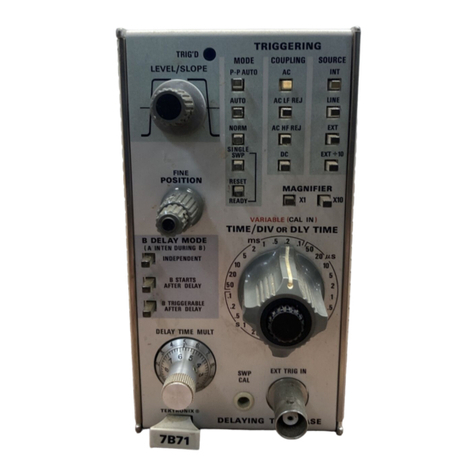
All controls required for the operation of the 7B71 are
located on the front panel of the unit (see Fig. 2-2). To
Release
Latch
Fig. 2-1. Location of release latch.
make full use of the capabilities of this instrument, the
operator should be familiar with the function and use of
each of these controls. Abrief description of the front-
panel controls and connector is given here. More detailed
information is given under General Operating Information.
Triggering Controls
LEVEL/SLOPE Selects the amplitude point and
slope of trigger signal on which the
sweep is triggered. When the indica-
tor line on the outer ring is to the
left of center, the sweep is triggered
on the positive-going slope of the
trigger signal, as shown by the
positive-going waveform. To the
right of center, the sweep is trig-
gered on the negative-going slope of
the trigger signal as shown by the
negative-going waveform.
TRIC'D Light indicates that the sweep is
triggered and will produce adisplay
with correct setting of the POSI-
TION control and the controls on
the associated vertical unit and indi-
cator oscilloscope.
[A] 2-1