Teledyne MX300 User manual

Portable Oxygen Monitor
Teledyne Analytical Instruments i
OPERATING & SERVICE INSTRUCTIONS FOR
MX300
PORTABLE OXYGEN MONITOR
TYPE B APPLIED PART:
Equipment provides a degree of protection against electric shock,
particularly regarding—
• Allowable Leakage Current
• Reliability of the protective earth connection (if present).
P/N M75387
Sep 18, 2009
ECO 09-0158

MX300
Teledyne Analytical Instruments ii
Copyright © 2009 Teledyne Analytical Instruments.
All Rights Reserved
No part of this manual may be reproduced, transmitted, transcribed, stored in a retriev-
al system, or translated into any other language or computer language in whole or in
part, in any form or by any means, whether it be electronic, mechanical, optical, ma-
nual, or otherwise, without prior written consent of Teledyne Analytical Instruments,
16830 Chestnut Street, City of Industry, CA 91749-1580, USA.
Warranty
Teledyne warrants that the goods are free from defects of material and of construction
for a period of 2 years (or less, as the case may be, with consumables) from the date of
shipment from Teledyne. The liability of Teledyne, if any, shall be limited solely to the
replacement or repair of the goods, and shall not include shipping costs or other inci-
dental damages as defined in Section 2-715 of the U.S. Uniform Commercial Code.
Teledyne cannot warrant any damage resulting from unauthorized repair, misuse, im-
proper maintenance, negligence, or other events not caused by Teledyne or our goods.
CAUTION: FEDERAL LAW RESTRICTS THIS DEVICE TO SALE BY OR
ON THE ORDER OF A PHYSICIAN.

Portable Oxygen Monitor
Teledyne Analytical Instruments iii
About This Manual
This Manual describes the installation, configuration, operation and
maintenance instructions for Model MX300 Portable Oxygen Monitor.
This Manual contains Cautions, Warnings, and Notes to ensure safe
and efficient performance of the Monitor.
For convenience with operating and maintaining your Monitor, this
manual includes Specifications, Troubleshooting and Maintenance Spare
Parts sections.
How To Use This Manual
This manual is designed to walk you through the initial set-up of
the MX300 Portable Oxygen Monitor. After you have used it to initially
commission your Monitor, it becomes a quick reference guide to help
you with specific questions or operating challenges.
Before operating the Monitor for the first time, you are advised to
read and familiarize yourself with the contents of this manual.

MX300
Teledyne Analytical Instruments iv
Safety Messages
Your safety and the safety of others are very important. Please care-
fully read and understand the Caution, Warning and Notes found in sev-
eral places in the manual.
CAUTION: THE MONITOR SHOULD ONLY BE USED FOR THE PUR-
POSES AND IN THE MANNER DESCRIBED IN THIS MA-
NUAL.
IF YOU USE THE MONITOR IN A MANNER OTHER THAN
THAT FOR WHICH IT WAS INTENDED, UNPREDICTABLE
BEHAVIOR COULD RESULT POSSIBLY ACCOMPANIED
WITH HAZARDOUS CONSEQUENCES.

Portable Oxygen Monitor
Teledyne Analytical Instruments v
Table of Contents
Safety Messages............................................................................ iv
List of Figures.................................................................................vii
List of Tables .................................................................................viii
Introduction...................................................................................... 1
1.1 Features .................................................................................... 3
1.2 Options ...................................................................................... 4
1.3 Applications ............................................................................... 4
1.4 Operation Summary .................................................................. 4
Operating Instructions ..................................................................... 7
2.1 Setup ......................................................................................... 7
2.1.1 Sensor Installation or Replacement........................................ 7
2.1.2 Mounting................................................................................. 9
2.1.2.1 V-mount adapter installation................................................ 9
2.1.2.2 Universal Mounting Clamp Installation .............................. 10
2.1.3 Battery Installation................................................................ 10
2.1.4 Calibration ............................................................................ 11
2.1.5 Alarms .................................................................................. 13
2.1.6 Output 0-1 VDC or RS232.................................................... 15
2.2 Operation................................................................................. 17
2.2.1 Procedure............................................................................. 17
2.3 Factors Affecting Sampling Accuracy ...................................... 18
2.3.1 Humidity ............................................................................... 18
2.3.2 Temperature......................................................................... 18

MX300
Teledyne Analytical Instruments vi
2.3.3 Pressure............................................................................... 18
2.3.4 Discrepancy in Readings...................................................... 19
2.3.5 Anesthetic Gases ................................................................. 19
2.3.5.1 Gases That MAY INDUCE Reading Error ......................... 19
2.3.5.2 Care After Use in Nitrous Oxide ........................................ 20
2.3.6 Cleaning ............................................................................... 21
2.4 Dos and Don’ts........................................................................ 21
Service Instructions....................................................................... 23
3.1 General Service Information.................................................... 23
3.2 Overall Maintenance ............................................................... 23
3.3 Battery Maintenance ............................................................... 23
3.4 Sensor Maintenance ............................................................... 24
3.5 Calibration ............................................................................... 24
3.6 Alarms ..................................................................................... 24
3.7 Factors Affecting Sampling Accuracy...................................... 24
3.8 Troubleshooting ...................................................................... 24
3.9 Watchdog ................................................................................ 27
3.10 Other Problems with the Monitor........................................... 28
3.11 Return Authorization for Service ........................................... 29
Appendix ....................................................................................... 30
A.1 Specifications.......................................................................... 30
A.2 Spare Parts List ...................................................................... 32
A.3 Optional Accessories .............................................................. 32

Portable Oxygen Monitor
Teledyne Analytical Instruments vii
List of Figures
Figure 1-1: MX300 Front View......................................................... 1
Figure 2-1: Installing the R17MED Sensor ...................................... 8
Figure 2-2: Sensor Cable Connection to Monitor ............................ 8
Figure 2-3: Mounting the Sensor in the Tee Adapter....................... 9
Figure 2-4: V-Mount Adapter Installation......................................... 9
Figure 2-5: Brass Insert for Universal Mounting Clamp................. 10
Figure 2-6: Installing Batteries....................................................... 11
Figure 2-7: Calibration Sequence.................................................. 12
Figure 2-8: Setting the Alarms....................................................... 14
Figure 2-9: 0-1 VDC or RS 232 Digital Output Port ....................... 15

MX300
Teledyne Analytical Instruments viii
List of Tables
Table 2-1: Oxygen Reading Error in a Mixture of Anesthetic Gas. 19
Table 3-1 Troubleshooting ............................................................ 25
Table 3.2 Error Codes................................................................... 27

Portable Oxygen Monitor Introduction
Teledyne Analytical Instruments 1
Introduction
The Teledyne Analytical Instruments MX300 Oxygen Monitor, he-
reinafter referred to as MX300 or Monitor, is a portable monitor de-
signed to analyze oxygen concentration in medical gas mixtures. The
Monitor is equipped with oxygen concentration alarms. Oxygen analy-
sis is linear across the single range of 0-100% using Teledyne’s class
R17MED oxygen sensor.
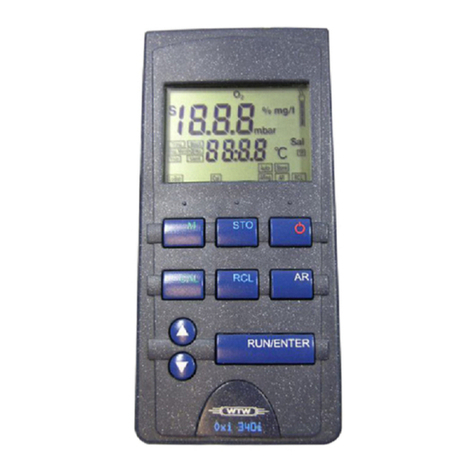
Figure 1-1: MX300 Front View
The MX300’s liquid crystal display (LCD) consists of up to 3.5
characters plus a decimal point indicator capable of displaying up to
105%. An integral battery life indicator is displayed continuously on the
MX300.
The Monitor is powered by three AA alkaline batteries and is de-
signed to operate for 2000 hours on a single set of batteries in a Non-
alarm State.

Introduction MX300
Teledyne Analytical Instruments 2
A sensor failure alarm is incorporated which warns the user if the
sensor signal is lost or low. When this occurs, the √SENSOR display
and a visual green light will flash, and the alarm buzzer will activate.
This alarm condition is also triggered when the oxygen concentration at
the point of analysis falls below 18% (Reference: ISO 7767 standard).
For safety reasons, when any of the above referenced conditions occur,
the alarm buzzer cannot be silenced until the alarm condition is resolved.
CAUTION: DURING NORMAL USE, ALARM CONDITIONS SHOULD
NOT BE OVERRIDDEN BY ACTIONS SUCH AS HOLDING
THE ALARM SILENCE KEY DEPRESSED OR REMOVING
THE BATTERIES. THE CAUSE FOR THE ALARM CONDI-
TION SHOULD FIRST BE RESOLVED.
CAUTION: WHILE HOLDING DOWN THE ALARM SILENCE KEY MAY
MOMENTARILY SILENCE THE ALARM BUZZER ACTI-
VATED BECAUSE OF REASONS MENTIOEND ABOVE,
AUDIBLE ALARM WILL RETURN UPON DISENGAGING THE
ALARM SILENCE KEY. HOLDING THE KEY FOR LONGER
DURATIONS WILL INITIATE THE “STUCK KEY” ALARM,
WHICH CAN BE DEACTIVATED ONLY VIA REMOVING THE
BATTERIES FROM THE ANALYZER. ANALYZER SHOULD
BE RECALIBRATED UP ON REPOWERING. .
The MX300 Monitor incorporates a dual concentration alarm with
individual user-defined set points. The set points are displayed on the
lower portion of the LCD display with the low alarm set point appearing
at the lower left and the high alarm appearing on the lower right of the
display. The alarm circuit provides both an audible and a visual alarm.
When the oxygen concentration reaches levels beyond the pre-set
alarm limits, the following will occur:
1. If the HI alarm is triggered because of monitored oxygen level
exceeding the high alarm set point, the green light display will
flash and the alarm buzzer will activate. The alarm buzzer can
be silenced by pressing the Alarm Silence key.
NOTE: IF THE ALARM CONDITION IS NOT CORRECTED WITHIN
ABOUT 115 SECONDS, THE ALARM BUZZER WILL REAC-
TIVATE. PRESSING THE ALARM SILENCE KEY AGAIN
WILL SILENCE THE ALARM BUZZER ONCE AGAIN FOR
ABOUT 115 SECONDS, WITH THE BUZZER REAACTIVAT-
ING IF THE ALARM CONDITIONS PERSIST.
2. If the LO alarm is triggered because of monitored oxygen level
falling below the low alarm set point, the green light display will
flash and the alarm buzzer will activate.
Table of contents
Other Teledyne Oxygen Equipment manuals

Teledyne
Teledyne 3160 User manual

Teledyne
Teledyne 3020T User manual

Teledyne
Teledyne 329R User manual

Teledyne
Teledyne 356WA User manual

Teledyne
Teledyne MX300-I User manual

Teledyne
Teledyne MD300 User manual

Teledyne
Teledyne MX300-I User manual
Teledyne
Teledyne 319R User manual

Teledyne
Teledyne OT-3 User manual