manuals.online logo
Brands
  1. Home
  2. •
  3. Brands
  4. •
  5. Toyota
  6. •
  7. Automobile Accessories
  8. •
  9. Toyota PC162-0K00H User manual

Toyota PC162-0K00H User manual

Other Toyota Automobile Accessories manuals
Toyota PW5D0-0K001 User manual

Toyota

Toyota PW5D0-0K001 User manual

Toyota Fortuner UH9000S User manual

Toyota

Toyota Fortuner UH9000S User manual

Toyota Bluetooth SWC User manual

Toyota

Toyota Bluetooth SWC User manual

Toyota PZQ22-89320 User manual

Toyota

Toyota PZQ22-89320 User manual

Toyota Avensis 2006 TNS600 User manual

Toyota

Toyota Avensis 2006 TNS600 User manual

Toyota PZ403-B2614-GA User manual

Toyota

Toyota PZ403-B2614-GA User manual

Toyota PVM User manual

Toyota

Toyota PVM User manual

Toyota Avensis 2006 TNS600 User manual

Toyota

Toyota Avensis 2006 TNS600 User manual

Toyota PT922-12170 User manual

Toyota

Toyota PT922-12170 User manual

Toyota PVM User manual

Toyota

Toyota PVM User manual

Toyota Auris (RHD) User manual

Toyota

Toyota Auris (RHD) User manual

Toyota IHF1700 User manual

Toyota

Toyota IHF1700 User manual

Toyota 00016-00401 User manual

Toyota

Toyota 00016-00401 User manual

Toyota RUSH-20 User manual

Toyota

Toyota RUSH-20 User manual

Toyota SIENNA U User manual

Toyota

Toyota SIENNA U User manual

Toyota PZ457-B056E-00 User manual

Toyota

Toyota PZ457-B056E-00 User manual

Toyota PZ403-99646-00 User manual

Toyota

Toyota PZ403-99646-00 User manual

Toyota PZ439-E9472-AB User manual

Toyota

Toyota PZ439-E9472-AB User manual

Toyota PZ457-E8310-00 User manual

Toyota

Toyota PZ457-E8310-00 User manual

Toyota handsfree communication User manual

Toyota

Toyota handsfree communication User manual

Toyota LHD User manual

Toyota

Toyota LHD User manual

Toyota handsfree communication User manual

Toyota

Toyota handsfree communication User manual

Toyota PZ408-E2555-00 User manual

Toyota

Toyota PZ408-E2555-00 User manual
Toyota Bluetooth SWC User manual

Toyota

Toyota Bluetooth SWC User manual

Popular Automobile Accessories manuals by other brands

Magneti Marelli AC161 Installation instruction

Magneti Marelli

Magneti Marelli AC161 Installation instruction

FDI uEZ GUI Start here

FDI

FDI uEZ GUI Start here

JCROffroad JT Install instructions

JCROffroad

JCROffroad JT Install instructions

Rostra VOXXElectronics 250-1930 owner's guide

Rostra

Rostra VOXXElectronics 250-1930 owner's guide

TOP VEHICLE TECH GR3FORD5 installation manual

TOP VEHICLE TECH

TOP VEHICLE TECH GR3FORD5 installation manual

Safe Fleet PRIME DESIGN AR-2000-BLK manual

Safe Fleet

Safe Fleet PRIME DESIGN AR-2000-BLK manual

Skoda Fabia Combi 5J Fitting instructions

Skoda

Skoda Fabia Combi 5J Fitting instructions

Camcar 40077 Al Mounting instructions

Camcar

Camcar 40077 Al Mounting instructions

Camcar 40089 AL Mounting instructions

Camcar

Camcar 40089 AL Mounting instructions

Impac Tradesman 2000 installation manual

Impac

Impac Tradesman 2000 installation manual

DVB OFFROAD BRSB-01 installation manual

DVB

DVB OFFROAD BRSB-01 installation manual

Safari Snorkel SS385HF installation guide

Safari Snorkel

Safari Snorkel SS385HF installation guide

ULTIMATE SPEED 279746 Assembly and Safety Advice

ULTIMATE SPEED

ULTIMATE SPEED 279746 Assembly and Safety Advice

SSV Works DF-F65 manual

SSV Works

SSV Works DF-F65 manual

ULTIMATE SPEED CARBON Assembly and Safety Advice

ULTIMATE SPEED

ULTIMATE SPEED CARBON Assembly and Safety Advice

Witter F174 Fitting instructions

Witter

Witter F174 Fitting instructions

WeatherTech No-Drill installation instructions

WeatherTech

WeatherTech No-Drill installation instructions

TAUBENREUTHER 1-336050 Installation instruction

TAUBENREUTHER

TAUBENREUTHER 1-336050 Installation instruction

manuals.online logo
manuals.online logoBrands
  • About & Mission
  • Contact us
  • Privacy Policy
  • Terms and Conditions

Copyright 2025 Manuals.Online. All Rights Reserved.

No.
1
2
3
4
5
6
7
8
1
1
1
1
8
2
1
1
Side Visor FR-RH
Side Visor FR-LH
Side Visor RR-RH
Side Visor RR-LH
Bracket
Paper Jig
Primer
Installation manual
PC162-0K00A
PC162-0K00B
PC162-0K00J
PC162-0K00K
PC162-0K00G
-
-
-
Part NamePart Number Qty Required tools
1.Clean cloth
2.White gasoline or
Alcohol 60-80%
3.Masking tape
4.Scissor or Cutter
Parts Number Model Remark
1.
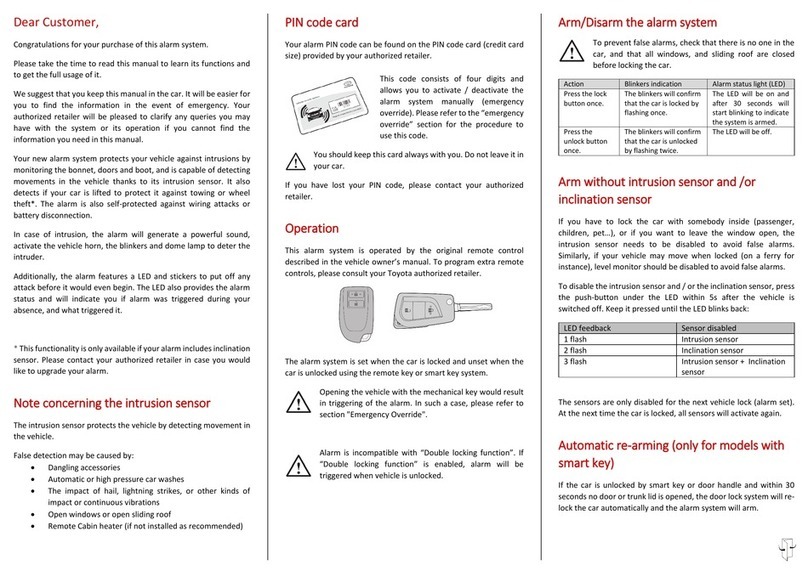
INSTALLATION MANUAL
SIDE VISOR
Thank you for purchasing TOYOTA genuinr “SIDE VISOR”. This manual explain the procedure
for installtion. Please read this manual carefully to ensure correct installation.
PC162-0K00H
FORTUNER 2015
-
Installation time : 30 mins
Component Parts
1
34
2
5 6 7 8 9
2
1
3
10cm.
80cm.
2
10ซม. 50ซม.
40mm.
13mm.
20cm 33cm
1. Preparation
1.1 Open all Doors and lower all Door Glasses.
1.2 Remove upper portion of Front & Rear Door
Glass Run from the Door Panel.
1.3 Clean the Door Frame with clean cloth and
white gasoline or alcohol 60-80%
3. Applying primers
3.1 Cut the marking template from the paper provided.
3.2 Attach the marking template to the Door Frame at
the location shown in the picture.
3.3 Apply the primer to the slotted area.
CAUTION:
- Do not apply primer out of the marking area as it
will be very hard to clean them off.
2. Positioning
2.1 Cut the position template from the paper provided.
2.2 Attach the position template to the Door Frame at
the location shown in the picture (approx).
CAUTION :
- Position template shall be attach from the top edge
of Door Frame.
- Distance from the upper door edge to part edge is
13 mm. all around.
PAPER JIG FOR APPLY PRIMER
FR-LH
PAPER JIG FOR APPLY PRIMER
RR-LH
3.
4
6
5
0 mm.
4. Installing the Brackets
4.1 Place the Side Visor on the Door Frame and
mark the location of Brackets.
4.2 Install the Brackets to the marked position.
4.3 Assembly back the Glass Run.
5. Peel the liners at the end of double side tape off
around 5 cm and fold it outward on both Front
and Rear Side Visor to prepare for installation.
6. Attach the Front Side Visor to Door Frame by using
position template as a guide.
*The top edge of the Front Side Visor must be touch
with the bottom edge of the position template, while
the rear edge of the Front Side Visor must be align
with the Door edge.
** The correct assembly
condition of the Bracket
5
4. 5.
8. Check that both Front and Rear Side Visor are on
the same level.
Then slowly peel off the tape liner and press Side
Visor to the vehicle starting from the middle to the
direction shown in the picture.
10. Pull the Side Visor gently to check that adhesive
tapes are properflly attached in all area.
11. Repeat the steps 1-10 to install on the other side.
10
7. Attach the Rear Side Visor to Door Frame by using
position template as a guide.
*The top edge of the Rear Side Visor must be touch
with the bottom edge of the position template, while
the front edge of the Rear Side Visor must be align
with the door edge.
9. Assembly the Brackets
9.1 Slide the Bracket to the Emboss.
9.2 Press the Bracket to lock with the Side Visor.
CAUTION :
When installing the Brackets, use your hand to press the
outer surface of Side Visor to make sure that the Side
Visor will not be detach.
BRKT
Side Visor
BRKT
Side Visor
** The correct assembly
condition of the Bracket
Do not press the bracket
to the hole is not align.
Manually adjust the hole to
align with the emboss ffiifirst
before press the bracket to
lock with the emboss .
9
9CAUTION:
- The Side Visor must only be pressed at the adhesive
area. If pressed wrongly, the tapes may not be fully
adhere.
8
7
0 mm.
BRKT
Side Visor
CAUTION
1
2
2
4. 5.
8. Check that both Front and Rear Side Visor are on
the same level.
Then slowly peel off the tape liner and press Side
Visor to the vehicle starting from the middle to the
direction shown in the picture.
10. Pull the Side Visor gently to check that adhesive
tapes are properflly attached in all area.
11. Repeat the steps 1-10 to install on the other side.
10
7. Attach the Rear Side Visor to Door Frame by using
position template as a guide.
*The top edge of the Rear Side Visor must be touch
with the bottom edge of the position template, while
the front edge of the Rear Side Visor must be align
with the door edge.
9. Assembly the Brackets
9.1 Slide the Bracket to the Emboss.
9.2 Press the Bracket to lock with the Side Visor.
CAUTION :
When installing the Brackets, use your hand to press the
outer surface of Side Visor to make sure that the Side
Visor will not be detach.
BRKT
Side Visor
BRKT
Side Visor
** The correct assembly
condition of the Bracket
Do not press the bracket
to the hole is not align.
Manually adjust the hole to
align with the emboss ffiifirst
before press the bracket to
lock with the emboss .
9
9CAUTION:
- The Side Visor must only be pressed at the adhesive
area. If pressed wrongly, the tapes may not be fully
adhere.
8
7
0 mm.
BRKT
Side Visor
CAUTION
1
2
2