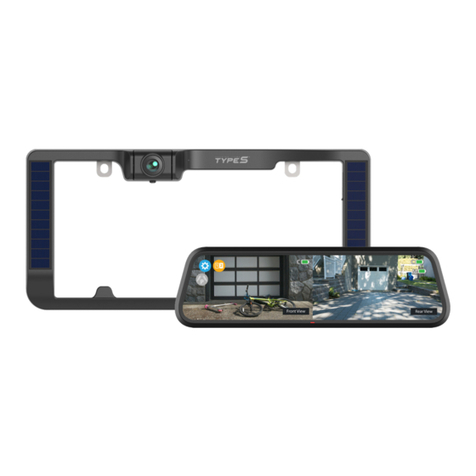
TypeS BT56485 Guide

App View and Solar Powered
Parking Sensor
Important, retain for future reference:
Read carefully
WP ITM. BT56485 / BT56885F
Care & Use Instructions

TABLE OF CONTENTS
1. Introduction ...............................................................................................................................................................................1
2. Package Contents ...................................................................................................................................................................2
3. Product Specications ..........................................................................................................................................................3
4. Installation Guide ....................................................................................................................................................................3
5. App Installation ........................................................................................................................................................................4
6. Using the App ...........................................................................................................................................................................5
7. Product Usage ...........................................................................................................................................................................6
8. Safety Information ..................................................................................................................................................................7
9. Maintenance & Warranty .....................................................................................................................................................9
10. General Information ..........................................................................................................................................................13

1
Please read all of the installation instructions carefully before installing the product. Improper
installation will void manufacturer’s warranty. The installation instructions do not apply to all types
of vehicles, and are written as guidelines to assist in installing the system.
Consult an experienced technician if you are not comfortable installing the product. You can also
contact Winplus at 866.294.9244 to speak to one of our installation specialists if you have any
specic questions regarding the App View and Solar Powered Parking Sensor.
BEFORE using the App View and Solar Powered Parking Sensor, please read the safety
information provided in this user manual. ALWAYS use the product as outlined in this user
manual.
Please make sure to read and understand all local laws and regulations regarding App View and
Solar Powered Parking Sensor and its use in a vehicle. Laws vary by state.
1. INTRODUCTION

2
1. App View and Solar Powered
Parking Sensor
2. USB Charging Cable
3. Instruction Manual
4. Quick Install Guide
2. PACKAGE CONTENTS
1. 2.
3. 4.

3
1. Operating Voltage: DC 5V
2. Battery Capacity: 2000mAh
3. Weather Resistance: IP67 rating
Note: Before installation, fully charge the Parking Sensor until the red indicator light is o.
1. Unscrew and remove your license plate
2. Standing with the license plate in one hand and the Parking Sensor in the other hand, slide the
Parking Sensor along the top of the license plate in order to determine the placement. Best
placement is in the center of the license plate. If you have a rear hatch handle you may need to
remove the Parking Sensor bracket, turn the bracket upside down and reattach to the Parking
Sensor. You would then mount the Parking Sensor from the bottom of the license plate.
3. PRODUCT SPECIFICATIONS
4. INSTALLATION GUIDE
Stick on back of
license plate

4
3. Peel o the lining of the double-sided tape already attached to the Parking Sensor and press
rmly to the license plate to secure the Parking Sensor. Make sure the back of the license plate is
clean before attaching double-sided tape.
4. Press the license plate and the Parking Sensor mounting rmly to the car to secure and get full
contact between the license plate and the double-sided tape. Screw the license plate back onto
the rear of your vehicle.
Install TYPE S DRIVE APP on your smart device. Scan below QR code or search for the
TYPE S DRIVE APP in the APP Store or Google Play.
Once installed, open the APP and begin enjoying your Type S Drive APP.
5. APP INSTALLATION
TYPE S DRIVE
Compatible with phones with
Android™ 4.3 or higher.
Compatible with iPhone 4s and
higher, iPad3, iPad Mini, iPad Air
and higher, and iPod touch 5th
Generation and higher.
Requires iOS 7.0 or higher.

5
Press OK when the App prompts you to bind the
Parking Sensor with your mobile device and press
the Parking Sensor power button at the same time.
Blue indicator light will ash and indicates the
Parking Sensor is in pairing mode.
The App will
prompt you to
turn on GPS
and bluetooth
of your mobile
device.
On the main
screen, choose
App View and
Solar Powered
Parking Sensor.
6. USING THE APP
Setup the password by entering a 4 digit number
and press CONFIRM. The indicator light will change
to solid blue if the binding is successful.
Note: To reset your password, Press and hold power
button for 5 seconds to reset the Parking Sensor.
Power Button

6
Main Interface
Main page
Tips
Alert signal
Alert signal will be divided into 4 areas:
front left, front right, rear left and rear
right.
Turn On/O sound alert
Note: The sound alert and buzzer
detection alert still function even the
screen of your mobile device is o.
Bind / Unbind Parking
Sensor with Password
To connect the Parking Sensor with
another mobile device, make sure you
are using the same password.
Switch between Front
and Rear Sensor
Note: Rear Sensor is the default setting in
the initial setup.
7. PRODUCT USAGE
1. Parking Sensor battery is solar rechargeable. Before installation, fully charge the Parking
Sensor until the red indication light is o.
2. Never charge less than 2 hours under sunlight exposure per day.
3. The Parking Sensor still function even the Type S Drive App runs in background. However,
turning o the app will disconnect the Parking Sensor.
4. The Parking Sensor is designed to auto-switch to power saving mode when your car speed is
above 25mph.

7
WARNING: A failure to read and follow these warnings and instructions may result in a serious
accident, including damaged property or a serious injury, including loss of life.
• The App View and Solar Powered Parking Sensor is designed as an aid to the driver in detecting
large stationary objects to help avoid damaging the vehicle. However, you, the driver, must use
it safely and properly. Use of the Parking Sensor is not a substitute for safe, proper and legal
driving.
• Never back up while looking only at the screen. You should always check behind and around
the vehicle when backing up just as you would if the vehicle did not have the Parking Sensor.
Always make sure your intended path is clear. If you back up while looking only at the app, you
may hit a vehicle, pedestrian, bicyclist, child, pet or other object resulting in injury or death.
Always back up slowly.
• Never depend on the Parking Sensor entirely when backing up. The signals and alerts on the
app is dierent from actual conditions. Use the inside mirror or glance over your shoulder to
properly judge distances to other objects.
• The eld of detection by the Parking Sensor is limited. The Parking Sensor cannot detect objects
that are close to or below the bumper, underneath the vehicle, or objects out of the Parking
Sensor’s eld of detection. The area displayed on the app screen may vary according to vehicle
orientation or road conditions.
• Be sure to check the Parking Sensor’s position before each use.
• Make sure the trunk, hatch, or backdoor is completely and securely closed when backing up.
• If the back of the vehicle is hit, the position of the Parking Sensor may change.
• When washing the vehicle with high pressure water, be sure not to spray it around the Parking
Sensor. Otherwise, water may enter the Parking Sensor unit causing malfunction, re or an
electric shock.
• Do not strike the Parking Sensor. It is a precision instrument. Otherwise, it may malfunction or
cause damage resulting in a re or an electric shock.
• The Parking Sensor only provides alerts that are within its eld of detection. Thus, it is imperative
that the Parking Sensor should be kept clean and unobstructed, and should be mounted so that
it covers the entire area behind your vehicle.
• Adhere to all applicable trac laws and motor vehicle regulations applicable to the device.
• Consult local laws and regulations for any restrictions on installation or use.
8. SAFETY INFORMATION

8
• Never allow children to play with the device. Small parts may be a choking hazard.
• The Parking Sensor has a water resistant construction. Do not detach, disassemble or modify it.
This may cause incorrect operation. Parking Sensor is waterproof.
• Do not submerge Parking Sensor in water, which can cause internal damage to the Parking
Sensor.
• If the temperature changes rapidly, such as when hot water is poured on the vehicle in cold
weather, the system may not operate normally. The Parking Sensor can withstand the eects of
rain, snow, and inclement weather.
• If dirt, rain or snow attaches to the Parking Sensor, the detection may be aected. If water
droplets, snow or mud adhere to the Parking Sensor, rinse with water and wipe with a dry cloth.
• Do not use alcohol, benzene or thinner to clean the Parking Sensor. This will cause malfunction.
To clean the Parking Sensor, wipe with a clean cloth dampened with mild cleaner diluted with
water and then wipe with a dry cloth.
• Will work up to 3.9 feet.
• ALWAYS engage Parking/Emergency/Hand Brakes of the vehicle when testing the system.
SAFETY AROUND AND BEHIND OTHER VEHICLES
Using a Parking Sensor is not enough to completely overcome a vehicle’s blind spot. Many
preventable injuries and deaths occur in driveways or parking lots when drivers do not see children,
pets, or others near their vehicles. Here are a few safety tips that will help you to avoid a back-over
accident:
• Walk completely around your vehicle before getting in. Check for kids, toys, and pets before
entering the vehicle and starting the engine.
• Know where children are. Have children stand in a place where they are in full view.
• Be aware of young children. Young children are small and hard to see.
• Parents, caregivers and all adults need to be vigilant in supervising children, especially when
children are in the yard, driveway or parking lot playing near parked cars.
• Roll down your window so you will be able to hear what is happening outside your vehicle.
• Owners of SUVs, trucks, and vans need to take extra care to avoid hitting or running over a child.
• Teach children to move away from a vehicle whenever it is started.
This manual suits for next models
1
Table of contents
Other TypeS Automobile Accessories manuals

TypeS
TypeS BT530034 Guide

TypeS
TypeS Formula DRIFT PSL PRO Series Original instructions

TypeS
TypeS MICRO LIGHT KIT User manual

TypeS
TypeS Formula DRIFT Pro Series Original instructions

TypeS
TypeS Plug and Glow User manual

TypeS
TypeS BT56485F Guide

TypeS
TypeS TERRA PRO LM57170 Guide

TypeS
TypeS SC533475 User manual

TypeS
TypeS Plug & Glow LM55879-1 User manual

TypeS
TypeS BT56208 User manual