UNIBLUE DRIVERSCANNER 2009 User manual

DriverScanner
2009
Manual
Scan, backup and update your PC’s drivers
1ST EDITION
DriverScanner
2009

2www.uniblue.com Back to Contents
DriverScanner is the simple and reliable tool for updating your system’s drivers, boosting
system performance, releasing improved functionality and increasing operability with
networks and hardware.
DriverScanner will scan your system to identify drivers to be updated, and deliver
the tools you need to download and then install those drivers. At the same time, this
application will also keep a full record of all DriverScanner activity and allow you to
backup and restore your drivers.
Combining a sophisticated system scanning engine with a characteristically elegant, clear
and simple-to-use Uniblue styled interface, DriverScanner will dramatically improve your
computing experience.
What is DriverScanner?
3www.uniblue.com Back to Contents
This manual explains everything you need to know to be able understand drivers,
and then boost your system’s performance with DriverScanner. Organized into seven
chapters, and a glossary, Help has been designed to follow the logical structure of
DriverScanner.
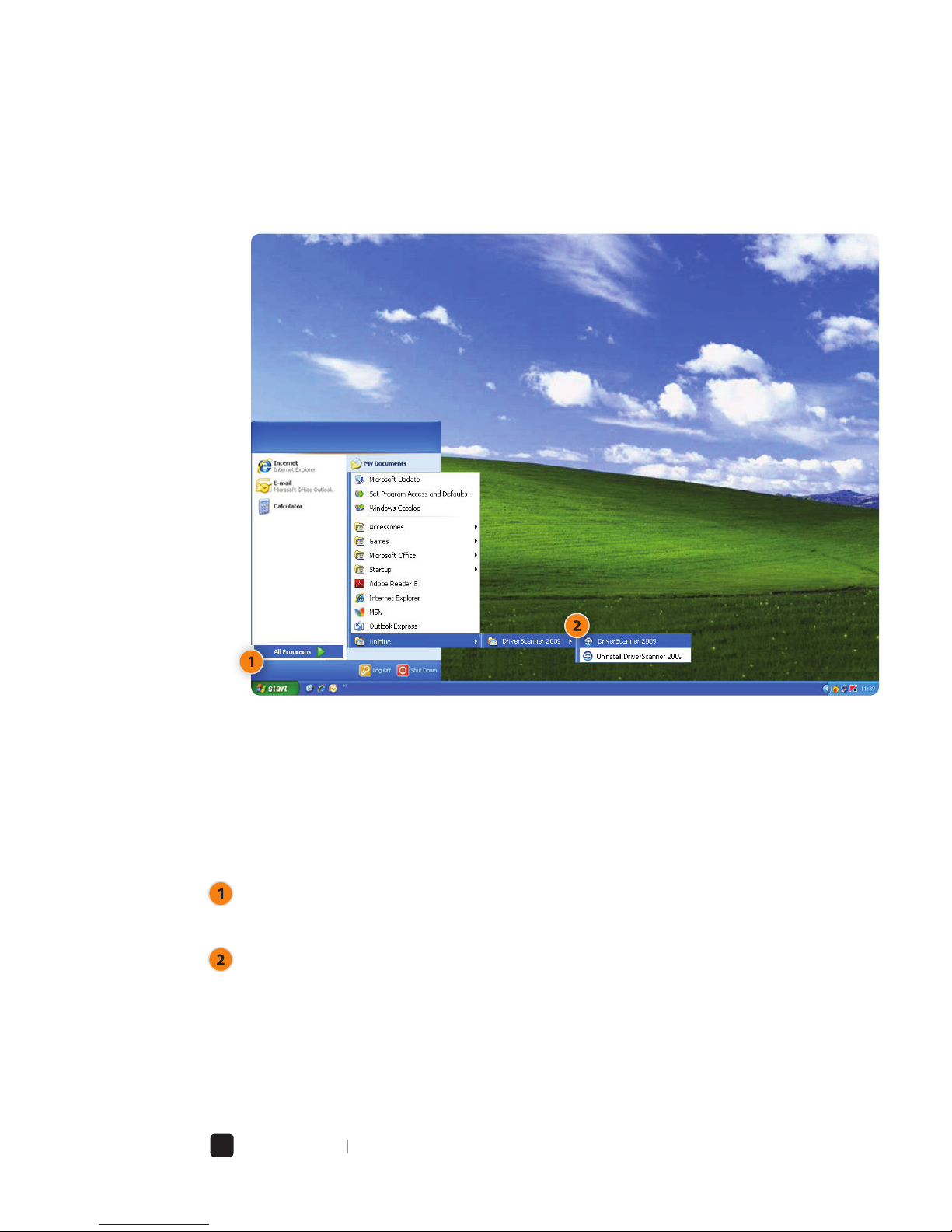
To open DriverScanner from the Windows Start menu, click on the Start menu button,
and move up to the All Programs (or Programs) menu item (figure 1).
In the resulting cascading menu, select the DriverScanner folder and, in the next menu,
choose DriverScanner itself (figure 1).
Conventions used in Help
(Figure 1)

4www.uniblue.com Back to Contents
If you are unfamiliar with drivers and want to learn more you can read
Chapter 2: Understanding drivers.
If DriverScanner is not yet installed on your computer, you can go directly to
Chapter 3: Installing, launching, registering and updating DriverScanner for
more help.
For a general overview about using DriverScanner read
Chapter 4: The DriverScanner user interface.
If you want to learn more about scanning and updating your drivers read
Chapter 5: Driver scans and updates.
For a brief guide to key Windows driver and DriverScanner concepts and definitions, you
can read the Glossary of terms.
Where do I go from here?
Also pay special attention to text, highlighted in blue or red, which is set apart from the
rest of the text:
Indicates warnings and items of extreme importance
Indicates important information

7
7
8
8
9
10
10
11
12
12
13
13
14
23
25
27
28
31
An introduction to DriverScanner
What does DriverScanner do?
Feature overview
Will DriverScanner make a difference?
Do I need to be an expert to use DriverScanner?
Understanding drivers
What are drivers?
When and why do driver problems occur?
Do I need to update and backup drivers?
How do I update and backup drivers?
Installing, launching, registering and
updating DriverScanner
DriverScanner system requirements
Installing DriverScanner
Launching DriverScanner
Online resources and support
Purchasing DriverScanner
Registering DriverScanner
ActiveProtection
Chapter
Chapter
Chapter
1
1.1
1.2
1.3
1.4
2
2.1
2.2
2.3
2.4
3
3.1
3.2
3.3
3.4
3.5
3.6
3.7
Contents

32
32
34
39
40
42
44
44
49
50
52
52
54
57
57
59
60
The DriverScanner user interface
The Overview screen
The Driver Scan screen
The Backup screen
The Restore screen
The Settings screen
Driver scans and updates
Scanning outdated drivers
Complete and partial driver scans
Updating drivers
Driver backups and restores
Driver backups
Driver restores
Configuring DriverScanner
System settings
System information
Glossary of terms
Chapter
Chapter
Chapter
Chapter
4
4.1
4.2
4.3
4.4
4.5
5
5.1
5.2
5.3
6
6.1
6.2
7
7.1
7. 2

7www.uniblue.com Back to Chapter 1 - An introduction to DriverScanner Back to Contents
Device drivers generally either come with our operating system, or we install them from
a CD. But, like any software, drivers are upgraded and updated, by the manufacturers, to
remove bugs, add extra functionality to the hardware or to improve the performance of
the device. Unless you update your drivers regularly you may face problems ranging from
the relatively minor such as having hardware that seems buggy and poorly performing,
to the more major such as hardware failures, conflicts and complete system crashes.
With so many drivers on your PC you can’t check them all yourself, which is why
DriverScanner, the innovative new product from Uniblue, is the perfect solution to your
driver update problems.This useful application will search your PC for all installed drivers
and then cross reference these against Uniblue’s authoritative library of drivers.Where
DriverScanner identifies outdated drivers it will then give you the tools to update your
PC with the latest versions of those drivers, so improving the performance and stability of
your computer and its peripherals.
What does DriverScanner do?1.1
Congratulations on purchasing DriverScanner from Uniblue.This section gives an
introduction into DriverScanner, explaining what it does and how it can help you.
An introduction to DriverScanner
1

8www.uniblue.com Back to Chapter 1 - An introduction to DriverScanner Back to Contents
DriverScanner will search your PC for all installed drivers and then cross reference these
against Uniblue’s substantial driver library.Where DriverScanner finds drivers that are
out of date it will then help you to install the most recent ones, so making sure that you
enjoy the highest levels of performance and stability from your PC and its peripherals.
Key benefits of DriverScanner include:
In depth analysis
By thoroughly scanning your PC for outdated drivers DriverScanner identifies exactly
how your system can be updated for improved performance.
Driver update management
Including sophisticated driver update management tools DriverScanner allows you to
control the loading and installation of all your drivers, from one screen.
Backup and restore
DriverScanner’s backup and restore features help to ensure your PC is protected from the
consequences of lost drivers.
Will DriverScanner make a difference?1.3
DriverScanner is an automatic, powerful and comprehensive driver update management
application for improving PC performance, stability and general health, which includes:
System overview report with detailed scan results to keep you updated about
outdated drivers found, backup and restore points created, and updates made.
Automatic scans at start-up to give you regular access to the latest drivers so
helping to enhance your computing experience and eliminate related system stalls
and slow-downs.
Automatic driver backup and restore giving you complete peace of mind knowing
that any changes or updates can be quickly undone at the click of the button.
An attractive and intuitive interface that makes the otherwise long and tedious task
of driver updates management, quick, simple and easy.
Feature overview1.2

9www.uniblue.com Back to Chapter 1 - An introduction to DriverScanner Back to Contents
At Uniblue, we are renowned for building easy-to-use yet powerful utility products and
DriverScanner is no exception. Regardless of your level computer literacy, you will find
DriverScanner simple and intuitive.
Do I need to be an expert to use DriverScanner?1.4
Boost your PC and keep it optimized
Dramatically improve your computing experience, and minimize network or hardware
problems by using DriverScanner regularly to find and update outdated drivers.
Log generation
Displays a transcript of your driver download history and your most recent scan results
for precise control of your system.
Exceptionally simple to use
Set in a highly attractive, logical and user-friendly graphical user interface DriverScanner
delivers advanced functionality in a simple-to-use package.
Safe and trusted
Uniblue’s DriverScanner is trusted by PC users around the World to enhance PC
performance and help protect against system failure.
Windows Vista compatible
DriverScanner is fully compatible with Windows XP and Vista (32-bit).The application
automatically identifies your operating system so you don’t need to configure any
settings manually.

10 www.uniblue.com Back to Chapter 2 - Understanding drivers Back to Contents
Drivers also called device drivers or software drivers enable high-level computer
programs to operate hardware. Just about all the equipment that runs on or in you
computer (from the motherboard, the hard-disk and the video card, through to the
mouse, screen and printer) will be operated using their own particular software. Drivers
are specific to the particular hardware device and the operating system used which
means that you will need to ensure that the installed driver is right for that combination
of equipment and operating system.
The driver will take a generic high level command from the operating system and
then translate this into a low-level form that the hardware understands.This makes
programming simpler since the creator of a word processing application doesn’t need
to program a different set of instructions for every single printer that it may be expected
to print to. Drivers also give hardware developers more freedom to change, alter and
expand the functionality of their equipment without having to worry about the high
level applications being able to communicate with the hardware.
What are drivers?2.1
This comprehensive tutorial gives more information on the most important aspects of
system drivers.
Understanding drivers
2
Table of contents
Other UNIBLUE Software manuals
UNIBLUE
UNIBLUE POWERSUITE 2010 - V1 User manual

UNIBLUE
UNIBLUE SPEEDUPMYPC 2010 - V1 User manual
UNIBLUE
UNIBLUE REGISTRYBOOSTER User manual
UNIBLUE
UNIBLUE SYSTEMTWEAKER 2010 - V1 User manual
UNIBLUE
UNIBLUE REGISTRYBOOSTER 2010 - V1 User manual
UNIBLUE
UNIBLUE DRIVERSCANNER 2010 - V1 User manual
UNIBLUE
UNIBLUE POWERSUITE User manual
UNIBLUE
UNIBLUE SYSTEMTWEAKER User manual
UNIBLUE
UNIBLUE DISKRESCUE 2009 - V1 User manual
UNIBLUE
UNIBLUE DRIVERSCANNER User manual