manuals.online logo
Brands
  1. Home
  2. •
  3. Brands
  4. •
  5. UNU
  6. •
  7. Batteries Charger
  8. •
  9. UNU Unity Series User manual

UNU Unity Series User manual

Popular Batteries Charger manuals by other brands

EVBox BusinessLine manual

EVBox

EVBox BusinessLine manual

Goobay 71808 user manual

Goobay

Goobay 71808 user manual

Kogan KACRDQIS4XA user manual

Kogan

Kogan KACRDQIS4XA user manual

Sealey WCB3 quick start guide

Sealey

Sealey WCB3 quick start guide

Vanner SP00143/181 owner's manual

Vanner

Vanner SP00143/181 owner's manual

KeyOuest KO037515 quick start guide

KeyOuest

KeyOuest KO037515 quick start guide

Enplus Silk Series user manual

Enplus

Enplus Silk Series user manual

Intermec SF51 user guide

Intermec

Intermec SF51 user guide

Colorovo PowerBox 6800 user guide

Colorovo

Colorovo PowerBox 6800 user guide

Smartech WBC-250 Operator's manual

Smartech

Smartech WBC-250 Operator's manual

PIXO C-USB instruction manual

PIXO

PIXO C-USB instruction manual

Gunson G4104 quick start guide

Gunson

Gunson G4104 quick start guide

Dometic NDS SCE320 Short Operating Manual

Dometic

Dometic NDS SCE320 Short Operating Manual

ABB HT572708 Operation manual

ABB

ABB HT572708 Operation manual

EVOline Square80 manual

EVOline

EVOline Square80 manual

Redarc SBC24025 Operating instructions and owner's manual

Redarc

Redarc SBC24025 Operating instructions and owner's manual

Absaar HV04 manual

Absaar

Absaar HV04 manual

DazeTechnology Cover Dazebox Home installation manual

DazeTechnology

DazeTechnology Cover Dazebox Home installation manual

manuals.online logo
manuals.online logoBrands
  • About & Mission
  • Contact us
  • Privacy Policy
  • Terms and Conditions

Copyright 2025 Manuals.Online. All Rights Reserved.

Installation Guide
UNU Unity Series Galaxy S5 Battery Case
!
For!a!complete!video!demo,!please!visit:!!
http://bit.ly/unity-s5
!
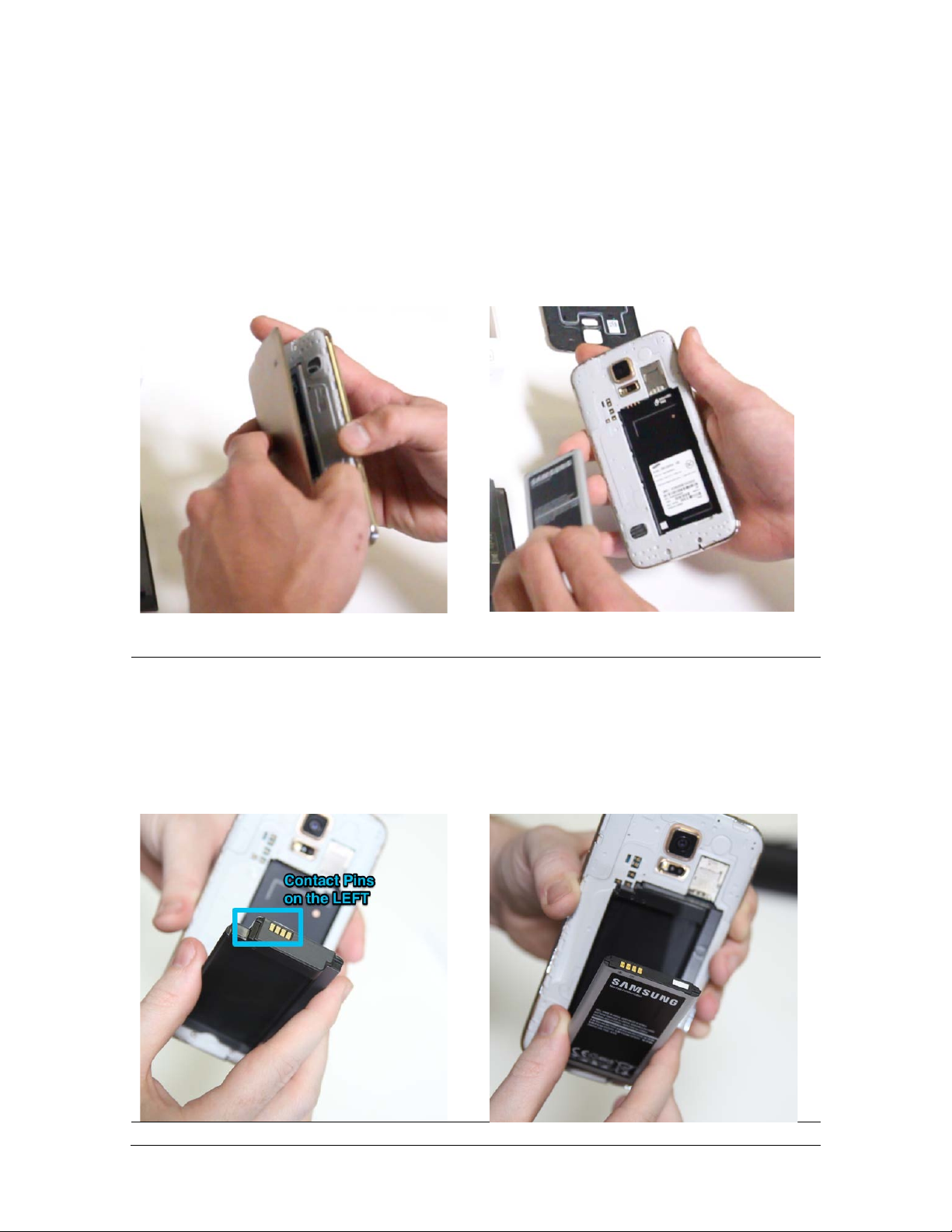
1. Turn of the S5 and Pop up the
original back cover
2. Take out the original battery
3. Now insert the unity battery chassis
into the phone’s battery compartment.
When insert, make sure the battery
contact pins are facing upward and
located on the left. Insert top portion in,
then snap down the bottom portion.
4. Now insert the Original Battery into
battery chassis. Make sure the pins on
the original battery are facing upwards
and located on the left side. Insert top
portion in, then snap down the bottom
portion.

5. Snap on the Unity cover over the
back of the S5
6. Put on the bumper and make sure
the bumper snaps securely with the
back cover
Congrats!
Now you have a fully protected Samsung Galaxy S5 with 2X Battery Life














