11
12
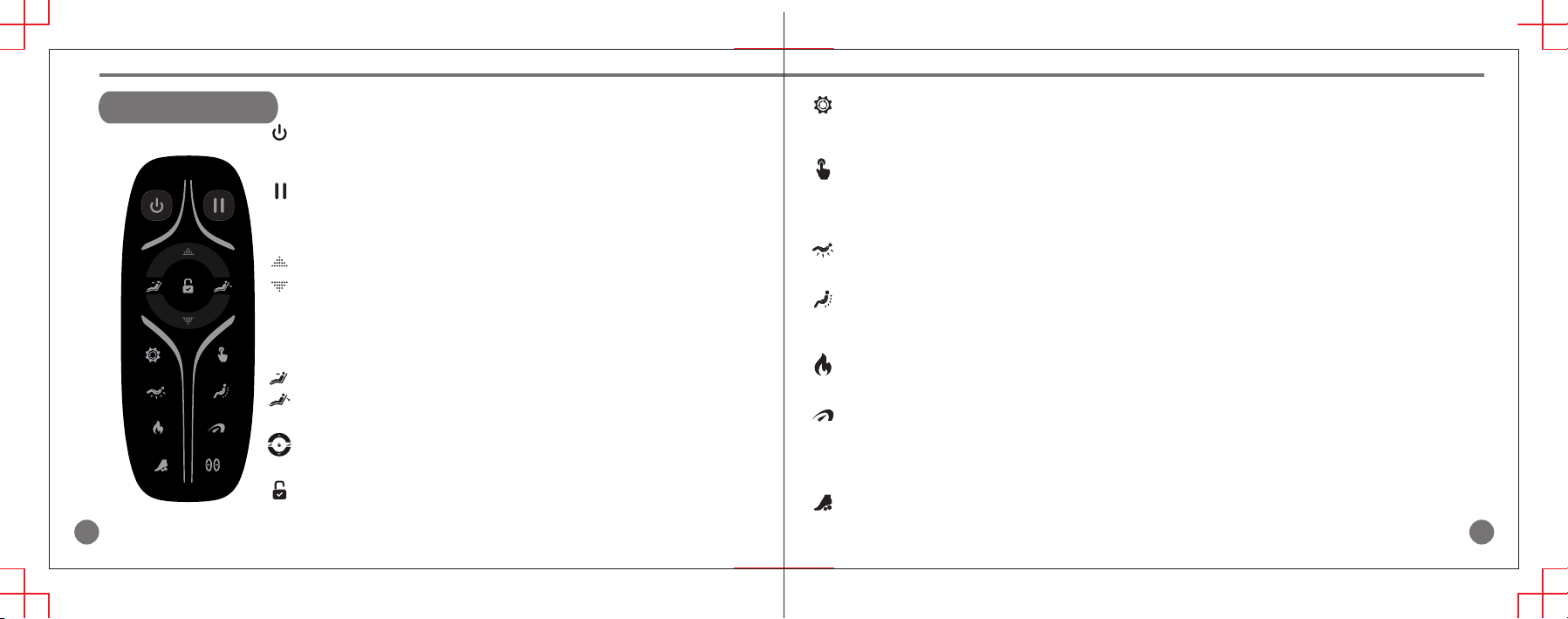
On/Off button: Press this key in standby state, the massage chair will enter
the power-on state and run the first auto program; in the power-on state, when
the massage chair need to be turned off, press this key, the massage chair
will be turned off and reset.
Pause button: Press this key in the power-on state, all functions will stop
working and the red pause indicator will be light on, all other buttons will be
invalid except the power switch and pause button; press the pause button
again, the red pause indicator will be light off, the function and instructions,
lights return to normal operation.
Auto button: Press this key in the power-on state to cycle through three auto massage modes: auto mode
1 (indicated in red),auto mode 2 (indicated in green), and auto mode 3 (indicated in yellow). Every time
you switch a mode, it start a new mode from the first step of each auto mode. When first enter the auto
mode, the whole chair posture will automatically lie down at a certain angle.
Manual button: In the power-on state, press this key to enter the manual massage mode, the back
mechanism is turning on the kneading massage (indicated in red)/tapping massage(indicated in green)/
kneading and percussion massage (indicated in yellow)/close or shiatsu (in the case of fixed point, the
technique is closed ; In the case of part selection, it is acupressure, the indication is blue, and the speed
can't be adjusted) to switch between four states.
Zero Gravity Button: press this key in the power-on state, the chair will enter the lying down zero gravity
state, the indicator light will be red, press this button again, the chair will return to the original state, and
the indicator light will be off.
Part button: Press this key in the power-on state to enter the manual massage mode, the massage
mechanism will cycle through the whole body (indicated in yellow), upper body (indicated in red), and
lower body (indicated in green) for the selected massage function (if no kneading or knocking/tapping
massage are selected, it will be shiatsu massage).
Heating button: In the power-on state, press this key to turn on the heating function (the heating indicator
light is on), and the heating function of the back and legs is turned on. Press the heating button again to
turn off the heating function (the heating indicator light is off).
Control panel Operation
Speed button: in the power-on state, press this key, when kneading, tapping or any functions is selected,
the speed key is valid; press the speed key once, the speed is at low speed (indicated in blue), medium
speed (indicated in blue) and high speed (indicated in red), and the indicator light corresponding to the
speed gear is on. In non-manual mode, press and hold for more than 5s to turn off/on the armrest light,
and the indicator flashes twice after the finger is away. The massage chair has the armrest light turned
on by default.
Roller key: In the power-on state, press this key to turn on the foot roller function, the default is low
speed; press this key again to turn on the high-grade roller function; press this key again, the roller
function is turned off. The function circles in turn, roller speed is low (the indicator is green), the
roller speed is high (the indicator is red), and the roller is off (the indicator light is off).
Fixed-point button: In the power-on state, when choose the manual massage
(kneading, tapping, kneading and knocking) , press the fixed-point up/down
button, the mechanism will according to fixed point to massage, long time to
press the up button (down button), the mechanism will adjust the fixed-point
position upwards (downwards), when loose this button, the mechanism will
stop at the current position for fixed-point massage. If you want to quit the
fixed-point massage, just press the part button, and then quit the fixed-point
massage and enter the part massage.
Sitting posture adjustment button: In the power-on state, long time to press
the sitting posture adjustment up button (down button), the whole chair will
adjust the posture upwards (downwards), and it will stop at the current
posture when loose this button.
Unlock button: In the power-on state, the hand controller will enter the lock
mode when there is no operation for more than 30 seconds, and it cannot
be operated at this moment. Press and hold the unlock area for 2 seconds
to unlock the hand controller, and the hand controller can operate normally.
The backlight brightness of the button is reduced in locked mode, and
recovered after unlocking.
Sitting posture adjustment button: In the power-on state, turn the gesture
counterclockwise (clockwise) in this area, the sitting posture can be adjusted,
and the chair will stop adjusting when it is released.