-14-
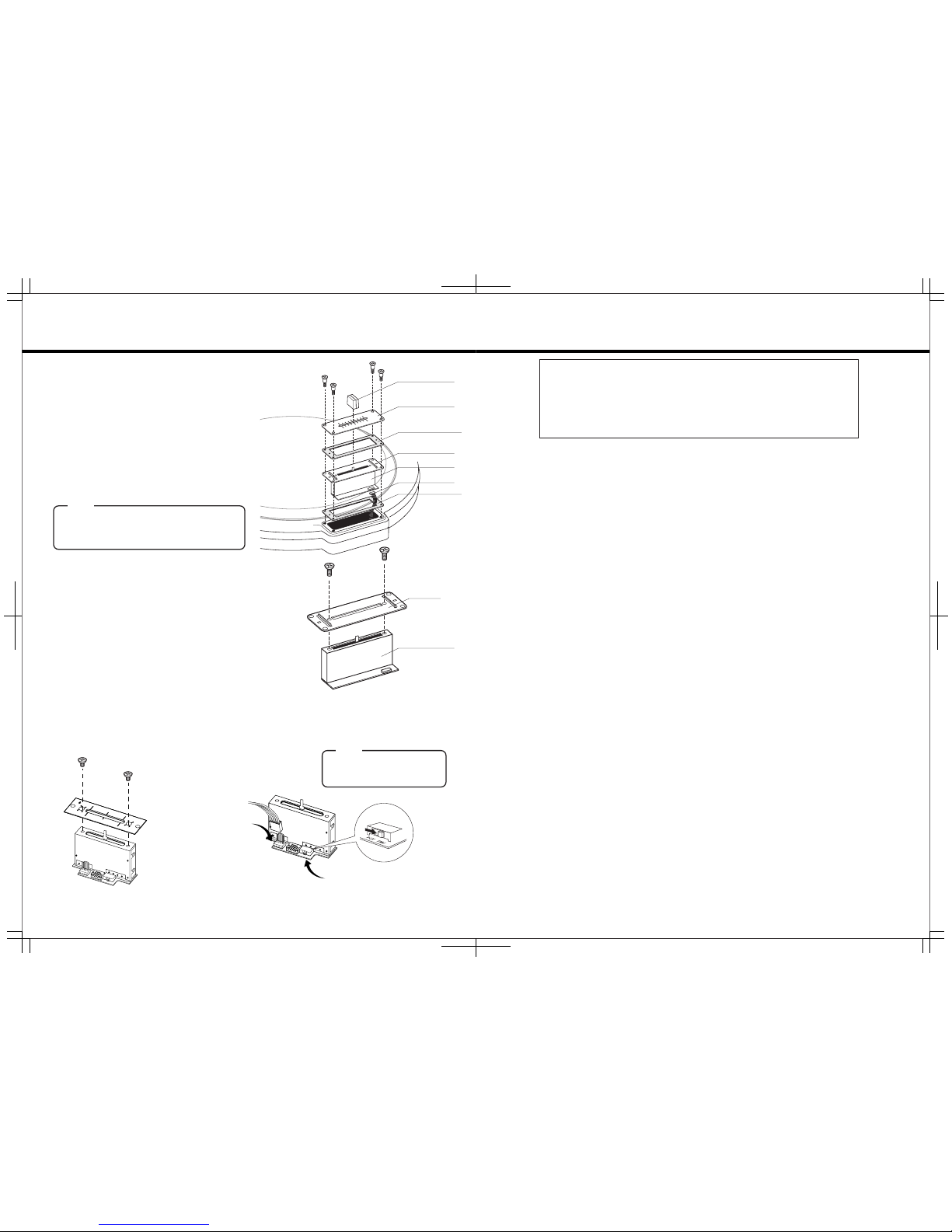
①Remove the 4 screws which fix the fader unit, and
removethefaderunitfrompositioninthisunit.
②Raise fader unit and remove both the surface fader
panelandthebufferrubberbelowthepanel.
③Carefully remove the multi-cable connector from the
faderunit.
④Removethefaderknobs.
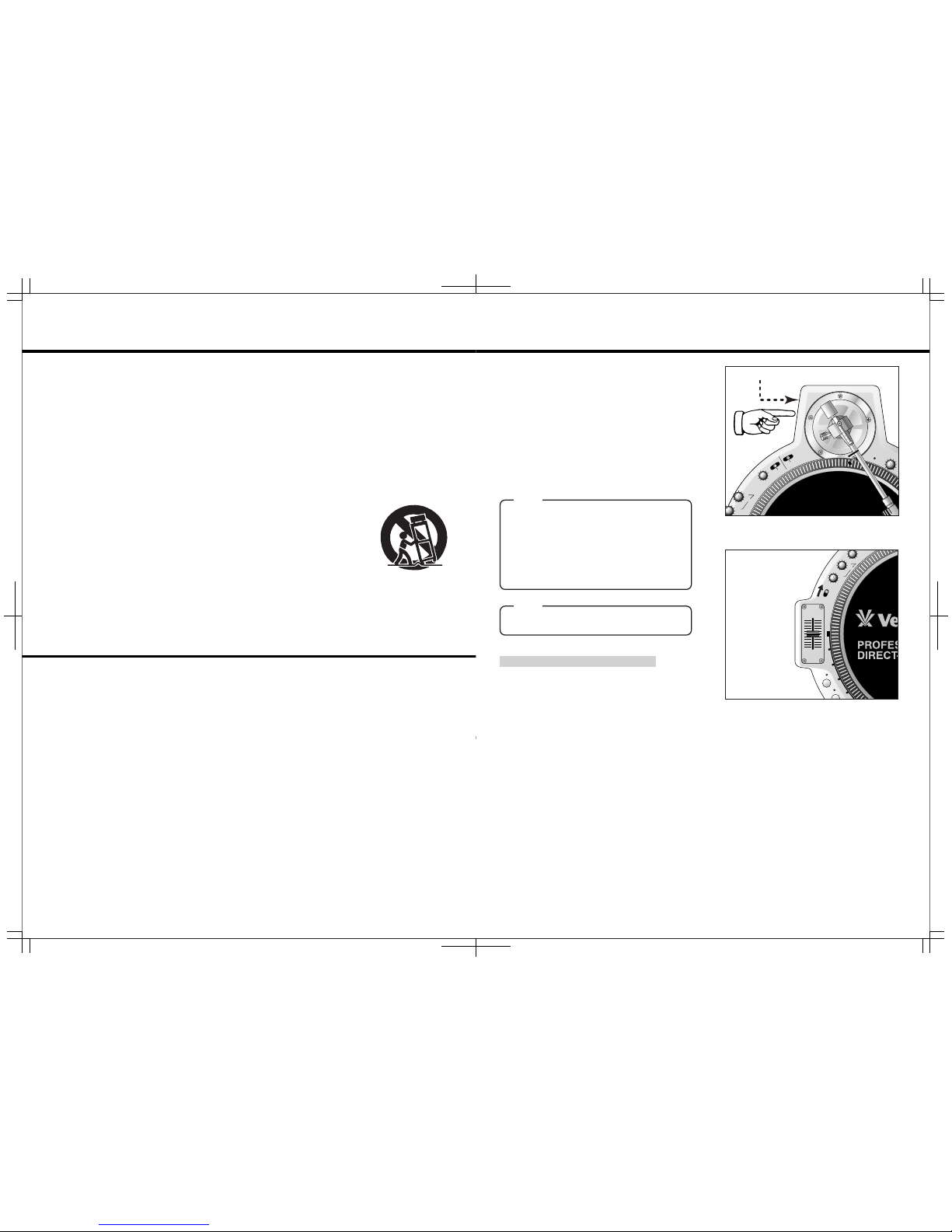
⑤Removethebracketwhichisscrewedtofadervolume
fromtheremovedfaderunit.(seetherightpicture)
⑥Fix the bracket to the new fader unit in the way of
reverseprocess.
⑦Attachmulti-cableconnectortonewfaderunit.
⑧Positionthefaderunitcarefullyandsecurewithscrews.
NOTE
Thebufferrubberisveryimportantparttoavoidthe
stylusskip.Becarefulnottoloseitwhenyouchange
fader unit. When you change to new fader unit,
pleasefixthebufferrubberproperly.
【InstructionsforcrossfaderCF-CPVreplacement】
①Unscrew the two screws on the
CF-PCVpanelandvolumeasitis
shownbelow
②Setthechangeswitch of the CF-
PCVtoPMC ③Connect the QFO bracket to the
CF-PCVfadervolume
NOTE
CF-PCV has to types of connectors
butconnectittothePMCconnector
asshownbelow
EXCHANGE THE FADER UNIT
FADERKNOB
FADERVOLUME
FADERVOLUME
CONNECTORCABLE
FADERPANEL
BUFFERRUBER①
BUFFERRUBER②
BRACKET
BRACKET
PMCConnecter
Setthisswitchto"PMC"
-3-
IMPORTANTSAFEGUARDS
READBEFOREOPERATINGEQUIPMENT
Thisproductwasdesignedandmanufacturedtomeetstrictqualityandsafety
standards.Thereare,however,someinstallationandoperationprecautions
whichyoushouldbeparticularlyawareof.
1.Read instructions-All the safety and operating
instructionsshouldbereadbeforetheapplianceis
operated.
2.Retain instructions-The safety and operating
instructionsshouldberetainedforfuturereference.
3.HeedWarnings-Allwarningsontheapplianceand
intheoperatinginstructionsshouldbeadheredto.
4.FollowInstructions-Alloperatinganduseinstructions
shouldbefollowed.
5.Cleaning-Unplug this product from the wall outlet
before cleaning. Do not use liquid cleaners or
aerosolcleaners.Useadampclothforcleaning.
6.Attachments-Do not use attachments not
recommendedbytheproductmanufacturerasthey
maycausehazards.
7.Water and Moisture-Do not use this product near
water-for example, near a dath tub, wash bowl,
kitchensink,orlaundrytub,inawetbasement,or
nearaswimmingpool,andthelike.
8.Accessories-Do not place this product on an
unstable cart, stand, tripod, or table. The product
mayfall,causingseriousinjurytoachildoradult,
andseriousdamagetotheappliance.Useonlywith
acart,.stand,tripod,bracket,ortablerecommended
by the manufacturer, or sold with product. Any
mounting of the appliance should follow the
manufacturer's instructions, and sholud use a
mounting accessory recommended by the
manufacturer.
9.Ventilation-Slots and openings in the cabinet are
provided for ventilation and to ensure reliable
operation of the product and to protect it from
overheating, and these openings must not be
blockedorcovered.Theopeningsshouldneverbe
blockedbyplactingtheproductonabed,sofa,rug,
orothersimilarsurface.Thisproductshouldnever
beplacednearoroveraradiatororheatregister.
This product should not be placed in a built-in
installation such as a bookcase or rack unless
properventilationisprovidedorthemanufacturer's
instructionshavebeenadheredto.
10.Power sources-This product should be operated
onlyfromthetypeofpowersourceindicatedonthe
marking label. If you are not sure of the type of
powersupplytoyourhome,consultyourappliance
dealerorlocalpowercompany.
11.GroundingorPolarization-Thisproductisequipped
withapolarizedalternating-currentlineplug(aplug
havingone blade widerthan the other).This piug
willfit into thepower outlet onlyoneway. This is
safetyfeature.Ifyouareunableto inserttheplug
fully into the outlet, try reversing the plug. If this
should still fail to fit, contact your electrician to
replace your obsolete outlet. Do not defeat the
safetypurposeofthepolarizedplug.
12.Power-CordProtection-Powersupplycordsshould
beroutedsothattheyarenotlikelytobewalkedon
orpinchedbyintemsplaceduponoragainstthem,
paying particular attention to cords at plugs,
conveniencereceptacles,andthepointwherethey
exitfromtheappliance.
13.Protective Attachment Plug-The appliance is
equippedwithanattachmentplughavingoverload
protection.Thisisasafetyfeature.SeeInstruction
Manual for replacement or resetting of protective
device. If replacement of the plug is required, be
suretheservicetechnicianhasusedareplacement
plug specified by the manufacturer that has the
sameoverloadprotectionastheoriginalplug.
14.Lightning-For added protection for this product
duringlightningstorm,orwhenitisleftunattended
andunusedforlongperiodsoftime,unplugitfrom
the wall outlet. This will prevent damage to the
productduetolightningandpower-linesurges.
15.Overloading-Do not overload wall outlets and
extensioncordsasthiscanresultinariskoffireor
electricshock.
16.ObjectandLiquidEntry-Neverpushobjectsofany
kindintothisproductthroughopeningsastheymay
touch dangerous voltage points or short-out parts
thatcouldresult in a fire or electric shock. Never
spillliquidofanykindontheproduct.
17. Servicing-Do not attempt to service product
yourselfasopeningorremovingcoversmayexpose
youtodangerrousvoltageorotherhazards.Refer
allservicingtoqualifiedsersonnel.
18. Damage Requiring Service-Unplug this product
fromthewalloutletandreferservicingtoqualified
servicepersonnelunderthefollowingconditions:
a.Whenthepower-supplycordorplugisdamage.
b.Ifliquidhasbeenspilledorobjectshavefalleninto
theproduct.