8
OPERATION
WARNING: THESE BATHS ARE NOT INTENDED FOR USE AS ACID BATHS. USE
AS AN ACID BATH WILL CAUSE SEVERE DAMAGE TO BATH COMPONENTS. DO
NOT USE DEIONIZED WATER, TAP WATER, OR CHEMICALS. USE DISTILLED
WATER ONLY. DO NOT TURN THE UNIT ON UNLESS THE TANK HAS WATER IN IT.
IF RAN DRY AT MAXIMUM TEMPERATURE, COATING MIGHT PEEL OFF.
4.1 Check power supply against unit serial plate; they must match. Plug service cord
into the electrical outlet.
4.2 Fill bath to your required depth with DISTILLED WATER. DO NOT USE tap water.
DO NOT USE deionized water. Note that normal depth is two-thirds full, but depth
must be at least 5cm.
4.3 Push the main power switch to the ON position, and turn the Over Temperature
Safety to its maximum position, clockwise, using a screwdriver or coin.
4.4 Set Main Temperature Control: Enter desired set point temperature. To enter set
point mode on the Control, press the Up or Down arrow pad one time. The digital
display will start to blink, going from bright to dim. While blinking, the digital display
is showing the set point. To change the set point, use the Up and Down arrow pads.
If the arrow pads are not pressed for five (5) seconds, the display will stop blinking
and will read the temperature in the bath. Allow the water bath at least two hours to
stabilize once set point is established.
4.5 Calibrating the Control: It is recommended that the digital display be calibrated
once the unit is in its working environment. The water bath, having reached set
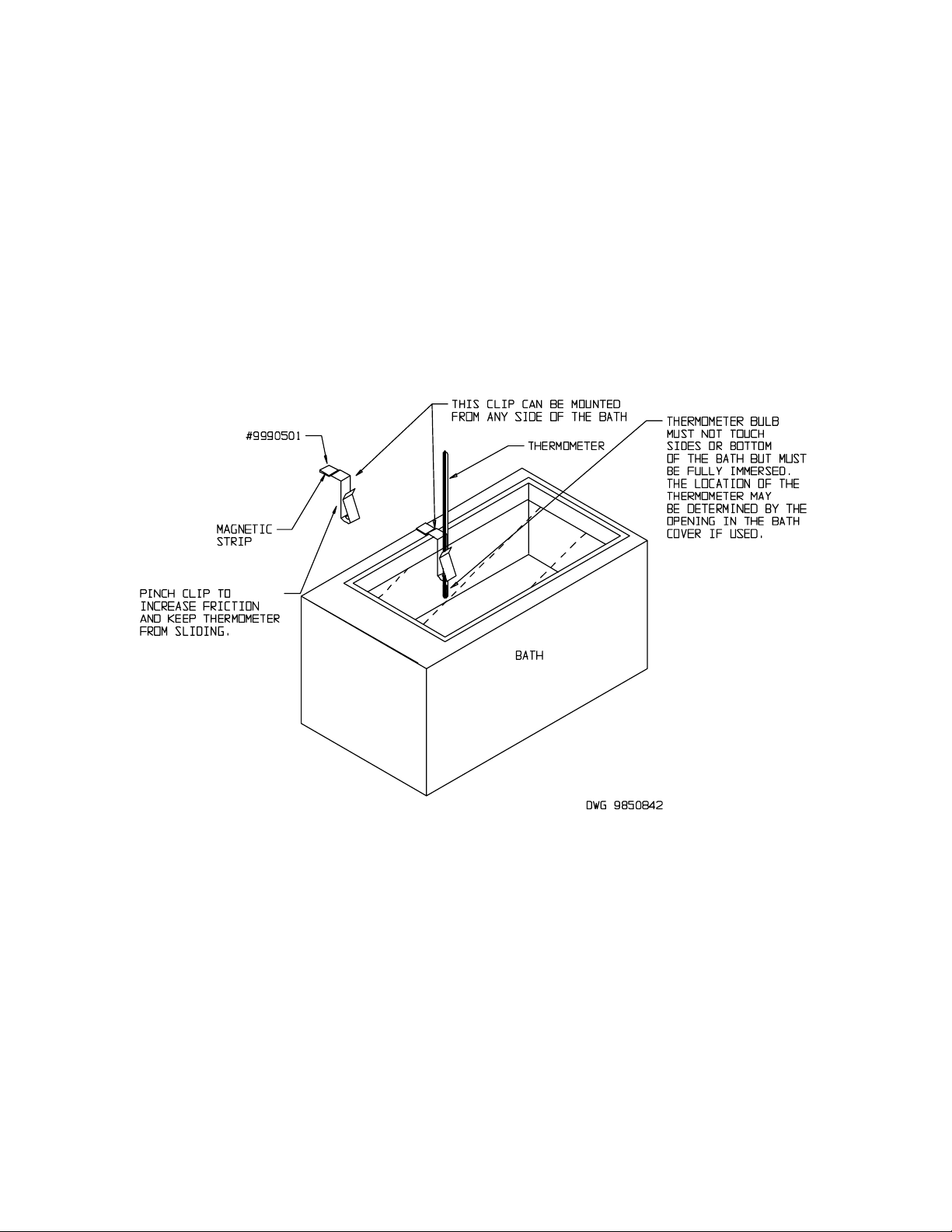
point and allowed to stabilize, is ready to calibrate. Place a certified reference
thermometer in the bath (a clip is provided with your accessory package. See figure
2for placement). Allow the thermometer to reach temperature where it remains
stabile for one hour. Compare the reading on the reference thermometer with the
digital display. If there is a difference, put the display into calibrate mode by
pressing the UP/DOWN arrow pads at the same time until the two outside decimal
points start to flash. When the decimal points are flashing, the display can be
changed to match the reference thermometer by pressing the UP or DOWN arrow
pads until the display reads the correct value. If the arrow pads are not pressed for
five (5) seconds the display will revert back to its original parameter. Allow the unit
to stabilize again then verify that the display matches the reference thermometer.
Sectio
4
Artisan Technology Group - Quality Instrumentation ... Guaranteed | (888) 88-SOURCE | www.artisantg.com