manuals.online logo
Brands
  1. Home
  2. •
  3. Brands
  4. •
  5. Xiaomi
  6. •
  7. Vacuum Cleaner
  8. •
  9. Xiaomi MI S10 User manual

Xiaomi MI S10 User manual

This manual suits for next models

1

Other Xiaomi Vacuum Cleaner manuals

Xiaomi Mop 2 Pro User manual

Xiaomi

Xiaomi Mop 2 Pro User manual

Xiaomi Mi Robot Vacuum-Mop 2 Pro+ User manual

Xiaomi

Xiaomi Mi Robot Vacuum-Mop 2 Pro+ User manual

Xiaomi G9 Plus User manual

Xiaomi

Xiaomi G9 Plus User manual

Xiaomi Mi Robot Vacuum-Mop User manual

Xiaomi

Xiaomi Mi Robot Vacuum-Mop User manual

Xiaomi S12 User manual

Xiaomi

Xiaomi S12 User manual

Xiaomi Mi G10 User manual

Xiaomi

Xiaomi Mi G10 User manual

Xiaomi Mi Robot Vacuum-Mop Essential User manual

Xiaomi

Xiaomi Mi Robot Vacuum-Mop Essential User manual

Xiaomi Mi Robot STYTJ02YM User manual

Xiaomi

Xiaomi Mi Robot STYTJ02YM User manual

Xiaomi Dreame V11 User manual

Xiaomi

Xiaomi Dreame V11 User manual

Xiaomi Roborock S7+ User manual

Xiaomi

Xiaomi Roborock S7+ User manual

Xiaomi Mi Robot STYTJ02YM User manual

Xiaomi

Xiaomi Mi Robot STYTJ02YM User manual

Xiaomi Mi Robot Vacuum-Mop 2 Ultra Auto-empty... User manual

Xiaomi

Xiaomi Mi Robot Vacuum-Mop 2 Ultra Auto-empty... User manual

Xiaomi Mi 1C User manual

Xiaomi

Xiaomi Mi 1C User manual

Xiaomi G11 User manual

Xiaomi

Xiaomi G11 User manual

Xiaomi Mi phone User manual

Xiaomi

Xiaomi Mi phone User manual

Xiaomi roborock User manual

Xiaomi

Xiaomi roborock User manual

Xiaomi MI E12 User manual

Xiaomi

Xiaomi MI E12 User manual

Xiaomi Jimmy JV53 Lite Blue User manual

Xiaomi

Xiaomi Jimmy JV53 Lite Blue User manual

Xiaomi Jimmy JV83 User manual

Xiaomi

Xiaomi Jimmy JV83 User manual

Xiaomi G9 Plus User manual

Xiaomi

Xiaomi G9 Plus User manual

Xiaomi W2 User manual

Xiaomi

Xiaomi W2 User manual

Xiaomi Mi Robot Vacuum S10+ User manual

Xiaomi

Xiaomi Mi Robot Vacuum S10+ User manual

Xiaomi Mi Robot Vacuum X10 User manual

Xiaomi

Xiaomi Mi Robot Vacuum X10 User manual

Xiaomi G10 Plus User manual

Xiaomi

Xiaomi G10 Plus User manual

Popular Vacuum Cleaner manuals by other brands

Shark KD400WM owner's guide

Shark

Shark KD400WM owner's guide

Shark CORDLESS SV780_N 14 user manual

Shark CORDLESS

Shark CORDLESS SV780_N 14 user manual

Philips FC9176/08 manual

Philips

Philips FC9176/08 manual

Kenmore KW3030 user manual

Kenmore

Kenmore KW3030 user manual

AMiO YF-101 user manual

AMiO

AMiO YF-101 user manual

Beko VRT 94929 VI user manual

Beko

Beko VRT 94929 VI user manual

Shark CORDLESS SV780 Series quick start guide

Shark CORDLESS

Shark CORDLESS SV780 Series quick start guide

Lumme LU-3203 instruction manual

Lumme

Lumme LU-3203 instruction manual

Melissa 640-040/051 instruction manual

Melissa

Melissa 640-040/051 instruction manual

Makita DVC152L instruction manual

Makita

Makita DVC152L instruction manual

Bosch BSN1 instruction manual

Bosch

Bosch BSN1 instruction manual

King Canada 8560LST Service manual & parts list

King Canada

King Canada 8560LST Service manual & parts list

EUFY RoboVac 11c+ owner's manual

EUFY

EUFY RoboVac 11c+ owner's manual

Panasonic MC-E4101 Service manual

Panasonic

Panasonic MC-E4101 Service manual

Panasonic MC-V9658 operating instructions

Panasonic

Panasonic MC-V9658 operating instructions

Bosch BGB 2 Series instruction manual

Bosch

Bosch BGB 2 Series instruction manual

Hoover dog & cat TURBO manual

Hoover

Hoover dog & cat TURBO manual

FGE Far Tools NET UP 20 manual

FGE

FGE Far Tools NET UP 20 manual

manuals.online logo
manuals.online logoBrands
  • About & Mission
  • Contact us
  • Privacy Policy
  • Terms and Conditions

Copyright 2025 Manuals.Online. All Rights Reserved.

Manual de usuario de Xiaomi Robot Vacuum S10 · 17
Manuel d’utilisation du Xiaomi Robot Vacuum S10 · 33
Manuale utente Xiaomi Robot Vacuum S10 · 49
Руководство пользователя Робота-пылесоса Xiaomi Robot Vacuum S10 · 65
Odkurzacz Xiaomi Robot S10 Instrukcja obsługi · 82
Xiaomi Roboterstaubsauger S10 Benutzerhandbuch · 99
Xiaomi Temizlik Robotu S10 Kullanım Kılavuzu · 114
· 130
· 145
Manual do utilizador do Aspirador robô Xiaomi S10 · 160
Посібник користувача Робота-пилососа Xiaomi Robot Vacuum S10 · 176
Robotický vysavač Xiaomi S10 – Uživatelská příručka · 192
Εγχειρίδιο χρήστη για τη ρομποτική σκούπα Xiaomi S10 · 208
Aspirator robotic Xiaomi S10 – Manual de utilizare · 224
Xiaomi Robotdammsugare S10 Användarhandbok · 240
Panduan Pengguna Xiaomi Robot Vacuum S10 · 256
Xiaomi Robotstøvsuger S10 Brugervejledning · 291
Xiaomi S10 -roboi-imurin käyöopas · 306
Xiaomi robotstøvsuger S10 Brukerhåndbok · 321
Xiaomi Robotstofzuiger S10 Gebruikershandleiding · 336
„Xiaomi S10“ dulkių siurblio-roboto naudotojo vadovas · 351
Xiaomi robotporszívó S10 – Felhasználói kézikönyv · 366
Korisnički priručnik za Xiaomi robotski usisavač S10 · 381
Uporabniški priročnik za robotski sesalnik XiaomiS10 · 396
Наръчник на потребителя за Прахосмукачка робот Xiaomi S10 · 411
Korisnički priručnik za Robotski usisivač Xiaomi S10 · 426
Používateľská príručka robotického vysávača Xiaomi S10 · 441
ﻦﻣ تﻮﺑوﺮﻟا ﺔﻴﺋﺎﺑﺮﻬﻜﻟا ﺔﺴﻨﻜﻤﻟا مﺪﺨﺘﺴﻣ ﻞﻴﻟد
Xiaomi S10
יטובור קבא באושב שמתשמל ךירדמ
Xiaomi S10
Ƴ˟ǖ˶ǥưǨǘǭƹˢƶǨǎǢ˿˟ǎǗǎNJ˪ljljǒ˿ˡǎÃěÓńĸěDzDZ · 276
Robot Vacuum S10 User Manual · 01
Safety Instructions
Usage Restrictions
• This appliance can be used by children aged from 8 years and above and persons
with reduced physical, sensory or mental capabilities or lack of experience and
knowledge if they have been given supervision or instruction concerning use of
the appliance in a safe way and understand the hazards involved. Children shall
not play with the appliance. Cleaning and user maintenance shall not be made by
children without supervision.
• The appliance is only to be used with the power supply unit provided with the
appliance.
• This appliance contains baeries that are only replaceable by skilled persons.
• Please keep the cleaning brush out of reach of children.
• Keep hair, loose clothing, fingers, and all parts of body away from openings and
moving parts.
• Do not use the robot vacuum to clean any burning substances.
• Do not pick up the robot vacuum by its laser radar cover.
• Make sure the robot vacuum is turned off and the power adapter is unplugged
before cleaning or performing maintenance.
Read this manual carefully before use, and retain it for future reference.
This product is for floor cleaning in a home environment only. Do not use it
outdoors, on non-floor surfaces, or in a commercial or industrial seing.
01
• This robot vacuum is only intended to clean floors in a home environment. Do not
use it outdoors such as on an open balcony or on a surface that is not a floor, like
a sofa, or in a commercial or industrial seing.
• Do not use the robot vacuum in an area suspended above ground level, such as a
lo, open balcony, or on top of furniture, unless a protective barrier is present.
• Do not use the robot vacuum at an ambient temperature above 35°C or below 0°C
or on a floor with liquids or sticky substances.
• Pick up any cables from the floor before using the robot vacuum to prevent it from
dragging them while cleaning.
• Pick up any fragile or loose items from the floor, such as vases or plastic bags, to
prevent the robot vacuum from being obstructed or bumping into them and
causing damage.
• Do not place children, pets, or any item on top of the robot vacuum while it is
stationary or moving.
• Do not use the mopping function on the carpet. The carpet can be cleaned under
the vacuuming mode.
• Do not allow the robot vacuum to pick up hard or sharp objects such as building
materials, glass, or nails.
• Do not spray any liquid into the robot vacuum. Make sure the 2-in-1 dust
compartment with water tank is thoroughly dry before its reinstalling.
• Do not place the robot vacuum upside down. Laser radar housing should never
touch the ground.
02
Baeries and Charging
• WARNING: Do not use any third-party baery, charging dock. Use only with
<BLJ24W200120P-V> power adapter.
• Do not aempt to disassemble, repair, or modify the baery or charging dock on
your own.
• Do not place the charging dock near a heat source.
• Do not use a wet cloth or wet hands to wipe or clean the dock’s charging
contacts.
• If the robot vacuum will not be used for an extended period, fully charge it, then
turn it off and store in a cool, dry place. Recharge the robot vacuum at least once
every 3 months to avoid over-discharging the baery.
• The lithium-ion baery pack contains substances that are hazardous to the
environment. Before disposing of the robot vacuum, please first remove the
baery pack, then discard, or recycle it in accordance with local laws and
• This product's laser radar meets the IEC 60825-1:2014 Standard for Class 1 laser
product safety and does not produce laser radiation hazardous to the human
body.
• Only use this product as directed in the user manual. Users are responsible for
any loss or damage arising from improper use of this product.
• For detailed e-manual, please go to www.mi.com/global/service/userguide
03
regulations of the country or region it is used in.
• When removing the baeries from the product, it is beer to use up the baeries
and make sure your product is disconnected from power.
1). Uninstall the screw on the boom, then remove the cover.
2). Unplug the baery connector, then remove the baeries. Do not damage the
baery case to avoid any risk of injuries.
3). Return the baeries to a professional recycling organization.
04
05
Product Overview
Note: Illustrations of product, accessories,
and user interface in the user manual are
for reference purposes only. Actual
product and functions may vary due to
product enhancements.
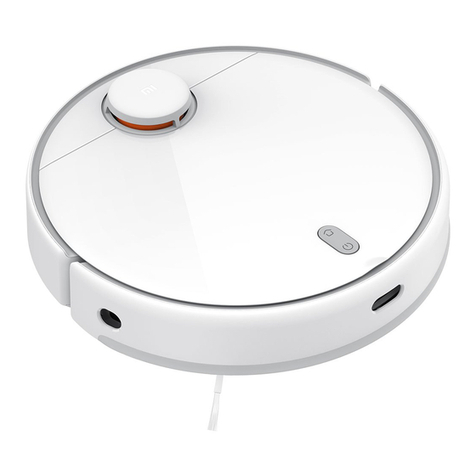
Robot Vacuum
Side Brush
Package Contents
Mop Pad Holder
Charging Dock Power Adapter User Manual
Cleaning Brush
(Visible when the cover
is open)
2-in-1 Dust Compartment
with Water Tank
(For vacuuming and mopping
modes)
Brush
(Pre-installed on the robot
vacuum)
Brush Cover
(Pre-installed on the
robot vacuum)
Mop Pad
(Pre-installed on the
mop pad holder)
06
Cover
Laser Distance Sensor
Buon/Indicator
Charging Dock
Le Wheel
Baery Pack
Mop Pad Assembly
Cliff Sensor
Right Wheel
Side Brush
Brush Cover
Brush
IR Receiver Sensor
Collision Sensor
Indicator Status Descriptions
Working normally
In charging
Returning to charge/Firmware is upgrading
White
Slowly blinking white
Blinking white
Wi-Fi disconnected
Error
Shutdown/In sleep
Yellow
Blinking yellow
Off
Charging Indicator
(Remain white when the robot
vacuum is connected to power)
Press and hold for three seconds to turn on or off
Press to start or pause cleaning
Press to return to charge or stop docking
07
Before Use
1. Remove the protective strips. 3. Remove the protective film from the charging
dock and place the charging dock against a wall.
Connect it to the power.
4. Charge the robot vacuum.
Place the robot vacuum on the charging dock to charge.
Take out the side brush, and install it onto the position as indicated in
the figure. The side brush is properly installed when you hear a "click".
2. Install the side brush.
CAUTIONS:
Do not place the charging dock in an area with direct sunlight.
Please ensure that no items are placed within 0.5 m on the le and right sides and
within 1.5 m in front of the charging dock.
Notes:
It is recommended to fully charge the robot vacuum before using it for the first
time to maintain its optimal baery performance and maximize baery life.
The robot vacuum will turn on automatically when it is on the charging dock, and
cannot be turned off while charging.
0.5 m
0.5 m
1.5 m
08
Connecting with Mi Home/Xiaomi Home App
This product works with the Mi Home/Xiaomi Home app*. Use the Mi
Home/Xiaomi Home app to control your device, and to interact with other
smart home devices.
Scan the QR code to download and install the
app. You will be directed to the connection
setup page if the app is installed already. Or
search "Mi Home/Xiaomi Home" in the app
store to download and install it.
Open Mi Home/Xiaomi Home app, tap "+" on the upper right, and then
follow prompts to add your device.
* The app is referred to as Xiaomi Home app in Europe (except for Russia). The name of
the app displayed on your device should be taken as the default.
Notes:
• The version of the app might have been updated, please follow the instructions based
on the current app version.
• If the robot vacuum's QR code cannot be scanned, you can search for its name to add it.
• When connecting the robot vacuum to the Mi Home/Xiaomi Home app using an iOS
device, follow the instructions in the app to connect to the robot vacuum's hotspot
"ijai-vacuum-v17_miapXXXX".
Common Issues Possible Causes and
Solutions
Make sure the robot vacuum is
within the Wi-Fi coverage with a
strong signal, then reset the Wi-Fi
of the robot vacuum and reconnect
to the network.
The robot vacuum cannot
connect to the
"ijai-vacuum-v17_miapXXXX"
network in the Mi Home/Xiaomi
Home app.
The robot vacuum
cannot connect to
Wi-Fi.
Check whether the Wi-Fi password
is correct.
The robot vacuum does not
support the 5 GHz network
frequency band. Please use a 2.4
GHz network.
The Wi-Fi signal is weak. Make sure
the robot vacuum is within the Wi-Fi
coverage with a strong signal.
There is something wrong with the
Wi-Fi connection. Reset the Wi-Fi
and download the latest version of
the Mi Home/Xiaomi Home app,
then try reconnecting.
Press and hold the buon for five seconds until you hear a "beep",
and then press and hold the buon for five seconds again until you
hear the voice prompt. The robot vacuum then restarts, and seings
like scheduled cleaning and Wi-Fi are restored to factory default.
Reseing System
While the robot vacuum is turned on, press and hold the buons and
for seven seconds. The Wi-Fi is successfully reset when you hear a voice
prompt.
Reseing Wi-Fi
8A347322
09
How to Use
1. Take out the 2-in-1 dust compartment with water tank, open the plug,
fill with clean water, and then refasten the plug. Install the 2-in-1 dust
compartment with water tank onto the robot vacuum in the direction
indicated in the figure, and make sure that the clip is firmly clasped.
2. Before using the vacuuming & mopping function, dampen the mop pad
and wring it out and then install it onto the mop pad holder. Slide the
mop pad holder along the boom of the robot vacuum horizontally in
the direction indicated in the figure until it clicks into place.
3. Press the buon to start vacuuming and mopping.
CAUTIONS:
Please remove the 2-in-1 dust compartment with water tank before adding water.
Do not add liquids such as hot water, detergent, or disinfectant to prevent
damaging the robot vacuum.
Due to production testing, the 2-in-1 dust compartment with water tank may have
water stains, which is normal.
Clip Plug
It is properly installed
when you hear a "click".
Open the plug and
add water.
ş Š š
If only vacuuming function is needed, please remove
the mop pad holder.
Clips
Press the clips and pull
the mop pad holder out.
Start Vacuuming & Mopping
CAUTIONS:
Remove the 2-in-1 dust compartment with water tank and pour out the leover
water in a timely manner aer a mopping task has been completed. Then clean and
dry the mop pad to prevent odor and mildew.
When the robot vacuum is running, please set up virtual walls or restricted areas
for carpeted areas in your home to avoid the robot vacuum from becoming
entangled in the carpet.