manuals.online logo
Brands
  1. Home
  2. •
  3. Brands
  4. •
  5. ZyTemp
  6. •
  7. Thermometer
  8. •
  9. ZyTemp TN288LF User manual

ZyTemp TN288LF User manual

Other ZyTemp Thermometer manuals

ZyTemp TN425LCE User manual

ZyTemp

ZyTemp TN425LCE User manual

ZyTemp TN905-05F User manual

ZyTemp

ZyTemp TN905-05F User manual

ZyTemp TCT303F User manual

ZyTemp

ZyTemp TCT303F User manual

ZyTemp TN01U User manual

ZyTemp

ZyTemp TN01U User manual

ZyTemp TN49RXG User manual

ZyTemp

ZyTemp TN49RXG User manual

Popular Thermometer manuals by other brands

Benetech GM900 instruction manual

Benetech

Benetech GM900 instruction manual

Parton PTD-400 manual

Parton

Parton PTD-400 manual

GAME 15900 owner's manual

GAME

GAME 15900 owner's manual

scigiene FP-180 instruction manual

scigiene

scigiene FP-180 instruction manual

Ametek Land UNO U1 600/1600C-L user guide

Ametek Land

Ametek Land UNO U1 600/1600C-L user guide

Delton 981A instruction manual

Delton

Delton 981A instruction manual

Taylor 5286498 instruction manual

Taylor

Taylor 5286498 instruction manual

Baker MM2P instruction manual

Baker

Baker MM2P instruction manual

Chino IR-FA Series instructions

Chino

Chino IR-FA Series instructions

Vive DMD1010 user manual

Vive

Vive DMD1010 user manual

Tarmo 320281 manual

Tarmo

Tarmo 320281 manual

Citizen CTD 504 instruction manual

Citizen

Citizen CTD 504 instruction manual

TFA 14.1500 instruction manual

TFA

TFA 14.1500 instruction manual

Gotemp THB4002 user guide

Gotemp

Gotemp THB4002 user guide

GREISINGER G 1202 Quick reference guide

GREISINGER

GREISINGER G 1202 Quick reference guide

Amprobe TMD-53W user manual

Amprobe

Amprobe TMD-53W user manual

Trotec BP10 operating manual

Trotec

Trotec BP10 operating manual

Radiance instruments RT616 Series product manual

Radiance instruments

Radiance instruments RT616 Series product manual

manuals.online logo
manuals.online logoBrands
  • About & Mission
  • Contact us
  • Privacy Policy
  • Terms and Conditions

Copyright 2025 Manuals.Online. All Rights Reserved.

T
TN
N2
28
88
8L
LF
F
T
Th
he
er
rm
mo
om
me
et
te
er
r
O
Op
pe
er
ra
at
ti
in
ng
g
I
In
ns
st
tr
ru
uc
ct
ti
io
on
ns
s
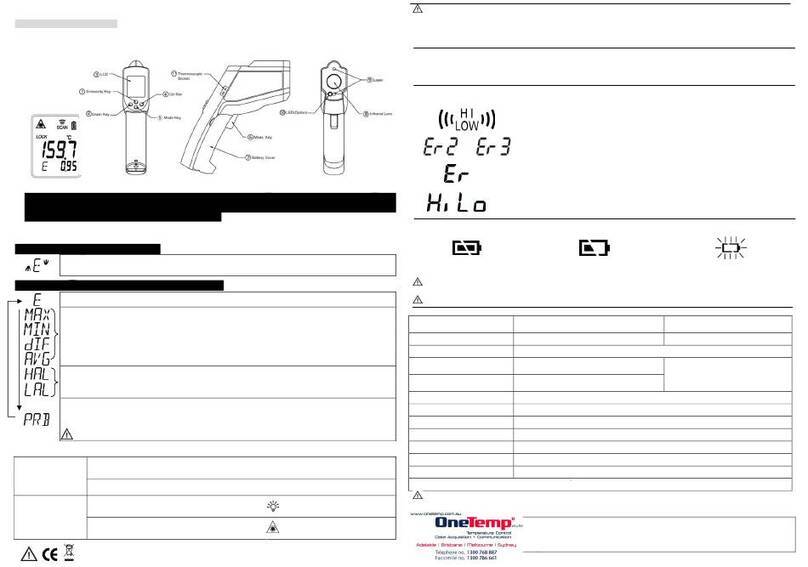
The thermometer is a non-contact infrared thermometer. Simply aim the thermometer at the target and press the ‘Scan
key’ to display the surface temperature.
Laser Information: (for models with
Laser only)
By pressing the ‘Scan key’, the device
will begin to measure the temperature
of the target and the laser will operate.
CAUTION!
1. WHEN DEVICE IS IN USE, DO NOT
LOOK DIRECTLY INTO THE LASER
BEAM–PERMANENT EYE DAMAGE
MAY RESULT.
2. USE EXTREME CAUTION WHEN
OPERATING THE LASER.
3. NEVER POINT THE DEVICE
TOWARDS ANYONE’S EYES.
4. KEEP OUT OF REACH OF ALL CHILDREN.
Always with the real time Max data
1.Power on: Press the “Scan. key”.
2.Temperature taking: When it’s power on, press the “Scan. key”, will get the
real time Max data immediately and the reading of measurement will be continuous updated.
HACCP CHECK
The “HACCP CHECK” feature is incorporated in our thermometer
temperature to graphically indicate critical temperature zone. The icons and
LED indicators located above the display indicate a food product stays in a
safe or unsafe HACCP “ Danger Zone” temperature. The green and red
LED light will always be lit before power off.
A Green LED appears with icon ” ” indicates a safe cool or frozen
condition below 4oC(40oF) or appears with icon ” ” indicates a safe
holding temperature above 60oC(140oF).
When temperature is between 4oC and 60oC, the red LED with icon ” ”
will appear and indicate that the temperature is fallen within the HACCP “Danger Zone” from 4oC to 60oC (40~140oF).
°C OR °F MODE
To change the thermometer from ‘°C’ to ‘°F’ or from ‘°F’ to ‘°C’, firstly turn the instrument on by pressing the ‘Scan key’,
then press the ‘Mode key’ one time, the ‘°C’ or ‘°F’ symbol will flash, press the ‘Scan key’ to change to scale.
EMISSIVITY RANGE
The infrared thermometer is supplied with a default emissivity of 0.95. The emissivity of the thermometer can be
changed from 0.05 (5E) to 1 (100E). Changes should only be carried out by experienced personnel. To change the
emissivity, firstly turn the instrument on by pressing the ‘Scan’ button, then press the ‘Mode’ button two times for
emissivity function. The 95E will flash on the LCD screen, then press the ‘Meas.’ button to adjust the emissivity value,
press the ‘Mode’ button again to exit the set up screen. For information relating to the emissivity of specific materials,
please contact the nearest retailer. Note: non-contact infrared thermometers are not recommended for use in measuring
the temperature of shiny or polished metals.
BAR DISPLAY: The fixed setting range for bar display is 20~220°C and Center=120°C.
The bar display will be updated comply with the measurement reading
changed.
LCD ERROR MESSAGES
The thermometer incorporates visual diagnostic messages as follows:
「」
「」
‘Hi’ or ’Lo’ is displayed when the temperature being measured is outside of the measurement
range.
「」
「 」
‘Er2’ is displayed when the thermometer is exposed to rapid changes in the ambient temperature.
‘Er3’ is displayed when the ambient temperature of the thermometer EXCEEDS 0°C (32°F) OR
+50°C (122°F). In both cases you should allow plenty of time (minimum 30 minutes) for the
thermometer to stabilize to the working/room temperature.
「 」
For all other error messages it is necessary to reset the thermometer. To reset the thermometer,
turn the instrument off, remove the battery and wait for a minimum of one minute, reinsert the
battery and turn on. If the error message remains please contact the Service Department for
further assistance.
BATTERIES
The thermometer incorporates visual low battery indication as follows:
‘Battery OK’:
measurements
are possible
‘Battery Low’: battery needs to
be replaced, measurements
are possible
‘Battery Exhausted’:
measurements are
not possible
When the ‘Low Battery’ icon indicates the battery is low, please use small, pointed screwdriver with the “X”
shaped to release the screw on the battery cover, the batteries should be replaced immediately with AAA,
1.5V * 2pcs.
It is important to turn the instrument off before replacing the batteries, otherwise the thermometer may
malfunction.
*IP54
Splash Proof

Ref No.:032011
After replacing new battery, the o-ring on the bottom of the device must be located at correct
position and well fixed before placing back the cover to make sure that it is splash proof.
Dispose of used battery properly and keep away from children.
STORAGE & CLEANING
The sensor lens is the most delicate part of the thermometer. The lens should be kept clean at all times, care should be
taken when cleaning the lens using only a soft cloth or cotton swab with water or medical alcohol, allowing the lens to
fully dry before using it, do not submerge any part of the thermometer. The thermometer should be stored at room
temperature.
SPECIFICATION
Measurement Range -55 to +350°C (-67~662°F)
Operating Range 0~50°C (32~122°F)
Accuracy (Tobj=15-35°C,Tamb=25°C) +/-1.0°C (1.8°F)
Accuracy(Tobj=-33~350 oC, Tamb=23±3oC) -55~0°C:±(2+0.05/deg.)°C ;above 0°C:±2°C (4°F)or 2% of reading
whichever is greater
Resolution (-55.0~199.9°C) 0.1°C / 0.1°F (switchable) , otherwise 1°C/1°F
Response Time (90%) 1 second
Distance:Spot 6:1 optics ratio
Emissivity Range 0.95 default – adjustable 0.05 to 1.00 emissivity
Battery Life Typ. 40hr, min 30hr (auto power off after 15 seconds)
Battery AAA*2pcs
Dimensions 26x 45 x 128mm(1.02×1.77×5.04 inch)
Weight 108 grams (3.8 oz)including batteries
EMC/RFI
Readings may be affected if the unit is operated within radio frequency electromagnetic field strength of approximately 3
volts per meter, but the performance of the instrument will not be permanently affected.
GUARANTED
The thermometer is guaranteed for a period of one year from the date of purchase against mechanical and electrical
manufacturing defects. There are no user serviceable parts inside the instrument. Any attempted repair by unauthorized
persons voids the warranty.
A new way to measure temperature
Manufactured by Radiant Innovation Inc.
Http://www.ZyTemp.com, E-mail: Service@ZyTemp.com
1F, No.3, Industrial East 9th Road, Science-Based Industrial Park,
HsinChu, Taiwan 300.