Aiwa PAVIT AZ-ES1 User manual

©2004 Sony Corporation
AZ-ES1/ES128/ES256
4-253-595-11(1)
Operating Instructions
The player
Portable USB
Memory Player

2
WARNING
To prevent fire or shock
hazard, do not expose the unit
to rain or moisture.
Do not install the appliance in a confined
space, such as a bookcase or built-in
cabinet.
To prevent fire, do not cover the ventilation
of the apparatus with news papers, table
cloths, curtains, etc. And don’t place lighted
candles on the apparatus.
To prevent fire or shock hazard, do not place
objects filled with liquids, such as vases, on
the apparatus.
Warning
Certain countries may regulate disposal of
the battery used to power this product. Please
consult with your local authority.
The validity of the CE marking is restricted
to only those countries where it is legally
enforced, mainly in the countries EEA
(European Economic Area).

3
Table of Contents
Overview
What you can do with your player .............. 4
Main features ............................................... 5
Getting started
Step 1: Check the package contents. ........... 6
Step 2: Insert a battery. ................................ 7
Locating controls ......................................... 8
Basic operations
Listening to music ....................................... 9
1. Connect the headphones.......................... 9
2. Put on the headphones........................... 10
3. Insert the “pavit” into the player. .......... 11
4. Start playback. ....................................... 11
B
Advanced operations
Changing the sound quality (M.D.S.E) ..... 14
Playing a track repeatedly (REP 1) /
Playing all tracks in random order
(SHUF) .................................................. 14
Locking the controls (HOLD) ................... 15
Turning off the beep sounds (BEEP)......... 15
B
Additional information
Precautions ................................................ 16
Cleaning..................................................... 16
Troubleshooting ......................................... 17
Specifications ............................................ 19
Index ............................................ Back cover

4
Overview
What you can do with your player
AZ-ES1/ES128/ES256 is a portable USB memory player specially designed for use with a USB
storage media called “pavit.”You can send MP3 files from your computer to the “pavit,” insert
the “pavit” into the player, and carry your favorite songs anywhere.
1Send your
favorite songs
to the “pavit.”
Use the supplied“Music
Transfer pavit Edition”
software to send MP3 files
from your computer to the
“pavit.”
2Enjoy music
anywhere with
your player!
What is “pavit”?
The “pavit” is a compact, lightweight, new-generation USB storage media* with a large
storage capacity. Although the “pavit” is dedicated to “pavit”-compatible devices, it can
also be used as an external storage media for your computer, since it connects directly to
the USB port, a standard interface for personal computers.
* Storage media is a device that can store data, such as floppy disk, hard disk and magneto-optic disk
(MO).
The “pavit” complies with USB2.0 (High-Speed USB).

5
OverviewOverview
Main features
•Compact size, lightweight, highly portable, with skip-proof operation
•Up to 120 minutes of music can be stored in a 128-MB “pavit” and 240 minutes in a 256-MB
“pavit.”*
• MP3 files on your computer are sent to the “pavit” by simple and easy operations using the
supplied “Music Transfer pavit Edition” software.
•The “pavit” connects directly to the USB port on your computer for high-speed data transfer.
•You can also store a variety of data other than MP3 files in the new-generation USB storage
media “pavit.”
*The time length varies according to the bit rate used when encoding MP3 files. The times indicated here are
for 128-kbps MP3 files.
Notes
•Music you record is limited to private use only. Any other use requires the permission of the copyright
holders.
•Sony is not liable for incomplete data transfer or damaged data due to problems of this product or your
computer.

6
Getting started
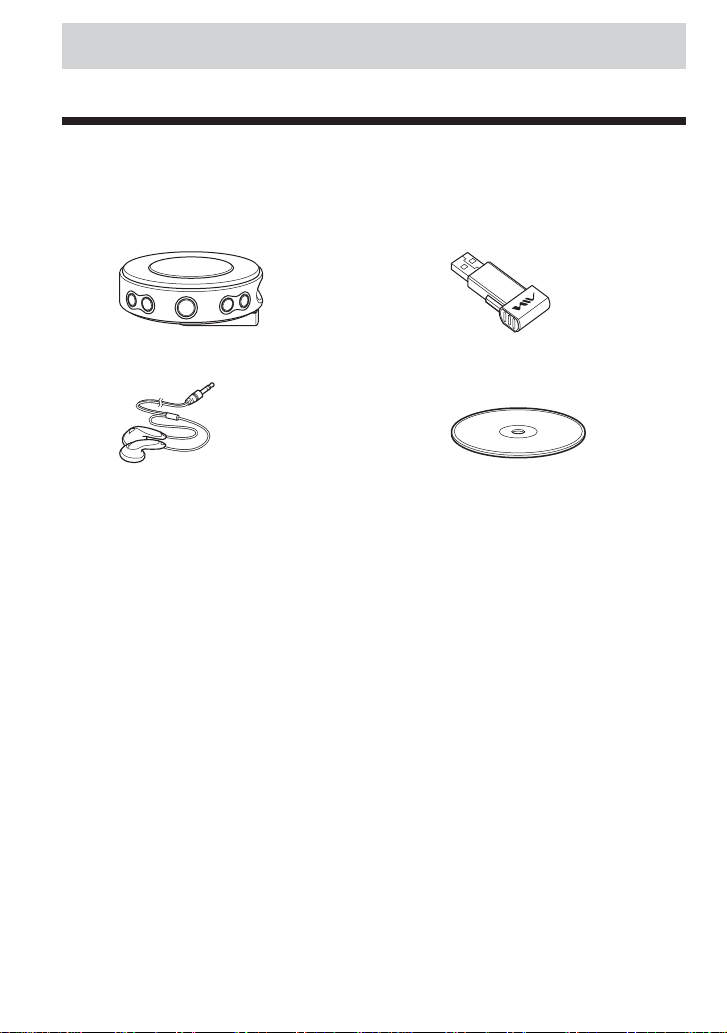
Step 1: Check the package contents.
Check the accessories enclosed in the package.
•Portable USB memory player (1)
•Stereo headphones (1)
•Headphone extension cord (1)
•Neck strap (1)
•Operating instructions for the application software “Music Transfer pavit Edition” (1)
•Quick start guide (1)
* Supplied with AZ-ES128 and AZ-ES256 only. ForAZ-ES1, see “Optional accessories” on page 19.
•USB storage media “pavit”* (1)
•CD-ROM (“Music Transfer pavit Edition”)
(1)

7
Getting started
Step 2: Insert a battery.
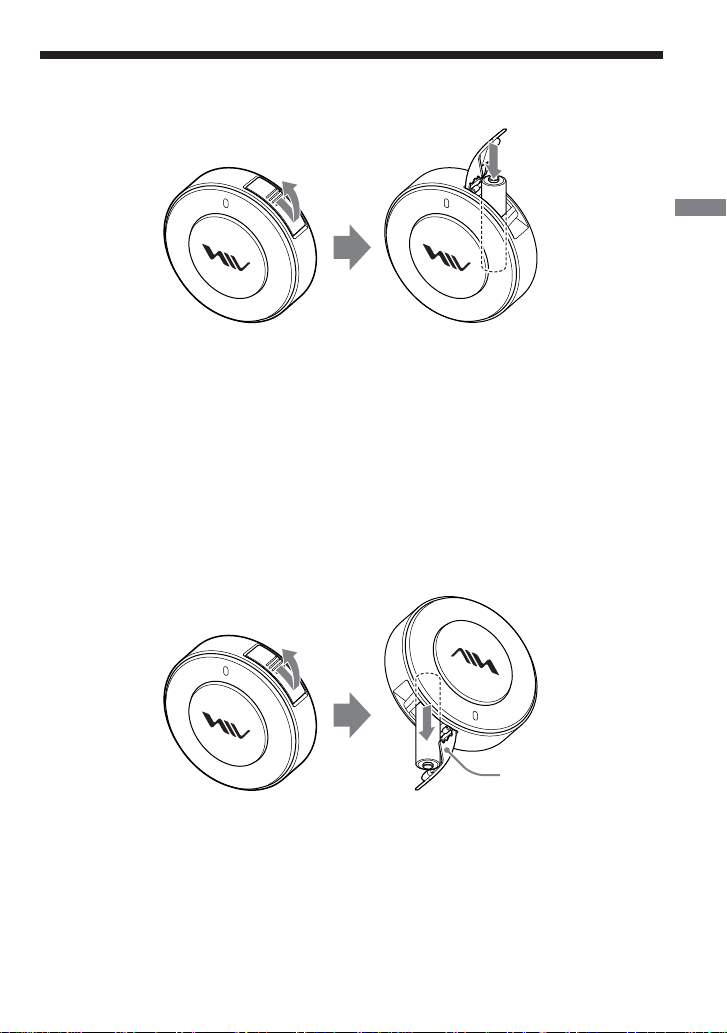
Insert one LR03 (size AAA) alkaline battery into the battery compartment as illustrated below.
e
E
Battery duration
Approximately 11 hours (continuous playback, with a Sony LR03 (sizeAAA) alkaline battery)
When the battery is drained, playback stops and the power is turned off automatically. If you try
to turn on the power in this state, the LED indicator will not light up and you cannot start
playback.
Replace the battery with a new one.
When you turn on the power after replacing the battery, playback starts from the track whose
playback was interrupted by battery drain.
To remove the battery
Turn the player upside down and push the battery inward a little to draw out the battery.
e
E
Notes on dry batteries
•Do not throw batteries into fire.
•Do not carry batteries with coins or other metallic objects. It can generate heat if the positive
and negative terminals of the battery are accidentally contacted by a metallic object.
•When the player is not to be used for a long time, remove the battery.
•If battery leakage occurs, wipe off any deposit in the battery compartment, and insert a new
battery. In case the deposit adheres to you, wash it off thoroughly.
Insert with the e
side upward.
The cover of the battery
compartment is designed
to prevent the battery
from dropping.

8
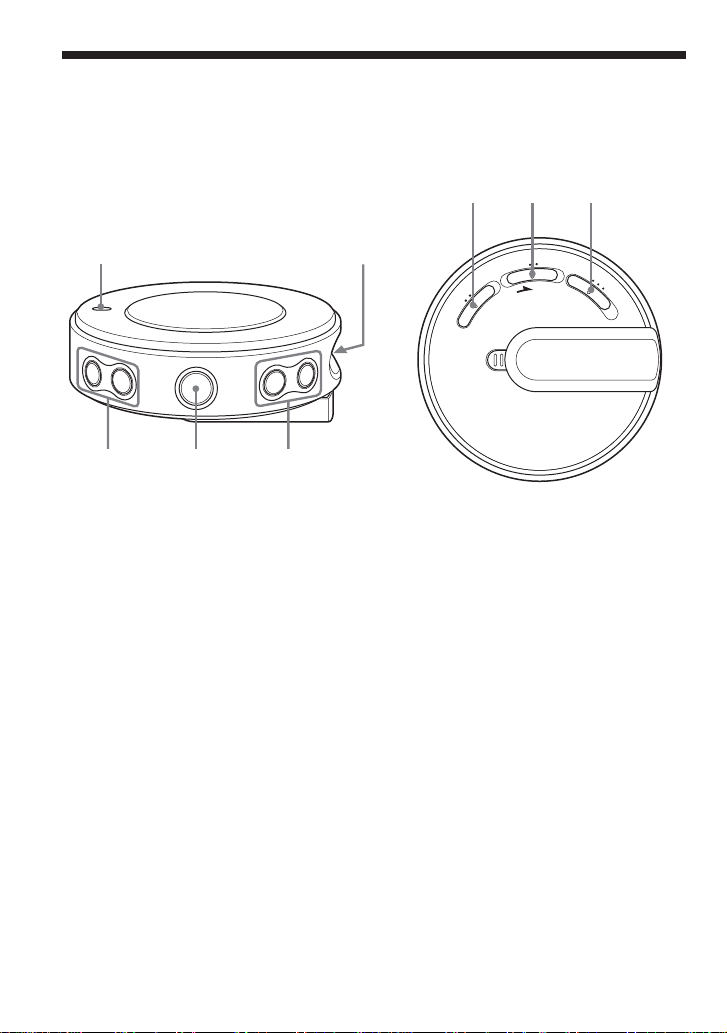
Locating controls
1LED indicator
2VOLUME –/+* buttons
3Nx* (play/stop) button
4./ >(skip) buttons
5“pavit” slot
*The button has a tactile dot.
2
15
3
4
M
.
D
.
S
.
E
B
E
E
P
O
F
F
O
N
H
O
L
D
O
F
F
R
E
P
1
S
H
U
F
O
F
F
O
N
678
Player (front/side) Player (rear)
6M.D.S.E (MP3 Digital Sound Enhancer)
switch
7HOLD/BEEP switch
8REP 1 (repeat 1)/SHUF (shuffle) switch

9
Basic operations
Basic operations
Listening to music
First, send MP3 files to the “pavit” from your computer using the supplied “Music Transfer pavit
Edition” software. Refer to the separate manual for “Music Transfer pavit Edition” about how to
send MP3 files to the “pavit.”
1.Connect the headphones.
1Remove the plug cover from the
player.
While pressing the latch 1, slide and
lift the plug cover 2.

3Connect the headphone plug to the i(headphones) jack, and reattach the
plug cover to the player.

Slide the plug cover so that it clicks into place securely.

2Pass the headphone cord
through the notch in the plug
cover.
1
2
2
1
(Continued)

10
2.Put on the headphones.
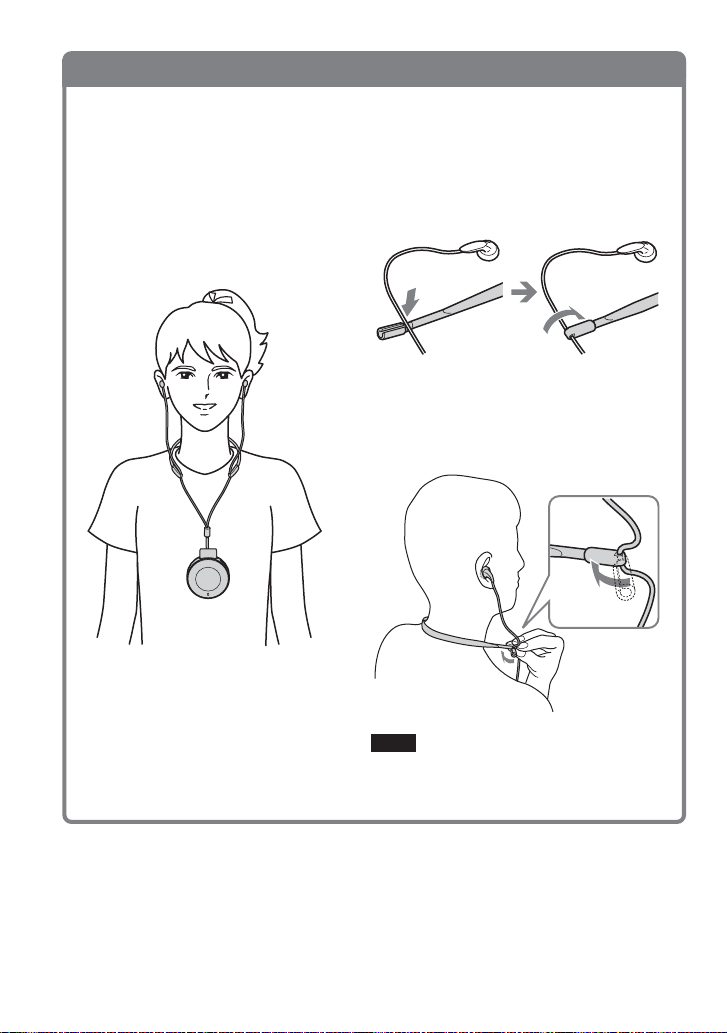
1Fold one end of the supplied neck
strap as illustrated to secure the
headphone cord.
You can hang the player from your neck with the supplied neck strap.

To use the player while carrying it in a pocket or bag, connect the supplied headphone
extension cord (see page 13).
2Place the strap around your neck,
then fold the other end of the neck
strap to secure the headphone cord.
Note
Hold the folded-over end of the neck strap when
adjusting the length of the headphone cord.
This manual suits for next models
4
Table of contents
Other Aiwa MP3 Player manuals