American Security Product Co. American Security Product Co.
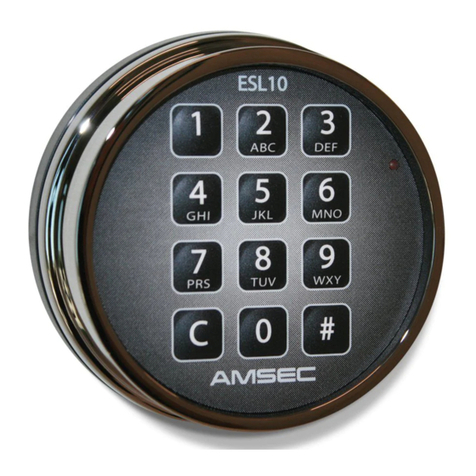
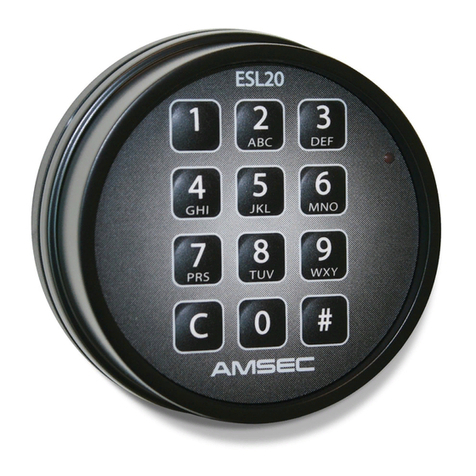
Operating Instructions for the ESL10 Electronic Safe Lock
Your AMSEC ESL10 Electronic Safe Lock has a Factory Combination of
C-1-2-3-4-5-6-#
To open the lock, simply press the “C” key to clear and wake up the electronics. Now press the
keys of the combination one at a time and finish with the “#” key. If the combination keyed is
correct, the lock will cycle open for three (3) seconds. During this 3 second period, turn the
handle of the safe to the unlocked position and pull the door open.
Here are a few things to remember:
a.
With each keystroke the red lamp on the keypad will flash and a chirp will be heard.
b.
If 4 (four) incorrect combinations are entered, the lock will go into a “Penalty Lockout” for 15
minutes to prevent trial and error manipulation attempts at opening the lock. The red lamp
will flash once every 5 seconds during the penalty period. If you press any key during the
lockout period, the red lamp will flash with a chirp 8 times rapidly to indicate the lockout
condition.
c.
Before keying the combination, be sure that the handle of the safe is in the fully locked
position to allow the lock to open freely.
d.
If the lock fails to open or acts strange, replace the batteries with good quality fresh alkaline
9 volt batteries To replace the batteries, simply turn the keypad housing counter-clockwise
to the stop and pull it away from the base. Un-snap the old batteries and clip on the new
one. Position them in the pocket at the bottom of the housing and replace it watching that
the wires are not pinched. You should replace your batteries once a year to prevent
corrosion damage from leakage.
e.
During the input sequence, if you make a mistake, you can press “C” to clear the previous
input and start over again.
f.
The ESL10 uses a fixed length 6 (six) digit combination.
g.
Use only your fingers to key the combination. Sharp objects will result in damage which is
not covered by the warranty.
h.
If at any time during opening or combination changing the unit is left without input for 10
(ten) seconds, it returns to a resting condition. If this occurs during a combination change,
the Old Combination is retained.
i.
At any time during opening or combination changing the unit will register the first 5 digits of
the combination into the “buffer” that receives input. The 6th digit will be the last numeric key
pressed. For example, if your press C-1-2-3-4-5-7-4-5-2-7-6-# the program recognizes only
the C-1-2-3-4-5-6-# input. The last numeric key pressed continues to replace the one prior
until the “#” key is pressed to indicate completion. This is a security feature that allows you
to baffle an on-looker that may be trying to memorize your combination.
You may change your combination any time you like and as many times as you like. Once your
safe is installed, you must change the combination to a number sequence other than the Factory
Combination of 1-2-3-4-5-6 to insure security.
Note: Combination changes should always be done with the door locked OPEN.
The input of a new combination is done by keying a “Change Key” code, followed by the Old
Combination to validate a change and then followed by entering the New Combination twice to
avoid a keying error. To change the combination, do the following:
a.
Press the keys “C” and then “#”. This is the “Change Key” that activates the change routine.
The unit responds with a short warbling tone (called the “good combo tone”) and the red
lamp strobes with the tone.
b.
Now key in the Old 6 digit combination, the “C” key may be used to clear an error in keying
at any time. Finish the input with a “#” key.
1.
If the combination keyed matches the existing combination in permanent
memory, another short good combo tone is sounded. Proceed to “c.”
2.
If the combination keyed is incorrect, the unit responds with 4 short beeps (called
the bad combo tone) and returns to rest. The combination change routine is
aborted and the Old combination is retained. This also causes a count up for
PenaltyLockout.
c.
Now key the first pass with the New 6 digit combination followed by a “#”key. Again, the “C”
key may be used to clear an error in keying at any time.
1.
If the combination input is 6 digit in length, another short good combo tone is
sounded. Proceed to “d.”
2.
If the combination keyed is not 6 digits long, the unit responds with 4 short beeps
(called the bad combo tone) and returns to rest. The combination change routine
is aborted and the Old combination is retained.
d.
Now key the second verify pass with the New 6 digit combination followed by a “#” key. As
before, the “C” key may be used to clear an error in keying at any time.
1.
If the combination input matched the first pass, a long good combo tone is
sounded. The New Combination replaces the Old Combination in permanent
memory and the unit returns to a resting condition. Proceed to “e.”
2.
If the combination keyed does not match the first pass, the unit responds with the
bad combo tone and returns to rest. The combination change routine is aborted
and the Old combination is retained.
e.
Test your New Combination several times prior to closing and locking the safe.
Continued on Reverse Side