9
HALO®DOSER™Installation Manual
Section 4. Control Using the
HaloChlorinator
4.1 Automatic Operation
For automatic operation, acid dosing is controlled
through the “Settings” page of the Halo Chlorinator.
Acid dosing will only occur whilst the filter pump
isrunning.
If a pH probe is being used, then the acid dosing
pump is regulated by the pH setting.
In this case, if the pH probe detects that the pH is
higher than the “Set Point”, the acid dosing pump
willrun (every 4 to 12 minutes) to lower the pH level.
If a pH probe isn’t fitted, then the“Acid Level”slider
(on the “Settings”page) is used to estimate acid
requirements. Generally, level 5 is a good starting
point, however it can be adjusted to increase or
reduce the amount of acid dispensed. Monitor and
test (using a test strip) every day or two until you find
the correct setting to suit your pool needs.
N.B. Adding more acid will lower the pH level, less acid
increases the pH level.
4.2 Manual Operation
The acid dosing pump can be run manually.
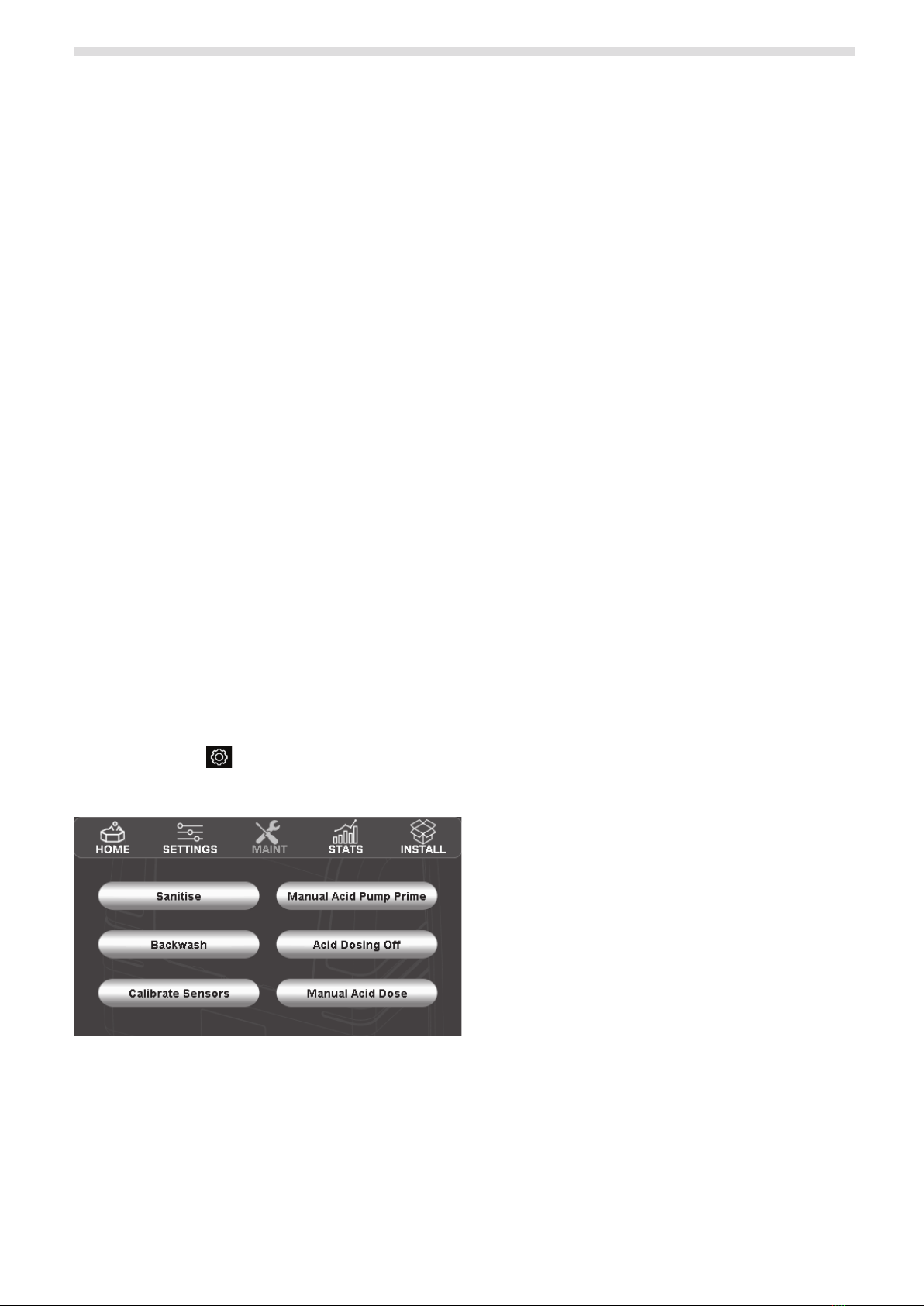
From the “Home”screen of the Halo Chlorinator, press
the “Settings” icon and then press the “Maint” icon
to display the maintenance page. See Figure 11.
Figure 11. Halo Maintenance Screen
“Manual Acid Pump Prime” will run the acid dosing
pump for 30 seconds to help prime the pump.
(Repeatas necessary.)
“Acid Dosing Off” can be used to turn the acid
dosing off for a period from 1 minute to 24 hours
(orindefinitely).
– When adding some chemicals (e.g. pH buffer /
sodium bicarbonate) it is desirable to turn the
acid dosing off for up to 24 hours.
– If your drum has run out of acid it is desirable
to disable acid dosing “indefinitely” until the
drum is refilled. To resume acid dosing, you
need to return to the“Acid Dosing Off” page
toresume dosing.
“Manual Acid Dose” can be used to add a specific
amount of acid to your pool (e.g. If your pool shop
advises you to add X litres of acid). From this screen,
you can also choose what mode the chlorinator
should be in after dosing the acid. (Typically you
would resume in auto mode, however if a large
amount of acid was added you may choose manual
mode and change to auto later.)
4.3 Operation Via the Halo ChlorGo App
The Halo ChlorGo App can be used to set the pH or
acid level using the “Settings” icon.
The only manual operation that can be performed
from the app however is to disable the dosing for a
period or indefinitely (and to reinstate dosing that
hasbeen turned off).