manuals.online logo
Brands
  1. Home
  2. •
  3. Brands
  4. •
  5. Audiovox
  6. •
  7. Car Video System
  8. •
  9. Audiovox Movies2Go AVXMTGHR1D User manual

Audiovox Movies2Go AVXMTGHR1D User manual

Other manuals for Movies2Go AVXMTGHR1D

2

Other Audiovox Car Video System manuals

Audiovox Rampage VBP1000S User manual

Audiovox

Audiovox Rampage VBP1000S User manual

Audiovox VOD102 - DVD Player With LCD Monitor User manual

Audiovox

Audiovox VOD102 - DVD Player With LCD Monitor User manual

Audiovox VME 9309 TS User manual

Audiovox

Audiovox VME 9309 TS User manual

Audiovox PROV716 User manual

Audiovox

Audiovox PROV716 User manual

Audiovox VOH8512 User manual

Audiovox

Audiovox VOH8512 User manual

Audiovox VODDLX10 User manual

Audiovox

Audiovox VODDLX10 User manual

Audiovox HR7011PKG User manual

Audiovox

Audiovox HR7011PKG User manual

Audiovox VM9214 User manual

Audiovox

Audiovox VM9214 User manual

Audiovox VOD108 - 10.2" Overhead Video Monitor User manual
Audiovox

Audiovox VOD108 - 10.2" Overhead Video Monitor User manual

Audiovox Mobile Video HR7010PKG User manual

Audiovox

Audiovox Mobile Video HR7010PKG User manual

Audiovox 128-5495E Quick start guide

Audiovox

Audiovox 128-5495E Quick start guide

Audiovox AVXMTG10UA User manual

Audiovox

Audiovox AVXMTG10UA User manual

Audiovox AVT 1498 User manual

Audiovox

Audiovox AVT 1498 User manual

Audiovox DVD1627 Planning guide

Audiovox

Audiovox DVD1627 Planning guide

Audiovox VME 9315BTA BTM 10 User manual

Audiovox

Audiovox VME 9315BTA BTM 10 User manual

Audiovox HR7008APKG User manual

Audiovox

Audiovox HR7008APKG User manual

Audiovox VOH802 - VOH 802 - LCD Monitor User manual

Audiovox

Audiovox VOH802 - VOH 802 - LCD Monitor User manual

Audiovox HR7008PKG User manual

Audiovox

Audiovox HR7008PKG User manual

Audiovox VOH682 User manual

Audiovox

Audiovox VOH682 User manual

Audiovox VOD108 - 10.2" Overhead Video Monitor User manual
Audiovox

Audiovox VOD108 - 10.2" Overhead Video Monitor User manual

Audiovox AVXMTG13UHD User manual

Audiovox

Audiovox AVXMTG13UHD User manual

Audiovox AVXMTG10U User manual

Audiovox

Audiovox AVXMTG10U User manual
Audiovox VOD701 User manual

Audiovox

Audiovox VOD701 User manual

Audiovox Movies 2 Go MMSV58 User manual

Audiovox

Audiovox Movies 2 Go MMSV58 User manual

Popular Car Video System manuals by other brands

Farenheit MD-1510CM instruction manual

Farenheit

Farenheit MD-1510CM instruction manual

Mazda Connect manual

Mazda

Mazda Connect manual

RCA DRC97983 Manual de usuario

RCA

RCA DRC97983 Manual de usuario

Panasonic CY-VHD9401U Service manual

Panasonic

Panasonic CY-VHD9401U Service manual

Stinger HEIGH10 RB10RAM13B installation manual

Stinger

Stinger HEIGH10 RB10RAM13B installation manual

Alpine IVA-W203 - 6.5" Touch Screen 2-DIN DVD In-Dash... owner's manual

Alpine

Alpine IVA-W203 - 6.5" Touch Screen 2-DIN DVD In-Dash... owner's manual

Eonon E1057 instructions

Eonon

Eonon E1057 instructions

Milion D2223 user manual

Milion

Milion D2223 user manual

Metra Electronics 99-8153 installation instructions

Metra Electronics

Metra Electronics 99-8153 installation instructions

Voxx Electronics HR8MA1 owner's manual

Voxx Electronics

Voxx Electronics HR8MA1 owner's manual

Axxera AV604Bi quick start guide

Axxera

Axxera AV604Bi quick start guide

Clarion NX706E owner's manual

Clarion

Clarion NX706E owner's manual

Pyle view PLDN74BTi owner's manual

Pyle view

Pyle view PLDN74BTi owner's manual

Clarion NX602 quick start guide

Clarion

Clarion NX602 quick start guide

RCA DRC6296 - Twin 9" Mobile DVD System Manual Del Usuario

RCA

RCA DRC6296 - Twin 9" Mobile DVD System Manual Del Usuario

Fiat Uconnect 5.0 manual

Fiat

Fiat Uconnect 5.0 manual

Lanzar SVDVD5 owner's manual

Lanzar

Lanzar SVDVD5 owner's manual

Eonon E1060 instructions

Eonon

Eonon E1060 instructions

manuals.online logo
manuals.online logoBrands
  • About & Mission
  • Contact us
  • Privacy Policy
  • Terms and Conditions

Copyright 2025 Manuals.Online. All Rights Reserved.

AVXMTGHR1D
7” LCD MONITOR
WITH BUILT-IN DVD PLAYER
FOR REAR SEAT ENTERTAINMENT
128-8944A
OPERATION MANUAL / INSTALLATION GUIDE
PUSH
ATTENTION
ATENCIÓN
MISE EN GARDE
Este producto está diseñado para utilizarse en vehículos modelo 2009 y anteriores.
Es ilegal instalarlo en vehículos modelo 2010 y posteriores.
Ce produit est destiné à être utilisé sur des véhicules de modèles 2009 et antérieurs.
Il est illégal de l’installer sur des modèles 2010 et plus récents.
This product is designed for use on 2009 and prior model year vehicles.
It is not lawful to install on 2010 model year vehicles or later.
Important Notice
Installation of headrest products require careful planning and preparation. Be extremely careful
of seats that have airbags built into them. Keep wiring away from any air bag wiring (usually
identified by yellow connectors and yellow wire jackets). Damage to air bag wiring can result in
personal injury to vehicle occupants. If you have any questions regarding wire routing or
installation in a vehicle, please contact Audiovox Technical Support at 1-800-225-6074.
When connecting power and ground in a mobile video installation, insure that the ACC wire is
fused at the point where it is connected to the vehicle ACC wiring. Failure to do so can result in
damage to the vehicle if a short circuit develops between the vehicle connection point and the
mobile video product.
An LCD panel and/or video monitor may be installed in a motor vehicle and visible to the driver if
the LCD panel or video monitor is used for vehicle information, system control, rear or side
observation or navigation. If the LCD panel or video monitor is used for television reception,
video or DVD play, the LCD panel or video monitor must be installed so that these features will
only function when the vehicle is in “park” or when the vehicle’s parking brake is applied.
An LCD panel or video monitor used for television reception, video or DVD play that operates
when the vehicle is in gear or when the parking is not applied must be installed to the rear of the
driver’s seat where it will not be visible, directly or
indirectly, to be operator of the motor vehicle.
Licensed under one or more of the following patents:
Patent NOS. 7,245,274 , 6,899,365 and 6,678,892
FEATURES
• 7” Digital Thin Film Transistor (TFT) Active Matrix Liquid Crystal Display (LCD) Monitor
• Built-in DVD Player
• Last position memory for DVD player
• Three Audio / Video Source inputs (DVD, AV and AUX)
• USB 2.0 port / SD Card Reader input
• Screen mode selection (4:3, 16:9)
• On Screen Display (OSD) for control of picture quality and functions
• Full function remote control
• Plays DVD, CD and MP3 discs
• IR headphone (optional)
SPECIFICATIONS
Specifications subject to change without notice.
Resolution
Pixels
Operation Temperature
Storage Temperature
Backlit life
Video Display System
Headphone Audio Output
Video Output
Power Source
Dimension (L x W x H)
480x234
336,960
32 ~113º F (0 ~ 45º C)
-4 ~ 149º F (-20 ~ 65º C)
20,000 Hours
NTSC / PAL / AUTO
0.03W @ 32 ohms
1.0Vp-p @ 75 ohms
10V~16V DC
147mm x 275mm x 200mm
Type TFT Active Matrix LCD
AVXMTGHR1D 3
5.7in x 10.8in x 7.8in
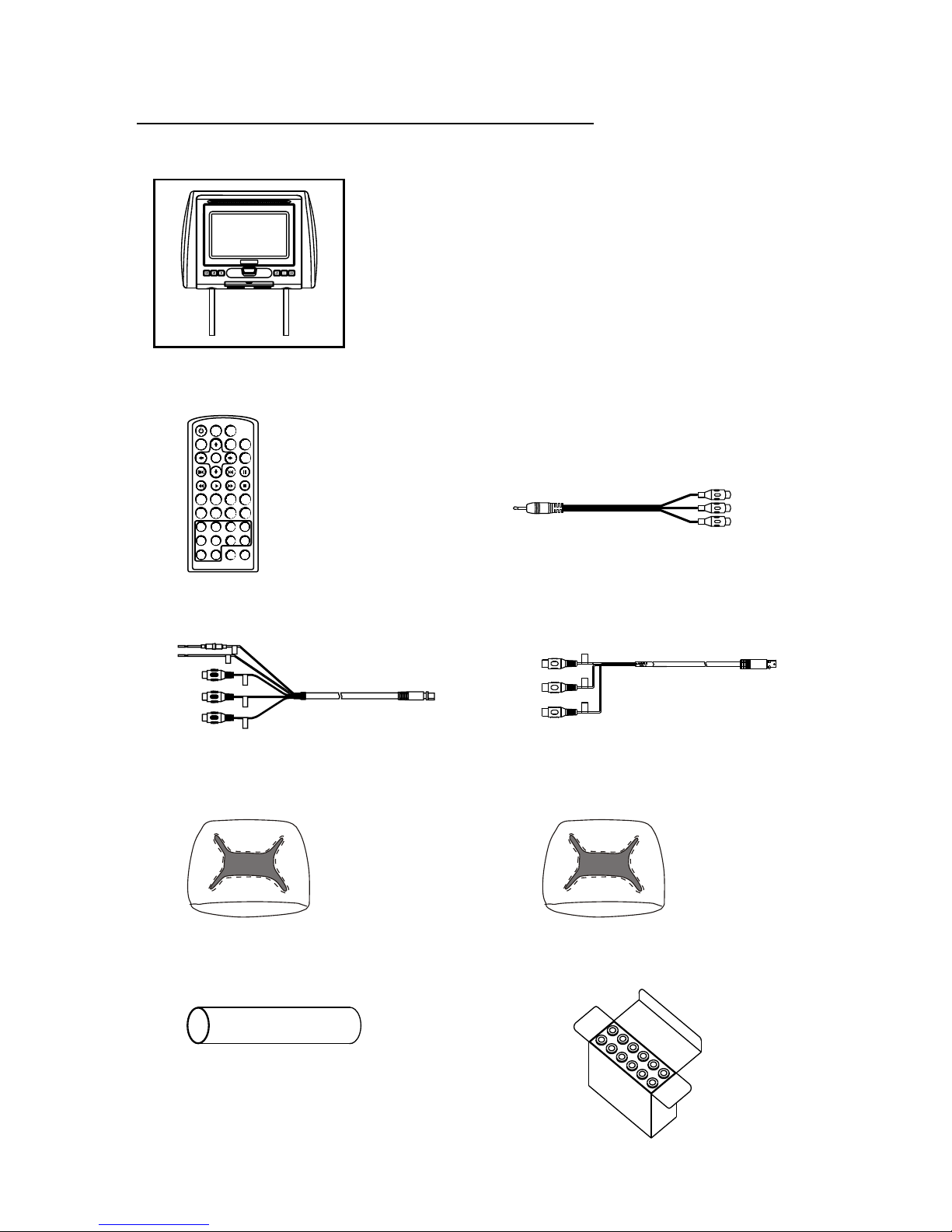
MATERIAL TO USE IN THIS PACKAGE:
NOTE: Headrest cables are included with the headrest DVD player and the headrest monitor.
1) AVXMTGHR1D System Monitor with DVD Player (AVXMTGHR1D) (1pc)
NOTE: The AVXMTGHR1D monitor has been designed to
be interchangeable from one headrest to the other. The
headrests will still have the Green and Red Din cables on
them and should be connected to their respective
connectors. The headrest cover from the manufacturer is
covered with shale colored vinyl.
1) Remote Control
(P/N 136-5150) - (1pc)
3) AV IN / Power Cable, 8 Pin Din to 3 RCA (Red)
(P/N 112-4149)-(1pc)
5) Black Vinyl Headrest Cover
(P/N 126-1377)-(1pc)
4) AV OUT Cable, 8 Pin Din to 3 RCA (Green)
(P/N 112-4160)-(1pc)
2) AV Adapter Cable
(P/N )-(1pc)112B3227
6) Pewter Vinyl Headrest Cover
(P/N 126-1378)-(1pc)
7) Shrink Tubing, Black
(P/N 138-1495 )-(2pcs)
8)
(P/N )-(1box)
Support Tube Adaptor Box
170-0161
POWE R SOURCE
VOLU ME
-+
MUTE
ENTE R
PIX
PREV NEXT PAUSE
STOPFFPL AYFR
AUDI OSUBT ITLEREPEATSETU P
ZOOM
DVD SO URCE
DISC ME NU
DISPLAY
1 2 3 4
5 6 7 8
9 0
FMM ON/O FF CHANNEL SELE CT
SYST EM MENU
AVXMTGHR1D 4
PUSH
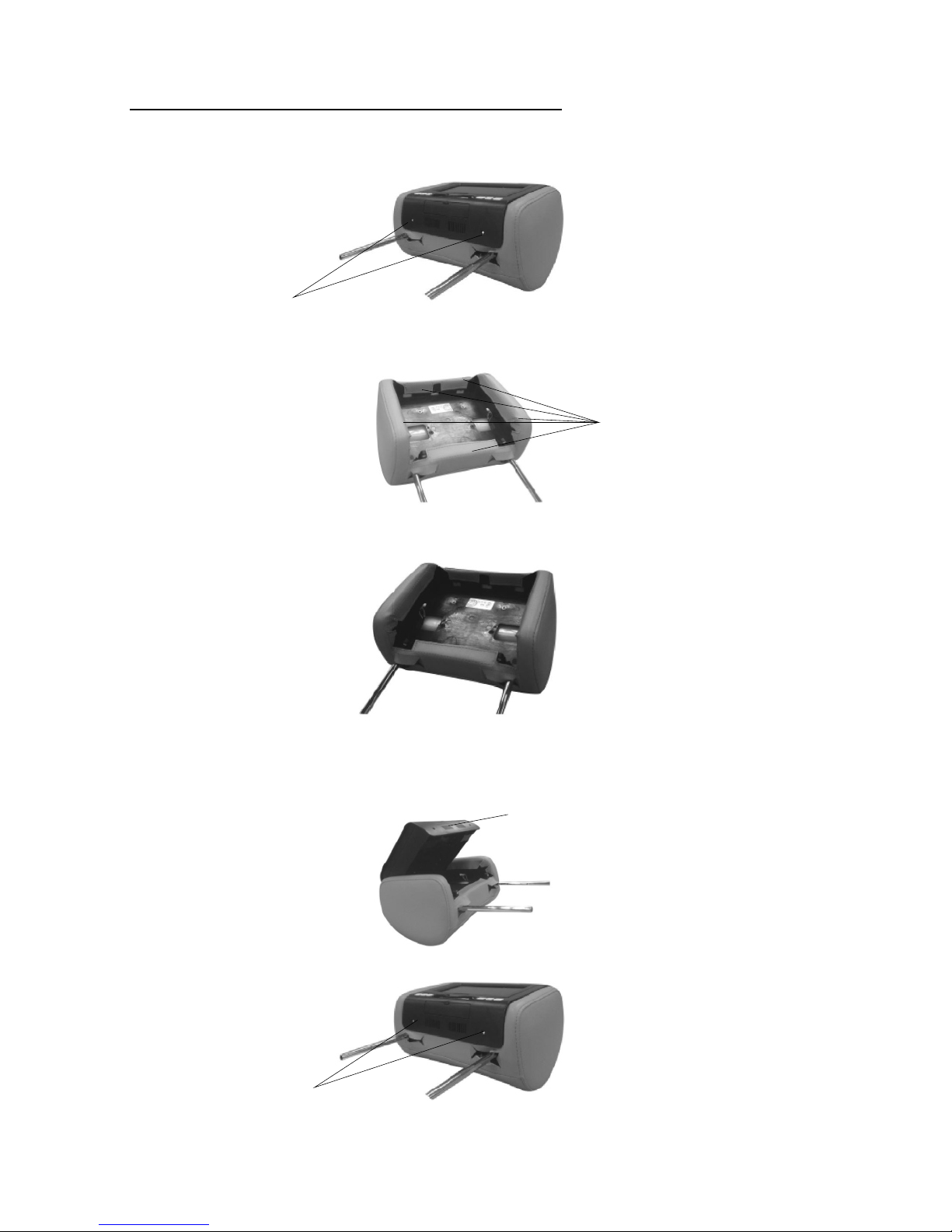
HEADREST COVER REPLACEMENT:
1. Using a Philips screwdriver, unscrew the two Philips screws and lift the bottom edge
of the monitor upward.
2. Remove the velcro tabs securing the headrest cover.
3. Replace the headrest cover with the desired color and secure the headrest cover by
re-attaching the velcro tabs.
4.Place the monitor cable into the space on the right side of the headrest and lower the
monitor into position to align the two Philips screws with the screw holes in the headrest.
Close the screen and press the PUSH button to secure the screen.
5.Tighten screws
AVXMTGHR1D 5
NOTE: If desired, replace the headrest cover before installing the headrest in the vehicle.
Unscrew Philips Screws
Remove Velcro Tabs
Push
Tighten Philips Screws
VEHICLE PREPARATION
AVXMTGHR1D 6
1) Decide on the system configuration and the options that will be installed.
2) Read the manuals and get familiar with the electrical requirements and
connections.
3) Decide on the mounting locations and methods of mounting the products that
will be connected to the AVXMTGHR1D.
4) Prepare the vehicle by removing any interior trim necessary to gain access to
the vehicle's wiring as well as all areas where interconnecting wire harnesses
will be located. The mounting method, and the location will vary from vehicle to
vehicle, so this manual will only focus for the installation of the AVXMTGHR1D
Monitors in the supplied configuration. The best location for the AVXMTGHR1D
System components is:
a. Monitors: Vehicle specific Headrest NOTE: The Master Monitor should be
installed in the passenger position most used.)
5) Locate an accessory power source (+12VDC present when the ignition key is in
the accessory and run positions. 0VDC should be present when the ignition key
is in the OFF position), a constant power source (+12vdc) at all times,
regardless of the ignition key and a good ground. Generally, these wires can be
found at the ignition switch or fusebox.
NOTE: Ensure that both the constant and accessory power is fused at the
source. Failure to do so may result in vehicle wiring damage.)
6) Run the wiring harnesses throughout the vehicle as necessary. (Refer to the
Wiring Diagrams on page 8, as well as the wiring instructions for the individual
components and accessory options being installed). Be sure, that all the wiring
is protected from sharp edges and is routed in such a manner that it will not be
pinched, when it is fully installed. Be sure to leave enough slack in the wiring at
each component to allow sufficient working room. Be sure to leave enough slack
in the monitor cables to allow the headrest to move up or down, and seat
movement.
7) Remove all the A/V system components from their packaging and then place
them in the vehicle at their respective locations.
8) Install the headrests:
a. Remove vehicle's original headrests.
b. insert appropriate support tube adaptors in vehicle post guides. (if needed)
c. Hold the headrest above the seat and insert the two cables into the vehicle
support guides Make sure that the headrest is in the correct position (Display
facing the rear).
d. Route the cables through the seat back and out the bottom of the seat while
pulling the cables to remove the slack. Be sure to leave enough slack in the
monitor cables to allow the headrest to move up or down.
9) Connect all the components together (electrically) and verify proper operation of
all the system functions.
AVXMTGHR1D 7
Wireless FM Modulator
The AVXMTGHR1D is equipped with a built-in wireless FM Modulator, that
allows you to listen to the DVD audio signal by tuning your vehicle’s radio to the
selected frequency, (CH1 87.7MHz, (CH2 88.1MHz, CH3 88.5MHz, CH4
88.9MHz, CH5 106.7.1MHz, CH6 107.1MHz, CH7 107.5MHz, CH8 107.9MHz.
This feature is accessed by using the FM transmitter buttons on the remote
(FMM ON/OFF, and CHANNEL SELECT).
Whenever the FM Modulator is on, broadcast reception on the vehicles radio will
be poor. Switching the FM Modulator off will allow normal radio reception.
NOTE: In certain areas where there are a large number of FM radio stations (e.g.
large cities, urban areas), the reception of the FM signal may not be satisfactory,
resulting in static, distorted sound or signal bleed thru from strong local radio
stations. This is not a defect in the product, but the result of a stronger local radio
station overpowering the wireless FM transmitter in your headrest monitor.
AVXMTGHR1D WIRING DIAGRAM
Headrest Monitor
GREEN
RED
AVXMTGHR1D 8
PUSH
8 Pin (M) Din Cable Red with RCA Cable
(P/N 112-4149)-(1pc)
8 Pin (M) Din Cable Green with RCA Cable
(P/N 112-4160)-(1pc)
Video Out Yellow
Audio Out Right Red
Audio Out Left White
12V+VDC
Ground-
Video In Yellow
Audio In Right Red
Audio In Left White
AVXMTGHR1D 9
PUSH
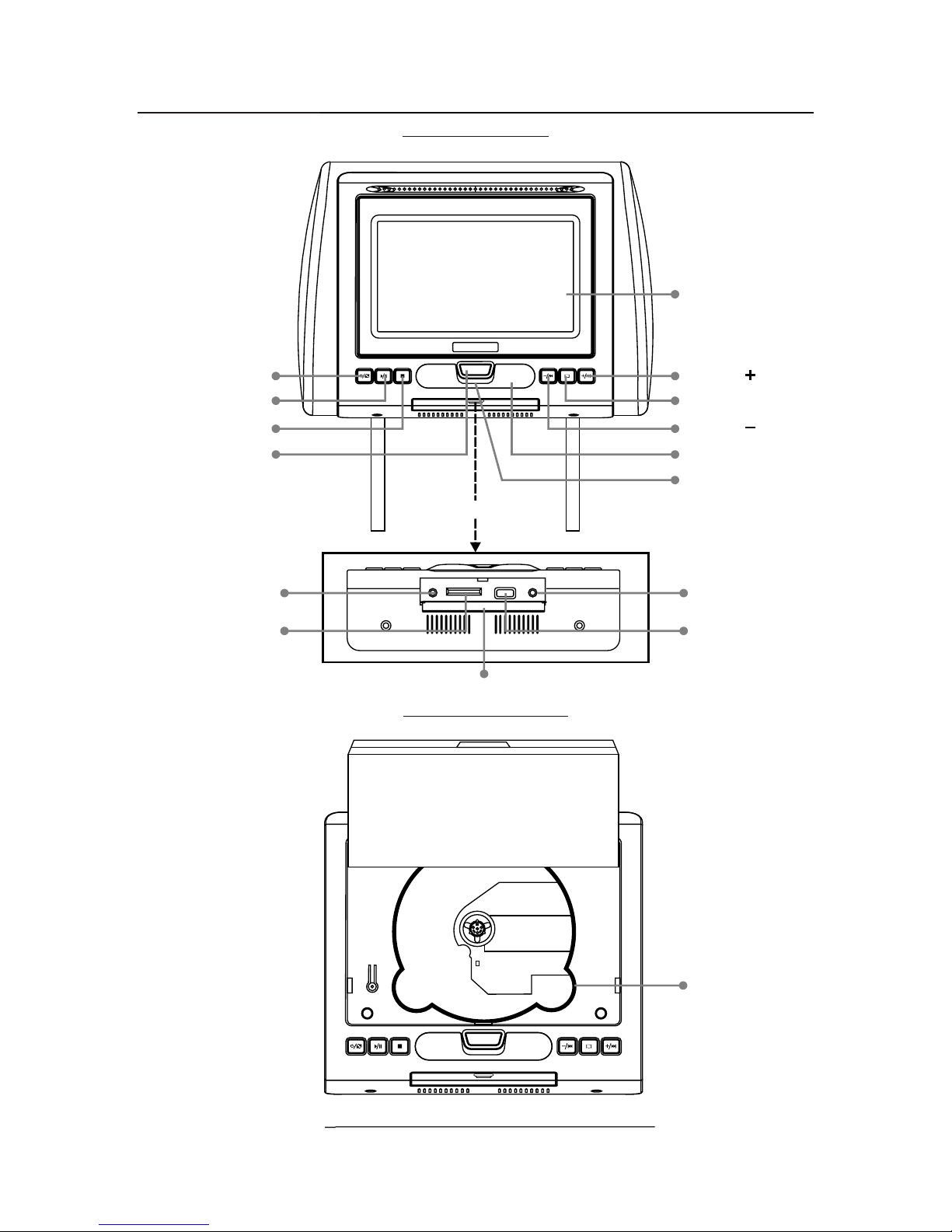
AVXMTGHR1D
(FRONT VIEW)
CONTROLS AND INDICATORS DIAGRAM
POWER/SOURCE
SCREEN RELEASE
PULL DOWN
PLAY/PAUSE
STOP
VOLUME /NEXT
SYSTEM MENU
VOLUME /PREVIOUS
IR SENSOR
IR HEADPHONE
TRANSMITTER LENS
AUX IN SD USB PHONE
AUX IN JACK
USB PORT
SD CARD READER
COVER
LCD PANEL
PUSH
DVD DISC
(FRONT VIEW MONITOR OPEN)
(BOTTOM VIEW)
HEADPHONE JACK
AVXMTGHR1D 10
REMOTE CONTROL OPERATION
NOTE: The remote control has a battery installed with a pull tab to prevent
battery discharge. Remove the pull tab before attempting to use the remote.
Battery Replacement
1. Remove the battery holder.
2. Insert the battery (CR2025) into the battery holder and insert the battery
holder into the remote. Be sure to observe the correct polarity.
3. Align the battery holder with the remote control and push until the holder
clicks.
POWER SOURCE
VOLUME
-+
MUTE
ENTER
PIX
PREV NEXT PAUSE
STOPFFPLAYFR
AUDIOSUBTITLEREPEATSETUP
ZOOM
DVD SOURCE
DISC MENU
DISPLAY
1 2 3 4
5 6 7 8
9 0
FMM ON/OFF CHANNEL SELECT
SYSTEM MENU
1
2
3
4
5
6
7
8
9
10
11
12
13
14
15
16
17
18
19
20
21
22
23
24
25
26
Remote Control Function Description