LCD
Size 5.46”
Resolution 1920 x 1080
Pixel Pitch 0.063 x 0.063 mm
Color 8bit
Viewing Angle 160(H), 160(V)
Luminance of White 450 cd/m²
Contrast 1000 : 1
Back Light LED
Display Area (H x V) 68.04 (H) x 120.96(V) mm
Input
1 x BNC HD/SD-SDI, 3G/1.485G/270M
1 x HDMI HDMI, (with HDCP v.1.1), 19pin Female
Output
1 x BNC SDI- Loop-through or HDMI conversion Out
1 x HDMI HDMI (with HDCP v.1.2), 19pin Female or SDI conversion Out
Input Signal Format
SMPTE 425M AB Level A MS1, MS2, MS3, MS4
Level B MS1, MS2, MS3, MS4
SMPTE 274M / 292M 1080i (60/59.94/50)
1080p(30/29.97/25/24/24sF/23.98/23.98sF)
SMPTE 296M 720p(60/59.94/50)
SMPTE 260M 1035i(60/59.94)
SMPTE 125M/259M 480i(60/59.94), 576i(50)
2048 x 1080p(24/24sF/23.98/23.98sF)
2K, SMPTE 428M
ITU R-BT.656 576i(50)
HDMI ~ 1080p(60)
Audio In / Out
1 x Phone Jack Out Headphone out (Stereo)
1 x Speaker Out 0.5W, Mono
General
Power Requirements DC (6.5V~18V) or AC Adaptor(100 ~ 230V, 50Hz/60Hz)
2 x Mini USB For rmware update (PGM, SERIAL)
Power Consumption 10W
Operating Temperature -10°C ~ 40°C
Operating Humidity 20% ~ 80% RH
Accessories Manual / Cleaner / DC Adaptor / Acrylic Protector
Option Sun Hood(PVC) /D-Tap Power Cable /
DV Battery Mount(Dual/Single-NCT) / Pouch / Tripod Adapter
* Specications are subject to change without prior notice.
5.5” FM-055F Spec sheet
·Supporting 3G-SDI (Level A/B)
·HDMI-to-SDI & SDI-to-HDMI Converter
·Horizontal/Vertical Level Meters
·DV- Battery Level Indicator
·Auto Color Temperature Adjustment
·Auto H/V Flip
·USB Memory Update
·Various Markers (EBU, 4:3, 16:9, 1.85:1, 2.35:1, etc.)
·Tally automatically turns on When recording(Arri, Red)
·Color Calibration for optimal luminance, gamma, color temperature
·H/V Delay, Pixel-to-Pixel View, Zero/Under/Over Scan, Blue/Mono
Operations
·Focus Assistance
·False Color
·Waveform / Vector scope
·Compatible to various DSLR Output
·Time Code(Except 3G Level B)
·8~16ch Audio Level Meter
·Exposure Range Check
·R/G/B/W Internal Patterns
Features
①POWER ON/OFF : Switch on the button to turn the monitor on and o the button to turn it o.
②Video Attribute : Press and rotate the knob to adjust the values for Volume, Sharpness, Brightness,
Contrast, Chroma and Phase.
③MENU/EXIT : Press the button to activate OSD Menu and press it again to exit the Menu.
④INPUT : Press the button to select the preferred input signal.
⑤Function 1~3 : User-preferred functions are saved on F1, F2 and F3. The settings for the functions
are managed under System Menu.
⑥AUDIO OUT : Insert a 3.5mm phone jack for the audio output.
⑦PGM : Used when the rmware needs to be updated.
⑧SERIAL : Used when the monitor is calibrated and rmware is updated via PC.
⑨SDI Input Port : Used for the input signal of HD/SD-SDI.
⑩SDI-OUT Port : Used for the output of HD/SD-SDI input signals. Output can be either the loop out
of HD/SD-SDI or SDI signal converted from HDMI input signal.
⑪HDMI Input Port : Used for the input of HDMI signals.
⑫HDMI-OUT Port : Used for the output of HDMI signal. Output can be either HDMI signal or
HDMI signal converted from input signal of SDI.
⑬DC Power Connector : Used when DC power is supplied. Please make sure you check the rated current
of DC voltage. When used with a DC adaptor, the max voltage is 18V.
⑭External Power : Connects to external battery power.
The voltage range of battery is from 6.5V to 18V.
*Please be careful with the polarity of batteries*
⑮Tally : displays 3 dierent colors: Red, Green and Amber.
The monitor is not covered by the warranty for the problems caused during the process of
calibrating and adjusting the gamma and colors done by users. Please make sure you get
enough training and support from specialized engineers before calibrating and adjusting
the gamma and colors.
*These features are subject to change without prior notice.
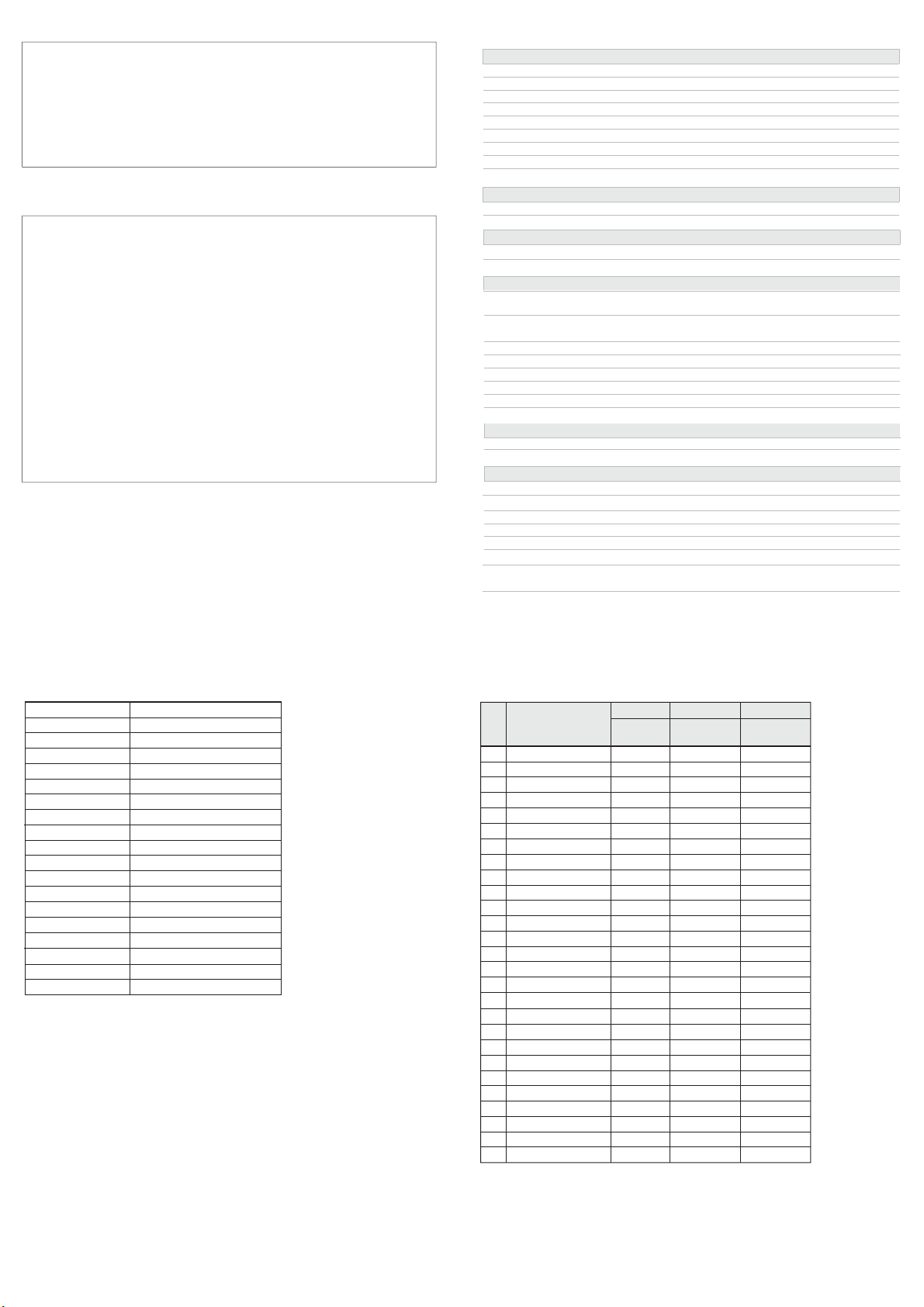
List of Compatible Signal formats (HDMI)
NO Signal input
Formats
INPUT OUTPUT OUTPUT
HD-YPbPr
HDMI
SDI to HDMI
(Convert)
HDMI to SDI
(Convert)
1
2
3
4
5
6
7
8
9
10
11
12
13
14
15
16
17
18
19
20
21
22
23
24
25
26
27
O
O
O
O
O
O
O
O
O
O
O
O
O
O
O
O
O
O
O
O
O
O
O
O
O
O
O
O
O
X
X
X
X
X
X
O
O
O
O
O
O
O
O
O
O
O
O
O
O
O
O
O
O
O
O
O
O
O
X
O
O(480i)
X
O
O
O
O
O
O
O
O
O
O
O
O
O
O
O
O
O
O
O
NTSC
PAL
720x576/50i
720x480/59.94i
720x480/60i
720x576/50p
720x480/59.94p
720x480/60p
1280x720/23.98p
1280x720/24p
1280x720/25p
1280x720/29.97p
1280x720/30p
1280x720/50p
1280x720/59.94p
1280x720/60p
1920
x
1080/50i
1920x1080/59.94i
1920x1080/60i
1920x1080/23.98p
1920x1080/24p
1920x1080/25p
1920x1080/29.97p
1920x1080/30p
1920x1080/50p
1920x1080/59.94p
1920x1080/60p
*These features are subject to change without prior notice.
List of Compatible Signal formats (SDI)
NTSC
PAL
525/60i(SD)
625/50i(SD)
720x480/59.94p
720x576/50p
1280x720/23.98p
1280x720/24p
1280x720/50p
1280x720/59.94p
1280x720/60p
1920x1035/59.94i
1920x1035/60i
1920x1080/50i
1920x1080/59.94i
1920x1080/60i
1920x1080/23.98p
1920x1080/23.98psf
1920x1080/24p
1920x1080/24psf
1920x1080/25p
1920x1080/25psf
1920x1080/29.97p
1920x1080/29.97psf
1920x1080/30p
1920x1080/30psf
1920x1080/50p
1920x1080/59.94psf
1920x1080/60p
2048x1080/23.98p
2048x1080/23.98psf
2048x1080/24p
2048x1080/24psf