manuals.online logo
Brands
  1. Home
  2. •
  3. Brands
  4. •
  5. Caberg
  6. •
  7. Motorcycle Accessories
  8. •
  9. Caberg JET FLYON II User manual

Caberg JET FLYON II User manual

Other Caberg Motorcycle Accessories manuals

Caberg Droid User manual

Caberg

Caberg Droid User manual

Caberg 49/50 User manual

Caberg

Caberg 49/50 User manual

Caberg A9235 PRO SPEAK EVO User manual

Caberg

Caberg A9235 PRO SPEAK EVO User manual

Caberg V2R User manual

Caberg

Caberg V2R User manual

Caberg A9235 PRO SPEAK EVO User manual

Caberg

Caberg A9235 PRO SPEAK EVO User manual

Caberg AVALON User manual

Caberg

Caberg AVALON User manual

Caberg HORUS User manual

Caberg

Caberg HORUS User manual

Caberg EGO User manual

Caberg

Caberg EGO User manual

Caberg REERIDE CASCO JET User manual

Caberg

Caberg REERIDE CASCO JET User manual

Caberg GHOST User manual

Caberg

Caberg GHOST User manual

Caberg PRO SPEAK EVO User manual

Caberg

Caberg PRO SPEAK EVO User manual

Caberg Levante User manual

Caberg

Caberg Levante User manual

Caberg XTRACE User manual

Caberg

Caberg XTRACE User manual

Caberg Jackal User manual

Caberg

Caberg Jackal User manual

Caberg DRIFT EVO II User manual

Caberg

Caberg DRIFT EVO II User manual

Caberg PRO SPEAK EVO User manual

Caberg

Caberg PRO SPEAK EVO User manual

Caberg PRO SPEAK EVO User manual

Caberg

Caberg PRO SPEAK EVO User manual

Caberg FLIP-UP DUKE X Instruction manual

Caberg

Caberg FLIP-UP DUKE X Instruction manual

Caberg DUKE EVO User manual

Caberg

Caberg DUKE EVO User manual

Caberg just speak User manual

Caberg

Caberg just speak User manual

Caberg DUKE II User manual

Caberg

Caberg DUKE II User manual

Caberg Just SpeakS User manual

Caberg

Caberg Just SpeakS User manual

Popular Motorcycle Accessories manuals by other brands

SRC H-ADV150-04-01AL quick start guide

SRC

SRC H-ADV150-04-01AL quick start guide

DMD P1 owner's manual

DMD

DMD P1 owner's manual

GIVI Airflow AF1110 manual

GIVI

GIVI Airflow AF1110 manual

Suzuki 99143-00A1 000 Series installation instructions

Suzuki

Suzuki 99143-00A1 000 Series installation instructions

Cardo Systems FREECOM 4+ Pocket guide

Cardo Systems

Cardo Systems FREECOM 4+ Pocket guide

Shark S 700 user manual

Shark

Shark S 700 user manual

R&G CR0081 Fitting instructions

R&G

R&G CR0081 Fitting instructions

SRC B-TRK502-01-01-SL quick start guide

SRC

SRC B-TRK502-01-01-SL quick start guide

hepco & becker 6307520 00 01 manual

hepco & becker

hepco & becker 6307520 00 01 manual

HOMCOM AA0-077 user manual

HOMCOM

HOMCOM AA0-077 user manual

hepco & becker 6307558 00 01 manual

hepco & becker

hepco & becker 6307558 00 01 manual

SHOEI JO Instructions for use

SHOEI

SHOEI JO Instructions for use

Wunderkind Custom 106503-F15 Installation and safety

Wunderkind Custom

Wunderkind Custom 106503-F15 Installation and safety

Suzuki 57100-05881 installation instructions

Suzuki

Suzuki 57100-05881 installation instructions

SIKH HELMETS Y-61 quick start guide

SIKH HELMETS

SIKH HELMETS Y-61 quick start guide

Dräger HPS 3500 Instructions for use

Dräger

Dräger HPS 3500 Instructions for use

M-WAVE SKI manual

M-WAVE

M-WAVE SKI manual

Kuryakyn 6212 installation instructions

Kuryakyn

Kuryakyn 6212 installation instructions

manuals.online logo
manuals.online logoBrands
  • About & Mission
  • Contact us
  • Privacy Policy
  • Terms and Conditions

Copyright 2025 Manuals.Online. All Rights Reserved.

JET
FLYON II
D1724
FLYON II
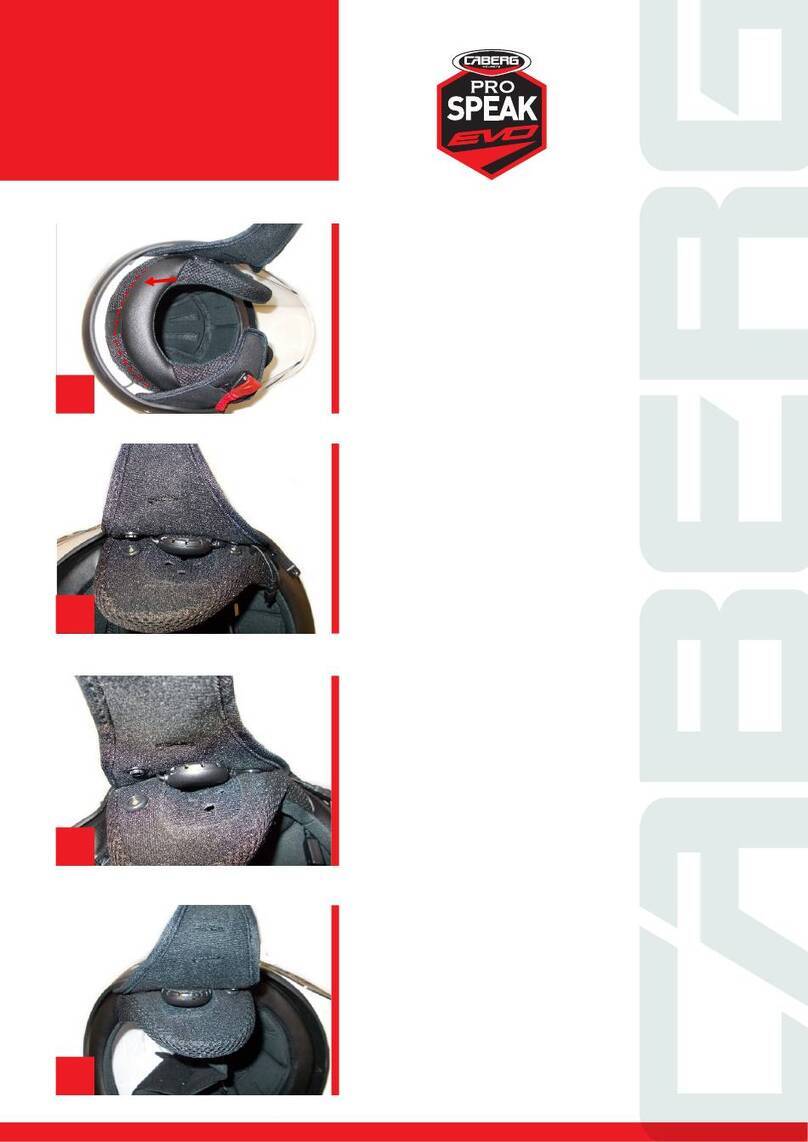
1. Rimuovere i guanciali e gli eventuali inserti antirumore dal
casco. Posizionare gli altoparlanti nell’apposita sede dopo aver
applicato il velcro adesivo.
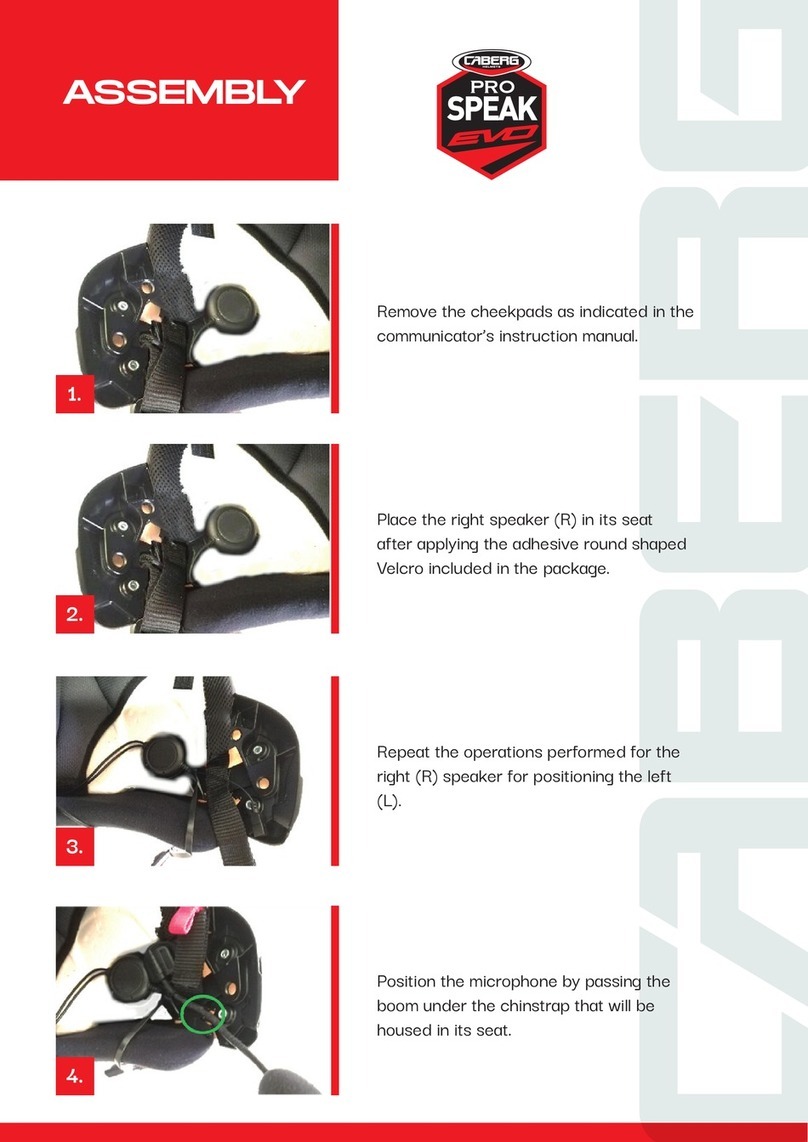
1. Remove the cheek pads and any noise reduction inserts from
the helmet. Place the speakers in the designated ear pockets,
after having applied the velcro pads.
1. Retirer les mousses latérales et les éventuels éléments
antibruit du casque. Placer les haut-parleurs dans le siège
approprié sous-jacent des mousses, après y avoir posé le
scratch adhésif.
1. Retirar las almohadillas y los insertos de protección auditiva
del casco, si los hubiera. Posicionar el autoparlante en el lugar
apropiado después de haber aplicado el velcro adhesivo.
1. Entfernen Sie die Wangenpolster und eventuelle
Geräuschdämpfungseinsätze aus dem Helm. Platzieren Sie
die Lautsprecher in die dafür vorgesehenen Aussparungen,
nachdem Sie die Klettverschlüsse angebracht haben.
ISTRUZIONI GENERALI DISPOSITIVO DI COMUNICAZIONE SPECIFICO DEL MODELLO FLYON II.
GENERAL INSTRUCTIONS FOR COMMUNICATION DEVICES SPECIFIC TO FLYON II MODEL.
INSTRUCTIONS GÉNÉRALES DISPOSITIFS DE COMMUNICATION SPÉCIFIQUES DES MODÈLES ET FLYON II.
INSTRUCCIONES GENERALES DE LOS DISPOSITIVOS DE COMUNICACIÓN ESPECÍFICOS PARA LOS MODELOS FLYON II.
ALLGEMEINE ANWEISUNGEN FÜR DIE SPRECHANLAGEN, DIE SPEZIFISCH FÜR DIE MODELLE FLYON II.
CABERG PRO SPEAK EVO (A9235)
2. Posizionare la base del microfono al di sotto del guanciale,
posizionare l’asta nella sede.
2. Place the base of the microphone underneath the cheek pad,
place the microphone stem in its housing.
2. Placer la base du microphone sous la mousse, positionner la
tige dans l’emplacement.
2. Colocar la base del micrófono por debajo de la almohadilla;
situar la varilla en su compartimento.
2. Positionieren Sie die Mikrofonbasis unter den
Wangenpolstern, und den Mikrofonarm in seinen Sitz.
3. Rimuovere la cuffia interna. Posizionare i cavi nell’
intercapedine tra calotta interna e calotta esterna.
3. Remove the inner liner. Place the cables in the gap between
the inner and outer shell.
3. Retirer les mousses internes. Positionner les câbles dans
l’espace entre la calotte interne et la coque extérieure.
3. Extraer el casco interno. Colocar los cables en el doble fondo
entre la calota interna y la calota externa.
3. Entfernen Sie den inneren Hörer. Positionieren Sie die Kabel in
den Raum zwischen der Innen- und der Außenschale.
3
1 2
4

4. Se il comunicatore è dotato di centralina BT separata,
alloggiarla nella tasca predisposta ricavata nella parte posteriore
della calotta interna
4. If your COM has a separate BT controller, place it in the
designated slot on the back of the inner shell.
4. Si le communicateur est équipé d’une unité de commande
BT séparée, placez-la dans la pochette située à l’arrière de la
coque intérieure.
4. Si el intercomunicador cuenta con unidad BT separada,
colocarla en el bolsillo correspondiente situado en la parte
posterior de la calota interna.
4. Wenn die Gegensprechanlage mit einer separaten
BT-Steuereinheit ausgestattet ist, legen Sie diese in das
entsprechende Fach auf der Rückseite der Innenschale.
5. Applicare il tastierino sul lato sinistro (casco indossato),
a circa 5 mm dal bordo inferiore della calotta mediante
l’utilizzo dell’apposito adesivo fornito. Verificare che ci sia
piena superficie di contatto tra il tastierino adesivizzato e la
calotta esterna.
5. Fit the keypad on the left side (helmet on), approximately
5 mm from the lower edge of the shell using the provided
adhesive. Make sure that there is full contact surface between
the adhesive keypad and the outer shell.
5. Fixer le clavier sur le côté gauche (dans le sens du casque), à
environ 5 mm du bord inférieur de la coque, à l’aide de l’adhésif
fourni. Vérifiez qu’il y a une surface de contact complète entre le
clavier adhésif et la coque extérieure.
5. Colocar los botones en el lado izquierdo (con el casco
puesto), a unos 5 mm del borde inferior de la calota con ayuda
del adhesivo suministrado. Comprobar que los botones con el
adhesivo estén totalmente en contacto con la superficie de la
calota externa.
5. Befestigen Sie das Tastenfeld mit dem mitgelieferten Kleber
auf der linken Seite (Helm auf), etwa 5 mm vom unteren Rand
der Schale entfernt. Vergewissern dass es eine vollständige
Kontaktfläche zwischen dem angeklebten Tastenfeld und der
Außenhülle gibt.
45
5
Per aprire la visiera esterna, utilizzare la mano sinistra e tirare verso
l’esterno il lato sinistro della visiera per permetterne lo sgancio.
In order to open the outer visor using your left hand, pull outwards
the left side of the visor and allow its release.
Pour ouvrir la visière externe, utilisez votre main gauche et tirez sur
le côté gauche de la visière pour la relevée.
Para poder abrir la visera con la mano izquierda, tire de su lado
izquierdo hacia fuera y deje que se suelte.
Um das Visier mit der linken Hand zu önen, ziehen Sie die linke Seite
des Visiers nach außen und lassen Sie es los.
6
PIC.1
1. ISTRUZIONI SMONTAGGIO VISIERA TRASPARENTE
1.1 Aprire completamente la visiera trasparente.
1.2 Svincolare il gancio Ae rimuovere la visiera azionando cursore Bcome illustrato nella Pic.1
1.3 Eseguire le stesse operazioni sull’altro lato.
1. HOW TO REMOVE THE OUTER CLEAR VISOR
1.1 Open completely the outer clear visor.
1.2 Release the hook Aand remove the visor by activating the trigger Bas indicated in Pic.1.
1.3 Repeat the same steps on the opposite side.
1. INSTRUCTION POUR LE DEMONTAGE DE L’ECRAN EXTERNE TRANPARENT
1.1 Ouvrir complètement l’écran externe transparent.
1.2 Relâchez le crochet Aet retirez l’écran en appuyant sur le curseur Bcomme indiqué sur la
figure 1.
1.3 Répétez les mêmes opérations de l’autre côté.
1. COMO QUITAR LA PANTALLA EXTERIOR
1.1 Abra completamente la pantalla externa.
1.2 Suelte el gancho Ay retire la visera accionando el gatillo Bcomo se indica en la Fig.1.
1.3 Repita los mismos pasos en el lado opuesto.
1. WIE SIE DAS AUSSENVISIER ENTFERNEN
1.1 Öffnen Sie vollständig das Visier.
1.2 Lösen Sie den Haken Aund entfernen Sie das Visier, indem Sie den Hebel Bbetätigen,
wie in Abbildung 1 gezeigt wird.
1.3 Wiederholen Sie die gleichen Schritte auf der gegenüberliegenden Seite.
7
8
PIC.2
9
2. ISTRUZIONI MONTAGGIO VISIERA TRASPARENTE
2.1 Collocare la visiera in posizione completamente aperta e inserire il gancio A nella
cremagliera.
2.2 Premere il perno Cdi rotazione come illustrato nella Pic.2 fino ad avvenuto aggancio.
2.3 Ripetere le stesse operazioni sull’altro lato.
2. HOW TO FIX THE OUTER CLEAR VISOR
2.1 Place the visor complete open and insert the hook Ainto the hook rail.
2.2 Press the rotation pivot Cas indicated in Pic.2 until it clicks.
2.3 Repeat the same steps on the opposite side.
2. INSTRUCTION POUR LE MONTAGE DE L’ECRAN EXTERNE TRANSPARENT
2.1 Placez l’écran en position complétement ouvert et insérer le crochet Adans la crémaillère.
2.2 Appuyez sur la tige de rotation Ccomme indiqué sur la figure 2 jusqu’à ce qu’elle
s’enclenche.
2.3 Répétez les mêmes opérations de l’autre côté.
2. COMO FIJAR LA PANTALLA EXTERIOR
2.1 Coloque la pantalla completamente abierta e inserte el gancho Aen el riel del gancho.
2.2 Presione el pivote de rotación Ccomo se indica en la Imagen 2 hasta que haga clic.
2.3 Repita los mismos pasos en el lado opuesto.
2. WIE SIE DAS AUSSENVISIER BEFESTIGEN
2.1 Setzen Sie das Visier auf die offene Position des Helmes und setzen Sie den Haken A in
die Hakenleiste.
2.2 Drücken Sie die Visierbefestigung Cwie in Abbildung 2 gezeigt, bis diese einrastet.
2.3 Wiederholen Sie die gleichen Schritte auf der gegenüberliegenden Seite.
10
PIC.3