LINC 3.0
4
OVERVIEW
USER INTERFACE - GENERAL LAYOUT
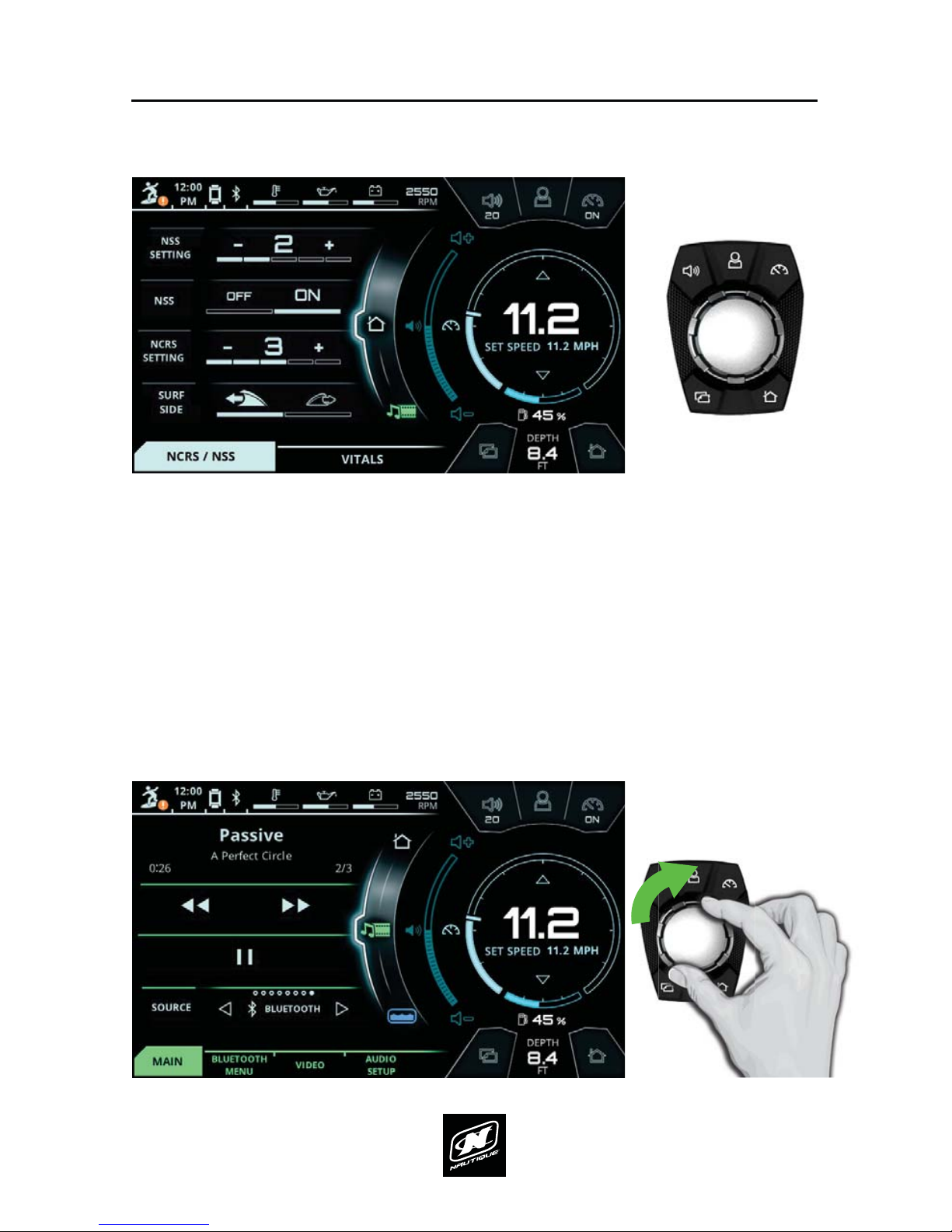
STATUS BAR 7KLVDUHDDOZD\VGLVSOD\VWKHDFWLYDWHG8VHU3URȴOHWLPHFXUUHQW
stereo source, engine temperature, oil pressure, voltage, and RPM. The operator
can tap on the engine temperature, oil pressure, or voltage for a numerical
readout of that particular gauge. This area will also display an icon for Surf Select
if that setting is turned on.
AREA FOR CRITICAL GAUGES & SETTINGS - This area displays the volume level, current
VSHHGVHWVSHHGVSHHGFRQWURORQRIXHOJDXJHDQGGHSWKJDXJH7KLVDUHD
also duplicates the 5 buttons on the Helm Command.
MENU WHEEL 'LHUHQWPHQXVFDQEHVHOHFWHGKHUHE\WDSSLQJLQGLYLGXDOPHQX
icons or by rotating the Helm Command knob if the Menu Wheel is highlighted.
There are 7 menus: Home, Media, Ballast, Switching, User, Map, and Preferences).
The middle icon of the Menu Wheel shows which menu is currently being viewed.
TAB BAR - The tab bar changes depending on the current menu. Each tab contains
a separate page of information that relates back to the current menu. Menus
contain either 2, 3 or 4 unique tabs.
VIEWING AREA OF CURRENT MENU & TAB - Each tab under every menu displays unique
information, settings, and functions in this area (which can be referred to as a
“page”). Most settings and functions are illustrated here as a stack-up of smaller
horizontal bars with curved ends.
STATUS BAR
TAB BAR MENU WHEEL
CURRENT SPEED
& SET SPEED
FUEL
GAUGE
DEPTH
GAUGE
VOLUME
LEVEL
VIEWING AREA OF
CURRENT MENU & TAB
(AKA “PAGE”)
AREA FOR CRITICAL GAUGES & SETTINGS