manuals.online logo
Brands
  1. Home
  2. •
  3. Brands
  4. •
  5. Crestron
  6. •
  7. Speakers
  8. •
  9. Crestron VECTOR CD896 User manual

Crestron VECTOR CD896 User manual

This manual suits for next models

21

Other Crestron Speakers manuals

Crestron Air Series User manual

Crestron

Crestron Air Series User manual

Crestron UC-SB1 User manual

Crestron

Crestron UC-SB1 User manual

Crestron SAROS ICT5T-12-W-T-EACH+ User manual

Crestron

Crestron SAROS ICT5T-12-W-T-EACH+ User manual

Crestron IW5 User manual

Crestron

Crestron IW5 User manual

Crestron SAROS IC4T User manual

Crestron

Crestron SAROS IC4T User manual

Crestron ULTIMATE OD6T-BRZ-T-EACH User manual

Crestron

Crestron ULTIMATE OD6T-BRZ-T-EACH User manual

Crestron ULTIMATE IC8-AW-W-T-EACH User manual

Crestron

Crestron ULTIMATE IC8-AW-W-T-EACH User manual

Crestron SAROS ICI4T Dimensional drawing

Crestron

Crestron SAROS ICI4T Dimensional drawing

Crestron SAROS IC6LPT User manual

Crestron

Crestron SAROS IC6LPT User manual

Crestron ULTIMATE IC6-W-T-EACH User manual

Crestron

Crestron ULTIMATE IC6-W-T-EACH User manual

Crestron FSDI8-W-T User manual

Crestron

Crestron FSDI8-W-T User manual

Crestron Ultimate IWLCR62-W-T-EACH User manual

Crestron

Crestron Ultimate IWLCR62-W-T-EACH User manual

Crestron ULTIMATE IC6-AW-W-T-EACH User manual

Crestron

Crestron ULTIMATE IC6-AW-W-T-EACH User manual

Crestron Aspire IW5 User manual

Crestron

Crestron Aspire IW5 User manual

Crestron Excite IC5 User manual

Crestron

Crestron Excite IC5 User manual

Crestron SPKA-BC-IC6 User manual

Crestron

Crestron SPKA-BC-IC6 User manual

Crestron REFERENCE OD4.1-4-S10-BRZ-T KIT User manual

Crestron

Crestron REFERENCE OD4.1-4-S10-BRZ-T KIT User manual

Crestron AIR SR4 User manual

Crestron

Crestron AIR SR4 User manual

Crestron Aspire IC8DT User manual

Crestron

Crestron Aspire IC8DT User manual

Crestron Excite IC6DT User manual

Crestron

Crestron Excite IC6DT User manual

Crestron FS6-B User manual

Crestron

Crestron FS6-B User manual

Crestron Ultimate IC3-AW-SA-BOX-WOOFER-W-T-EACH User manual

Crestron

Crestron Ultimate IC3-AW-SA-BOX-WOOFER-W-T-EACH User manual

Crestron SPK-6L User manual

Crestron

Crestron SPK-6L User manual

Crestron SAROS PD4T User manual

Crestron

Crestron SAROS PD4T User manual

Popular Speakers manuals by other brands

Electro-Voice LR4S engineering data

Electro-Voice

Electro-Voice LR4S engineering data

Definitive Technology Sound Cylinder user guide

Definitive Technology

Definitive Technology Sound Cylinder user guide

AudioSource LS545 user manual

AudioSource

AudioSource LS545 user manual

Paso C402-T Instructions for use

Paso

Paso C402-T Instructions for use

Altec Lansing 416-8C LF SPEAKER manual

Altec Lansing

Altec Lansing 416-8C LF SPEAKER manual

Kenwood KFC-1072 Servise manual

Kenwood

Kenwood KFC-1072 Servise manual

Peavey ProSys 112 user guide

Peavey

Peavey ProSys 112 user guide

JBL Control Contractor 60 Series installation instructions

JBL

JBL Control Contractor 60 Series installation instructions

Aura STORM-8 owner's manual

Aura

Aura STORM-8 owner's manual

Oontz ANGLE 3 PLUS quick start guide

Oontz

Oontz ANGLE 3 PLUS quick start guide

Electro-Voice LR4A engineering data

Electro-Voice

Electro-Voice LR4A engineering data

Rave RK-650-ICA-B owner's manual

Rave

Rave RK-650-ICA-B owner's manual

Flux Reference Series installation manual

Flux

Flux Reference Series installation manual

Lanzar AQAWBS64BK installation manual

Lanzar

Lanzar AQAWBS64BK installation manual

DAPAudio DCS-6230 manual

DAPAudio

DAPAudio DCS-6230 manual

Aluratek ABS03F quick start guide

Aluratek

Aluratek ABS03F quick start guide

Kenwood KES-5A instruction manual

Kenwood

Kenwood KES-5A instruction manual

Sonance ORIGINAL SERIES instruction manual

Sonance

Sonance ORIGINAL SERIES instruction manual

manuals.online logo
manuals.online logoBrands
  • About & Mission
  • Contact us
  • Privacy Policy
  • Terms and Conditions

Copyright 2025 Manuals.Online. All Rights Reserved.

VECTOR™ Performance Loudspeakers
Installation Guide
Description
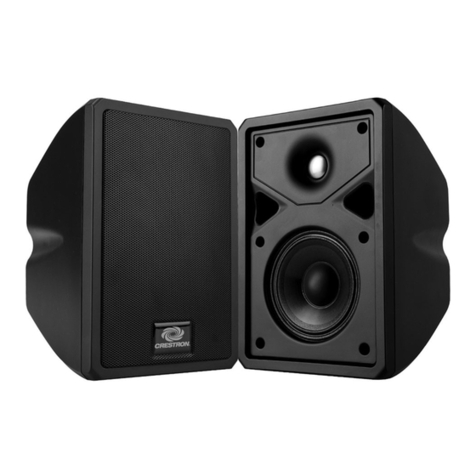
The Crestron®Vector™ performance loudspeakers are designed for use in public and
commercial spaces. These loudspeakers range in size from a compact 6.5" full range
product that services small conference room environments to large systems with 15"
coaxial speakers and 18" subwoofers for use in auditoriums, lecture halls, and
conference centers.
Additional Resources
Visit the product page on the Crestron website (www.crestron.com)
for additional information and the latest rmware updates. Use a QR
reader application on your mobile device to scan the QR image.
Installation
Vector loudspeakers are constructed with threaded inserts that are used to permanently
mount the speaker. There are two options for mounting a speaker: use Vector EB eye
bolts for multipoint horizontal or vertical suspension with wire rope, or use a Vector YB
yoke bracket for rigid horizontal attachment. Vector EB eye bolts and Vector YB yoke
brackets are sold separately. See the table below for a list of compatible accessories.
WARNING: The installer is responsible for providing a properly engineered solution for
suspending or mounting a speaker. The installer is responsible for obtaining rigging
designs and drawings from a professional engineer, obtaining required permits, and
receiving inspections and nal approvals from the authority having jurisdiction of the
installation site.
NOTE: Speaker models with the “RH” sufx are supplied with a rotated horn. The
horn’s wide angle is parallel to the wide dimension of the enclosure.
Eye Bolts
Each speaker has threaded inserts located on the top, bottom, sides and rear that are for
use with Vector EB eye bolts. The speaker’s threaded inserts support the weight of the
speaker enclosure and cannot be used to support any additional weight. No additional
load-bearing capability is either certied or recommended. M6 threads are used on the
Vector CS699 and CD896(-RH) speakers. M10 threads are used on the Vector
CD1265(-RH), CD1295(-RH), CD1565(-RH), CS1265(-RH), CS1295(-RH), CS1565(-RH),
CS1595(-RH), SUBD18, SUBS15, and SUBS18.
Use an appropriate hex key to remove the thread cover(s) and install the appropriate eye
bolts for suspending and aiming the speaker.
CAUTION: Do not remove any of the Phillips screws from the speaker enclosure.
Yoke Brackets
Yoke brackets are used for rigid horizontal attachment to a mounting surface. Yoke
brackets are available for the Vector CD896(-RH), CD1265(-RH), CD1295(-RH), CS699,
CS1265(-RH), CS1295(-RH), CS1565(-RH), and CS1595(-RH) speakers. For details, refer
to the VECTOR YOKE6/YOKE8D/YOKE12/YOKE12D/YOKE15 Installation Guide
(Doc. 8210) at www.crestron.com/manuals.
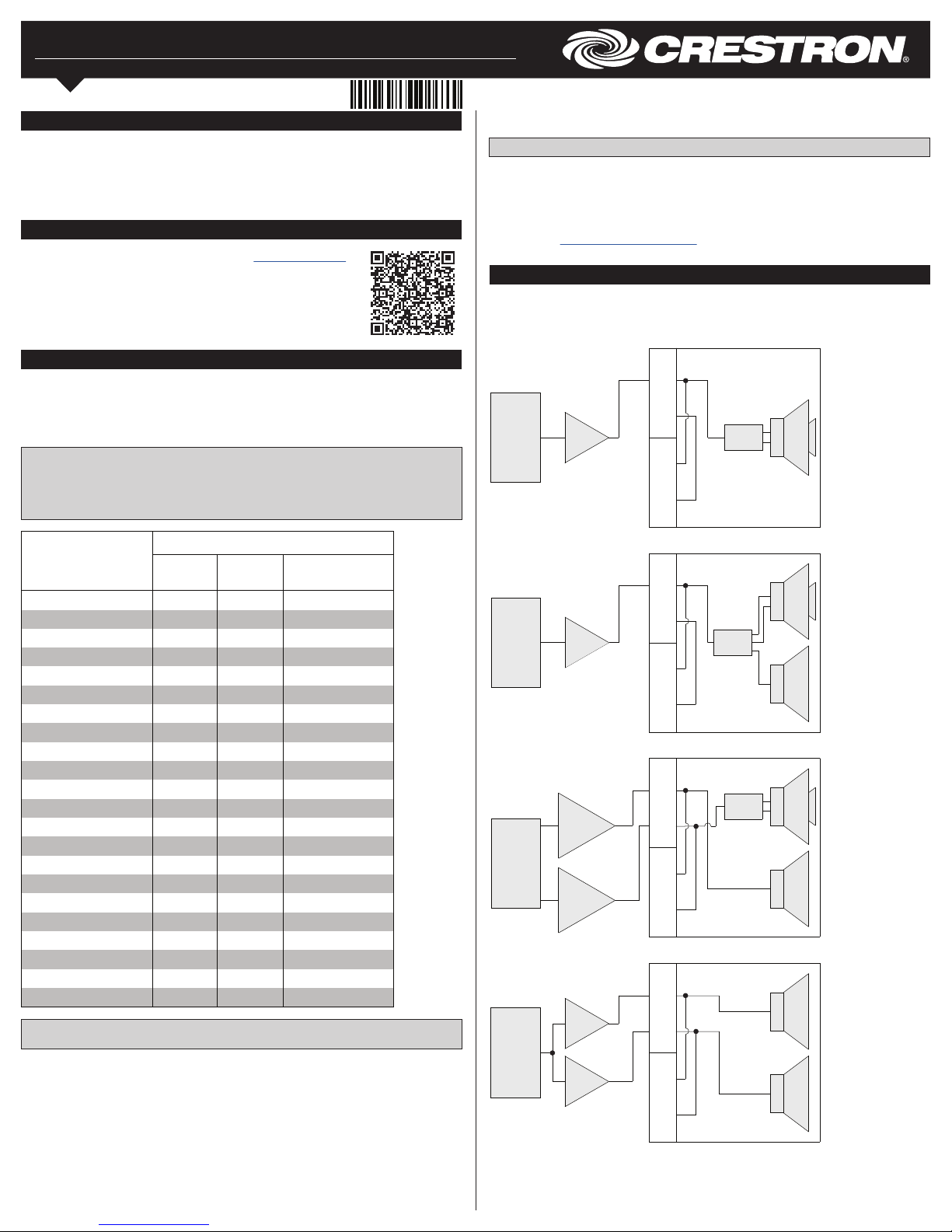
Hardware Hookup
Each Vector speaker has a set of Neutrik® speakON® input and pass-through
connections on the rear panel. Refer to the following diagrams when wiring the Vector
CONN2 and CONN4 connectors.
DSP
LF
AMP
LF
AMP
2 ±
NL4
1±
2 ±
NL4
1±
LF 2
LF 1
Wiring for SUBD18
2 ±
NL4
1±
2 ±
NL4
1±
DSP AMP
HF
LF
LF
XOVER
Wiring for CD896(-RH)
DSP
HF/LF
AMP
LF AMP
2 ±
NL4
1±
2 ±
NL4
1±
HF
LF
LF
XOVER
Wiring for CD12XX(-RH) and
CD15XX(-RH)
AMP
2 ±
NL4
1±
2 ±
NL4
1±
DSP XOVER HF
LF
Wiring for CS699, CS12XX(-RH),
and CS15XX(-RH)
SPEAKER MODEL
COMPATIBLE ACCESSORY
EYE
BOLT YOKE CONNECTOR
VECTOR CD896 EB6 YOKE8D CONN2 or CONN4
VECTOR CD896-RH EB6 YOKE8D CONN2 or CONN4
VECTOR CD1265 EB10 YOKE12D CONN4
VECTOR CD1265-RH EB10 YOKE12D CONN4
VECTOR CD1295 EB10 YOKE12D CONN4
VECTOR CD1295-RH EB10 YOKE12D CONN4
VECTOR CD1565 EB10 N/A CONN4
VECTOR CD1565-RH EB10 N/A CONN4
VECTOR CD1595 EB10 N/A CONN4
VECTOR CD1595-RH EB10 N/A CONN4
VECTOR CS1265 EB10 YOKE12 CONN2 or CONN4
VECTOR CS1265-RH EB10 YOKE12 CONN2 or CONN4
VECTOR CS1295 EB10 YOKE12 CONN2 or CONN4
VECTOR CS1295-RH EB10 YOKE12 CONN2 or CONN4
VECTOR CS1565 EB10 YOKE15 CONN2 or CONN4
VECTOR CS1565-RH EB10 YOKE15 CONN2 or CONN4
VECTOR CS1595 EB10 YOKE15 CONN2 or CONN4
VECTOR CS1595-RH EB10 YOKE15 CONN2 or CONN4
VECTOR CS699 EB6 YOKE6 CONN2 or CONN4
VECTOR SUBD18 EB10 N/A CONN4
VECTOR SUBS15 EB10 N/A CONN2 or CONN4
VECTOR SUBS18 EB10 N/A CONN2 or CONN4

As of the date of manufacture, the product has been tested and found to comply with specications
for CE marking.
The product warranty can be found at www.crestron.com/warranty.
The specic patents that cover Crestron products are listed at patents.crestron.com.
Certain Crestron products contain open source software. For specic information, please visit
www.crestron.com/opensource.
Crestron, the Crestron logo, and Vector are either trademarks or registered trademarks of Crestron
Electronics, Inc. in the United States and/or other countries. Neutrik and speakON are either
trademarks or registered trademarks of Neutrik AG in the United States and/or other countries. Other
trademarks, registered trademarks, and trade names may be used in this document to refer to either
the entities claiming the marks and names or their products. Crestron disclaims any proprietary
interest in the marks and names of others. Crestron is not responsible for errors in typography or
photography.
This document was written by the Technical Publications department at Crestron.
©2017 Crestron Electronics, Inc.
Crestron Electronics, Inc. Installation & Operation Guide - DOC. 8209B
15 Volvo Drive, Rockleigh, NJ 07647 (2049039)
Tel: 888.CRESTRON 11.17
Fax: 201.767.7576 Specications subject to
www.crestron.com change without notice.
AMP
2 ±
NL4
1±
2 ±
NL4
1±
DSP LF
Wiring for SUBS15 and SUBS18