manuals.online logo
Brands
  1. Home
  2. •
  3. Brands
  4. •
  5. ekwb
  6. •
  7. Computer Hardware
  8. •
  9. ekwb EK-MOSFET ASUS M7G Guide

ekwb EK-MOSFET ASUS M7G Guide

Other ekwb Computer Hardware manuals

ekwb EK-Quantum Reflection Uni 140 D5 PWM D-RGB User manual

ekwb

ekwb EK-Quantum Reflection Uni 140 D5 PWM D-RGB User manual

ekwb EK-FB KIT ASUS R5E Guide

ekwb

ekwb EK-FB KIT ASUS R5E Guide

ekwb EK-7970 Guide

ekwb

ekwb EK-7970 Guide

ekwb EK-Classic Pump Reservoir 160 SPC PWM D-RGB Guide

ekwb

ekwb EK-Classic Pump Reservoir 160 SPC PWM D-RGB Guide

ekwb EK-FC780 GTX HOF Series Manual

ekwb

ekwb EK-FC780 GTX HOF Series Manual

ekwb EK-FC R9-290X Manual

ekwb

ekwb EK-FC R9-290X Manual

ekwb EK-FC790 Guide

ekwb

ekwb EK-FC790 Guide

ekwb EK-MOSFET ASUS M6G Guide

ekwb

ekwb EK-MOSFET ASUS M6G Guide

ekwb EK-Quantum Momentum Aorus Z490 Master D-RGB User manual

ekwb

ekwb EK-Quantum Momentum Aorus Z490 Master D-RGB User manual

ekwb EK-DBAY RES SPIN Guide

ekwb

ekwb EK-DBAY RES SPIN Guide

ekwb EK-FB EVGA X58 CLASSIFIED User manual

ekwb

ekwb EK-FB EVGA X58 CLASSIFIED User manual

ekwb EK-FCQ6000 Manual

ekwb

ekwb EK-FCQ6000 Manual

ekwb EK-Quantum Vector Trinity RTX 3080/3090 User manual

ekwb

ekwb EK-Quantum Vector Trinity RTX 3080/3090 User manual

ekwb EK-Loop Fan FPT 120 FAN User manual

ekwb

ekwb EK-Loop Fan FPT 120 FAN User manual

ekwb EK-FC980 GTX Classy Manual

ekwb

ekwb EK-FC980 GTX Classy Manual

ekwb EK-FB MSI X299 GAMING PRO CARBON RGB... User manual

ekwb

ekwb EK-FB MSI X299 GAMING PRO CARBON RGB... User manual

ekwb EK-Quantum Vector XC3 RTX 3080 D-RGB User manual

ekwb

ekwb EK-Quantum Vector XC3 RTX 3080 D-RGB User manual

ekwb EK-FC RX-480 User manual

ekwb

ekwb EK-FC RX-480 User manual

ekwb EK-FB GA X470 Gaming 7 RGB User manual

ekwb

ekwb EK-FB GA X470 Gaming 7 RGB User manual

ekwb EK-Quantum Vector RE RTX 3080 Active Backplate... User manual

ekwb

ekwb EK-Quantum Vector RE RTX 3080 Active Backplate... User manual

ekwb EK-Loop User manual

ekwb

ekwb EK-Loop User manual

ekwb EK-Quantum Vector2 Trio RTX 3080/90 ABP Set... User manual

ekwb

ekwb EK-Quantum Vector2 Trio RTX 3080/90 ABP Set... User manual

ekwb EK-FB ASUS ROG R6E Monoblock User manual

ekwb

ekwb EK-FB ASUS ROG R6E Monoblock User manual

ekwb EK-FB ASUS M6E Guide

ekwb

ekwb EK-FB ASUS M6E Guide

Popular Computer Hardware manuals by other brands

Toshiba TOSVERT VF-MB1/S15 IPE002Z Function manual

Toshiba

Toshiba TOSVERT VF-MB1/S15 IPE002Z Function manual

Shenzhen MEITRACK MVT380 user guide

Shenzhen

Shenzhen MEITRACK MVT380 user guide

TRENDnet TEW-601PC - SUPER G MIMO WRLS PC CARD user guide

TRENDnet

TRENDnet TEW-601PC - SUPER G MIMO WRLS PC CARD user guide

StarTech.com CF2IDE18 instruction manual

StarTech.com

StarTech.com CF2IDE18 instruction manual

Texas Instruments LMH0318 Programmer's guide

Texas Instruments

Texas Instruments LMH0318 Programmer's guide

Gateway 8510946 user guide

Gateway

Gateway 8510946 user guide

Devon IT TC2D Quick setup guide

Devon IT

Devon IT TC2D Quick setup guide

Krüger & Matz Air Shair2 owner's manual

Krüger & Matz

Krüger & Matz Air Shair2 owner's manual

Crystalio VPS-2300 quick guide

Crystalio

Crystalio VPS-2300 quick guide

MYiR FZ3 user manual

MYiR

MYiR FZ3 user manual

Protech Systems BC-K200 Quick reference guide

Protech Systems

Protech Systems BC-K200 Quick reference guide

Miranda DENSITE series DAP-1781 Guide to installation and operation

Miranda

Miranda DENSITE series DAP-1781 Guide to installation and operation

Sierra Wireless Sierra Wireless AirCard 890 quick start guide

Sierra Wireless

Sierra Wireless Sierra Wireless AirCard 890 quick start guide

Leadtek Killer Xeno Pro Quick installation guide

Leadtek

Leadtek Killer Xeno Pro Quick installation guide

Star Cooperation FlexTiny 3 Series Instructions for use

Star Cooperation

Star Cooperation FlexTiny 3 Series Instructions for use

Hotone Ampero user manual

Hotone

Hotone Ampero user manual

Connect Tech Xtreme/104-Express user manual

Connect Tech

Connect Tech Xtreme/104-Express user manual

Yealink WF50 user guide

Yealink

Yealink WF50 user guide

manuals.online logo
manuals.online logoBrands
  • About & Mission
  • Contact us
  • Privacy Policy
  • Terms and Conditions

Copyright 2025 Manuals.Online. All Rights Reserved.

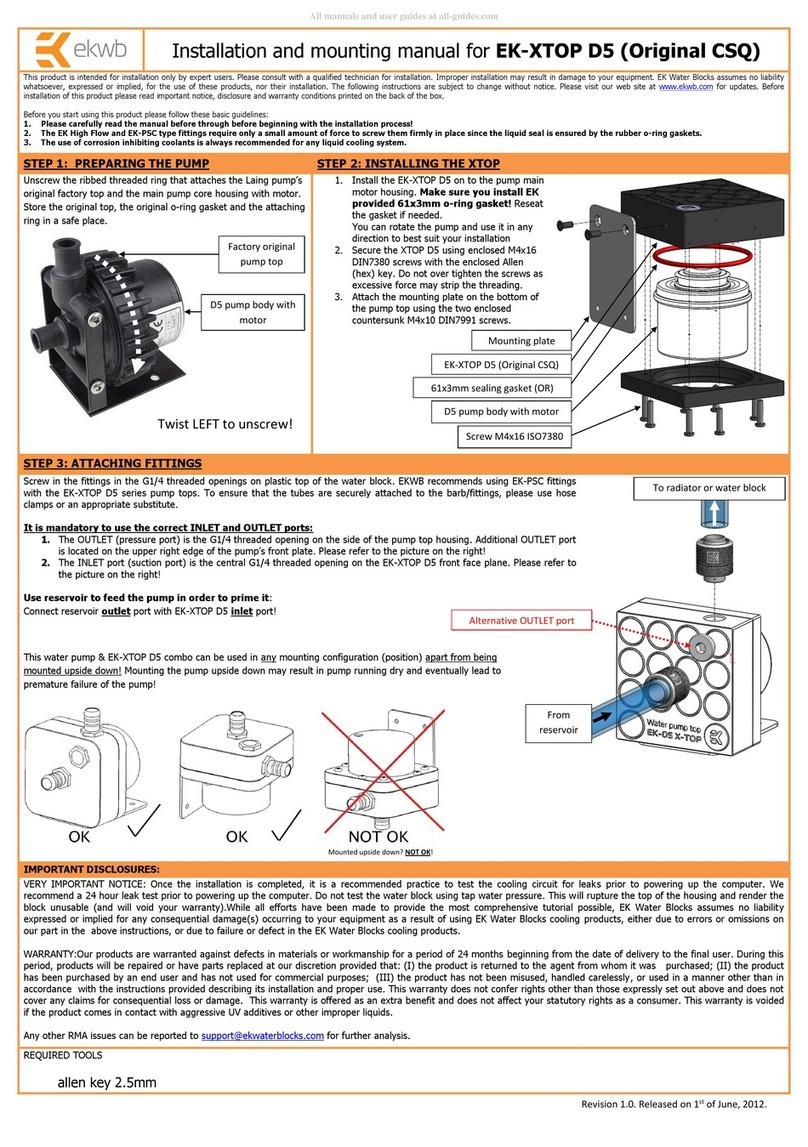
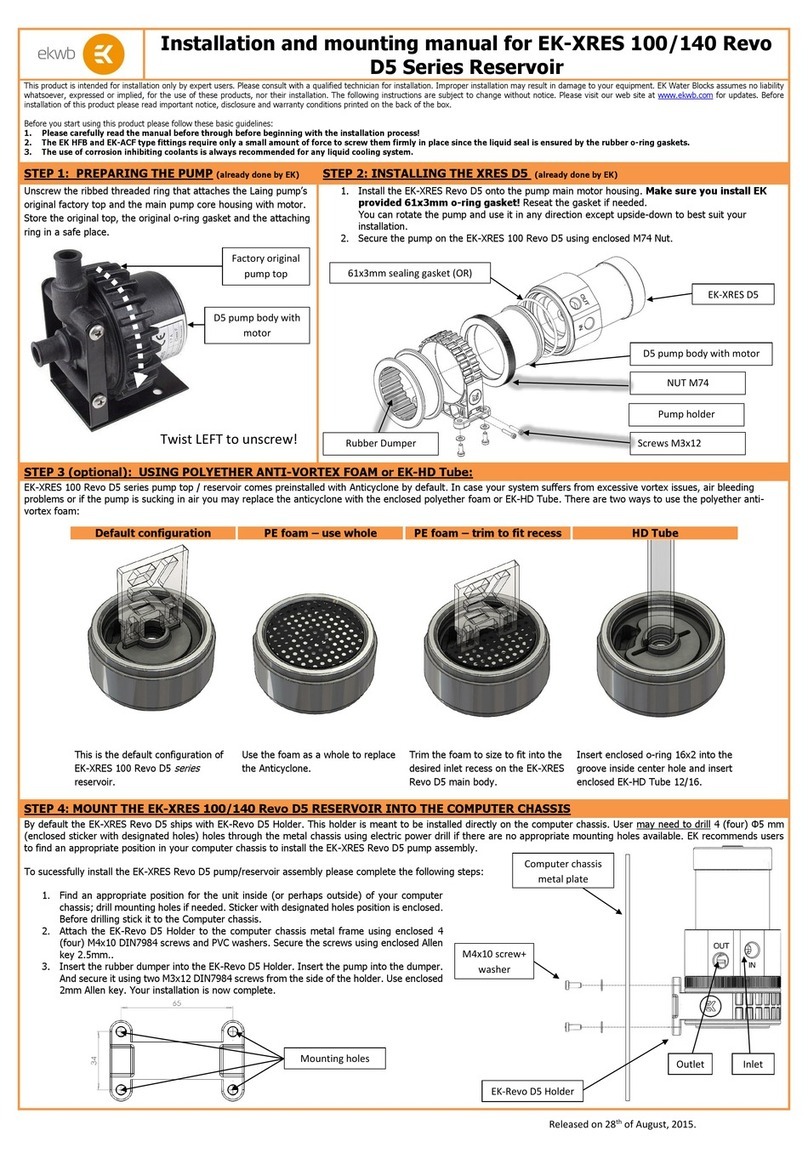
All disclosures, notices and warranty conditions are being written on EKWB web page. Please check terms of use. Revision 1.0. Published on September 14th 2014
This product is intended for installation only by expert users. Please consult with a qualified technician for installation. Improper installation may result in damage to your equipment. EK Water Blocks assumes no liability
whatsoever, expressed or implied, for the use of these products, nor their installation. The following instructions are subject to change without notice. Please visit our web site at www.ekwb.com for updates. Before
installation of this product please read important notice, disclosure and warranty conditions printed on the back of the box.
Before you start using this product please follow these basic guidelines:
1. Please carefully read the manual before through before beginning with the installation process!
2. Please remove your motherboard from the computer to assure safest mounting process in order to prevent any possible damages to your CPU and/or motherboard’s circuit board (PCB).
3. The EK High Flow and EK-PSC type fittings require only a small amount of force to screw them firmly in place since the liquid seal is ensured by the rubber o-ring gaskets.
4. The use of quality, market proved corrosion inhibiting coolants is always strongly recommended for any liquid cooling system.
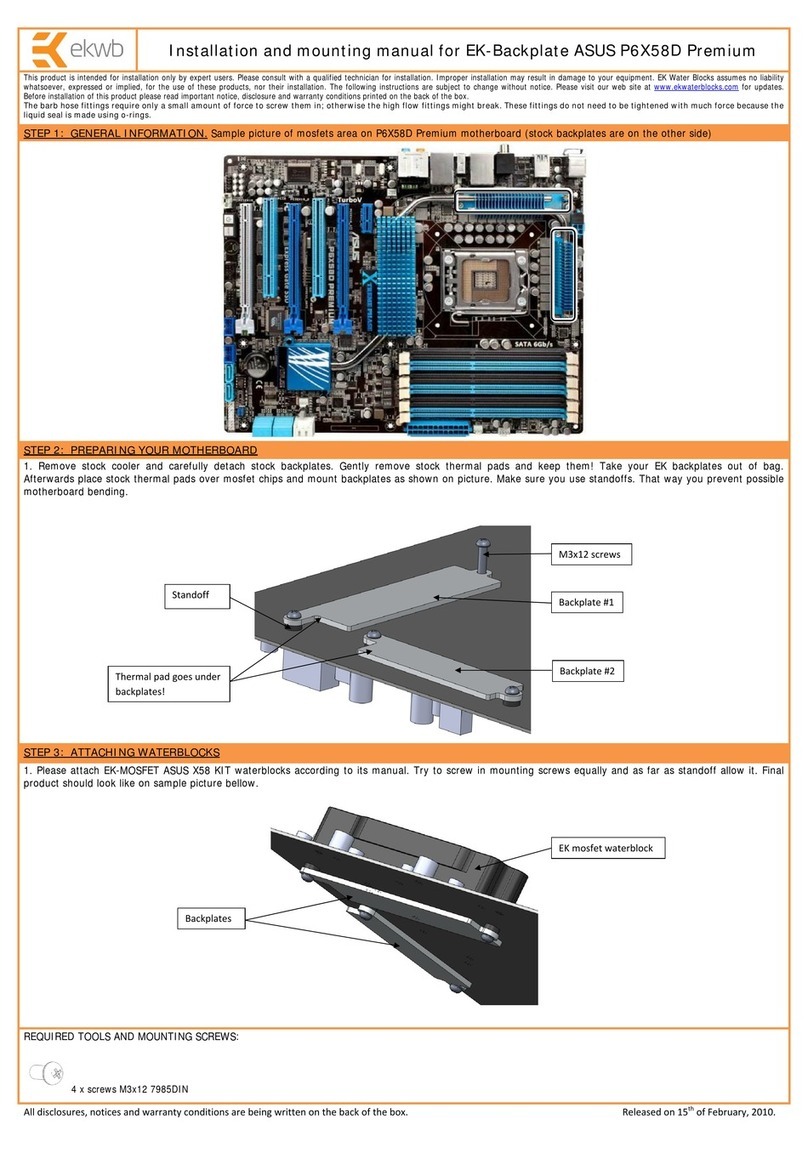
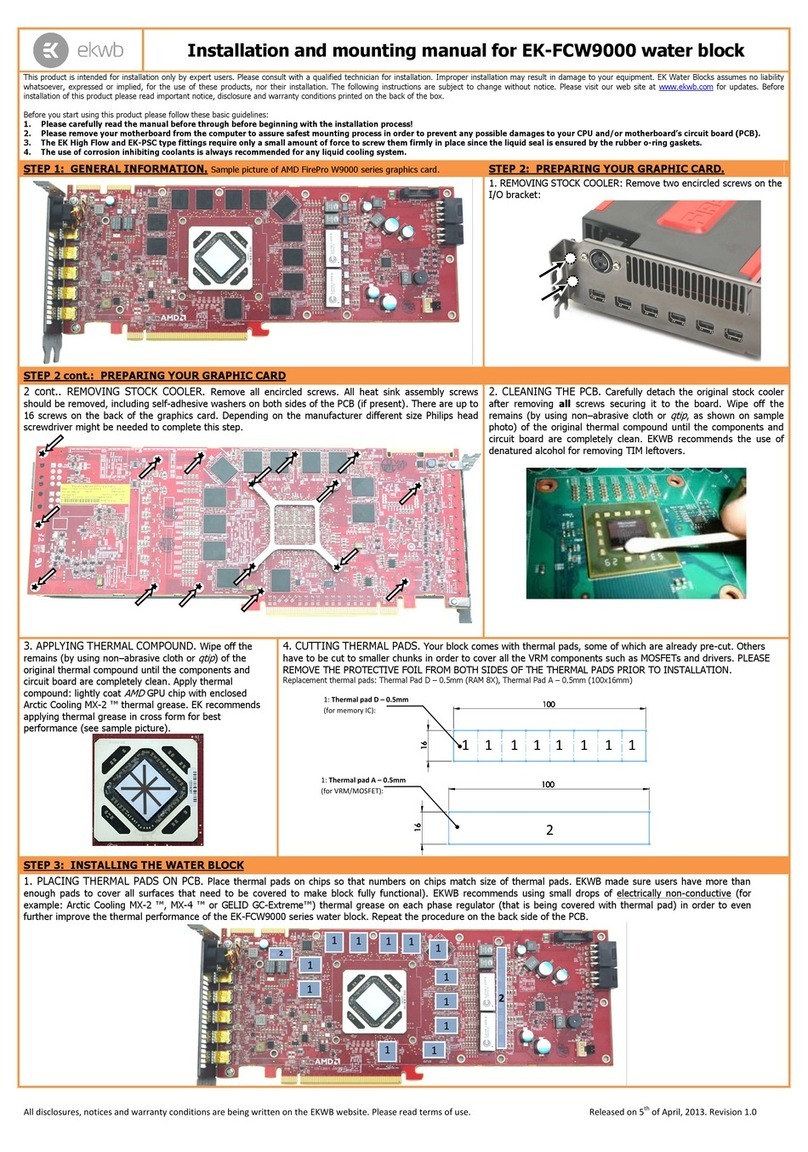
STEP 1: GENERAL INFORMATION Sample photo of ASUS Maximus VII GENE motherboard
STEP 2: PREPARING YOUR MOTHERBOARD
1. REMOVING STOCK COOLER. Remove all encircled screws. There are 4 screws on the back of the
motherboard that needs to be removed in order to remove the factory installed MOSFET.
2. CLEANING THE PCB. Carefully detach the original stock cooler
after removing all screws securing it to the board. Wipe off the
remains (by using non–abrasive cloth or
q-tip
, as shown on sample
photo) of the original thermal compound until the components and
circuit board are completely clean. EKWB recommends the use of
denatured alcohol for removing TIM leftovers.
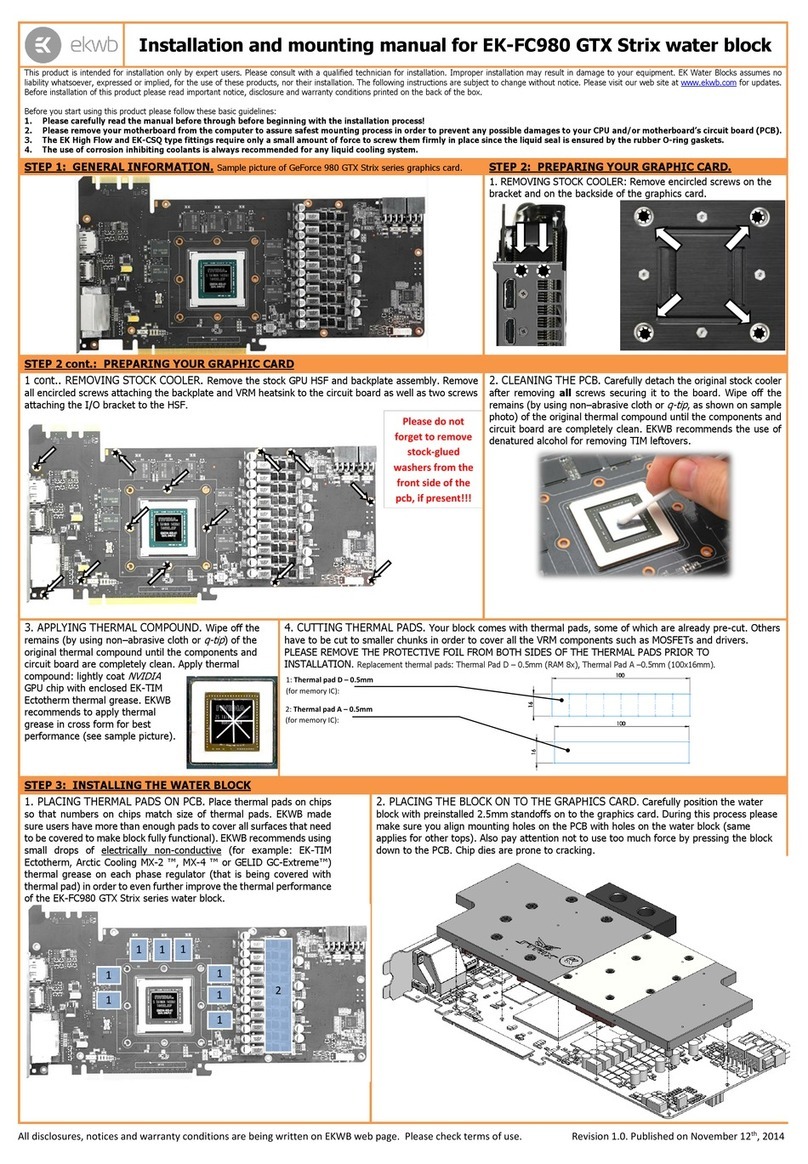
4. CUTTING THERMAL PADS. Your block comes with two thermal pads which needs to be trimmed in order to fit the voltage regulation area (VRM/MOSFET) on the
motherboard’s circuit board. WARNING: DIMENSIONS ON PICTURES BELOW ARE SCALED!
Replacement thermal pads @ EKWB web shop:
Thermal PAD A 1.0mm - (100x16mm) [EAN: 3830046996626]
5. PLACING THERMAL PADS ON MOTHERBOARD. Place thermal pads you cut on PCB as shown on picture bellow (PLEASE REMOVE THE PROTECTIVE FOIL FROM BOTH
SIDES OF THE THERMAL PADS PRIOR TO INSTALLATION). EK recommends using small drops of electrically non-conductive (for example: Arctic Cooling MX-2 ™, EK-TIM
Ectotherm or GELID GC-Extreme ™) thermal grease on each phase regulator (that is being covered with thermal pad; see picture below) in order to even further improve the
thermal performance of the EK-MOSFET ASUS M7G series water block.
Intel Z97 PCH (SB)
CPU socket(LGA-1150)
Installation and mounting manual for EK-MOSFET ASUS M7G water block:
Place 1.0mm thick thermal pads in larger strips over
marked area and make sure all mosfet chips are
covered.

Mosfets
All disclosures, notices and warranty conditions are being written on EKWB web page. Please check terms of use. Revision 1.0. Published on September 14th 2014
STEP 3: PREPARING YOUR WATER BLOCK
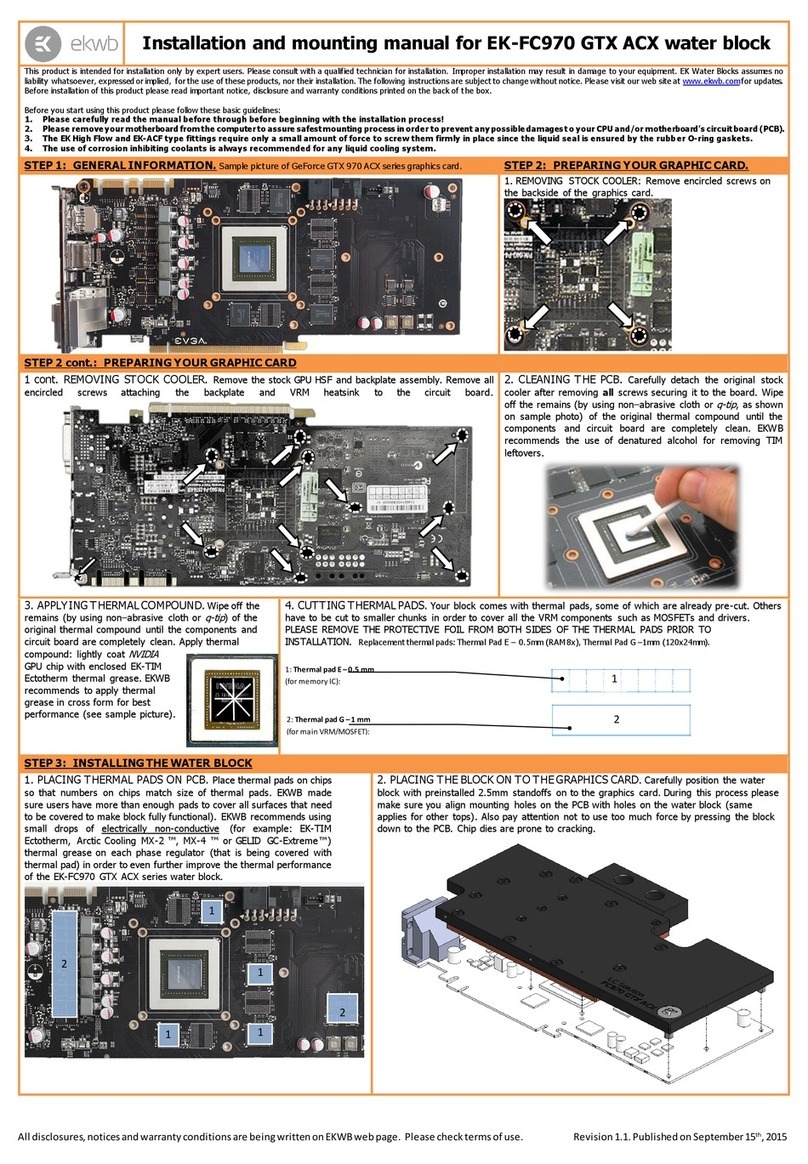
1. PLACING THE BLOCK ON THE MOTHERBOARD. Place the EK-MOSFET ASUS M7G series water block with pre-installed 2.5mm standoffs kit gently to the motherboard or vice
versa. Make sure that mounting holes are aligned.

STEP 4: ATTACHING BLOCK TO MOTHERBOARD
STEP 5: CHECKING FOR CONTACTS
Prior to fastening the screws please make sure the mounting holes on the motherboard’s circuit board are
aligned with the water block.

Re-use ASUS factory (“stock”) backplate use four M3x8 DIN7985 and a PVC washer: Tighten the screws,
beginning near the center of the board and continue evenly outwards. Do not use excessive force when
tightening the screws!
Temporarily r
emove the water block to check for uniform
surface contact between the block and the components. Note
the pattern of contact on a piece of paper. Then repeat steps 3
and 4 to reattach the block applying more or less pressure to
the areas where you have found it necessary. Note that there is
no need for perfect thermal pad imprint on the inductors/coils
(mentioned in STEP2)
6. POSITIONING FITTINGS AND CONNECTING TO WATER CIRCUIT
Attach the liquid cooling tubes and connect the water-block(s) into the cooling circuit. EKWB recommends using EK-CSQ compression fittings with the EK-MOSFET ASUS M7G
series water block. You can use any opening as an inlet/outlet port. Plan your tubing routing in advance!
REQUIRED TOOLS AND MOUNTING SCREWS:
scissors philips screwdriver
EK-CSQ fitting
Tubing
PVC washer
Thermal pad imprints
M3x8 screw
ASUS factory backplate
M3 NUT
Detail A (Back of
the PCB)
Detail A (Top of the
PCB)