manuals.online logo
Brands
  1. Home
  2. •
  3. Brands
  4. •
  5. ekwb
  6. •
  7. Computer Hardware
  8. •
  9. ekwb EK-XRES DCP 4.0 Manual

ekwb EK-XRES DCP 4.0 Manual

Other ekwb Computer Hardware manuals

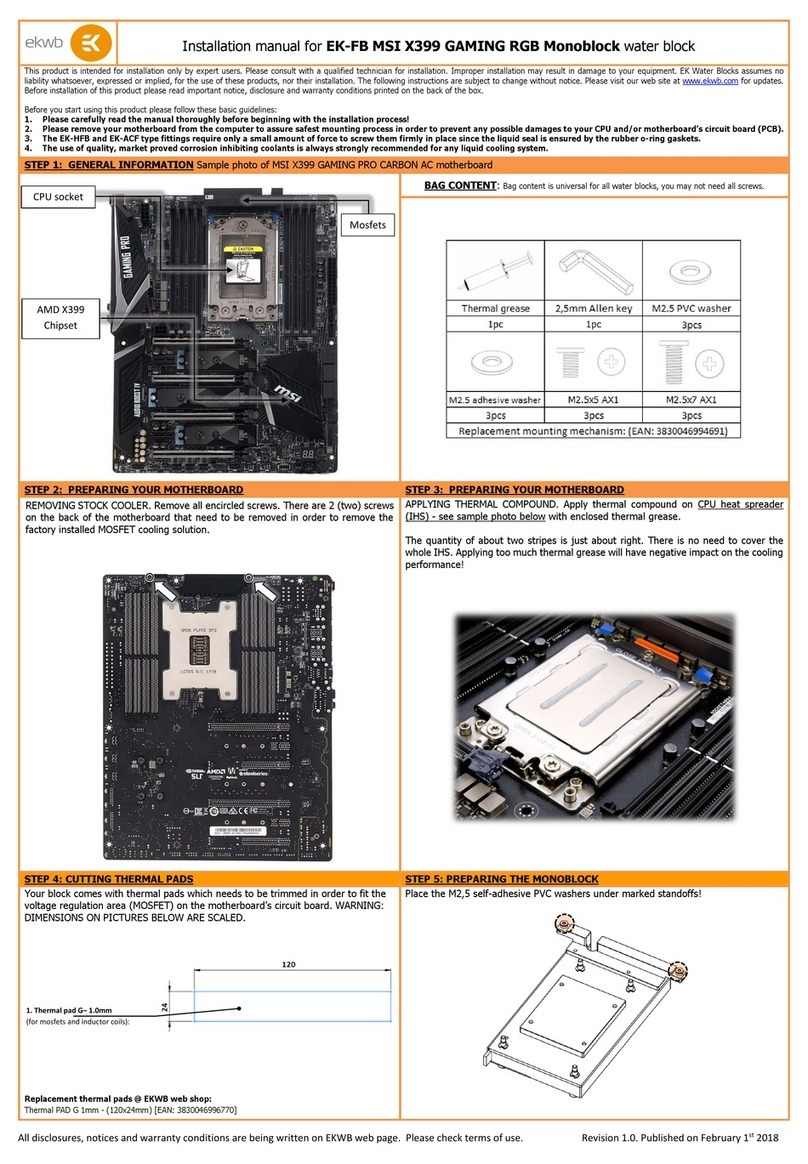
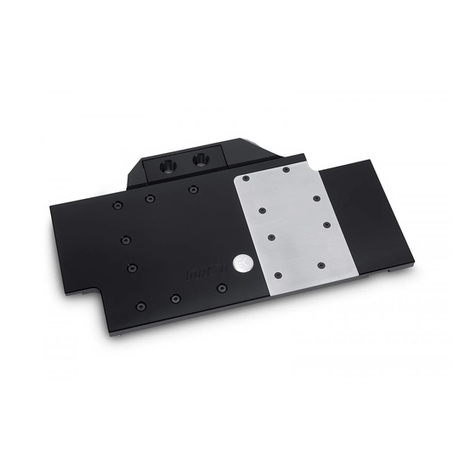
ekwb EK-FC Strix RTX 2080 Ti Backplate Classic User manual

ekwb

ekwb EK-FC Strix RTX 2080 Ti Backplate Classic User manual

ekwb EK-Quantum Vector FE RTX 3070 User manual

ekwb

ekwb EK-Quantum Vector FE RTX 3070 User manual

ekwb EK-FB ASUS M5E Guide

ekwb

ekwb EK-FB ASUS M5E Guide

ekwb EK-FC580 DCII Manual

ekwb

ekwb EK-FC580 DCII Manual

ekwb EK-FB EVGA X58 CLASSIFIED User manual

ekwb

ekwb EK-FB EVGA X58 CLASSIFIED User manual

ekwb EK-FC 780 GTX Lightning Manual

ekwb

ekwb EK-FC 780 GTX Lightning Manual

ekwb EK-FC R9-295X2 Manual

ekwb

ekwb EK-FC R9-295X2 Manual

ekwb EK-FC1080 GTX G1 User manual

ekwb

ekwb EK-FC1080 GTX G1 User manual

ekwb EK-FC R9-290X Backplate Manual

ekwb

ekwb EK-FC R9-290X Backplate Manual

ekwb EK-Quantum Momentum ROG Zenith II Extreme User manual

ekwb

ekwb EK-Quantum Momentum ROG Zenith II Extreme User manual

ekwb EK-FC980 Manual

ekwb

ekwb EK-FC980 Manual

ekwb EK-FC980 GTX Ti WF3 Manual

ekwb

ekwb EK-FC980 GTX Ti WF3 Manual

ekwb EK-FC R9 Nano Series Manual

ekwb

ekwb EK-FC R9 Nano Series Manual

ekwb EK-FB KIT GA P67A UD7 Manual

ekwb

ekwb EK-FB KIT GA P67A UD7 Manual

ekwb EK-FCQK5000 Manual

ekwb

ekwb EK-FCQK5000 Manual

ekwb EK-XRES 140 Revo D5 Series Guide

ekwb

ekwb EK-XRES 140 Revo D5 Series Guide

ekwb EK-FB MSI X370 XPower Monoblock User manual

ekwb

ekwb EK-FB MSI X370 XPower Monoblock User manual

ekwb EK-FCTK20 Guide

ekwb

ekwb EK-FCTK20 Guide

ekwb EK-Loop Modulus Series User manual

ekwb

ekwb EK-Loop Modulus Series User manual

ekwb EK-FC980 GTX Ti Strix Series Manual

ekwb

ekwb EK-FC980 GTX Ti Strix Series Manual

ekwb EK-FB MSI X299 GAMING PRO CARBON RGB... User manual

ekwb

ekwb EK-FB MSI X299 GAMING PRO CARBON RGB... User manual

ekwb EK-Classic Pump Reservoir 160 SPC PWM D-RGB Manual

ekwb

ekwb EK-Classic Pump Reservoir 160 SPC PWM D-RGB Manual

ekwb EK-Quantum Vector RE RTX 3080 Active Backplate... User manual

ekwb

ekwb EK-Quantum Vector RE RTX 3080 Active Backplate... User manual

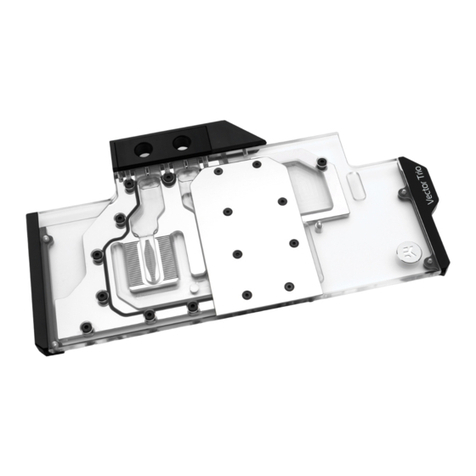
ekwb EK-Vector Trio RTX 2080 Ti User manual

ekwb

ekwb EK-Vector Trio RTX 2080 Ti User manual

Popular Computer Hardware manuals by other brands

Toshiba TOSVERT VF-MB1/S15 IPE002Z Function manual

Toshiba

Toshiba TOSVERT VF-MB1/S15 IPE002Z Function manual

Shenzhen MEITRACK MVT380 user guide

Shenzhen

Shenzhen MEITRACK MVT380 user guide

TRENDnet TEW-601PC - SUPER G MIMO WRLS PC CARD user guide

TRENDnet

TRENDnet TEW-601PC - SUPER G MIMO WRLS PC CARD user guide

StarTech.com CF2IDE18 instruction manual

StarTech.com

StarTech.com CF2IDE18 instruction manual

Texas Instruments LMH0318 Programmer's guide

Texas Instruments

Texas Instruments LMH0318 Programmer's guide

Gateway 8510946 user guide

Gateway

Gateway 8510946 user guide

Devon IT TC2D Quick setup guide

Devon IT

Devon IT TC2D Quick setup guide

Krüger & Matz Air Shair2 owner's manual

Krüger & Matz

Krüger & Matz Air Shair2 owner's manual

Crystalio VPS-2300 quick guide

Crystalio

Crystalio VPS-2300 quick guide

MYiR FZ3 user manual

MYiR

MYiR FZ3 user manual

Protech Systems BC-K200 Quick reference guide

Protech Systems

Protech Systems BC-K200 Quick reference guide

Miranda DENSITE series DAP-1781 Guide to installation and operation

Miranda

Miranda DENSITE series DAP-1781 Guide to installation and operation

Sierra Wireless Sierra Wireless AirCard 890 quick start guide

Sierra Wireless

Sierra Wireless Sierra Wireless AirCard 890 quick start guide

Leadtek Killer Xeno Pro Quick installation guide

Leadtek

Leadtek Killer Xeno Pro Quick installation guide

Star Cooperation FlexTiny 3 Series Instructions for use

Star Cooperation

Star Cooperation FlexTiny 3 Series Instructions for use

Hotone Ampero user manual

Hotone

Hotone Ampero user manual

Connect Tech Xtreme/104-Express user manual

Connect Tech

Connect Tech Xtreme/104-Express user manual

Yealink WF50 user guide

Yealink

Yealink WF50 user guide

manuals.online logo
manuals.online logoBrands
  • About & Mission
  • Contact us
  • Privacy Policy
  • Terms and Conditions

Copyright 2025 Manuals.Online. All Rights Reserved.

Revision 1.0 Released on 2nd of October, 2013.
Smaller distance
Installation and mounting manual for EK-XRES DCP 4.0 Reservoir/Pump Combo
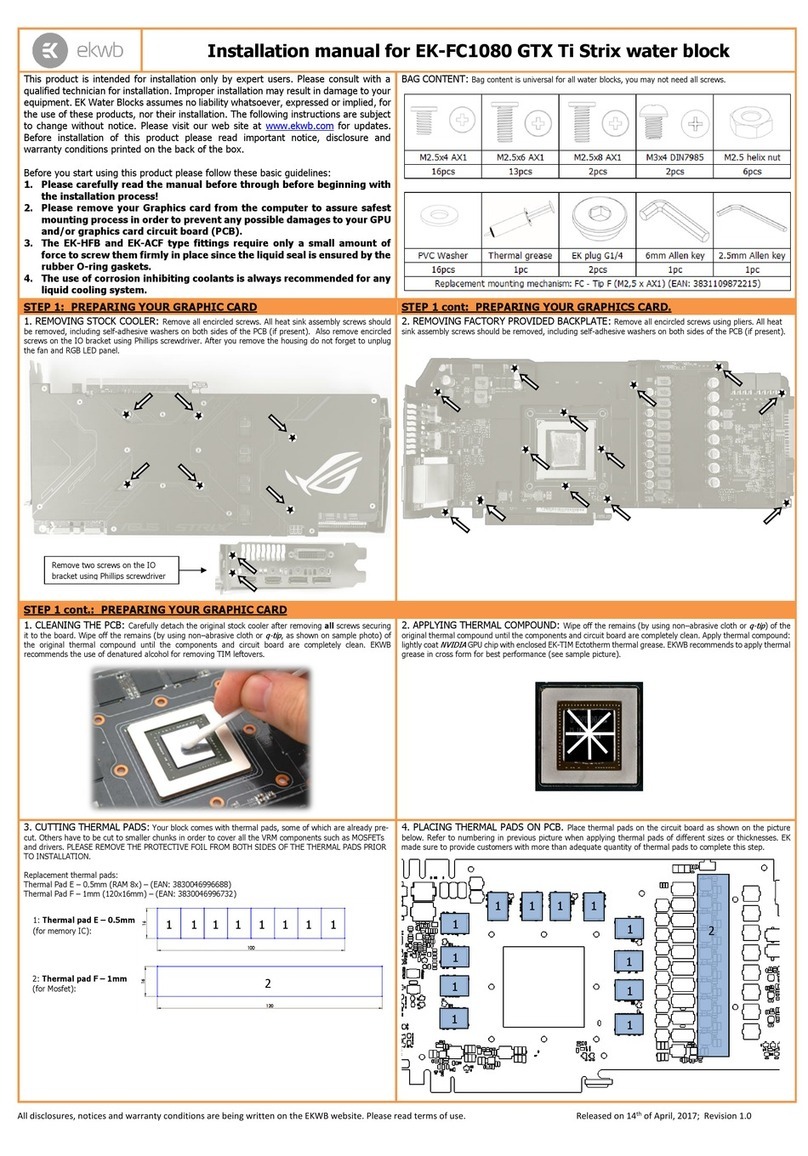
This product is intended for installation only by expert users. Please consult with a qualified technician for installation. Improper installation may result in damage to your equipment. EK Water Blocks assumes no liability
whatsoever, expressed or implied, for the use of these products, nor their installation. The following instructions are subject to change without notice. Please visit our web site at www.ekwb.com for updates. Before
installation of this product please read important notice, disclosure and warranty conditions printed on the back of the box.
Before you start using this product please follow these basic guidelines:
1. Please carefully read the manual before through before beginning with the installation process!
2. The EK High Flow and EK-PSC or EK-CSQ type fittings require only a small amount of force to screw them firmly in place since the liquid seal is ensured by the rubber O-ring gaskets.
3. The use of quality, market proved corrosion inhibiting coolants is strongly recommended for any liquid cooling system.
GENERAL INFORMATION: Exploded view of EK-XRES DCP 4.0
STEP 1: PREPARING THE PUMP
Unscrew the original M3 screws with Philips head screwdriver and
store them in a safe place. These screws will not be needed any
more.
STEP 2: ATTACHING THE INTERCONNECTING PLATE TO
THE BASE
STEP 3: CONNECTING THE PUMP AND RESERVOIR
Use four enclosed M3x8 DIN 7991 countersunk screws and attach the
interconnecting metal plate to the base with enclosed Allen key 2mm.
In order to connect the reservoir and the
pump please follow these steps:
1) Install the provided gasket (O-ring
19 x 2 mm) into the milled groove as
shown on the picture below. Failing
to do this will cause serious leakage.
2) Use four enclosed M3x8 DIN 7991
(countersunk) screws and attach
pump to the reservoir with enclosed
Allen key 2 mm.
TROUBLESHOOTING:
-If the threaded holes do not align
please re-check STEP 2 in the
manual.
-If the screw head does not
align (flush) with the metal
plate please re-check STEP 2 in
manual.
O-ring
M3 x 16 screws
ATTENTION!
Pay special attention
to orientation of the
interconnecting metal
plate.
The screws head
must be aligned
(flushed) with the
metal plate.
Bigger distance
ATTENTION/CAUTION !
Be extremely careful not to over tighten the
M3 screws. Doing this may strip the thread and
render product useless.
Revision 1.0 Released on 2nd of October, 2013.
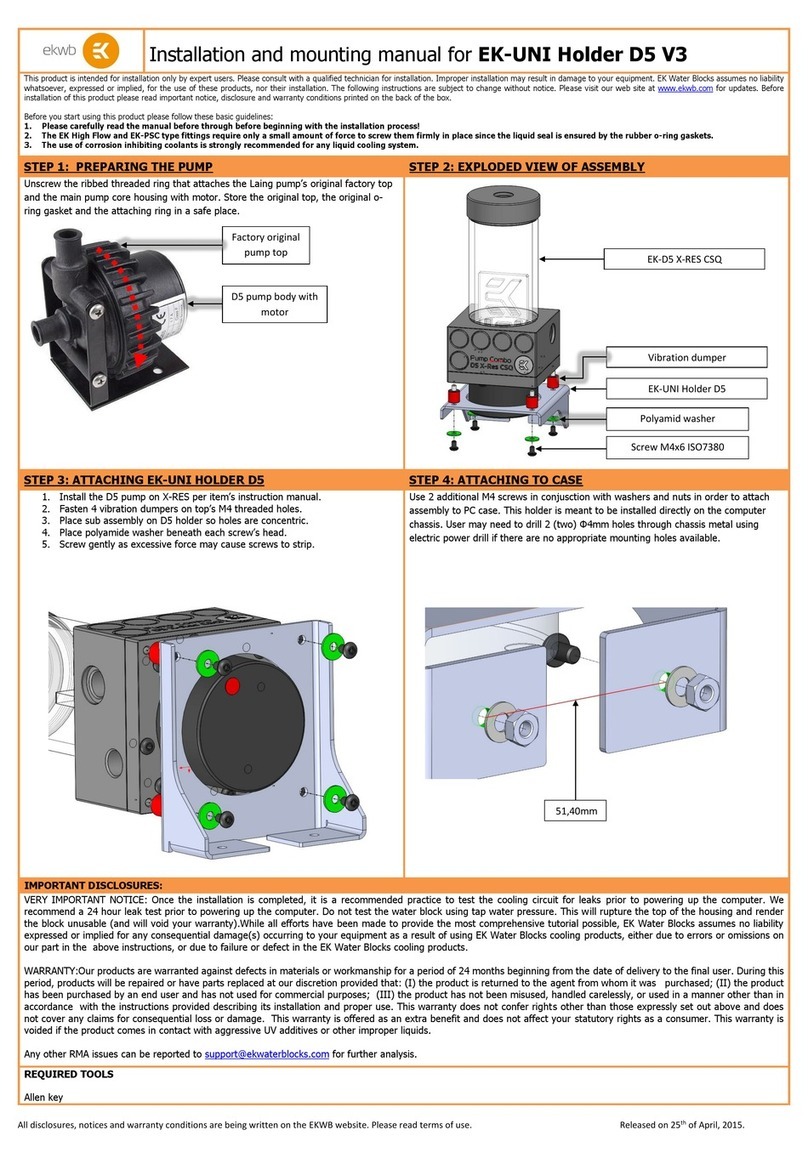
STEP 4: INSTALLING THE MOUNTING PLATE
STEP 5: FINISHING THE INSTALLATION
Screw in the four (4) rubber vibration dampers into the threaded holes
on the bottom side of the reservoir. Do not use any tools to fasten the
dampers in to position, use thumbs only.
Then use enclosed M4x4 DIN 7984 screws to install the metal plate on
the reservoir using enclosed Allen key 2.5 mm.
Secure the metal plate through the openings to the computer chassis
using enclosed M4x6 ISO 7380 screws, washers and M4 nuts. User may

need to drill 4 (four) ∅4 mm holes through chassis metal using electric
power drill if there are no appropriate mounting holes available.
The EK-XRES DCP 4.0 offers three inlet (suction) G1/4 ports. In order to use the

selected port as inlet it is mandatory to use the enclosed EK-Extender G1/4 with the
G/4 threaded fitting. Use enclosed G1/4 Plugs to plug the remaining two unused ports.
In order to make air bleeding process easier one can install the enclosed PU mesh in
the inlet compartment of the XRES.

STEP 6: CONNECTING YOUR RESERVOIR
Connect two G1/4 threaded fittings to the reservoir (IN/suction) and pump (OUT/pressure). Please note the water flow orientation.
EKWB recommends
using EK-CSQ fittings and EK-CSQ Adapters with the EK-XRES DCP 4.0 series reservoirs. To ensure that the tubes are securely attached to the barb/fittings,
please use hose clamps or an appropriate substitute.
STEP 7: FILLING THE RESERVOIR
Unscrew the top cap and fill the coolant in the reservoir. Make sure the liquid is not spilled over your computer or any electrical devices nearby. Run your pump
shortly for couple of times to make sure water floods your tubes and other water cooling components. Repeat the procedure until you are done and pay attention
to the water level in your reservoir. Lowest level of the coolant should be at least 1 cm above the plastic (Acetal) base of the reservoir. The highest
recommendable water level is approximately 0.5 cm below the top of the acrylic tube. Once done with the filling process please close your EK-XRES DCP 4.0 by
reinstalling the end cap, twisting it clock-wise.
STEP 8: OTHER INSTRUCTIONS
VERY IMPORTANT NOTICE: Once the installation is completed, it is a recommended practice to test the cooling circuit for leaks prior to powering up the
computer. We recommend a 24 hour leak test prior to powering up the computer. Do not test the product using tap water pressure. This will rupture the top of
the housing and render the product unusable (and will void your warranty). While all efforts have been made to provide the most comprehensive tutorial
possible, EK Water Blocks assumes no liability expressed or implied for any consequential damage(s) occurring to your equipment as a result of using EK Water
Blocks cooling products, either due to errors or omissions on our part in the above instructions, or due to failure or defect in the EK Water Blocks cooling
products.
WARRANTY: Our products are warranted against defects in materials or workmanship for a period of 24 months beginning from the date of delivery to the final
user. During this period, products will be repaired or have parts replaced at our discretion provided that: (I) the product is returned to the agent from whom it
was purchased; (II) the product has been purchased by an end user and has not used for commercial purposes; (III) the product has not been misused, handled
carelessly, or used in a manner other than in accordance with the instructions provided describing its installation and proper use. This warranty does not confer
rights other than those expressly set out above and does not cover any claims for consequential loss or damage. This warranty is offered as an extra benefit and
does not affect your statutory rights as a consumer. This warranty is voided if the product comes in contact with aggressive UV additives or other improper
liquids.
REQUIRED TOOLS:
Philips head screwdriver Power drill with 4 mm drill bit (optional)
Water in
Water out
G1/4 Fitting
Plastic foam
DCP 4.0 Pump
Screw M4x4
DIN 7984
Rubber
anti-
vibration
dumper
Metal plate
EK-Extender G1/4
Use these zip holes to mount the
XRes to the PC chasis using
enclosed M4×6mm screws and
nuts.