manuals.online logo
Brands
  1. Home
  2. •
  3. Brands
  4. •
  5. Garmin
  6. •
  7. Marine GPS System
  8. •
  9. Garmin GPSMAP 3005C User manual

Garmin GPSMAP 3005C User manual

Other manuals for GPSMAP 3005C

5

Other Garmin Marine GPS System manuals
Garmin GPSMAP 5208 - Marine GPS Receiver User manual
Garmin

Garmin GPSMAP 5208 - Marine GPS Receiver User manual

Garmin GPSMAP 180 User manual

Garmin

Garmin GPSMAP 180 User manual
Garmin GPS 16 Series Reference guide

Garmin

Garmin GPS 16 Series Reference guide
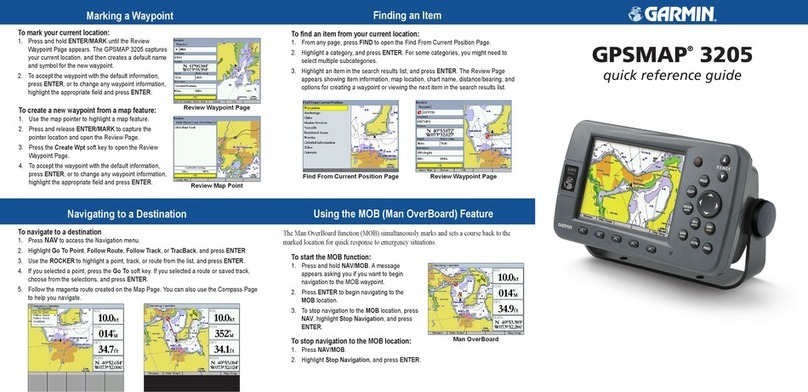
Garmin GPSMAP 3205 - Marine GPS Receiver User manual
Garmin

Garmin GPSMAP 3205 - Marine GPS Receiver User manual

Garmin GPSMAP 640 User manual

Garmin

Garmin GPSMAP 640 User manual

Garmin GPS 16 Series User manual

Garmin

Garmin GPS 16 Series User manual
Garmin MSC 10 User manual

Garmin

Garmin MSC 10 User manual
Garmin GWS 10 Marine Wind Sensor User manual
Garmin

Garmin GWS 10 Marine Wind Sensor User manual

Garmin GPSMAP 6008 Reference guide

Garmin

Garmin GPSMAP 6008 Reference guide
Garmin Echomap Plus 40 series User manual

Garmin

Garmin Echomap Plus 40 series User manual

Garmin GPSMAP 180 User manual

Garmin

Garmin GPSMAP 180 User manual
Garmin GSD20 Sounder Owner's manual

Garmin

Garmin GSD20 Sounder Owner's manual
Garmin GPSMAP 215 User manual

Garmin

Garmin GPSMAP 215 User manual
Garmin GPSMAP 620 Reference guide

Garmin

Garmin GPSMAP 620 Reference guide
Garmin GNX 21 User manual

Garmin

Garmin GNX 21 User manual

Garmin Astro 220 User manual

Garmin

Garmin Astro 220 User manual
Garmin Panoptix PS21-TM User manual

Garmin

Garmin Panoptix PS21-TM User manual
Garmin ECHOMAP UHD2 6 SV User manual

Garmin

Garmin ECHOMAP UHD2 6 SV User manual
Garmin GHP 10  Marine Autopilot System Reference guide
Garmin

Garmin GHP 10 Marine Autopilot System Reference guide

Garmin GPSMAP 4210 User manual

Garmin

Garmin GPSMAP 4210 User manual
Garmin GPSMAP 185 Sounder User manual

Garmin

Garmin GPSMAP 185 Sounder User manual

Garmin Fishfinder 320C User manual

Garmin

Garmin Fishfinder 320C User manual

Garmin GPSMAP 8008 MFD User manual

Garmin

Garmin GPSMAP 8008 MFD User manual

Garmin GPSMAP 3205 - Marine GPS Receiver User manual

Garmin

Garmin GPSMAP 3205 - Marine GPS Receiver User manual

Popular Marine GPS System manuals by other brands

JRC JHS-183 installation manual

JRC

JRC JHS-183 installation manual

Thuraya IP Voyager user guide

Thuraya

Thuraya IP Voyager user guide

Furuno GP-1610CF Operator's manual

Furuno

Furuno GP-1610CF Operator's manual

Raytheon NautoPilot NP 5100 Operator's manual

Raytheon

Raytheon NautoPilot NP 5100 Operator's manual

Furuno GP-1650WDF Operator's manual

Furuno

Furuno GP-1650WDF Operator's manual

Iridium Pilot user manual

Iridium

Iridium Pilot user manual

Beam Terra 800 quick start guide

Beam

Beam Terra 800 quick start guide

Sailmon E4 installation manual

Sailmon

Sailmon E4 installation manual

AUTOHELM ST50 PLUS Operation and installation

AUTOHELM

AUTOHELM ST50 PLUS Operation and installation

ASTRO X-5 twin B operating instructions

ASTRO

ASTRO X-5 twin B operating instructions

Iridium EXTREME quick start guide

Iridium

Iridium EXTREME quick start guide

Satcube Ku quick start guide

Satcube

Satcube Ku quick start guide

Thuraya ATLAS IP+ user manual

Thuraya

Thuraya ATLAS IP+ user manual

Radio Zeeland DMP Sigma 120 manual

Radio Zeeland DMP

Radio Zeeland DMP Sigma 120 manual

METRACKCO SVT600/T1/T3 user guide

METRACKCO

METRACKCO SVT600/T1/T3 user guide

Thuraya SatSleeve user manual

Thuraya

Thuraya SatSleeve user manual

Humminbird 532162-1_B installation guide

Humminbird

Humminbird 532162-1_B installation guide

Norsat GLOBETrekker user guide

Norsat

Norsat GLOBETrekker user guide

manuals.online logo
manuals.online logoBrands
  • About & Mission
  • Contact us
  • Privacy Policy
  • Terms and Conditions

Copyright 2025 Manuals.Online. All Rights Reserved.

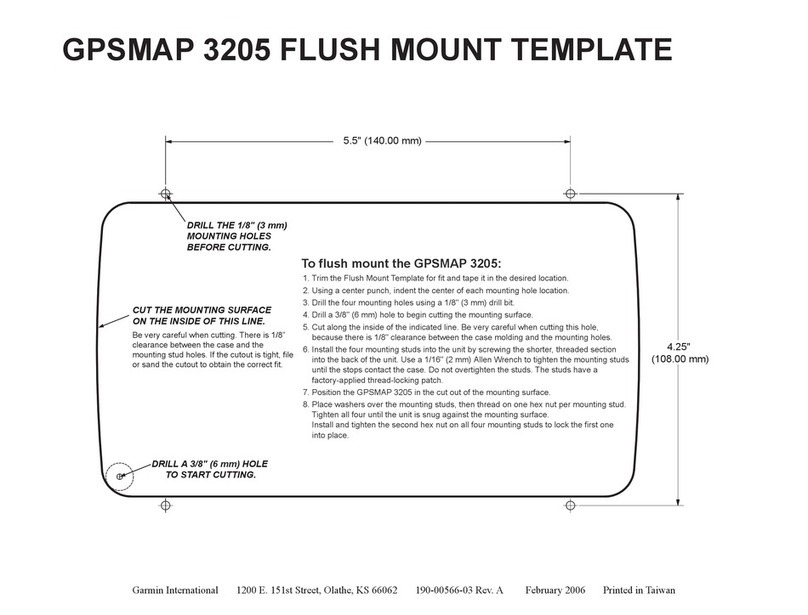
5.5" (140.00 mm)
4.25"
(108.00 mm)
DRILL A 3/8" (6 mm) HOLE
TO START CUTTING.
CUT THE MOUNTING SURFACE
ON THE INSIDE OF THIS LINE.
DRILL THE 1/8" (3 mm)
MOUNTING HOLES
BEFORE CUTTING.
Be very careful when cutting. There is 1/8”
clearance between the case and the
mounting stud holes. If the cutout is tight, file
or sand the cutout to obtain the correct fit.
1. Trim the Flush Mount Template for fit and tape it in the desired location.
2. Using a center punch, indent the center of each mounting hole location.
3. Drill the four mounting holes using a 1/8" (3 mm) drill bit.
4. Drill a 3/8" (6 mm) hole to begin cutting the mounting surface.
5. Cut along the inside of the indicated line. Be very careful when cutting this hole,
because there is 1/8" clearance between the case molding and the mounting holes.
6. Install the four mounting studs into the unit by screwing the shorter, threaded section
into the back of the unit. Use a 1/16" (2 mm) Allen Wrench to tighten the mounting studs
until the stops contact the case. Do not overtighten the studs. The studs have a
factory-applied thread-locking patch.
7. Position the GPSMAP 3005C in the cut out of the mounting surface.
8. Place washers over the mounting studs, then thread on one hex nut per mounting stud.
Tighten all four until the unit is snug against the mounting surface.
Install and tighten the second hex nut on all four mounting studs to lock the first one
into place.
To flush mount the GPSMAP 3005C:
GPSMAP 3005C FLUSH MOUNT TEMPLATE
Garmin International 1200 E. 151st Street, Olathe, KS 66062 190-00531-03 Rev. B March 2006 Printed in Taiwan