
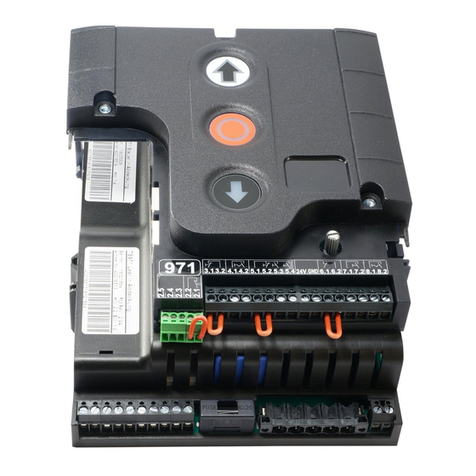
GFA TS 971 User manual

1
TS 971
51171594 c 10.2013
Electrical operating instructions en
0000 0 0 0 000 0 511 7 1 5 9 4 XXXXX
EN 13241-1

Contents
1General safety information ..............................................................................................5
2Technical data.................................................................................................................6
3Mechanical installation ....................................................................................................7
4Electrical installation........................................................................................................8
Connection cable connection overview .............................................................................9
Carrying out the electrical installation..............................................................................10
Mains connection ............................................................................................................11
Mains connection to control.............................................................................................11
Completing the electrical installation ...............................................................................11
Overview of control..........................................................................................................12
5Starting up the control ................................................................................................... 13
DES: Rapid adjustment of limits......................................................................................13
6Electrical installation – control accessories....................................................................14
X1 External supply ..........................................................................................................14
X3 Emergency stop.........................................................................................................14
X4 Automatic closing On/Off ...........................................................................................14
X5 Control device ............................................................................................................14
X5 / X6 Radar motion detector ........................................................................................14
X5 / X6 Infrared radar system .........................................................................................14
X6 Photo cell ...................................................................................................................15
X6 Light curtain ...............................................................................................................16
X7 Radio receiver............................................................................................................16
X7 Pull switch..................................................................................................................16
X8 Intermediate stop .......................................................................................................16
X20 / X21 Red / green traffic light ...................................................................................16
X20 / X21 Magnetic brake ...............................................................................................16
Connection of spiral cable ...............................................................................................17
"WSD" Wireless Safety Device........................................................................................18
8K2 electrical safety edge system on "WSD" door module .............................................18
OSE optical safety edge system 1 on "WSD" door module.............................................18
OSE optical safety edge system 2 on "WSD" door module.............................................19
Door safety switch on "WSD" door module .....................................................................19
Teaching in of "WSD" door module .................................................................................20
Completing the electrical installation ...............................................................................20

7Control programming .................................................................................................... 21
8Table of menus ............................................................................................................. 22
Operating mode ..............................................................................................................22
Door positions .................................................................................................................23
Door functions.................................................................................................................24
Door positions .................................................................................................................25
Door positions .................................................................................................................26
Door positions .................................................................................................................27
Safety functions ..............................................................................................................28
DU/FI settings .................................................................................................................29
Advanced door functions.................................................................................................30
Maintenance cycle counter .............................................................................................31
Reading out memory.......................................................................................................32
Delete all settings............................................................................................................32
Reading out WSD data ...................................................................................................33
9Safety devices .............................................................................................................. 34
X2: Input, door safety switch ...........................................................................................34
X2: Input, safety edge system.........................................................................................36
Installation of the spiral cable..........................................................................................37
Integrated "WSD" wireless safety device ........................................................................39
EMERGENCY operation .................................................................................................41
X3: Input, emergency stop ..............................................................................................41
10Functional description ................................................................................................... 42
X: 24 V DC voltage supply ..............................................................................................42
X1: Mains supply line for control and external supply .....................................................42
X4: Input, automatic closing Off/On.................................................................................43
X5: Input, control device..................................................................................................43
X6: Input, "Through / reflective photo cell" or light curtain...............................................44
X7: Input, pull switch/radio receiver.................................................................................47
Internal radio receiver .....................................................................................................48
Teach-in of radio transmitter ...........................................................................................48
Deleting an individual radio transmitter ...........................................................................49
Deleting all radio transmitters..........................................................................................49
X8: Input, intermediate stop On/Off.................................................................................50
X20 / X21: Potential-free relay contacts..........................................................................51
Force monitoring .............................................................................................................51

UBS system ....................................................................................................................52
UBS connection ..............................................................................................................52
Reversing duration adjustment........................................................................................52
Maintenance cycle counter..............................................................................................53
Short-circuit/overload display ..........................................................................................53
Display for active "WSD" wireless safety device .............................................................53
Standby function .............................................................................................................54
Lighting of the internal control device ..............................................................................54
11Status display................................................................................................................55
Faults ..............................................................................................................................55
Commands......................................................................................................................60
Status indications ............................................................................................................61
12Explanation of symbols .................................................................................................62
13Declaration of Incorporation/Declaration of Conformity.................................................. 64
Symbols
Warning - Risk of injury or danger to life!
Warning - Danger to life from electric shock !
Note - Important information!
▶ Prompt - Required action!
Illustrations show example products. Differences from the delivered product are possible.

1General safety information
Specified normal use
The door control is intended for a power-operated door with a drive unit (DES GfA limit switch
system).
The safe operation is only guaranteed with specified normal use. The drive unit is to be
protected from rain, moisture and aggressive ambient conditions. No liability for damage
caused by other applications or non-observance of the information in the manual.
Modifications are only permitted with the agreement of the manufacturer. Otherwise the
Manufacturer’s Declaration shall be rendered null and void.
Safety information
Installation and initial operation tasks are to be performed by skilled personnel only.
Only trained electrical craftsmen are permitted to work on electrical equipment. They must
assess the tasks assigned to them, recognise potential danger zones and be able to take
appropriate safety measures.
Installation work is only to be carried out with the supply off.
Observe the applicable regulations and standards.
Coverings and protective devices
Do not operate unless corresponding coverings and protective devices are installed.
Ensure that gaskets are fitted correctly and that cable glands are correctly tightened.
Spare parts
Only use original spare parts.

2Technical data
Series TS 971
Dimensions W xHxD 155 x 386 x 90 mm
Installation Vertical
Vibration Free of vibration
Installation
Operating frequency 50/60 Hz
Supply voltage
1 N~220 V, PE
3 N~220-400 V, PE
3~220-400 V, PE
Output power for drive unit, maximum 3 kW
Protection per phase, on-site 10-16 A
24 V DC
External supply voltage:
(internal electronic protection) 0.35 A
1 N~230 V
External supply voltage: X1/L, X1/N
(protection via F1 micro-fuse) 1.6 A time-lag
24 V DC
Control inputs
Type 10 mA
Type of relay contacts (2 pcs)
Max. current of 1A at 230VAC, and 0.4A at 24VDC
(The use of LED lamps is recommended.)
Potential-free changeover
contacts
230 V AC
Loading of relay contacts,
ohmic/inductive 1 A
Control power consumption 10 VA
Temperature range Operation: -10..+50
Storage: +0..+50 °C
Air humidity to 93 %
non-condensing
Protection class of housing IP65
Compatible GfA limit switch DES
Integrated radio receiver
WSD / radio transmitter 2.4GHz / 434MHz

3Mechanical installation
Control installation!
Indoor use only
Mount on a level surface free of vibration
Only mount in the vertical position
Door must be in clear view from place of assembly
Requirements
The permissible loads on walls, fastenings, mountings and transmission elements must not
be exceeded.
Mounting
The control shall be mounted at the rails

4Electrical installation
Warning – Danger to life from electric shock!
Disconnect the cables (mains OFF) and check that the supply is off
Observe the applicable regulations and standards
Ensure proper electrical connection
Use suitable tools
On-site backup fuse and disconnector unit!
Only use current sensitive earth leakage circuit breakers type B for FI-drive units
Connection to the indoor installation via an all-pole disconnector unit, with current
≥ 10 A as per EN 12453 (e.g. CEE plug connector, main switch)
Read the drive unit installation instructions!

Connection cable connection overview
Motor connection cable Connection cable for limit switch
MOT X13 Motor plug DES X12 Limit switch plug
Pin Core Term. Pin Core Term.
1 3 W Phase W 1 5/wh 1 +24 V safety circuit
2 2 V Phase V 2 6/bn 2 Channel B (RS485)
3 1 U Phase U 3 7/gn 3 Ground
4 4 N Neutral conductor (N) 4 8/ye 4 Channel A (RS485)
5 PE PE 5 9/gy 5 Safety circuit
6 10/pk 6 8 V DC supply voltage

Carrying out the electrical installation
▶ Remove covers. ▶ Open cable entry ① or ②.
▶ Insert and connect connection cable in the open cable entry ① (from below) or ② (from
above).
▶ Properly tighten cable glands.
Attention - Damage to components!
Open cable entry with suitable tool
Install cable entries and/or cable glands
Other manuals for TS 971
3
Table of contents
Other GFA Control Unit manuals
Popular Control Unit manuals by other brands

Festo
Festo Compact Performance CP-FB6-E Brief description

Elo TouchSystems
Elo TouchSystems DMS-SA19P-EXTME Quick installation guide

JS Automation
JS Automation MPC3034A user manual

JAUDT
JAUDT SW GII 6406 Series Translation of the original operating instructions

Spektrum
Spektrum Air Module System manual

BOC Edwards
BOC Edwards Q Series instruction manual

KHADAS
KHADAS BT Magic quick start

Etherma
Etherma eNEXHO-IL Assembly and operating instructions

PMFoundations
PMFoundations Attenuverter Assembly guide

GEA
GEA VARIVENT Operating instruction

Walther Systemtechnik
Walther Systemtechnik VMS-05 Assembly instructions

Altronix
Altronix LINQ8PD Installation and programming manual





