MF877-00 Page 2
Template Revision A
HPE instructions for this template are available at MF877-01
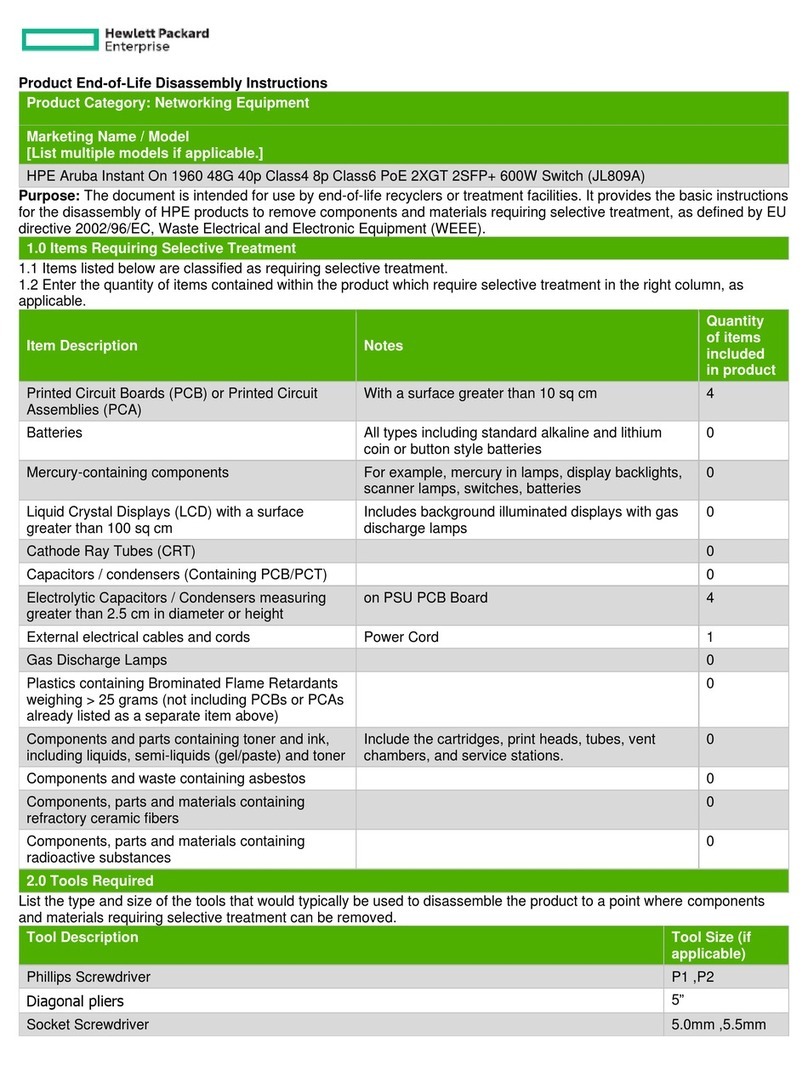
Item Description Notes
of items
included
Components, parts and materials containing
radioactive substances
List the type and size of the tools that would typically be used to disassemble the product to a point where components
and materials requiring selective treatment can be removed.
Tool Size (if
applicable)
3.0 Product Disassembly Process
3.1 List the basic steps that should typically be followed to remove components and materials requiring selective treatment:
1. Remove the chassis lid
1. Using a Phillips screwdriver, remove the screws (qty 18)
2. Slide the lid off the chassis
2. Remove the two power supplies
1. Locate the power supplies on the left side of the back of the chassis
2. While pressing the release lever toward the handle, pull a power supply out of the chassis
3. Repeat for the other power supply
3. Remove the five fan assemblies
1. Locate the fan assemblies on the right side of the back of the chassis
2. Either by hand or using a Phillips screwdriver, loosen the set screw for each fan assembly
3. Using the fan assembly handle, pull out a fan assembly
4. Repeat for the remaining four fan assemblies
4. Remove the center PCA assembly
1. Using a Phillips screwdriver, remove the two screws at the back corners of the center PCA assembly
2. Using a small adjustable wrench, remove the two nuts at the front corners of the center PCA assembly
3. Slowly remove the center PCA assembly from the chassis, taking into account the connector under the bottom
left corner
5. Remove the two DIMMs from the center PCA assembly
1. Gently spread the retaining levers away from the top DIMM
2. Remove the top DIMM
3. Repeat for the bottom DIMM
6. Remove the heatsink from the center PCA assembly
1. Locate the heatsink fasteners on the underside of the PCA, opposite the heatsink
2. Use needle nose pliers to pinch the heat sink fasteners while removing the heat sinks from the center PCA
assembly
7. Remove the fan assembly PCA
1. Using a Phillips screwdriver, remove the four screws attaching the fan assembly PCA to the chassis
2. Remove the fan assembly PCA from the chassis, easing it away from the connector to the PCA bridging it to
the main PCA
8. Remove the power supply PCA
1. Using a Phillips screwdriver, remove the three screws attaching the power supply PCA to the chassis
2. Remove the power supply PCA from the chassis, easing it away from the connector to the main PCA
9. Remove the main PCA