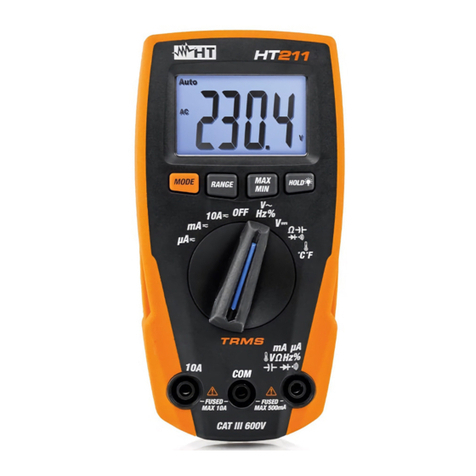
HT HT25N User manual

Copyright HT ITALIA 2016 Release EN 1.02 - 06/04/2016
ENGLISH
User manual

HT25N
EN - 1
Table of Contents:
1.SAFETY PRECAUTIONS AND PROCEDURES..........................................................2
1.1.Preliminary ........................................................................................................................ 2
1.2.During use......................................................................................................................... 3
1.3.After use............................................................................................................................ 3
1.4.Measuring (overvoltage) categories definitions................................................................. 3
2.GENERAL DESCRIPTION...........................................................................................4
3.PREPARATION FOR USE...........................................................................................4
3.1.Initial.................................................................................................................................. 4
3.2.Supply voltage................................................................................................................... 4
3.3.Calibration......................................................................................................................... 4
3.4.Storage.............................................................................................................................. 4
4.OPERATING INSTRUCTIONS.....................................................................................5
4.1.Instrument - description..................................................................................................... 5
4.1.1.Front panel.................................................................................................................................. 5
4.2.Description of function keys .............................................................................................. 5
4.2.1.HOLD key................................................................................................................................... 5
4.2.2.Backlight key ......................................................................................................................... 5
4.3.Measurements................................................................................................................... 6
4.3.1.DC Voltage measurement.......................................................................................................... 6
4.3.2.AC Voltage measurement .......................................................................................................... 7
4.3.3.DC Current measurement .......................................................................................................... 8
4.3.4.Resistance measurement........................................................................................................... 9
4.3.5.Continuity test and Diode test................................................................................................... 10
4.3.6.Battery test................................................................................................................................ 11
5.MAINTENANCE .........................................................................................................12
5.1.Battery and fuses replacement........................................................................................ 12
5.2.Cleaning.......................................................................................................................... 12
5.3.End of life ........................................................................................................................ 12
6.TECHNICAL SPECIFICATIONS ................................................................................13
6.1.Technical features...........................................................................................................13
6.1.1.Reference standards................................................................................................................ 14
6.1.2.General data............................................................................................................................. 14
6.2.Environment.................................................................................................................... 14
6.2.1.Environmental conditions ......................................................................................................... 14
6.3.Accessories..................................................................................................................... 14
6.3.1.Standard accessories............................................................................................................... 14
7.SERVICE....................................................................................................................15
7.1.Warranty conditions......................................................................................................... 15

7.2.After-sale service............................................................................................................. 15

HT25N
EN - 2
1. SAFETY PRECAUTIONS AND PROCEDURES
This meter is in compliance with IEC/EN61010-1 guideline related to electronic measuring
instruments. For your own safety and to avoid damaging the instrument follow the
procedures described in this instruction manual and read carefully all notes preceded by
this symbol .When taking measurements:
Avoid doing that in humid or wet places
Avoid doing that in rooms where explosive gas, combustible gas, steam or excessive
dust is present.
Keep you insulated from the object under test.
Do not touch exposed metal parts such as test lead ends, sockets, fixing objects,
circuits etc.
Avoid doing that if you notice anomalous conditions such as breakages, deformations,
fractures, leakages of battery liquid, blind display etc.
Be particularly careful when measuring voltages exceeding 20V to avoid risk of
electrical shocks.
The following symbols are used on the instrument and in the manual:
CAUTION - refer to the instruction manual - an improper use may damage the
instrument or its components.
Double insulated meter.
AC Voltage
DC Voltage or Current
Ground reference
1.1. PRELIMINARY
This instrument has been designed for use in environments of pollution degree 2.
It can be used for VOLTAGE and DC CURRENT measurements on installations of
CAT III 600V measurement
This instrument is not suitable for measurements of not sine wave voltage.
When using the instrument always respect the usual safety regulations aimed at
protecting you against the dangerous electric currents and protecting the instrument
against incorrect operations.
Only the leads supplied with the instrument guarantee compliance with the safety
standards in force. They must be in good conditions and, if necessary, replaced with
identical ones.
Do not test or connect to any circuit exceeding the specified overload protection.
Do not effect measurements under environmental conditions exceeding the limits
indicated in § 6.2.1
Make sure that batteries are properly installed
Before connecting the test probes to the installation make sure that the rotary selector
is positioned on the right function
Make sure that LCD and rotary selector indicate the same function

HT25N
EN - 3
1.2. DURING USE
Read the recommendations which follow and the instructions in this manual:
CAUTION
An improper use may damage the instrument and/or its components or
injure the operator.
When changing the range, first disconnect the test leads from the circuit under test in
order to avoid any accident.
When the instrument is connected to measuring circuits never touch any unused
terminal.
When measuring resistors do not add any voltage. Although there is a protection
circuit, excessive voltage could cause malfunctioning.
If during measurement the displayed values remain constant check whether the HOLD
function is active.
1.3. AFTER USE
After using the instrument turn it off.
If you expect not to use the instrument for a long period remove the battery to avoid
leakages of battery liquids which may damage its inner components.
1.4. MEASURING (OVERVOLTAGE) CATEGORIES DEFINITIONS
IEC/EN61010-1: Safety requirements for electrical equipment for measurement, control
and laboratory use, Part 1: General requirements, gives a definition of measuring
category, usually called overvoltage category. § 6.7.4: Measuring circuits:
(OMISSIS)
Circuits are divided into the following measurement categories:
Measurement category IV is for measurements performed at the source of the low-
voltage installation.
Examples are electricity meters and measurements on primary overcurrent protection
devices and ripple control units.
Measurement category III is for measurements performed in the building installation.
Examples are measurements on distribution boards, circuit breakers, wiring, including
cables, bus-bars, junction boxes, switches, socket-outlets in the fixed installation, and
equipment for industrial use and some other equipment, for example, stationary motors
with permanent connection to fixed installation.
Measurement category II is for measurements performed on circuits directly
connected to the low voltage installation..
Examples are measurements on household appliances, portable tools and similar
equipment.
Measurement category I is for measurements performed on circuits not directly
connected to MAINS.
Examples are measurements on circuits not derived from MAINS, and specially
protected (internal) MAINS-derived circuits. In the latter case, transient stresses are
variable; for that reason, the norm requires that the transient withstand capability of the
equipment is made known to the user.

HT25N
EN - 4
2. GENERAL DESCRIPTION
This instrument HT25N performs the below listed measurements:
DC Voltage
AC sine wave Voltage
DC Current
Resistance
Continuity test
Diode test
9V and 1.5V battery test
All function is selectable by means of a rotary selector. In addition there are the HOLD key
to hold the displayed value and the key for activated/disable LCD backlight.
3. PREPARATION FOR USE
3.1. INITIAL
This instrument was checked both mechanically and electrically prior to shipment. All
possible cares and precautions were taken to let you receive the instrument in perfect
conditions. Notwithstanding we suggest you to check it rapidly (eventual damages may
have occurred during transport – if so please contact the local distributor from whom you
bought the item).
Make sure that all standard accessories mentioned in § 6.3.1 are included. Should you
have to return back the instrument for any reason please follow the instructions mentioned
in § 7.
3.2. SUPPLY VOLTAGE
The instrument is supplied by 1x9V battery type IEC 6F22. When battery are low, a low
battery indication “BAT” is displayed. To replace/insert battery please refer to § 5.1.
3.3. CALIBRATION
The instrument complies with the technical specifications contained in this manual and such
compliance is guaranteed for 1 year. Annual recalibration is recommended.
3.4. STORAGE
After a period of storage under extreme environmental conditions exceeding the limits
mentioned in § 6.2.1 let the instrument resume normal measuring conditions before using
it.

HT25N
EN - 5
4. OPERATING INSTRUCTIONS
4.1. INSTRUMENT - DESCRIPTION
4.1.1. Front panel
CAPTION:
1. LCD display
2. HOLD key
3. Backlight key
4. Function selector
5. Input terminal 10A
6. Input terminal COM
7. Input terminal
VmAA
Fig. 1: Instrument description
4.2. DESCRIPTION OF FUNCTION KEYS
4.2.1. HOLD key
By pressing HOLD key the measured value is frozen on the display where the symbol
"HOLD" appears. Press again HOLD to disable this function and resume normal operation.
4.2.2. Backlight key
By pressing key it’s possible to activate/disabled the backlight function on the display.

HT25N
EN - 6
4.3. MEASUREMENTS
4.3.1. DC Voltage measurement
CAUTION
The maximum input for DC voltage is 600V. Do not attempt to measure
higher voltages to avoid electrical shocks or damages to the instrument.
Fig. 2: Using the meter for DC Voltage measurement
1. Selecting the position 200mV , 2000mV , 20V , 200V or 600V
2. Insert the test leads into the jacks, the red plug into VmAAjack and black plug
into COM jack
3. Connect the red and black test leads to the positive and negative poles of the circuit
under test respectively (see Fig. 2). The voltage value is displayed
4. If the message "OL" is displayed select a higher range.
5. The symbol "-" on the instrument display indicates that voltage has opposite direction
with regard to the connection.
6. For HOLD function refer to § 4.2.1

HT25N
EN - 7
4.3.2. AC Voltage measurement
CAUTION
The maximum input for AC voltage is 600V. Do not attempt to measure
higher voltages to avoid electrical shocks or damages to the instrument.
Fig. 3: Using the instrument for AC Voltage measurement
1. Selecting the position 200Vor 600V
2. Insert the test leads into the jacks, the red plug into VmAAjack and black plug
into COM jack
3. Connect the test leads to the circuit under test (see Fig. 3). The voltage value is
displayed
4. If the message "OL" is displayed select a higher range.
5. For HOLD function refer to § 4.2.1

HT25N
EN - 8
4.3.3. DC Current measurement
CAUTION
The maximum input for DC current is 10A (10A input) or 200mA
(VmAAinput). Do not attempt to measure higher currents to avoid
electrical shocks or damages to the instrument.
Fig. 4: Using the instrument for DC Current measurement
1. Power off the circuit under test
2. Selecting the position 2000A, 20mA , 200mA or 10A
3. Insert the test leads into the jacks, the red plug into 10A jack or VmAAjack
and black plug into COM jack
4. Connect the red and the black plugs in series with the circuit whose current is to be
measured respecting the polarities (see Fig. 4)
5. Energize the circuit under test. The current value will be displayed.
6. The message "OL" means that the detected current exceeds the limits.
7. The symbol "-" on the instrument display indicates that voltage has opposite direction
with regard to the connection.
8. For HOLD function refer to § 4.2.1

HT25N
EN - 9
4.3.4. Resistance measurement
CAUTION
Before taking resistance measurements on the circuit remove power from
the circuit being tested and discharge all capacitors.
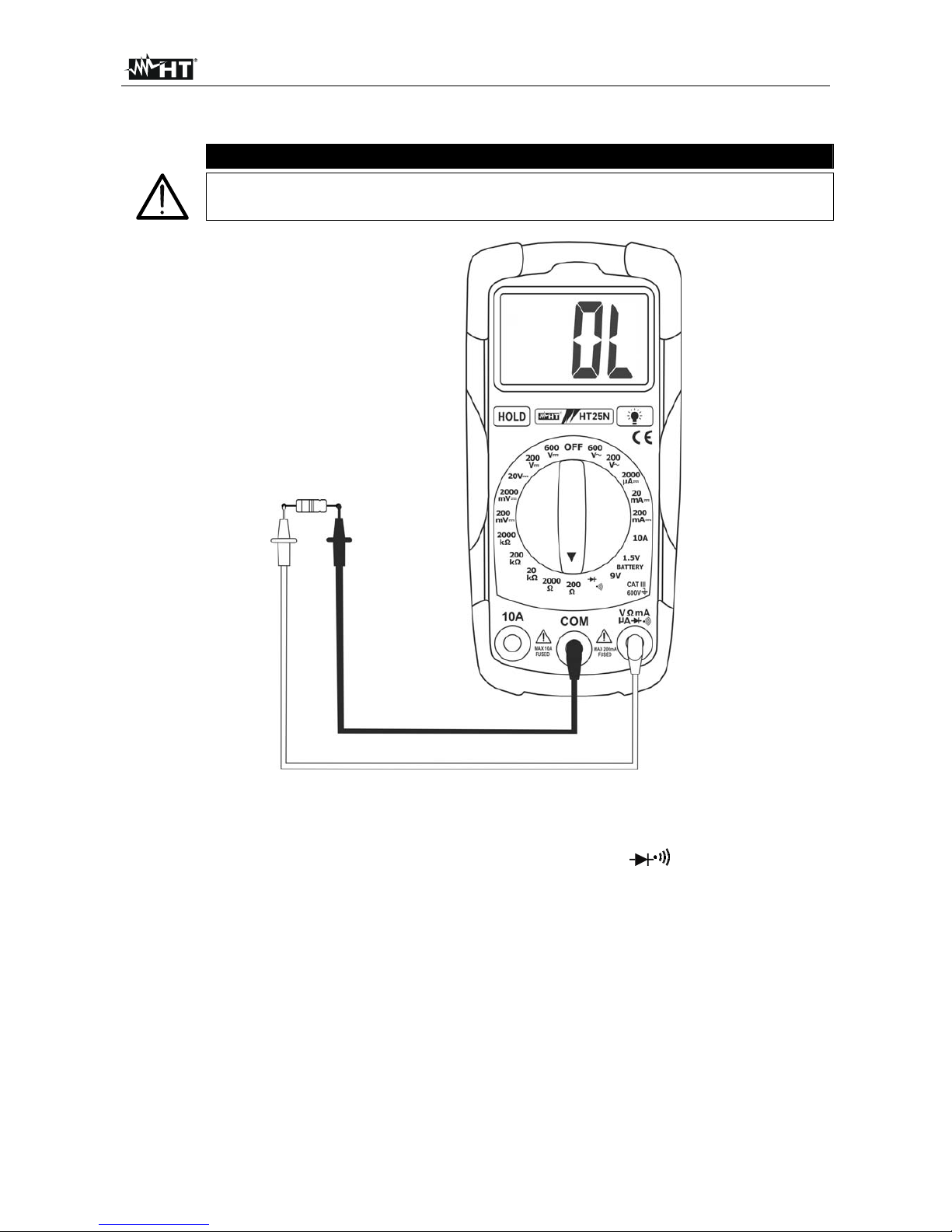
Fig. 5: Using the instrument for Resistance measurement
1. Selecting the position 200, 2000, 20k, 200kor 2000k
2. Insert the test leads into the jack, the red plug into VmAAjack and black plug
into COM jack
3. Connect the test leads to the circuit under test (see Fig. 5). The resistance value is
displayed
4. If the message "OL” is displayed a higher range must be selected
5. For HOLD function refer to § 4.2.1
Table of contents
Other HT Multimeter manuals
Popular Multimeter manuals by other brands

Gossen MetraWatt
Gossen MetraWatt METRAmax 6 operating instructions

PeakTech
PeakTech 4000 Procedure of calibration

YOKOGAWA
YOKOGAWA 90050B user manual

Gossen MetraWatt
Gossen MetraWatt METRALINE DMM16 operating instructions

Fluke
Fluke 8846A Programmer's manual

Tempo Communications
Tempo Communications MM200 instruction manual