manuals.online logo
Brands
  1. Home
  2. •
  3. Brands
  4. •
  5. JONARD TOOLS
  6. •
  7. Test Equipment
  8. •
  9. JONARD TOOLS OFI-50 User manual

JONARD TOOLS OFI-50 User manual

Other JONARD TOOLS Test Equipment manuals

JONARD TOOLS TBS-100 User manual

JONARD TOOLS

JONARD TOOLS TBS-100 User manual

JONARD TOOLS TETP-900 User manual

JONARD TOOLS

JONARD TOOLS TETP-900 User manual

JONARD TOOLS TEP-200 User manual

JONARD TOOLS

JONARD TOOLS TEP-200 User manual

JONARD TOOLS OFI-50 User manual

JONARD TOOLS

JONARD TOOLS OFI-50 User manual

Popular Test Equipment manuals by other brands

Ambit P.F. Series instruction manual

Ambit

Ambit P.F. Series instruction manual

Megger BMM500 Series user guide

Megger

Megger BMM500 Series user guide

RJG Lynx Sensor Tester operating instructions

RJG

RJG Lynx Sensor Tester operating instructions

Mark-10 TT02 Series user guide

Mark-10

Mark-10 TT02 Series user guide

Martel 3001 Operator's manual

Martel

Martel 3001 Operator's manual

ElproSys DiagProg4 instruction manual

ElproSys

ElproSys DiagProg4 instruction manual

Redtech TRAILERteck T05 user manual

Redtech

Redtech TRAILERteck T05 user manual

Venmar AVS Constructo 1.0 HRV user guide

Venmar

Venmar AVS Constructo 1.0 HRV user guide

Test Instrument Solutions SafetyPAT operating manual

Test Instrument Solutions

Test Instrument Solutions SafetyPAT operating manual

Hanna Instruments HI 38078 instruction manual

Hanna Instruments

Hanna Instruments HI 38078 instruction manual

Kistler 5495C Series instruction manual

Kistler

Kistler 5495C Series instruction manual

Waygate Technologies DM5E Basic quick start guide

Waygate Technologies

Waygate Technologies DM5E Basic quick start guide

StoneL DeviceNet CK464002A manual

StoneL

StoneL DeviceNet CK464002A manual

Seica RAPID 220 Site preparation guide

Seica

Seica RAPID 220 Site preparation guide

Kingfisher KI7400 Series Training manual

Kingfisher

Kingfisher KI7400 Series Training manual

Kurth Electronic CCTS-03 operating manual

Kurth Electronic

Kurth Electronic CCTS-03 operating manual

SMART KANAAD SBT XTREME 3G Series user manual

SMART

SMART KANAAD SBT XTREME 3G Series user manual

Agilent Technologies BERT Serial Getting started

Agilent Technologies

Agilent Technologies BERT Serial Getting started

manuals.online logo
manuals.online logoBrands
  • About & Mission
  • Contact us
  • Privacy Policy
  • Terms and Conditions

Copyright 2025 Manuals.Online. All Rights Reserved.

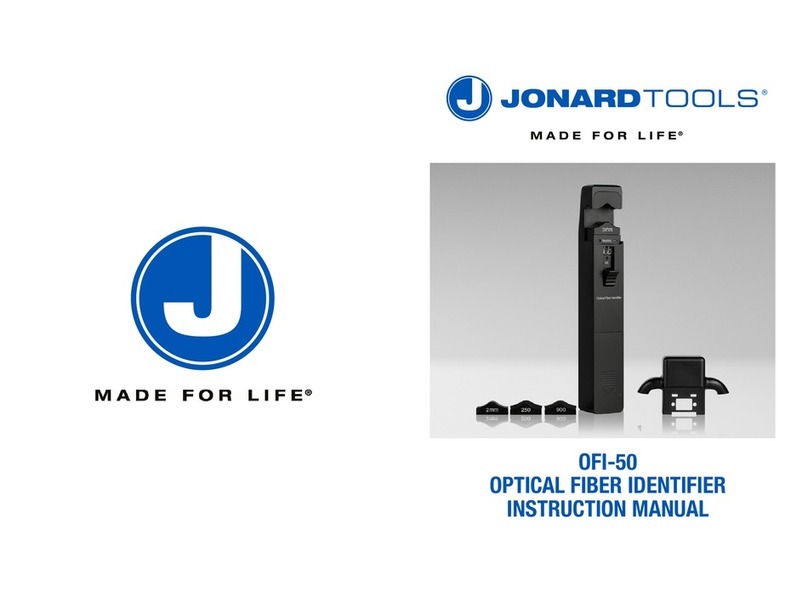
OFI-50
OPTICAL FIBER IDENTIFIER
INSTRUCTION MANUAL
CONTENTS:
1. Overview -----------------------------------------------------------------
2. Technical Specification --------------------------------------------------
3. Standard Accessories ----------------------------------------------------
4. Function Description -----------------------------------------------------
5. User Instructions ----------------------------------------------------------
6. Maintenance --------------------------------------------------------------
7. Warranty and Service -----------------------------------------------------
1. OVERVIEW:
The OFI-50 quickly identifies the direction of transmitted fiber and displays the relative core power without
damaging the fiber or disrupting the network. It can use three different modulation frequencies (270 Hz, 1
kHz, 2 kHz) and four different adapter heads (3 mm, 2 mm, 900 nm, and 250 nm) to test a wide range of
fiber optic cables.
2. TECHNICAL SPECIFICATIONS:
jonard.com | OFI-50 Instruction Manual
12
3. INCLUDED COMPONENTS:
(1) Optical Fiber Identifier
(4) Adapter Heads
(3 mm, 2 mm, 900 nm, 250 nm)
(1) Sunshade
(1) 9V Battery
(1) User Manual
(1) Carrying Case
4.KEY FEATURES:
2
1. Introduction
The OFI-50 quickly identifies the direction of transmitted fiber and displays the relative core
power without damaging the fiber or disrupting the network. It can use three different
modulation frequencies (270 Hz, 1 kHz, 2 kHz) and four different adapter heads (3 mm, 2
mm, 900 nm, and 250 nm) to test a wide range of fiber optic cables.
2. Technical Specifications
Type Optical Fiber Identifier
Identified Wavelength Range
800-1700 nm
Identified Signal Type
CW, 270Hz±5%,1kHz±5%,2kHz±5%
Detector Type
Ø1mm InGaAs 2pcs
Adapter Type
Ø0.25 (Applicable for Bare Fiber)
Ø0.9 (Applicable for Ø0.9 Cable )
Ø2.0 (Applicable for Ø2.0 Cable )
Ø3.0 (Applicable for Ø3.0 Cable )
Signal Direction
Left & Right LED
Si
gnal Direction Test Range
(dBm, CW/0.9mm bare fiber)
-46~10(1310nm)
-50~10(1550nm)
Signal Power Test Range
(dBm, CW/0.9mm bare fiber)
-50~+10
Signal Frequency Display (Hz)
270, 1k, 2k
Frequency Test Range
(dBm, Average Value)
Ø0.9, Ø2.0, Ø3.0
-30~0 (270Hz,1KHz)
-25~0 (2KHz)
Ø0.25
-25~0 (1KHz,2KHz)
-20~0 (2KHz)
Insertion Loss(dB, Typical Value)
0.8 (1310nm)
2.5 (1550nm)
Alkaline Batt
ery (V) 9
Operating Temperature
(℃) -10-+60
Storage Temperature
(℃) -25-+70
1
1
2
3
4
6
6
Sunshade
Battery Level Indicator
Clamp button
Frequency Indicator
Relative Core Power
Battery Cover
Direction Indicator
Adapter Heads Sunshade
4
2. When using the Ø2.0 or Ø3.0 adapters, insert the fiber into the adapter head groove as shown
below:
3. When using the Ø0.9 and Ø0.25 adapters, insert the fiber into the groove on the clamp of the
OFI-50 directly:
5.2 Testing the Fiber
1. After inserting the fiber and adapter head into the OFI-50, push the “Clamp Button” up until it
clicks to clamp the fiber and test it. This will also turn the device “ON”.
3
4.2 READING THE DISPLAY:
Direction Indicator: An LED will illuminate to tell you which direction the signal is travelling.
Relative Power: Displays the relative core power of the signal.
Battery Indicator: Changes color based on amount of battery power left.
Frequency Indicator: The respective LED will illuminate depending on the frequency of the signal detected.
Clamp Button: Push up to clamp the fiber optic cable you want to test.
5.INSTRUCTIONS:
5.1 Selecting the Adapter
1. Select the appropriate adapter head based on the size of fiber cable being tested. There are 3
mm, 2 mm, and 900 nm options for jacketed fiber, and a 250 nm adapter for testing bare fiber.
jonard.com | OFI-50 Instruction Manual
2. When optical signal passes the fiber, the LED illuminator will indicate the traffic’s direction
with intermittently audible tone and the relative core power will be also displayed in digital
format.
3. If no optical signal passes the fiber, the LED illuminator is dead and the “LO” will be displayed
in the relative core power position.
4. When done, push on the Clamp Button to release the fiber being tested and turn OFF the
device.
5.3 Battery Power Indication
If the LED is…
Green: Battery Power is full
Yellow: Battery Power is low, but device can function properly
Red: Battery Power is too low, and the battery needs to be replaced.
56
6.MAINTENANCE:
1. Ensure the proper adapter is being used and the fiber is inserted into the appropriate groove when
being tested.
2. Clean the surface of the detectors regularly using the included cotton swabs to keep it from
collecting dust.
3. Remove the battery of this device if it will not be used for a long period of time.
7. WARRANTY AND SERVICE:
Caution: Repair it in the field is prohibited.
7.1 18 months warranty for Fiber Identifier.
OUR COMPANY warranties that each of fiber identifier will be free from defects in material and workmanship for
18 months. This warranty covers the original user only and is not transferable. Should the device fail at any time
during this warranty period, OUR COMPANY will, at its sole discretion, replace, repair or refund the purchase
price of the product.
This warranty is limited to defects in workmanship and materials and does not cover damage from accident, acts
of God, neglect, contamination, misuse or abnormal conditions of operation or handling.
To establish original ownership and provide date of purchase, please complete and return the registration card to
OUR COMPANY. This warranty card will not go into effect until the warranty registration has been received by
OUR COMPANY.
A warranty registration card is included with the original shipment of equipment. Please take a few moments to
fill out the card and mail or fax it to OUR COMPANY to ensure proper initiation of your warranty term.
To return a defective product for warranty coverage, contact OUR COMPANY for a written authorization. Failure to
properly protect the product during shipping may avoid this warranty.
OUR COMPANY will pay return transportation for products repaired or replace in warranty period. Before making a
repair not covered the warranty, OUR COMPANY will estimate cost and obtain authorization, then invoice for
repair and return transportation. OUR COMPANY reserves the right to charge for all testing and shipping costs
incurred, if test results determine that the device is without defect.