manuals.online logo
Brands
  1. Home
  2. •
  3. Brands
  4. •
  5. JVC
  6. •
  7. Speakers
  8. •
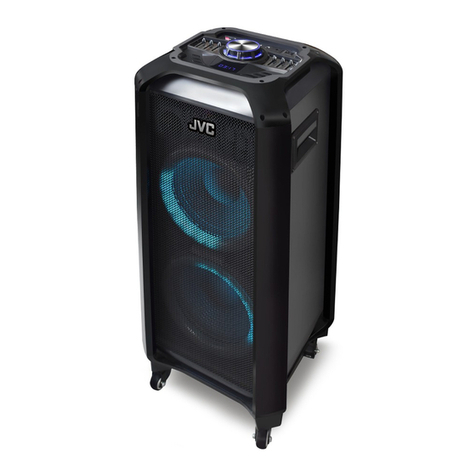
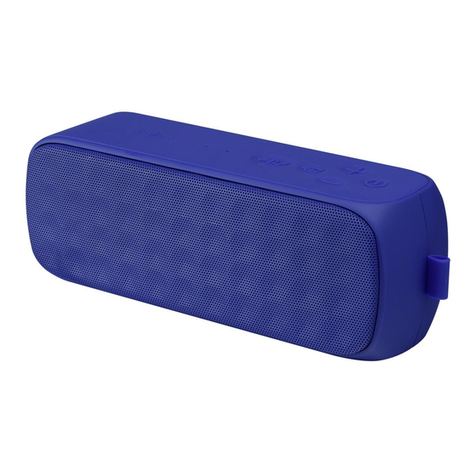
  9. JVC XS-N3111PBA User manual

JVC XS-N3111PBA User manual

Other JVC Speakers manuals

JVC PC-X270 User manual

JVC

JVC PC-X270 User manual

JVC Adventure XS-N1122BA User manual

JVC

JVC Adventure XS-N1122BA User manual

JVC SP-AD80-B Manual

JVC

JVC SP-AD80-B Manual

JVC XS-N1249BBA User manual

JVC

JVC XS-N1249BBA User manual

JVC SP-AP1-B User manual

JVC

JVC SP-AP1-B User manual

JVC SP-AD300 User manual

JVC

JVC SP-AD300 User manual

JVC TH-N239BA User manual

JVC

JVC TH-N239BA User manual

JVC SP-XE5 User manual

JVC

JVC SP-XE5 User manual

JVC TH-D357B User manual

JVC

JVC TH-D357B User manual

JVC SP-XF10 User manual

JVC

JVC SP-XF10 User manual

JVC NX-BX3-B Administrator Guide

JVC

JVC NX-BX3-B Administrator Guide

JVC SP-UXQD9S User manual

JVC

JVC SP-UXQD9S User manual

JVC SP-HXZ9 User manual

JVC

JVC SP-HXZ9 User manual

JVC TH-D357B User manual

JVC

JVC TH-D357B User manual

JVC KW-XC407 Guide

JVC

JVC KW-XC407 Guide

JVC XS-N1129AA User manual

JVC

JVC XS-N1129AA User manual

JVC TH-D227B User manual

JVC

JVC TH-D227B User manual

JVC XS-SR1 User manual

JVC

JVC XS-SR1 User manual

JVC UX-G46B User manual

JVC

JVC UX-G46B User manual

JVC TH-WL311B User manual

JVC

JVC TH-WL311B User manual

JVC XS-F720B User manual

JVC

JVC XS-F720B User manual

JVC UX-L40R User manual

JVC

JVC UX-L40R User manual

JVC NX-HD10 User manual

JVC

JVC NX-HD10 User manual

JVC CA-MXKC45 User manual

JVC

JVC CA-MXKC45 User manual

Popular Speakers manuals by other brands

Electro-Voice LR4S engineering data

Electro-Voice

Electro-Voice LR4S engineering data

Definitive Technology Sound Cylinder user guide

Definitive Technology

Definitive Technology Sound Cylinder user guide

AudioSource LS545 user manual

AudioSource

AudioSource LS545 user manual

Paso C402-T Instructions for use

Paso

Paso C402-T Instructions for use

Altec Lansing 416-8C LF SPEAKER manual

Altec Lansing

Altec Lansing 416-8C LF SPEAKER manual

Kenwood KFC-1072 Servise manual

Kenwood

Kenwood KFC-1072 Servise manual

Peavey ProSys 112 user guide

Peavey

Peavey ProSys 112 user guide

JBL Control Contractor 60 Series installation instructions

JBL

JBL Control Contractor 60 Series installation instructions

Aura STORM-8 owner's manual

Aura

Aura STORM-8 owner's manual

Oontz ANGLE 3 PLUS quick start guide

Oontz

Oontz ANGLE 3 PLUS quick start guide

Electro-Voice LR4A engineering data

Electro-Voice

Electro-Voice LR4A engineering data

Rave RK-650-ICA-B owner's manual

Rave

Rave RK-650-ICA-B owner's manual

Flux Reference Series installation manual

Flux

Flux Reference Series installation manual

Lanzar AQAWBS64BK installation manual

Lanzar

Lanzar AQAWBS64BK installation manual

DAPAudio DCS-6230 manual

DAPAudio

DAPAudio DCS-6230 manual

Aluratek ABS03F quick start guide

Aluratek

Aluratek ABS03F quick start guide

Kenwood KES-5A instruction manual

Kenwood

Kenwood KES-5A instruction manual

Sonance ORIGINAL SERIES instruction manual

Sonance

Sonance ORIGINAL SERIES instruction manual

manuals.online logo
manuals.online logoBrands
  • About & Mission
  • Contact us
  • Privacy Policy
  • Terms and Conditions

Copyright 2025 Manuals.Online. All Rights Reserved.

ProductSpecification
Speaker
4Ω
Output Power
3600mAh,3.7V
DC5V,1A
Power Input
40Hz~20KHz
Separation
Register your product at jvctv.com.au/warranty-registration
Dynamic Range
Distortion
Input Signal Source
Radio FM
SNR
87-108MHz
>75dB(AFR)
AUX Terminal,Bluetooth,USB,TF,FM
Bluetooth Version
Main Channel Frequency Response
5.0
40dB
90dB
1%
16W
8"X1+Tweeter 1"
Impedance(Ω)±20%
Battery Capacity
Bluetooth Speaker
XS-N3111PBA
Performance Parameters
Turn off the unit before charging. Charge the unit fully before using it for the first time and
whenever the sound becomes weak.
1. Connect the USB charging cable to the microUSB Charging Port on the unit.
Connect the other end of the charging cable to a DC 5V, 1A power adaptor to charge the
unit. You can also connect it to the USB port of a computer or similar.
2. The red Charging Indicator turns on when the unit is charging and turns off when it is fully
charged.Remove the charging cable promptly.Do not overcharge.
3. It takes about 8 hours to charge the battery fully.
Battery run time: Around 3 hours.
Bluetooth Connection
Place the speaker close to (within 10 metres of) your Bluetooth enabled device.
Enable Bluetooth function on your Bluetooth-enabled smartphone, Tablet or media
player; navigate to the Bluetooth setting menu, and search for new devices.
The Bluetooth name for this speaker is ‘XS-N3111’.
FM Radio Playback
Press the Mode Button to switch to FM Radio mode.
Press the Play/Pause Button to search for available FM channels automatically.
Once the search is complete, the speaker will store the channels automatically.
To stop automatic search, press the Play/Pause Button again.
Press the Previous or Next Buttons to switch between the channels.
USB/microSD/AUX Input
Connect a USB/microSD memory device, or an AUX cable connected to your device,
to the appropriate port. Use the ‘Mode’ Button to switch to the correct mode.
Note:
Only MP3 or WAV formats are compatible.
Maximum size of the USB/ microSD device that can be connected is 32GB.
Microphone Input
Connect a microphone to the Microphone Input on the top of the unit.
Use the Mic Vol and Echo Dials to adjust the echo and volume settings.
True Wireless Stereo (TWS) Mode
(Optional, requires two speakers)
If you have two speakers (Model: XS-N3111PBA), you can use them together for a
more immersive Audio experience.
1.Place the two speakers in the same room and turn them on.
2.Press the Mode Button on both speakers to switch the speakers to Bluetooth mode.
3.Do not connect either speaker to your audio source device at this stage.
4.Press and hold the TWS Button on either speaker to connect the two speakers in
TWS mode. you will hear an audio alert indicating that the two speakers are connected.
5.Now enable Bluetooth function on your Bluetooth-enabled smartphone, tablet or
media player;Navigate to the Bluetooth setting menu, and search for new devices.
The Bluetooth name for this speaker is ‘XS-N3111’.
6.Once connected, you can play Bluetooth audio from your source device on the speakers
wirelessly, in stereo.
Press Mode Button to switch to Bluetooth mode.
Once connected, you can short press Previous or Next Button to play the previous or
next song.
Important Safety Instructions
Warning: To prevent fire or shock hazard, do not expose the unit to rain or moisture.
to avoid electrical shock, do not dismantle. Refer all servicing to qualified service personnel.
1. Read these instructions thoroughly and retain for future reference.
2. When using electrical appliances, basic safety precautions should always be followed.
3. This appliance is not intended for use by persons (including children) with reduced
physical, sensory or mental capabilities, or lack of experience and knowledge, unless
they have been given supervision or instruction concerning use of the appliance by a
person responsible for their safety.
4. This product is not a toy! Children should be supervised to ensure that they do not play
with the appliance.
5. Any repairs must be done by qualified service personnel. There are no user-serviceable
parts inside.Do not attempt to repair by yourself.
6. Do not expose this speaker to water, corrosive liquids or gases. Store the speaker in a
clean, dry place.
7. For indoor use only. Keep the unit free from dust and away from heat sources, direct
sunlight,humidity, water or other liquids.
8. Do not immerse the unit in water or other liquids.
9. Do not place any naked flame sources such as lit candles on or near the speaker.
10. Clean only with a soft, dry cloth.
11. Place the unit on a flat, stable surface. Do not cover the speaker during use.
12. Do not operate the unit if it has been exposed to water, moisture or any other liquid in
order to prevent electric shock, explosion and/or injury to yourself and damage to the unit.
13. Do not use the unit for anything other than its intended use.
14. Do not play music at excessive volume levels as this can cause hearing loss or damage
the unit.
Charging the Speaker
PACKING LIST
1.Speaker 1pc
2.User Manual 1pc
3.Aux In Cable 1pc
4.Wired Microphone 1pc
5.USB Charging Cable 1pc
.............................
........................
........................
...............
............

1. Microphone input jack

2. Aux In input jack(3.5mm audio input)
3. Microphone Echo control
4. Microphone volume control
5. microSD (TF) card input slot
6. USB device input slot(USB 2.0,Max 32GB)
7. LED display
PRODUCT OVERVIEW
8. Previous Song (Previous Station) or EQ:
Short press to go to the previous song (or previous
station in FM mode).
Press and hold to choose equaliser mode (POP/ROC/
JAZ/CLR/NOR).
9. Music Play/Pause or TWS:
Short press to play a song or to pause play. In FM
mode, short press to search available FM stations.
In Bluetooth mode, press and hold to make
TWS connection (see TWS section for details).
10. Next song/ Next station or RPT:
Short press to go to the next song (or next station in
FM mode).
In USB/microSD mode, press and hold to repeat one
song, all songs or turn off repeat.
11. Mode/Lights:
Short press to switch between the available modes:
BT/FM/USB/TF/AUX.
Press and hold to turn on or turn off the LED lights.
12. microUSB Charging Port:
DC 5V, 1A socket for charging the speaker.
13. Charging Indicator LED:
LED remains on during charging and turns off when
battery is charged fully.
14. Power Switch/Volume Control:
The speaker is off when the dial is turned fully to the
left.Turn the dial to the right until it ‘clicks’ to turn on,
turn it to the left end to turn off.
Adjust the dial to the right or left to increase or
decrease the volume.