Page 10
the AC Input Port of the unit..
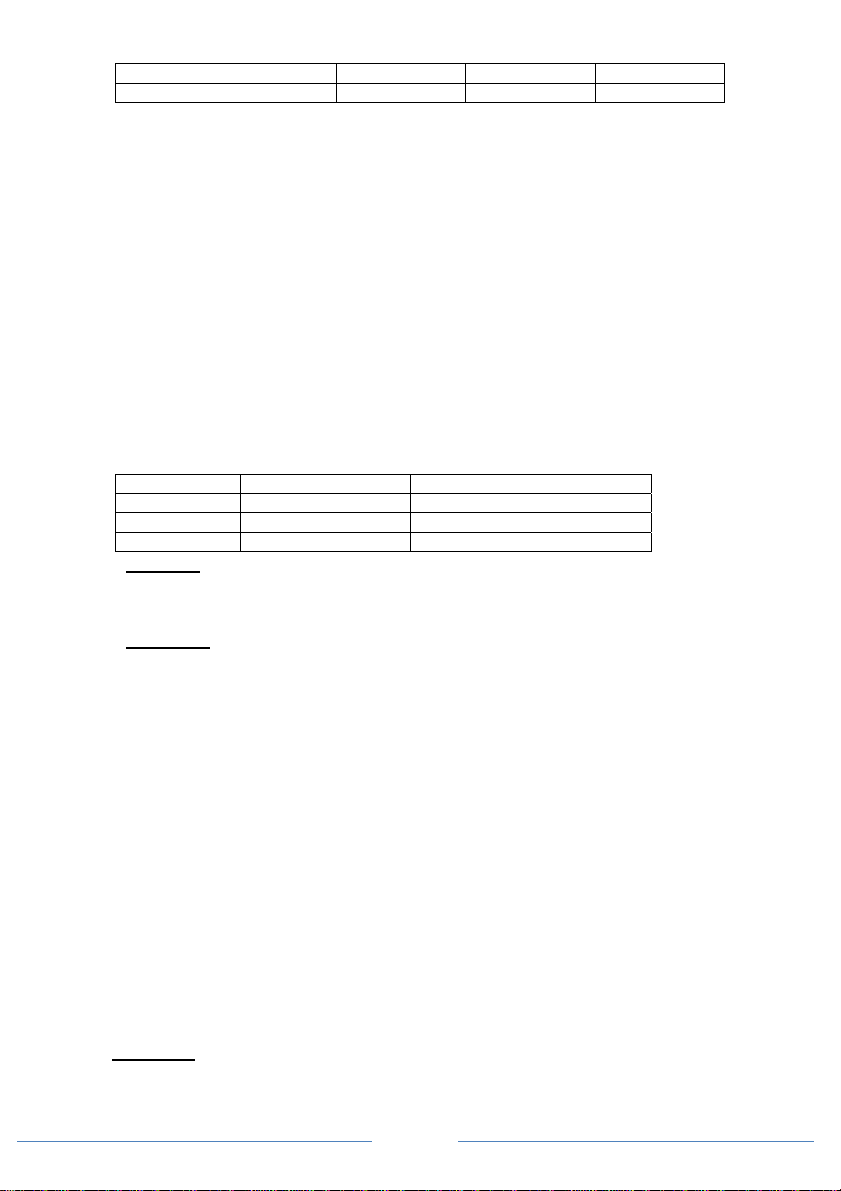
Model AC Input Branch Breaker AC Input wire
120VAC unit 30A (maximum) #10 AWG (minimum)*
230VAC unit 16A (maximum) #14 AWG (minimum)*
•Remove the AC compartment cover by unscrewing the four screws located at the front of the
AC compartment cover.
*Note: A small size AC Input wire can be used when a smaller amperages rated AC-Input
Branch Breaker is used upstream to feed the unit.
•Connect the AC Input ‘L’ wire between the unit’s AC Input Port and the Branch Breaker
terminal.
•Connect the AC Input ‘N’ wire between the unit’s AC Input Port and the AC source ‘N’ terminal.
•Connect the AC Input ground wire to the Common AC Ground connection on the unit. If solid
ground wire is used, the wire can be connected directly under the screen head. If stranded
ground wire is used, ring terminals must be used.
AC Output Connections:
CAUTION: Please be sure that the AC Input source is not energized before making any Output
connection and that the DC disconnect switch is turned OFF.
For 120V model:
The AC Output has three types of AC connections:
1) Use of the provided AC Output GFCI Socket for AC load connection:
This configuration does not require AC Output installation. Plug in the AC load to the
provided AC Output GFCI Socket. During the By-Pass mode, the AC output is limited by the
rating of the thermal breaker and the limitation of the GFCI used (15Afor 1000W model, and
20A for 2000W and 3000W models).
2) Use of the provided Hardwire AC Output terminal (Port 2) – with GFCI Protection.
•To access Port 2, remove AC compartment cover located on the front panel of the unit.
•Hardwire the AC load or any external AC socket to the AC Output port 2. Please verify the
HOT ‘H’ and NEUTRAL ‘N’ connection on the AC Output port.
Note:This AC Output Port 2 is connected directly to the output (load side) of the GFCI
outlet, having the same power rating. This hardwire port is under the influence of the GFCI
socket’s “Test” and “Reset” buttons.
3) Use of the provided Hardwire AC Output terminal (Port 1) – with no GFCI Protection.
•To access Port 1, remove AC compartment cover located on the front panel of the unit.
•Hardwire the AC load or any external AC socket to the AC Output Port 1. Please verify the
HOT ‘H’ and NEUTRAL ‘N’ connection on the AC Output port.
4) Connect the AC Output Ground wire(s) to the Common AC Ground terminal inside the wiring
compartment.
Note: During Battery Power Mode, AC output is limited to a total of 8.3A for 1000W model,
16.7A for 2000W model and 25.0A for 3000W model.
For 230V model:
The AC Output has two types of AC connections:
1) Use of the provided AC Output Socket for AC load connection:
This configuration does not require AC Output installation. Plug in the AC load to the
provided AC Output Socket. During the By-Pass mode, the AC output is limited by the rating
of the thermal breaker and the limitation of the AC Output used (16A on -EU model, 13A on -
UK model and 10A on -AU model).
2) Use of the provided Hardwire AC Output terminal (Port 2).
•To access Port 2, remove AC compartment cover located on the front panel of the unit.
•Hardwire the AC load or any external AC socket to the AC Output port 2. Please verify the
LIVE ‘L’ and NEUTRAL‘N’ connection on the AC Output Port 2.
Important: If a RCD (Residual Current Detector) is used for the AC Output connection, an
AWG #14 jumper wire is required to connect between GP1 and GP2. This is used to ground
the Neutral pin of the inverter to the chassis.
3) Connect the AC output Ground wire to the Common AC Ground terminal inside the wiring