Kramble Industries Inc. is not responsible or liable for indirect, special, or consequential damages arising out of or in connection
with the use or performance of the product or other damage with respect to any economic loss, loss of property, loss of revenue
or profit, or costs of removal, installation, or reinstallation.
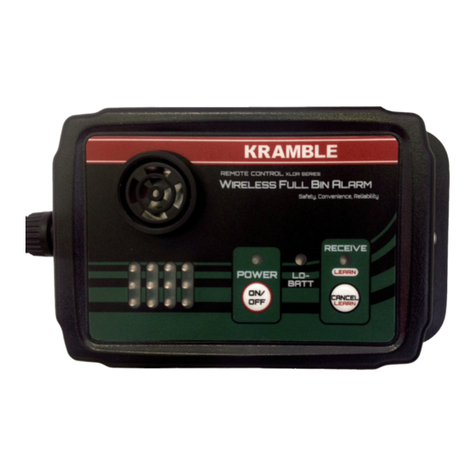
Low Battery LED
The green LED illuminates when the sensor sends a Low Battery signal, indicating that the Sensor
Probe battery needs to be replaced. Once activated, the green LED will remain on until the
receiver is powered off.
FBA Receiver Console Self-Test
To test the Receiver Console alarm light and siren, hold the cancel button for six seconds while
the Full Bin Alarm is powered on. Once tested, the alarm will shut off when the cancel button is
released.
The Receiver power may be turned off when not in use to prevent undesired operation.
Probe/Receiver Matching
The Receiver is matched to a Sensor Probe by “learning” the probe’s unique security code so that
the receiver will accept commands from that probe. A factory default system already has its
probe matched to the receiver.
To match a probe to a receiver, first turn the receiver power switch OFF. Hold the button marked
LEARN on the receiver and press the receiver power ON, then release the two buttons. The
Receive/LEARN light is then lit to indicate that the receiver is waiting for a signal from the
transmitter to be learned. Tilt the probe to send a signal and the receiver will read the probe’s
security code and store it in memory. The Receive/LEARN light will flash three times to indicate
that the transmitter has been successfully learned, and the Receive/LEARN light will turn off and
receiver will then enter normal operating mode. Up to eight probes can be learned by a receiver.
If eight unique probe have already been learned by a receiver and it is instructed to learn another
probe, the oldest-learned probe’s security code will be overwritten and forgotten. The buzzer
and light are disabled for ten seconds after learning a sensor probe’s security code in order to
prevent unwanted activation of the alarm.
To erase all stored security codes, turn the receiver power ON while holding the LEARN button,
and continue holding the button until the Receive/LEARN light begins to rapidly flash. Release
the button, and the light will flash more slowly for three seconds, then turn off to indicate that
the erase operation has succeeded. If the LEARN button is pressed while the Receive/LEARN light
is slowly flashing, the erase operation is aborted and the receiver retains the stored transmitter
security codes.
The Receiver is equipped with a two-position switch to enable or disable the learn and erase
functions. To enable or disable a function, open the case and locate the switch as illustrated
below. The switches and their positions are labeled on the circuit board. Factory default systems
are set by default so that the Learn function is Enabled and the Erase function is Disabled.