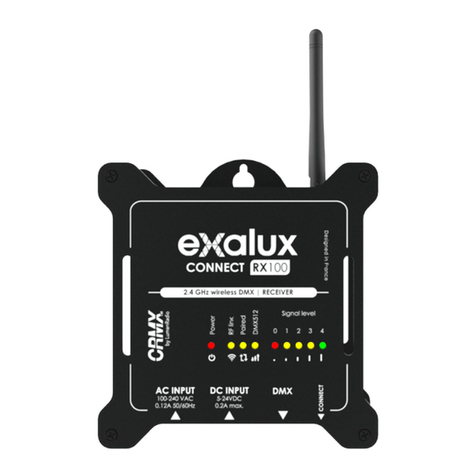
LumenRadio MoonLite User manual

MoonLite
INTRODUCTION
Thank you for buying a LumenRadio CRMX MoonLite product. This guide is intended to give you a quick
start to experience the benets of LumenRadio’s CRMX system.
The CRMX product you just purchased are designed to give you the highest reliability on the market
and are fully compatible with other CRMX products in entertainment lighting (CRMX Nova,
CRMX Outdoor, CRMX Slim, CRMX OEM). Through this you are able to expand
your wireless system with units from our other product lines as well as
with those of our partners. For the latest updates please visit
the LumenRadio website www.lumenradio.com.
The information furnished in this start guide is for informational use only and is subject to change without notice. Please
check www.lumenradio.com for latest version. LumenRadio AB assumes no responsibility or liability for any errors or
inaccuracies that may appear in this start guide.
All information and graphics are property of LumenRadio AB, Svangatan 2B, SE-416 68 Gothenburg, Sweden.
lumenradio
Creating Connectivity for a Better Tomorrow
Right green >80%
Mid green >60%
Left green >40%
Amber >20%
Red <20%
Link button - press
to link with, or unlink
from, another unit.
LED indicators - Mode, Status, Data
(See specications below)
We hope that you will enjoy
our products and that they
will bring benets and positive
experiences.
Mode (M)
BLE on (TX mode)
BLE on (RX mode)
RX mode
TX mode
RX mode
TX mode
Linked and synced
Transmitting
Linking or linked but not synced
Linking
color of ST = universe color selected by user
(green by default)
Not linked
DMX present
RDM, no DMX
RDM, with DMX
No DMX
when D = green, level bar displays battery level
when D = amber, level bar displays signal quality
Level indicators
- Signal quality and battery level
(See specications below)
CRMX MOONLITE CONTROL PANEL
See the operation section for details on how to link and unlink CRMX MoonLite units.
Indicators turn off after 30 sec inactivity when running on battery, press the button to wake up.
Status (ST) Data (D)
Level indicators

LINKING
MoonLite can link with any other CRMX unit as well as legacy W-DMX™ (G2/G3/G4/G4S) transmitters
(2.4 GHz only).
POWER ON/OFF
Power on the device by pressing and holding its link button for 5 seconds until the LEDs lights up.
Power off the device by pressing and holding its link button for 5 seconds until the LEDs turn off.
FLEX MODE CHANGING
MoonLite offers the ultimate exibility to operate as either a transmitter or a receiver. (RX by default)
The Mode LED indicator shows different colors depending on the units current conguration
Mode LED displays yellow: Receiver mode selected
Mode LED displays red: Transmitter mode selected
The mode can be changed in the CRMX Toolbox app. You can also switch mode by using a manual button
press sequence (see below).
MANUAL CHANGE OF MODE
1. If LEDs are off – press the link button once to wake up the device.
2. Press and release the link button ve times in succession, then immediately press and hold the button
for three seconds (until ST LED is lit).
3. You can now change the Flex mode as desired. The mode LED will indicate the selected mode by
blinking in the modes corresponding color (red/yellow).
• To step between Flex modes: Press and release the link button to move to the next mode.
• To save changes: Press and hold the link button for three seconds. The unit will revert to normal oper-
ation using the newly selected mode.
• To exit without saving changes: The unit will revert to normal operation if you do not press the link
button within fteen seconds.
The unit will continue to act as congurated until you activly change the mode (even if you turn the unit off).
MANUAL RESET OF PIN CODE
If LEDs are off – press the link button once to
wake up the device. Press and release the link
button seven times in succession. Then immedi-
ately press and hold the button for three seconds.
You have now successfully reseted the pin code.
SWITCHING BLUETOOTH ON/OFF
If LEDs are off – press the link button once to wake
up the device. Press and release the link button.
Then immediately press and hold the button for three
seconds. For full DMX integrity we recommend to
switch of Bluetooth during operation.
TO LINK
1. Power on the MoonLites you would like to connect.
2. Congure the MoonLite for RX/TX mode (see instructions below)
3. Ensure that the Status LED indicators on all receivers are off to
indicate that the receivers are ready to be linked. (If necessary,
follow the unlink procedure.)
4. On the transmitter, press and release the link button.
5. The transmitter will search for any unlinked receivers. Its Status
LED indicator will ash for 10 seconds and normal operation will
resume.
6. Status LED will display (in the selected universe color)
on successfully linked receivers.
TO UNLINK
• Unlink one:
On the receiver, press and hold
its link button for more than 3
seconds (until ST LED is lit) to
unlink it from a transmitter. The
Status LED indicator will turn off.
• Unlink all:
On the transmitter, press and
hold its link button for more
than 3 seconds (until ST LED is
lit) to unlink all of its receivers.

Link button
Male XLR
DMX passthrough
Status LEDs
USB Micro-B
Female XLR
Velcro fastening
MOUNTING
MoonLite comes with a velcro strap to
simplify mounting.
CHARGING
If you are running low on battery MoonLite can be charged
through the Micro USB port. The adaptor used for charging can
be any standard 5V USB with minimum 500mA output capability.
Charging time is about 3h.
During charging MoonLite will be fully functional and can be
powered through the Micro USB.
PRODUCT SPECIFICATIONS
MoonLite comes with Bluetooth connectivity and an internal
antenna. The rechargeable battery provides up to 12h operation
in receiver mode, with a charging time of only 3h.
UNIVERSE COLOR
To keep track of wich MoonLites belongs to which universe you can use the color pairing function available
in the CRMX Toolbox app.
1. Open the app and select the MoonLite congured for TX mode.
2. In the settings for this unit, select the color of your choice in the options shown.
3. The Status LED on your TX will now display your selected color.
4. All RX units linked to this TX will also show your selected color.
Until selecting a color, all units will have the green color by default.

Release 1.0 June 2019
SPECIFICATIONS
Power protection: Overvoltage and ESD protected power input
Operation temp. range: -20°C to +40°C (-4°F to 122°F) (ambient)
Environmental: For indoor use only
Frequency range: 2.402 to 2.480 GHz
Output power levels: 100mW (20dBm), 35mW (15dBm), 10mW (10dBm)
Low voltage operation: This product can also be powered by a supply rated 5V, minimum 500mA
MoonLite™, CRMX™, CRMX Nova™, CRMX Outdoor™, CRMX Slim™, CRMX OEM™, CRMX SuperNova™ are trademarks of LumenRadio AB.
W-DMX™ is a trademark of Wireless Solution Sweden AB. CRMX is patented by LumenRadio, CE, FCC.
US Patent 7,432,803
EU Declaration of Conformity
These products comply with the RED (Radio Equipment
Directive) of the European Union (2014/53/EC). This
equipment meets the following conformance standards:
ETSI EN 301 489-1 V2.1.1; ETSI EN 301 489-3 V2.1.1;
ETSI EN 300 328 V2.1.1; EN 60950
FCC statement
Note: This equipment has been tested and found to comply with the
limits for a Class B digital device, pursuant to part 15 of the FCC Rules.
These limits are designed to provide reasonable protection against
harmful interference in a residential installation. This equipment
generates, uses and can radiate radio frequency energy and, if not
installed and used in accordance with the instructions, may cause
harmful interference to radio communications. However, there is no
guarantee that interference will not occur in a particular installation.
If this equipment does cause harmful interference to radio or
CRMX Toolbox app
Scan the QR code to download the CRMX Toolbox app.
For any questions, please contact
https://support.lumenradio.com
FCC ID: XRSTIMOMWAN201
IC: 8879A-TIMOMWAN201
• Reorient or relocate the receiving antenna.
• Increase the separation between the equipment and receiver.
• Connect the equipment into an outlet on a circuit different from
that to which the receiver is connected.
• Consult the dealer or an experienced radio/TV technician for help.
television reception, which can be determined by turning the
equipment off and on, the user is encouraged to try to correct the
interference by one or more of the following measures:
Table of contents
Other LumenRadio Lighting Equipment manuals