manuals.online logo
Brands
  1. Home
  2. •
  3. Brands
  4. •
  5. Maxeon
  6. •
  7. Inverter
  8. •
  9. Maxeon SunPower Reserve User manual

Maxeon SunPower Reserve User manual

Other manuals for SunPower Reserve

2

This manual suits for next models

1

Other Maxeon Inverter manuals

Maxeon SPR-P6-555-UPP User manual

Maxeon

Maxeon SPR-P6-555-UPP User manual

Maxeon Sunpower E Series Setup guide

Maxeon

Maxeon Sunpower E Series Setup guide

Maxeon Sunpower User manual

Maxeon

Maxeon Sunpower User manual

Maxeon SunPower Reserve Setup guide

Maxeon

Maxeon SunPower Reserve Setup guide

Maxeon SunPower Reserve User manual

Maxeon

Maxeon SunPower Reserve User manual

Popular Inverter manuals by other brands

Omnik New Energy Omniksol-1.5k-TL user manual

Omnik New Energy

Omnik New Energy Omniksol-1.5k-TL user manual

Agilent Technologies 33250A user guide

Agilent Technologies

Agilent Technologies 33250A user guide

4-noks ZR-SWITCH-RC instruction manual

4-noks

4-noks ZR-SWITCH-RC instruction manual

V&T V5 Series user manual

V&T

V&T V5 Series user manual

Hon Turing HT-T-S1000-12 introduction

Hon Turing

Hon Turing HT-T-S1000-12 introduction

Metabo E 140 SP Plus Original operating instructions

Metabo

Metabo E 140 SP Plus Original operating instructions

BARRON EXITRONIX Tucson Micro Series installation instructions

BARRON

BARRON EXITRONIX Tucson Micro Series installation instructions

Baumer HUBNER TDP 0,2 Series Mounting and operating instructions

Baumer

Baumer HUBNER TDP 0,2 Series Mounting and operating instructions

electroil ITTPD11W-RS-BC Operation and Maintenance Handbook

electroil

electroil ITTPD11W-RS-BC Operation and Maintenance Handbook

Silicon Solar TPS555-1230 instruction manual

Silicon Solar

Silicon Solar TPS555-1230 instruction manual

Mission Critical Xantrex Freedom SW-RVC owner's guide

Mission Critical

Mission Critical Xantrex Freedom SW-RVC owner's guide

HP 3312A Operating and service manual

HP

HP 3312A Operating and service manual

Hoymiles HM-500T user manual

Hoymiles

Hoymiles HM-500T user manual

Nitecore SPM10 user manual

Nitecore

Nitecore SPM10 user manual

AEG Protect PV installation manual

AEG

AEG Protect PV installation manual

On Board TruePower Plus 1200MS owner's manual

On Board

On Board TruePower Plus 1200MS owner's manual

Plugreen PGM-200P-230 Installation and operation manual

Plugreen

Plugreen PGM-200P-230 Installation and operation manual

Fourgroup Easy use and Programming Handbook

Fourgroup

Fourgroup Easy use and Programming Handbook

manuals.online logo
manuals.online logoBrands
  • About & Mission
  • Contact us
  • Privacy Policy
  • Terms and Conditions

Copyright 2025 Manuals.Online. All Rights Reserved.

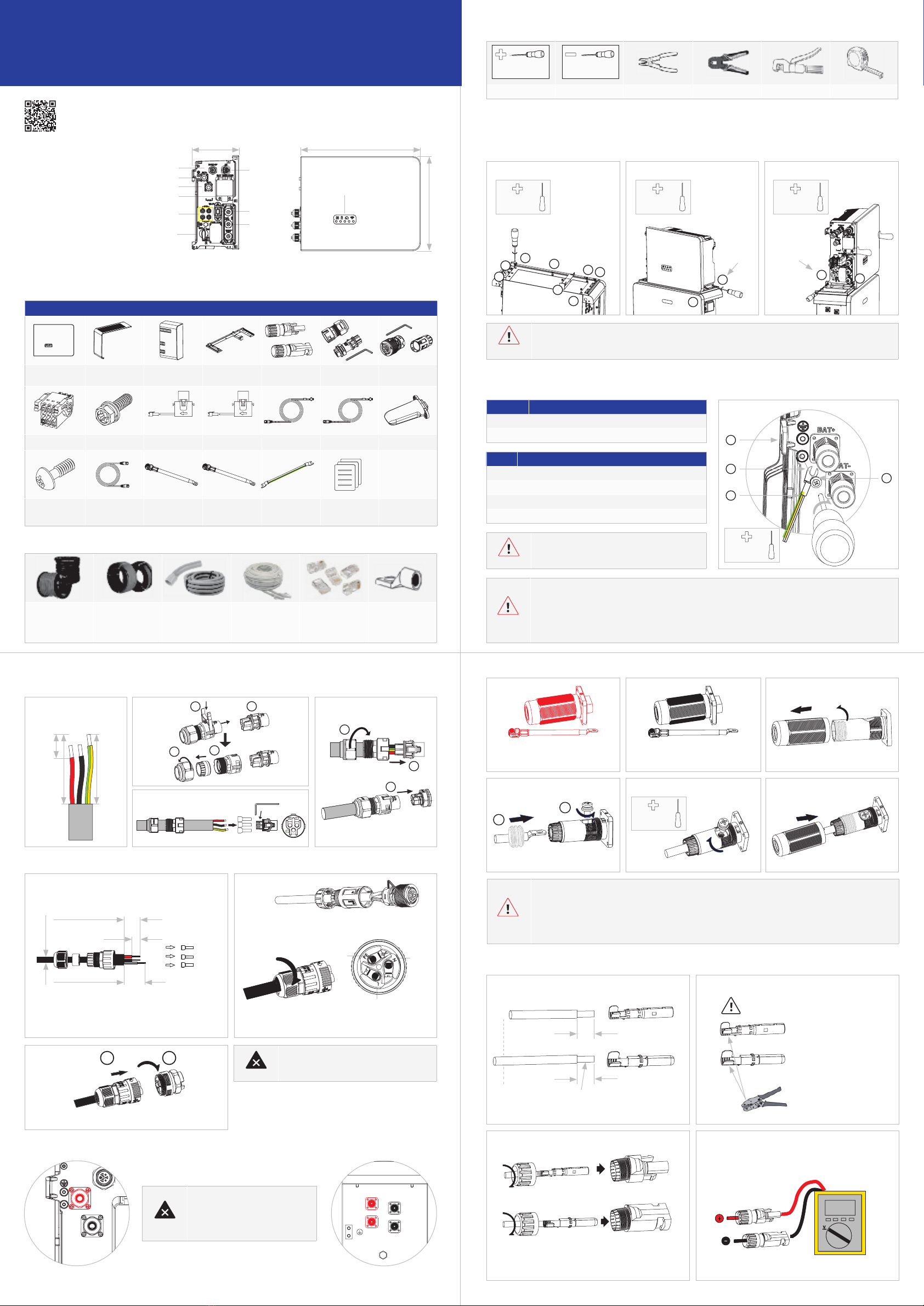
SunPower Reserve Quick Installation Guide
Home energy storage system (RESERVE-INV-1-P5-L1-INT)
548268 Revision B - Jun 2023
Dimensions: WxHxD = 483x380x190mm
1.0 Product Overview
(1) Grid connector
(2) Backup connector
(3) BAT +
(4) BAT -
(5) Battery circuit breaker
(6) PV connectors
(7) PV switch
(8) Wi-Fi port
(9) Communication ports
(10) LED display
2

(1)
(2)
(3)
(4)
(5)
(6)
(7)
(8)
(9)
(10)
H
W

RESERVE-INV-1-
P5-L1-INT (x1)
TOP decoration
plate (x1)
Cable cover
(x1)
Inverter base (x1) PV MC4 connector
pair (X2)
Grid connector (x1) BACK UP
Connector (x1)
AUX Connector (x1) M5*12 Screw (x16) Grid CT (x1) PV CT (x1) Grid CT Cable (x1) PV CT Cable (x1) WiFi Module (x1)
Screw M4*10 (x2) Battery
Communication
Cable (x1)
Battery Positive
Power Cable (x1)
Battery Negative
Power Cable (x1)
Grounding Cable
(x1)
Inverter Quick
Installation Guide
(x1)
Grid-CT PV-CT
Three-core outdoor
copper cable
Grid Cable: 6-8mm
AC Backup Cable:
4-6mm
DC Cable: PV1-F
Conductor cross-
section: 4-6mm
Conduits Ethernet Cables Cat5e,
UTP, UV-resistant for
outdoor use
RJ45 Plugs PE Terminal


Phillips Screwdriver Flat-Head Screwdriver Wire Stripper Network Plug Clamp Crimping Pliers Tape Measure
PH2x150mm 1.2x75mm




PH2x150mm
2.5Nm
PH2x150mm
2.5Nm
PH2x150mm
2.5Nm
PH2x150mm
4.5-5Nm
PH2x150mm
2.5Nm
1
1
2
4
2
3
3
6
8
1. Installing the base of the inventer


screw


screw
9
2. Lock right screws 3. Lock left screws
10 11
7
5
412


You must protect each inverter with an individual AC
circuit breaker in order to ensure that the inverter can
disconnected safely.

Bore doing any electrical connection, ensure the PV switch, AC and BAT circuit breaker are switched OFF and
cannot be reactivated.

Please ensure that the connector has been
correctly installed.
1. Switch OFF the battery breaker
which is located on the right
side of the battery
 
(Black) then the BAT+ wire (Red)




to 40A, otherwise the circuit breaker may trip under normal operation conditions.

 
release.
 
 
short-circuiting of the positive and negative battery pwer cables.


Position 
1 Housing
2 M5 terminal lug with protective conductor
3 M5x12 PH2 head screw
4 PE cable
 
Grid side 32/40/50 A
Backup side 32A
32mm
30mm
14mm
1.
Stripping 14mm
1.
3.
2.
2.
3.
4.
1.
2. 3. 4.
PE
L N
1
1
2
2
4
3
3




Three-core (L, N and PE) outdoor copper cable
Conductor cross-section: 4-6mm²




8mm
PE
L
N
Insert the crimped conductors, L, N and PE into the
corresponding terminals and tighten the screws (torque
1.5±0.1N-m)
Assemble the locking cap, threaded sleeve and swivel nut
together
Plug the connector into the socket and tighten firmly
1 2
Inverter side




 





1
2
1. Strip off the insulation.


7mm
7mm
4-6mm²

2. Assemble the MC4 cable ends.




3. Assemble the connectors.
Please check if the cables are securely installed by pulling
outwards.
2.6-2.9Nm
Positive
Negative
4. Check the polarities of the PV strings. Check
the open-circuit voltage is less than 580V.





NEED MORE HELP?
 
  for more information.


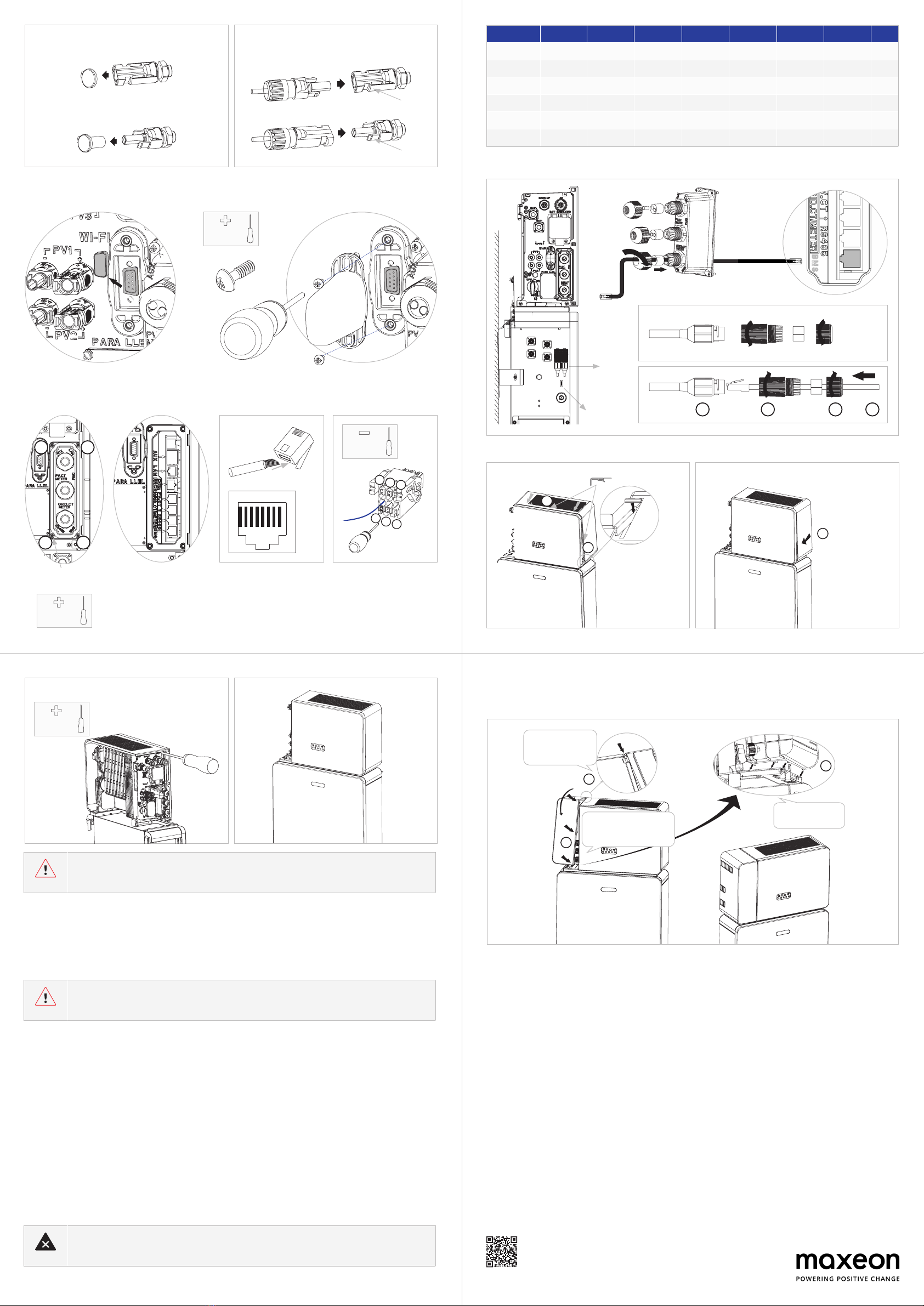
Communincation connection part as follows:
7.0 Commissioning
To set up the inverter as part of a SunPower Reserve installation, follow the commissioning steps as outlined in the Reserve Safety
and Installation Instructions.

Power ON procedure
1. Switch ON the BATTERY CIRCUIT BREAKER on the right side of the battery. Repeat for additional batteries in sequential order.
2. Switch ON the BATTERY SYSTEM ISOLATOR which is on the left side of the inverter under housing top cover.
3. Press the BATTERY START BUTTON for 1s on BATTERY 1. It is located next to the battery circuit breaker(s). Repeat for additio-
nal batteries in sequential order, within 5s.
4. Switch ON the AC GRID SUPPLY to the inverter.
5. Switch ON the AC BACKUP SUPPLY from the inverter if installed.
6. Switch ON the PV ISOLATOR on the left side of the inverter if PV connected to the inverter directly.

1. Set the Changeover switch to MAINS to supply loads from the GRID, if installed.
2. Switch OFF the AC BACKUP SUPPLY from the inverter if installed.
3. Switch OFF the AC GRID SUPPLY to the inverter.
4. Switch OFF the PV ISOLATOR on the left side of the inverter if PV connected to the inverter directly.
5. Switch OFF the BATTERY SYSTEM ISOLATOR which is on the left side of the inverter.
6. Switch OFF the BATTERY CIRCUIT BREAKER for each battery.
7. 
For more information, refer to the Safety and Installation Instructions.
5.
Remove the waterproof caps.
If there is a used terminal, please seal with the cap.
6.
Insert the connectors into the terminal until an audible
click is heard.


5.0 Communication Connection


x2
PH2x150mm
2.0Nm
PH2x150mm
2.5Nm
PH2x150mm
1.0Nm
1
3
2
4


135
246
1.2x75mm


12345678


No. 1 2 3 4 5 6 7 8
BMS NC RS485_A4 NC CAN1_H CAN1_L NC RS485_B4 NC
RS485 12V NC GND RS485_B5 RS485_A5 NC NC NC
GRID_CT/METER GRID_CT- GRID_CT+ RS485_A7 NC NC RS485_B7 NC NC
PV_CT PV_CT- PV_CT+ RS485_A7 NC NC RS485_B7 NC NC
DRM DRED1/5 DRED2/6 DRED3/7 DRED4/8 REFGEN/0 COMLOAD/0
AUX DO1_NO DO1_COM DO1_NC DI_NEGATIVE DI_POSITIVE GND


Resistor
234 1

3
1
2
1.
3. 4.
2.
Before turning on power, ensure that all the electrical connections are secure.
Ensure a reliable and correct installation and electrical connection before power on.

This Quick Installation Guide is not replacing the Safety and Installation Instructions, it is a short introduction to
the product installation. The reference remains the Safety and Installation Instructions

Make sure all the wiring is secure and the system is working properly and then install the plastic parts on the left side of the inverter.
Refer to Safety and Installation Instructions to commission the whole system.
3
1
2








Item



NEED MORE HELP?
 
  for more information.

Safety and Installation Instructions for SunPower Reserve